Features
What Strata actually does.
One window, a room for each job. Every number in it is a measurement, not an estimate, and every screen on this page is the app itself.
The Overview
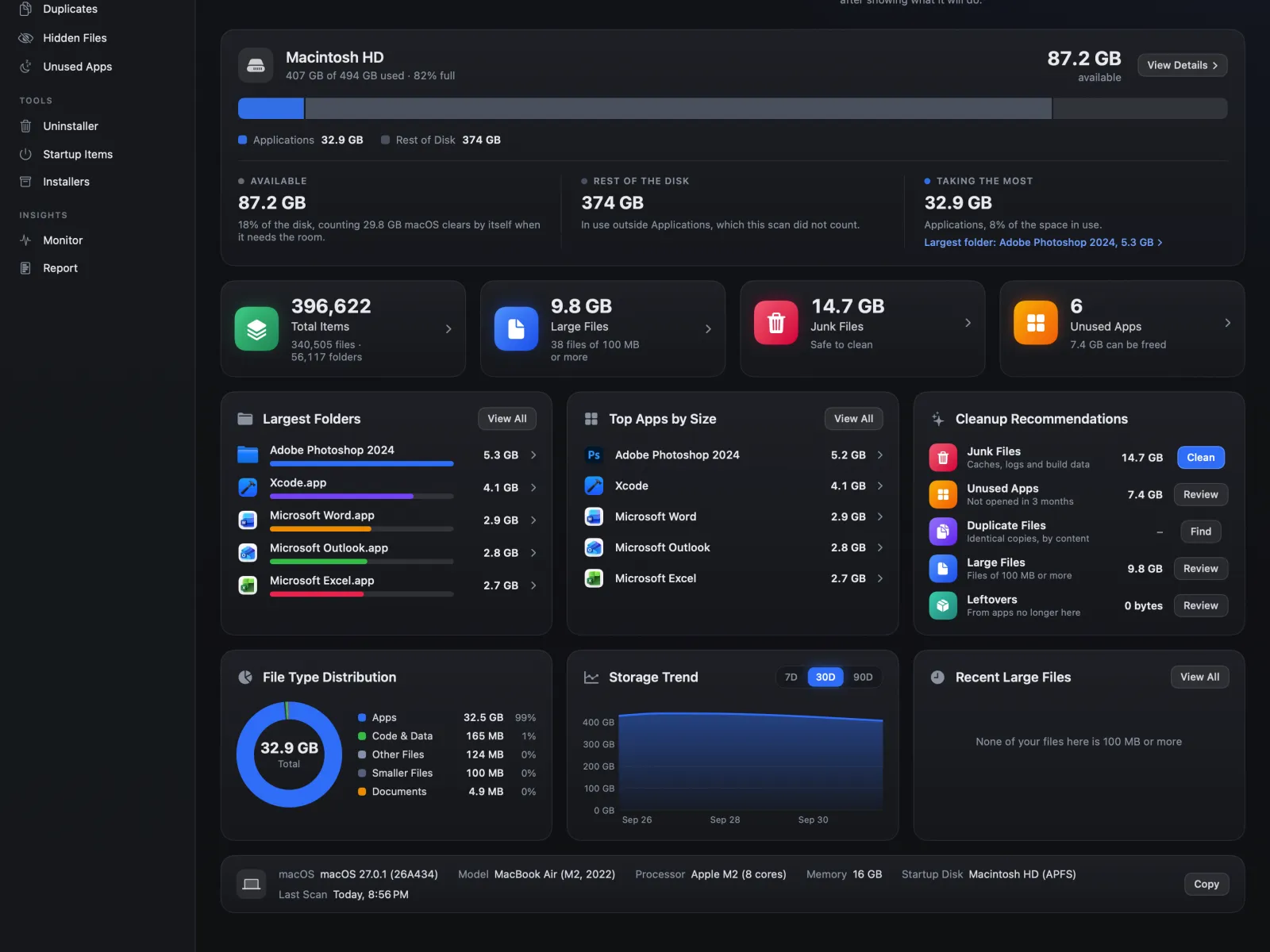
Scan and Optimize side by side, and under them the whole disk in one bar: what is available, what macOS needs, and what is taking the rest, with Downloads and Pictures shown apart. Then how many files, the large ones, the junk worth clearing and the apps you no longer open; the largest folders and apps, the files by type, recent large files and a short list of what is worth cleaning up.
- A storage trend Strata keeps itself, one point a day
- Every card opens the room that acts on it
- The Mac's own details in one line, with Copy for a support email
The Space Map
Any drive or folder, drawn to scale. Each app and folder is a card with its icon, name and size, and the biggest things inside it are smaller cards. Double-click to go in, Back to come out. The same folder can be seen as its apps, its biggest folders or its kinds of file, or as the detailed map, drawn down to single files.
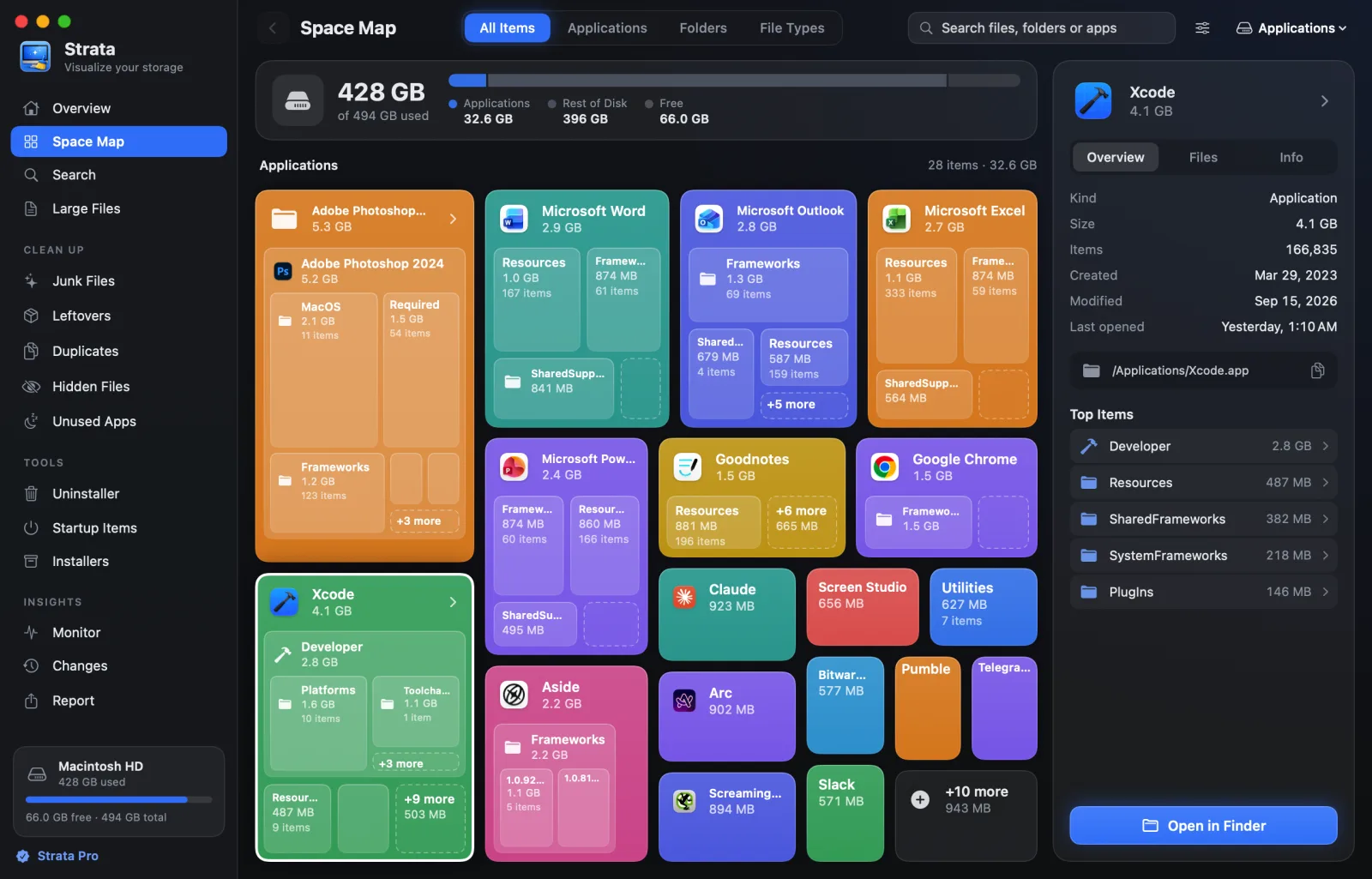
Or as Finder shows a folder: a list that opens folders in place and orders by name, kind or size, or columns that open each folder chosen in the next. Choose several with Command or Shift, and move them to the Trash together.
Sizes are what files occupy on disk, not the length they claim. On APFS those differ constantly: clones share storage, sparse files have holes, compressed files are smaller than they say. Summing the wrong one gives totals that disagree with Finder.
- Under a minute for a full boot volume on most Macs
- The Overview shows what it can at once, while the scan counts on
- Hard links counted once, so snapshots do not inflate the total
Search and large files
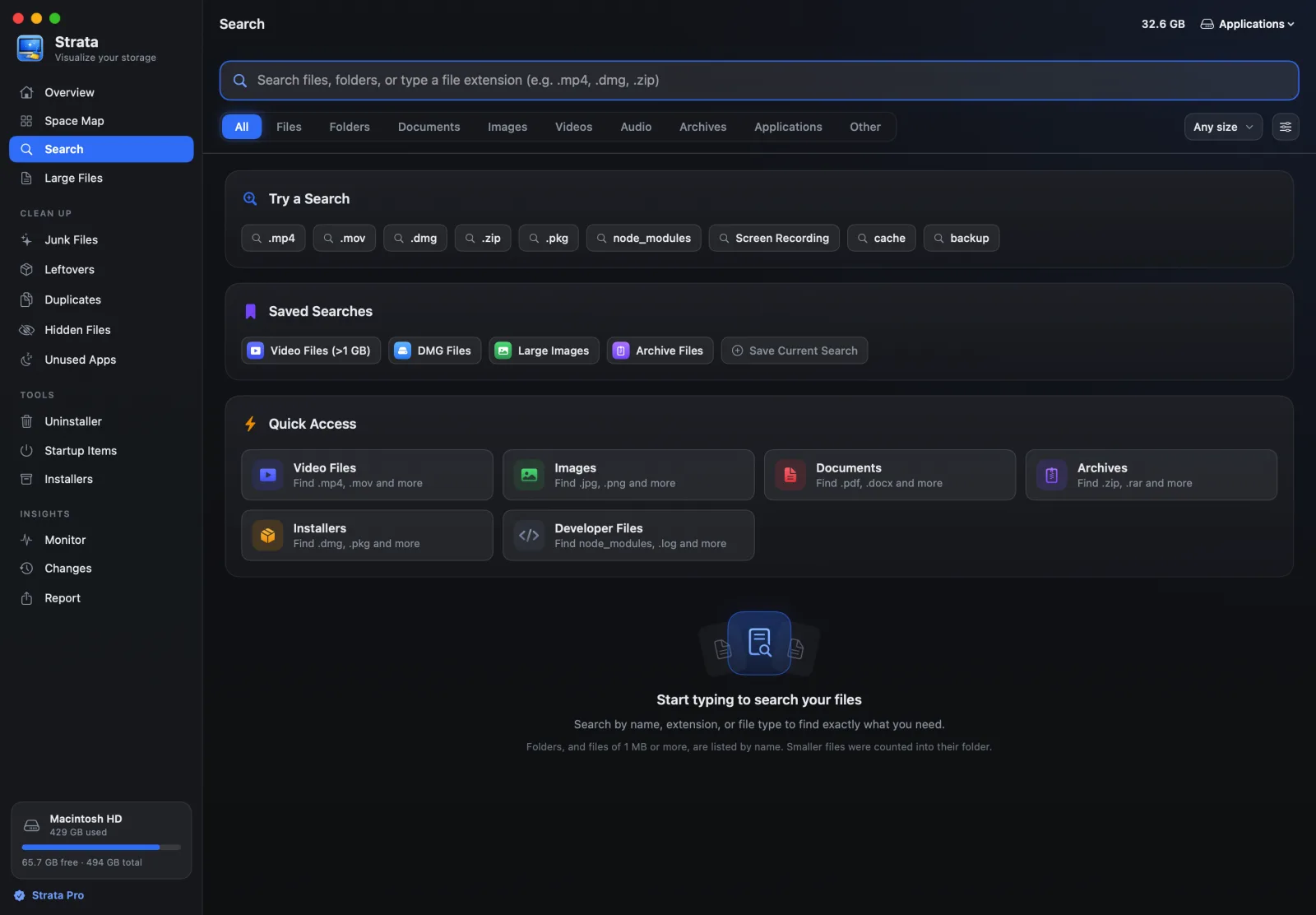
Search by name, by extension or by kind of file, with a size floor and an order beside
them. final .mp4 finds the MP4s with “final” in their names; the
Videos tab and 1 GB finds every video over a gigabyte. Case and accents are ignored, so
resume finds résumé.pdf.
A kind lists an app or a photo library whole, not the thousands of files inside it, which are the library's to manage. Recent and saved searches stay on your Mac. Large Files skips the typing: everything over a size you pick, biggest first.
Optimize
A second button beside Scan, and one in the menu bar panel. Red when Strata has measured junk worth clearing or apps sitting idle in memory, amber while junk waits for the apps using it, and green when there is nothing to do. Press it and a sheet shows exactly what it would do, before it does anything.
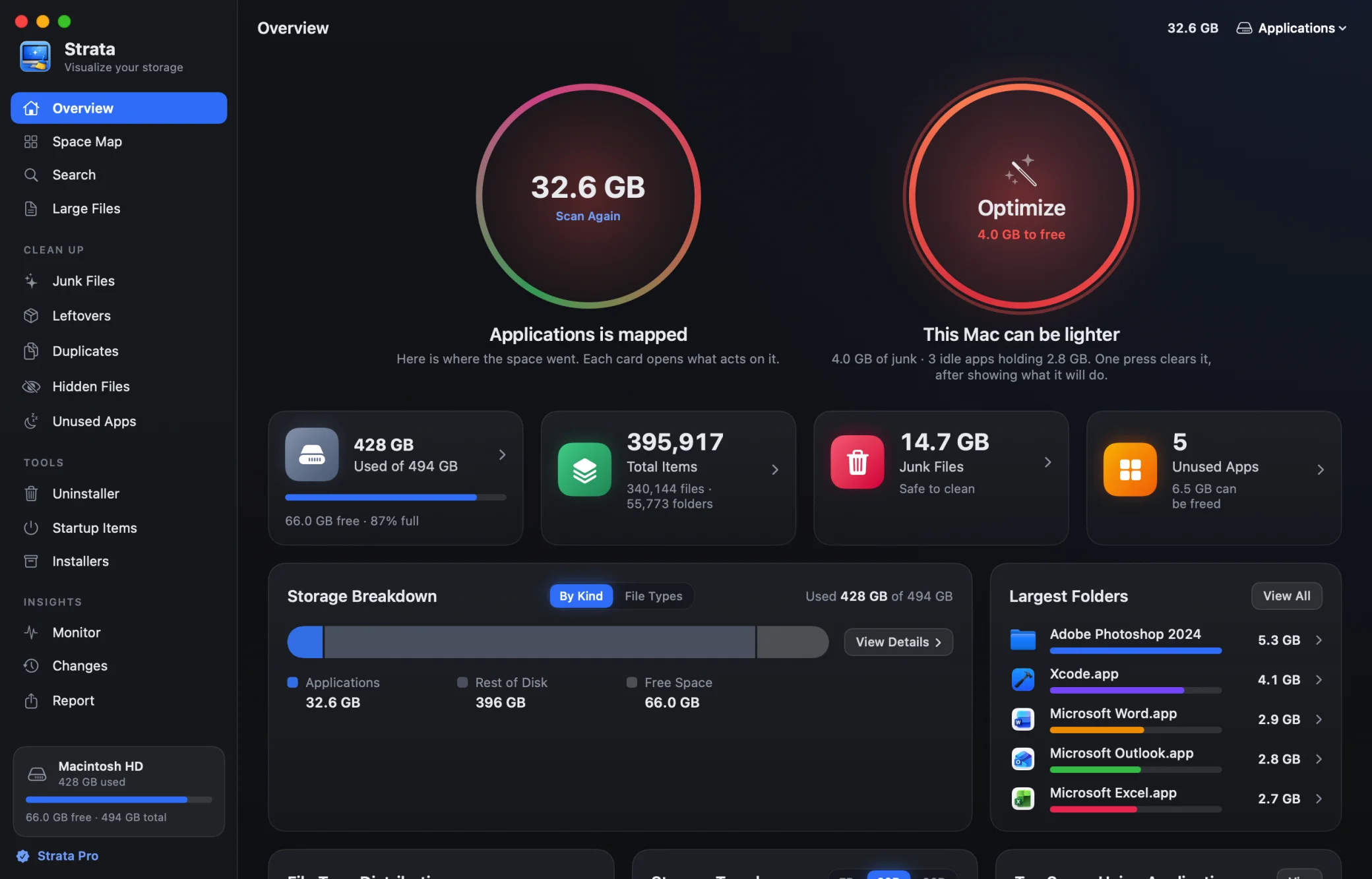
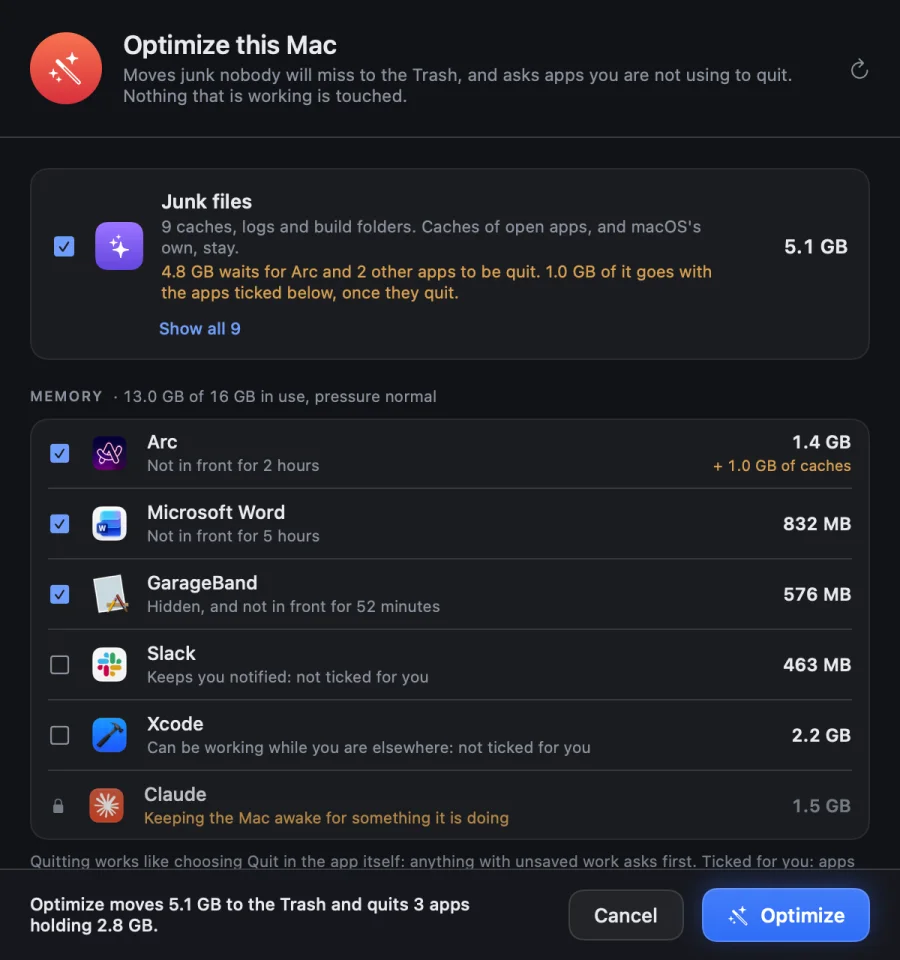
It is careful on purpose. An app is ticked for quitting only after half an hour out of the front, and never while it is playing sound, keeping the Mac awake, running a program of its own or busy. Quitting is the app's own Quit, so anything with unsaved work asks first, and an app quit from Optimize takes its waiting caches with it.
- Mail, chat, terminals and editors are shown, never ticked for you
- One last look at sound and wake locks at the moment of quitting
- Everything moved goes to the Trash, and Put Back returns it
Junk files
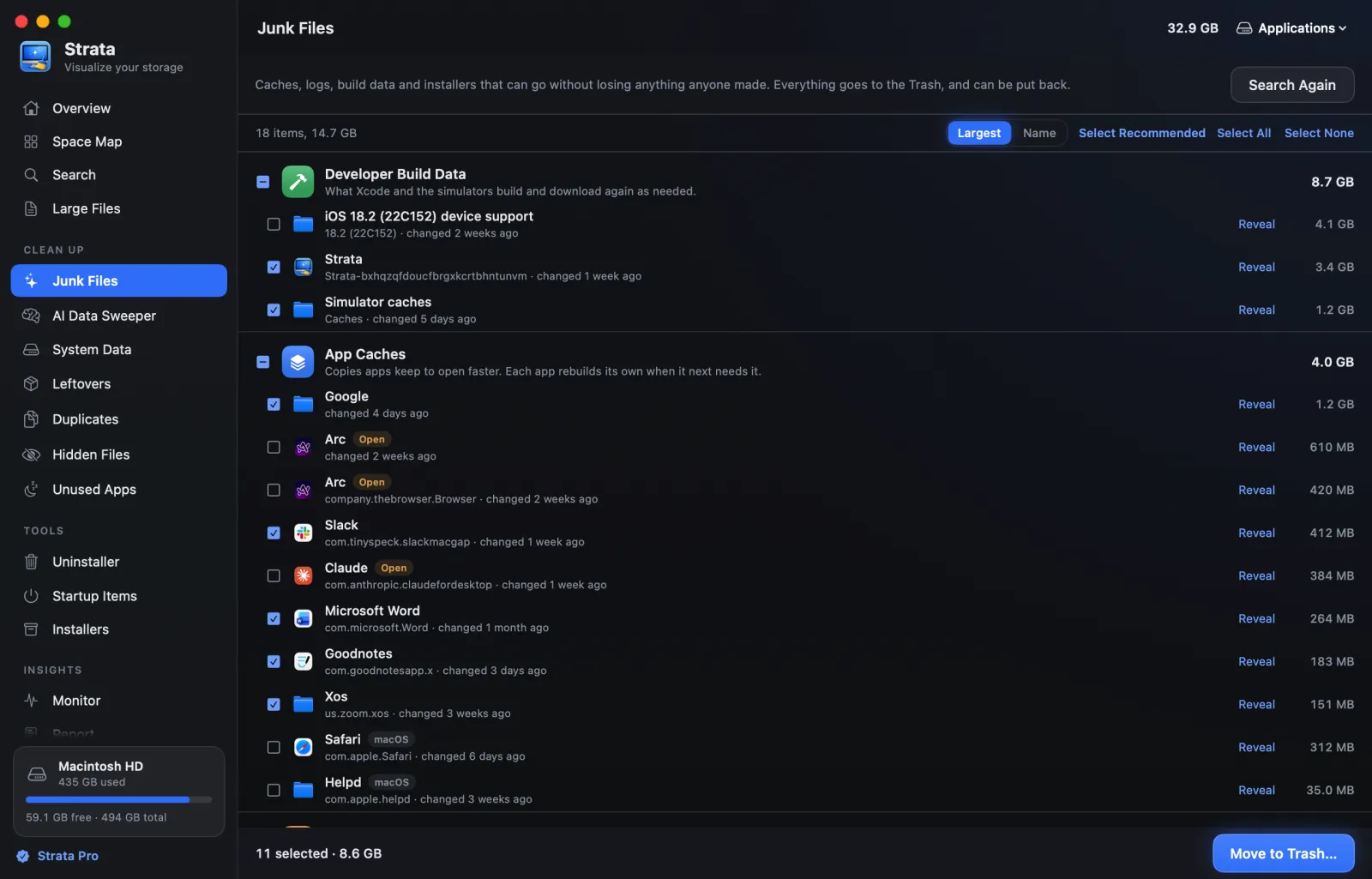
App caches, including those browsers and apps like Slack and Discord keep beside their settings, logs and crash reports, Xcode's build data and simulator caches, and package managers' downloads, measured and grouped by kind, each with the app it belongs to. Projects' node_modules and build output are measured too, from a Flutter project's build folder to Rust's target, and ticked only in projects left alone for three months. Downloads you have not opened for three months, virtual machines and games are listed too, apart.
Only what nobody will miss starts ticked. macOS's own caches, the caches of apps that are open, device support files, Xcode's archives, installers, old downloads, virtual machines and games are shown, and left for you to tick.
AI Data Sweeper
AI models take more room than almost anything else on a Mac, and they arrive without asking. Apple Intelligence and Siri download theirs by themselves; Ollama, LM Studio, Hugging Face and other AI apps keep gigabytes in hidden folders, some named only by a hash.
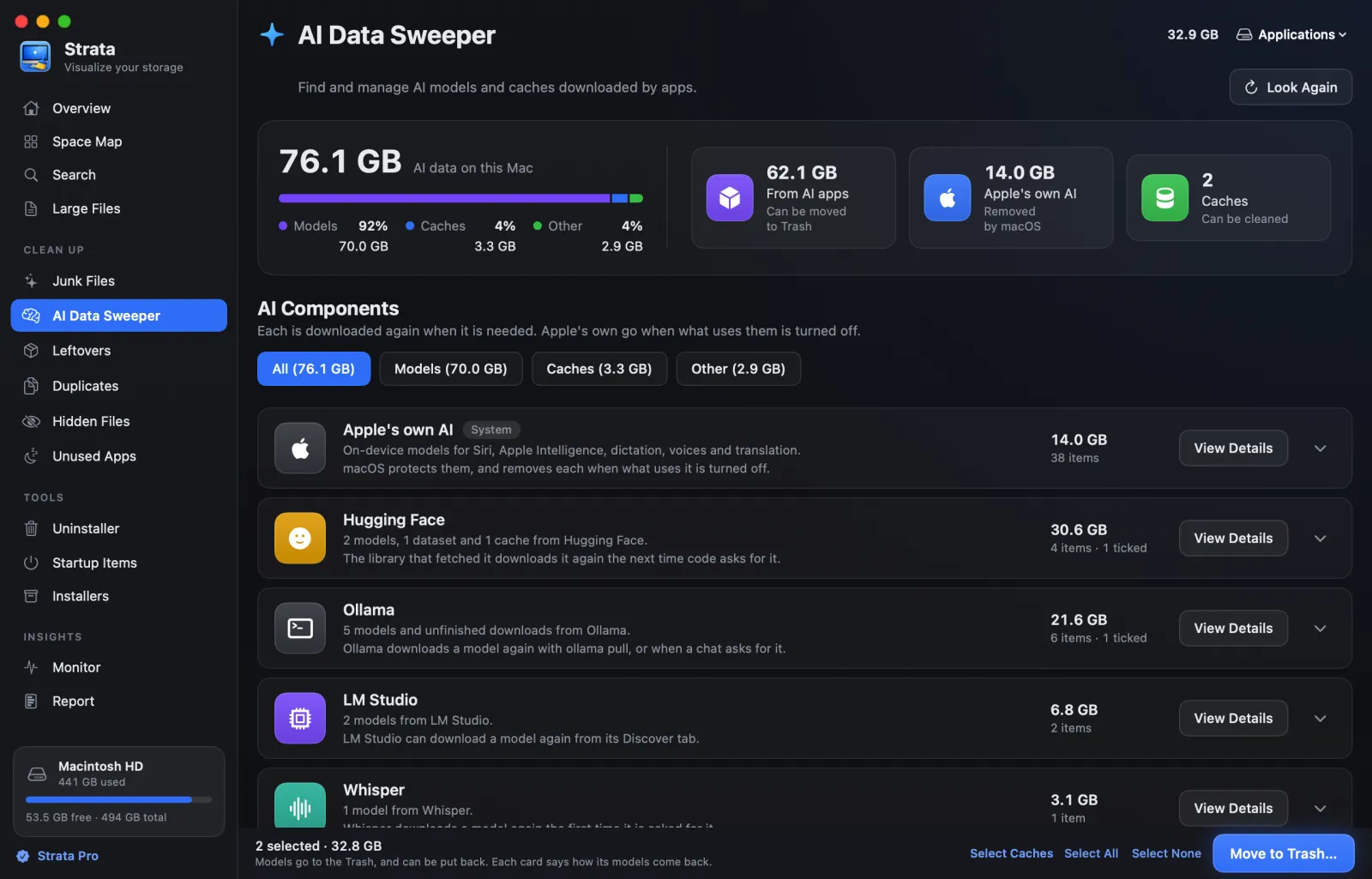
Strata finds every model, names it the way its app does, and sizes it. A model an AI app
downloaded goes to the Trash in a click, and can be put back. A layer or file another model
still uses stays until that model goes too. Ollama 0.40 and later keeps its models in a way
only Ollama removes safely, so Strata lists them with the ollama rm command
ready to copy.
- Ollama, LM Studio, Hugging Face, Msty, GPT4All, Jan, Draw Things, ComfyUI, Whisper and more
- Apple Intelligence, Siri, dictation and voices, summed up by feature
- macOS protects Apple's own models, and only macOS can remove them: Strata sums them up by feature and opens the settings where each is set
System Data
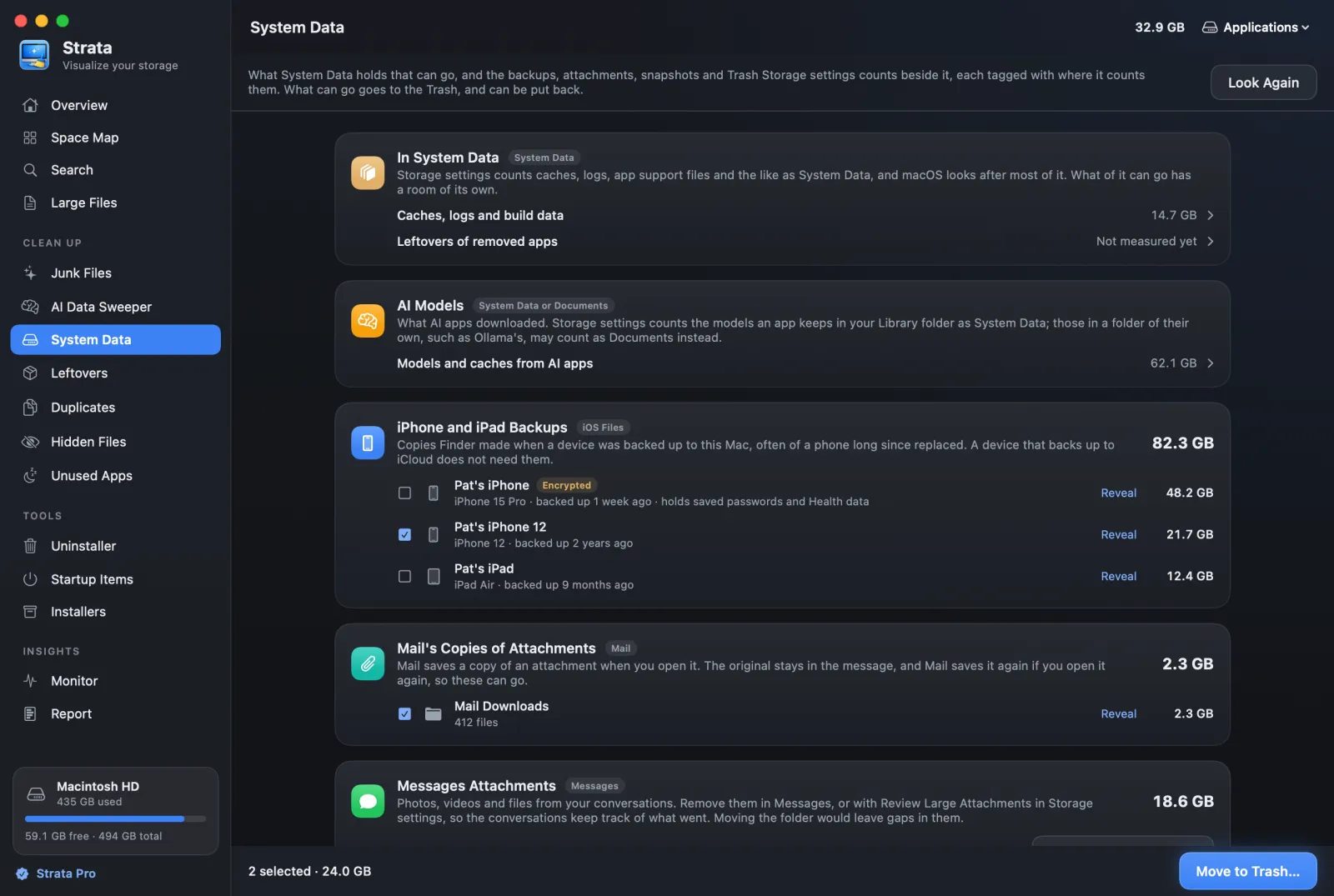
System Settings shows a grey block called System Data and says little about it. Strata says what in it can go, such as caches, logs and leftovers, and shows what Storage settings counts beside it: AI models, counted by where each app keeps them, the iPhone and iPad backups Finder made, often of a phone long since replaced, the copies of attachments Mail saved, what Messages keeps, Time Machine’s local snapshots, and the Trash.
- Each part tagged with where Storage settings counts it: System Data, Documents, iOS Files, Mail, Messages or Trash
- Each backup by device, model and age; encrypted ones are marked, since they hold saved passwords
- Backups and Mail’s copies go to the Trash, and can be put back
- Messages and Time Machine are left to their own settings, one click away, so nothing breaks
- What waits in the Trash, which takes space until it is emptied in Finder
The uninstaller
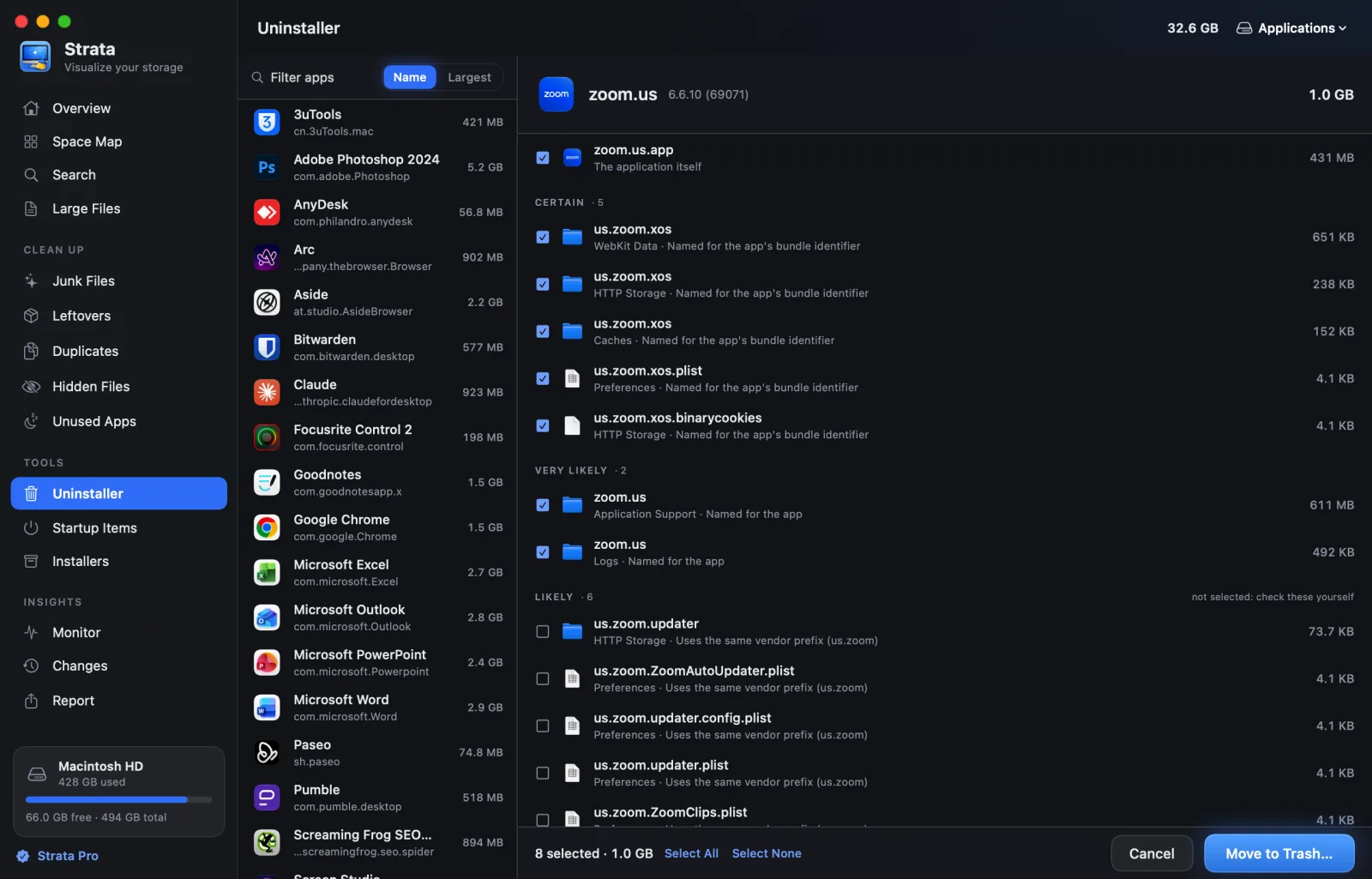
Drag an app to the Trash and its preferences, caches, saved state and support files stay behind. Strata reads the app's bundle identifier and searches eighteen Library locations for anything belonging to it. Every match is graded and every grade is shown. Anything below “very likely” arrives unticked.
- Checks each match against every other installed app first
- Vendor folders shared between apps are excluded outright
- What only an administrator can move is selected in Finder, which asks for the password
- Several apps at once: tick them, or Command-click and Shift-click, and uninstall them together
- Filter to the apps not opened for three months, or the large ones, and choose them all in one click
- An app's icon leaves the Dock with it, and Undo puts it back where it was
- Dock icons left by apps that are gone, even ones another account uninstalled, are offered for removal
Apple's own apps are another matter. Music, TV and the rest come with macOS, on a part of the disk it seals, and nothing can remove them. Strata lists them apart and can keep any of them closed instead: whenever one opens, even Music by itself when you press Play, Strata quits it.
Installers you no longer need
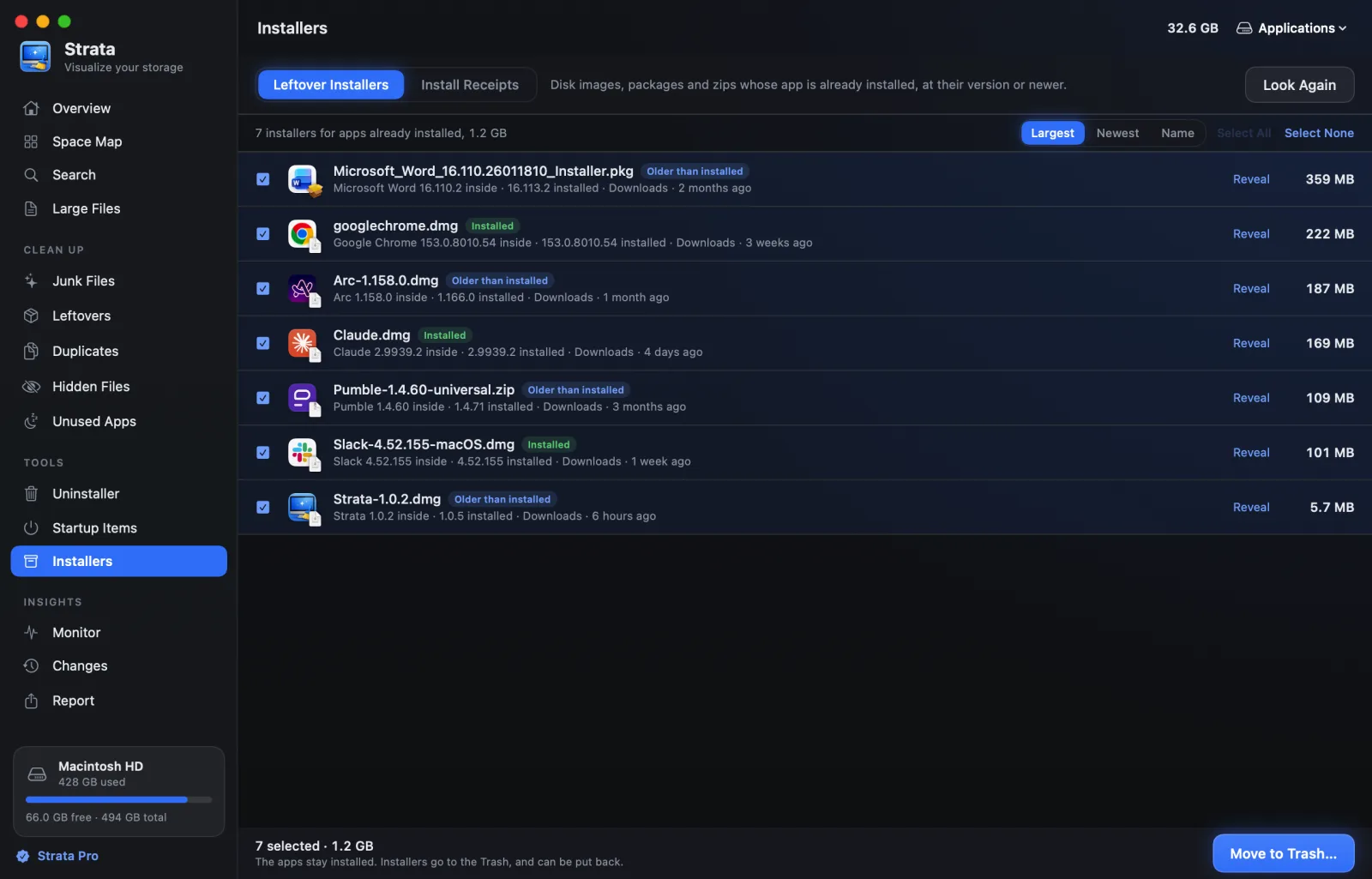
Disk images, packages and zips in Downloads and on the Desktop whose app is already installed, at their version or a newer one. Strata looks inside each one without installing anything: a disk image is opened read-only and hidden from Finder, a package's own metadata is read, and a zip's app is read from the archive.
An installer for an app you have not installed, or for a newer version than yours, is your next install, and is never listed.
Duplicates
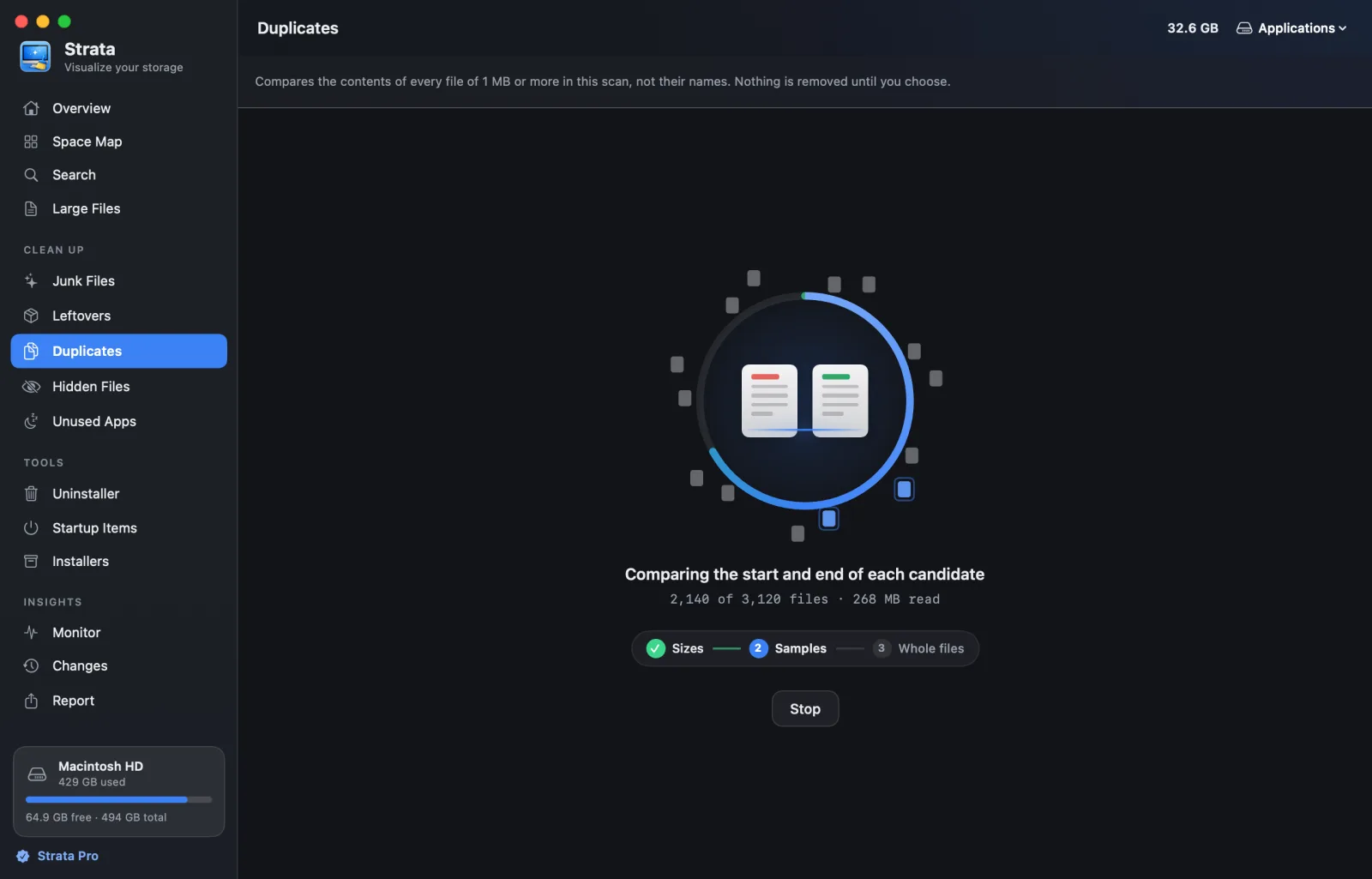
Files with identical contents, whatever they are called. Strata groups files by size, compares a sample from the start and end of each, and reads in full only the ones that still match, with the three passes on screen as it goes.
Copies that share storage on disk, like APFS clones and hard links, are counted as the little that removing them would free. Nothing starts ticked: one click selects the extra copies and keeps one of each.
Every place space hides.
Leftovers Pro
Preferences, caches and support files left behind by apps you removed long ago, grouped by the app they came from.
Hidden files Pro
The largest things Finder does not show you, such as caches in dot folders, with what each one is.
Startup items Pro
Everything that starts itself: launch agents, launch daemons, helper tools and system extensions, and whether anything still owns them.
Unused apps Free
Apps not opened in 3 months, 6 months or a year, from Spotlight's own record on this Mac.
The Monitor
The processor, memory, disk, battery and network, charted over five minutes, fifteen or the hour, with the processes, temperatures, fans, disk activity and memory pressure beside them.
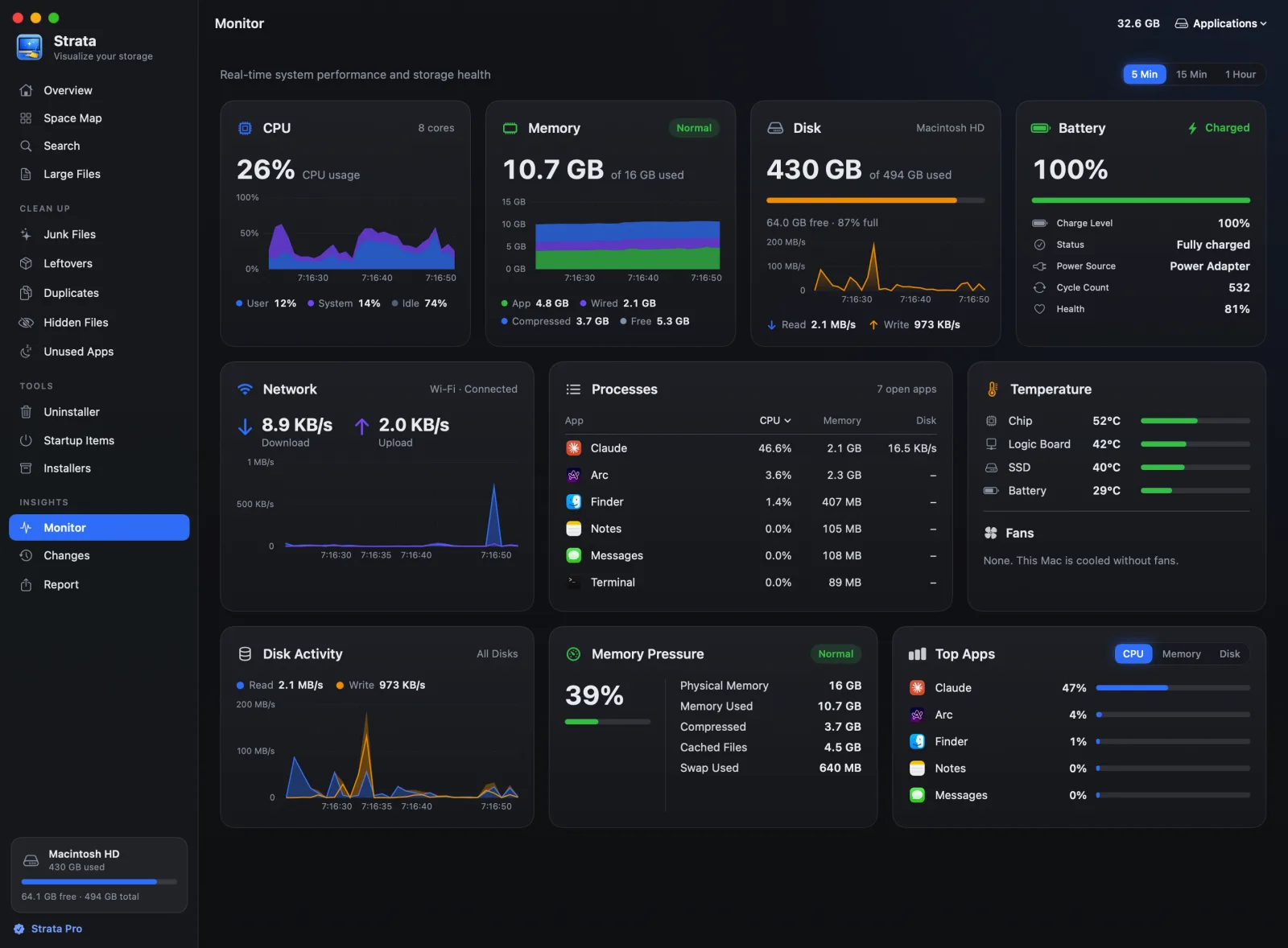
Memory is counted the way Activity Monitor counts it, app plus wired plus compressed, never total minus free. macOS fills spare memory with cached files on purpose, so free memory on a healthy Mac is near zero, and reporting that as used is how other tools tell everyone their machine is out of memory.
The menu bar
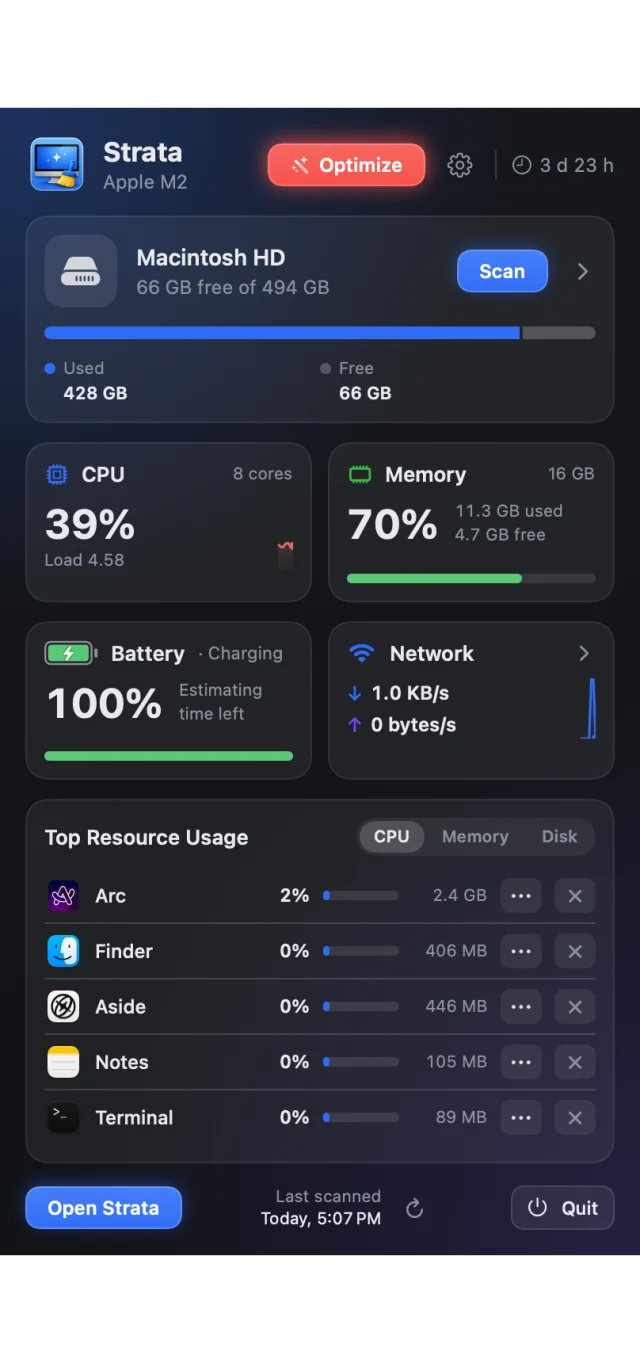
Free space beside Strata's icon, and one click away a panel with the disk by kind, the processor with its load, memory, the battery with its time left, the network, and the apps using the most, ranked by processor, memory or disk, each a button away from quitting.
Optimize sits in its header, red, amber or green, and opens the window to show what it would do. The panel reads the Mac only while it is open.
Or, chosen in Settings or with one click in the panel, the panel as cards: one each for the disk, memory, battery, processor, network and Optimize, under a word on how the Mac is doing. Click a card and its details open beside the panel, with the temperatures, the battery’s cycles and health, and the apps using the most. Beside the icon, choose free space, CPU, memory, network and battery.
And a notice when the disk is almost full, under a share you choose: once a day, every hour once under 5% is free, and under 2%, a warning from the menu bar icon with what you can clear. Or each week when junk has built up again, if you turn that on in Settings. All of it is worked out on the Mac.
Changes and reports
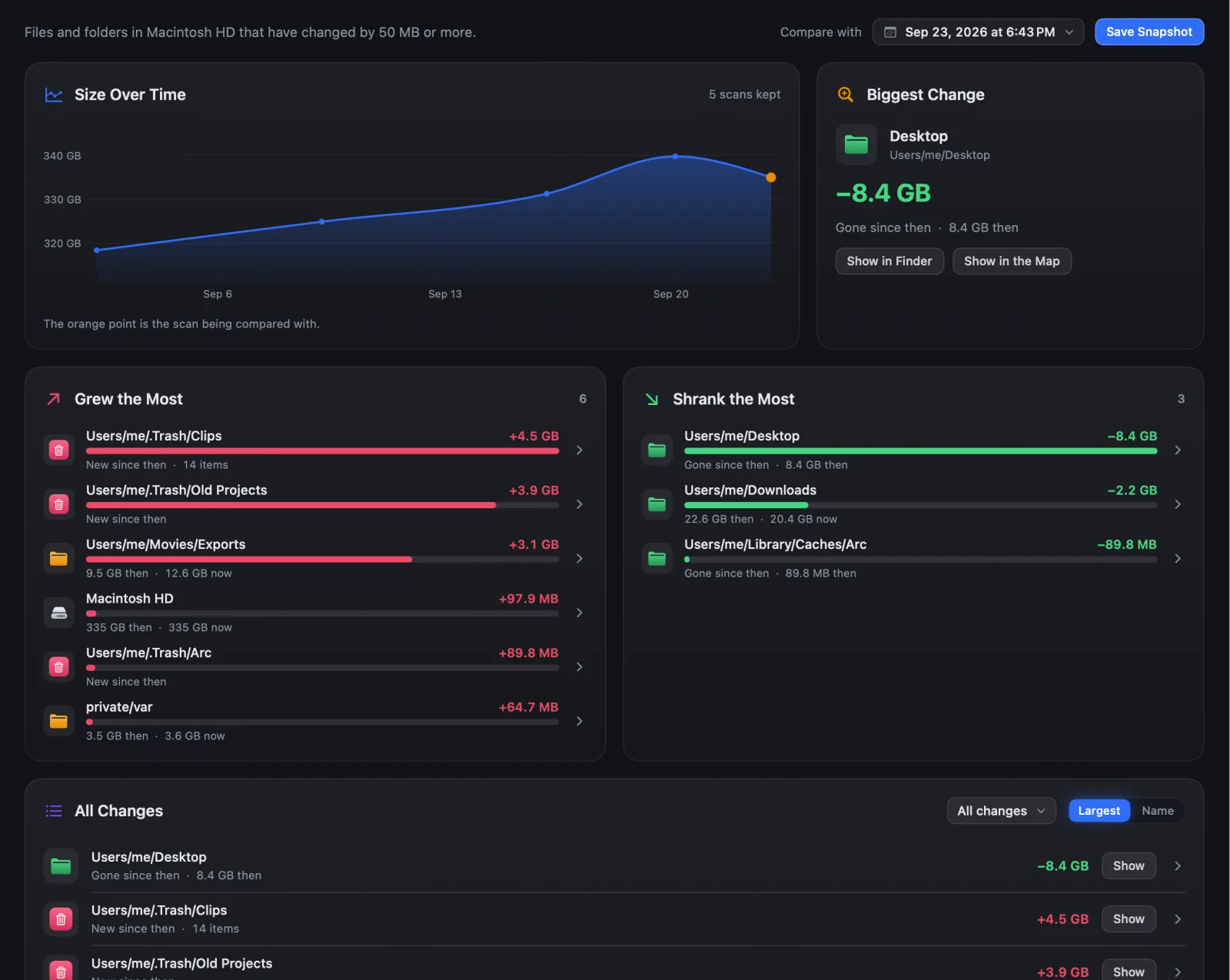
Strata keeps a snapshot of every scan: folder sizes only, a few hundred kilobytes, in its own folder on your Mac. Changes draws the disk's size over time and compares today with any earlier scan: the biggest change, what grew beside what shrank, and every change in one list, each with Show in Finder.
Report turns a scan into something to keep: a spreadsheet of the largest folders and files, one self-contained web page that loads nothing from the internet, or a few lines to paste into a message. Both live in one room, Report: Changes Over Time, and Summary & Export.

Try all of it, free for 14 days.
Every feature from the first launch, removing up to 40 GB, with no account and no card. After that the map, search and the Monitor stay free, with no time limit. Strata Pro is $5 once for the first 200 buyers, then $9.99, with a refund within 14 days of buying if it is not for you.