The best Mac cleaner apps in 2026, and whether you need one
Mac cleaners range from $40-a-year suites with antivirus to indie apps launched this month. Most do the same core job: find caches, leftovers, duplicates and big files, and remove them. What separates them is less visible: whether removing means the Trash or gone for good, what runs in the background, what they send home, and what they cost over three years. This compares them on exactly that, from each vendor's own words, and starts with whether you need one at all.
Key takeaways
- You may not need one: macOS clears caches itself when space runs short. A cleaner earns its keep on leftovers, forgotten big files and developer junk.
- Three years of a subscription here costs about $60 to $200, and more for MacKeeper paid monthly; several good options are free or paid once.
- Read how each deletes. CleanMyMac, BuhoCleaner, Mole, PureMac, Intego's SmartClean and both DevCleaners delete some things permanently; several others use the Trash, and some do not say.
- Several install a privileged helper or a background item that runs whether or not the app is open, and several collect analytics. A few, including Strata, do neither.
- Memory cleaners mostly undo what macOS does on purpose; even one seller says its module matters less on Apple silicon than on Intel Macs.
- Two developer cleaners share the name DevCleaner, and a fake copy of one spread malware: download from the developer's own site.
We make Strata, which is in this list. Every other app's facts come from its developer's own site, help pages, privacy policy or store listing, checked on 27 September 2026, except MacKeeper's history and test result, which come from the reports linked below. Prices change often, and sale prices more often; check before you buy. We did not run the other apps for this article.
First: do you need a cleaner at all?
macOS does more than it gets credit for. Apple's own guide says that when space is needed, macOS "clears caches and logs that are safe to delete", such as interrupted downloads, staged updates and Safari website data. Storage settings can empty the Trash automatically after 30 days, remove watched TV, and keep only recent files locally with iCloud.
Where macOS stops is explaining itself. Its own guide says you cannot manage the System Data category, and it has no idea which caches belong to an app you deleted three years ago. A cleaner is worth having for:
- finding what is actually using the space (a map, or a sorted list);
- leftovers of apps, which dragging to the Trash leaves behind;
- developer data: Xcode build data, simulators, package caches;
- duplicates and old installers.
What it is not worth having for is "speed". Clearing caches makes the next launch of each app slower, not faster, and memory cleaners mostly undo work macOS did on purpose; Nektony, which sells one, writes that on Apple silicon its Memory Cleaner module "is also less impactful than it was on Intel Macs".
What to check before you install one
- Where removed files go. The Trash, or gone for good. Look for the vendor's own words, not a feature list.
- What it installs. A privileged helper runs with administrator rights and asks for your password once. Background items run whether or not the app is open.
- What it sends. Analytics, crash reports, and whether its licence check phones home. The privacy policy will say.
- What it costs over time. Yearly, monthly or once; how many Macs; whether major upgrades are included; whether the trial takes a card and renews.
The comparison table
| App | Price | Deleting | Helper or background | Data sent | Needs |
|---|---|---|---|---|---|
| Strata | Free to scan; $9.99 once, every Mac | Trash only | Menu bar panel, on by default; no helper | None; update check only | macOS 13 |
| CleanMyMac | $39.95 a year; about $120 once | Permanent in some modules | Privileged helper, Menu, Updater | Diagnostics incl. file paths | macOS 11 |
| MacKeeper | Subscription only | Not documented | System extension (antivirus) | Device details, app list; account | macOS 10.15 |
| MacCleaner Pro | $39.95 a year; $85.95 once | Trash, with history | Optional menu bar helper | Opt-out usage analytics | macOS 11 |
| Sensei | $29 a year; $59 once, 3 Macs | Trash-first (its own marketing) | Launch daemon | Sentry, Amplitude | macOS 14 |
| BuhoCleaner | Yearly or lifetime (sale prices) | Uninstalls "irreversible" | Privileged helper | Google Analytics, Sentry | OS X 10.10 |
| CCleaner for Mac | Free; Pro by region | Not documented | Asks for admin credentials | Device IDs, analytics | Not consistent |
| Intego ONE (SmartClean) | $48.99 first year, then $69.99 a year | Permanent (Disk Space Monitor) | Antivirus and firewall | Usage and diagnostic data, scan logs | macOS 12.4 |
| OnyX | Free | Not documented | None stated | None stated | One build per macOS |
| AppCleaner | Free | Not documented | SmartDelete (a launch agent, per Homebrew) | No policy found | macOS 15 |
| PureMac | Free, open source | Trash for apps and duplicates; permanent for cleanup | Optional menu bar monitor and scheduled cleaning | None; network for app updates | macOS 13 |
| Mac Sai | Free, open source | Trash by default; Shredder permanent | Menu bar widget | None; daily update check, on by default | macOS 14 |
| Mole for Mac | $19 once, 2 Macs | Caches permanent by default | Menu bar | No telemetry; licence activation online | macOS 14 |
| DissectMac | Free map; Pro $12.99 (sale) | Trash | None stated | Sentry crash reports | macOS 12 |
| Macaroom | $5 for the first 50 buyers, then $19; up to 10 Macs | Trash; optional delete | Menu bar | No analytics; weekly licence check | macOS 14 |
| Bytesweep | $5 once per computer | 7-day restore point | Menu bar | No analytics; licence check | macOS 14 |
| DiskBuddy | $19 launch, then $49, one machine | Trash; optional permanent | Menu bar | No analytics; licence check | macOS 14 |
| DeepClean | Free to 10 GB; $39 once | Trash, with history | None stated | Usage events, opt-out | macOS 13 |
| DataSweeper | $9.99, App Store | Trash, with undo | None | None | macOS 26.2 (App Store) |
| Trace | €29 once, 1 Mac; €69, 3 Macs (excl. VAT) | Trash, quarantine or permanent | TraceAgent menu bar helper | No telemetry; online licence check | macOS 15 |
| SpareDisk | $4.99 once | Trash only | Optional menu bar item | None; no network | macOS 15 |
| DevCleaner | Free; Pro $19.99 a year or $29 once (early bird), 3 Macs | Permanent by default; Trash option | Menu bar app | Anonymous stats on by default; licence check | macOS 14 |
| DevCleaner for Xcode | Free; optional tips | Permanent | None stated | None, per its App Store label | macOS 14 |
The subscription suites
CleanMyMac
MacPaw's suite does the most: junk, large and old files, duplicates and similar photos, an uninstaller with leftovers, login items, malware protection, cloud cleanup and menu bar monitors. $39.95 a year for one Mac, $9.95 a month, or about $120 once without major upgrades; also included in a Setapp membership ($14.99 a month for one Mac, or $8.99 a month paid yearly). Its help says Large and Old Files and Duplicates are removed "bypassing the Trash"; it installs a privileged helper; and its privacy notice lists diagnostic data including cleanup logs with file paths. CleanMyMac vs Strata.
MacKeeper
A security-and-cleaning suite from Clario: antivirus (it scored full marks in an AV-TEST report in March 2025), VPN, ad blocking, cleaning and an uninstaller. Subscription only, $10.95 a month or yearly offers that vary by page; it needs an account; and its privacy policy lists collecting device details including the serial number and MAC address, and information about your apps. Its history is well documented: its then owner settled a US class action in 2015 for up to $2 million without admitting fault, and a customer database was left exposed later that year. MacKeeper's own help acknowledges its "controversial" legacy.
MacCleaner Pro, Sensei and BuhoCleaner
MacCleaner Pro (Nektony) bundles six tools, including a duplicate finder and a sunburst disk analyzer; removals go to the Trash with a restore history; $39.95 a year or $85.95 once. Sensei (Cindori) adds hardware health, benchmarks and TRIM to cleaning and uninstalling, with no disk map by its own account; $29 a year or $59 once for up to three Macs; its policy names Sentry and Amplitude. BuhoCleaner (Dr.Buho) has a visual disk analyzer, duplicates, leftovers and a menu bar monitor; its guide calls uninstalling "an irreversible action"; its store shows sale prices for yearly and lifetime plans; its policy names Google Analytics and Sentry.
CCleaner for Mac
Still sold by Gen Digital, with a free tier for junk, duplicates, large files, uninstalling and startup items. Its only 2026 release was a compliance update in June; its own pages disagree about which macOS versions it supports; and its price is set by region, so we could not confirm a US figure. Its policy lists device identifiers and a third-party analytics tool.
Intego ONE's SmartClean, and Washing Machine
Intego's cleaner is now SmartClean, part of its Intego ONE security subscription. The older Washing Machine X9 no longer has a product page, though Intego's support site still documents it and it had a security update in March 2026. SmartClean scans for junk, uninstalls apps, watches the processor, memory and disk, and has a Quick Cleanup that removes low-risk junk in one step without a review. Its guide says that deleting a large file from the Disk Space Monitor is permanent and cannot be undone. SmartClean comes with the Advanced and Complete plans; on 27 September 2026 Intego's store showed Advanced for one Mac at $48.99 for the first year, renewing at $69.99 a year. It needs macOS 12.4 and 8 GB of memory. Its privacy policy lists usage and diagnostic data, including scan logs and detected threats, and in-app analytics you can switch off in the app's privacy settings. intego.com.
The free tools
OnyX (Titanium Software) is free maintenance software: caches, logs, rebuilding indexes, hidden settings, with a separate build for each macOS version; 5.1.0 for macOS 27 runs on Apple silicon only. It asks a lot of you, and its site describes no disk map. AppCleaner (FreeMacSoft) is the free uninstaller, updated in September 2026 for macOS 15 and later; AppCleaner vs Strata, and the best uninstallers compared. Pearcleaner, a free, source-available uninstaller, has been on hold since the end of 2025. The free Mole CLI, a hugely popular open source Terminal cleaner, comes from the same developer as the paid Mole app below, which is a separate Swift app. And macOS's own Storage settings cost nothing.
Two open source cleaners have grown quickly this year, and both are worth reading closely before you press anything. PureMac (MIT licence, about 6,800 stars on GitHub) clears junk and developer caches, from Xcode to Docker and the caches of Ollama and LM Studio, uninstalls apps, finds files left by apps already deleted, finds duplicates, and can clean on a schedule, for macOS 13 or later. Its README says uninstalls, leftovers and duplicates go to the Trash, while category cleanup, scheduled cleaning and several other paths delete permanently; its homepage and privacy policy still say everything goes to the Trash, so trust the README. github.com/momenbasel/PureMac. Mac Sai (BSD licence) has 17 modules, including a treemap, duplicates that can be merged into APFS clones instead of deleted, an uninstaller, startup items, a menu bar monitor and a signature-based malware check, for macOS 14 or later. Removals go to the Trash by default; its Shredder and its module for emptying the Trash are permanent by design. It sends no telemetry, but checks GitHub and Homebrew for its own updates once a day unless you turn that off. github.com/iliyami/MacSai. Both also install with Homebrew.
The one-time indies
Strata
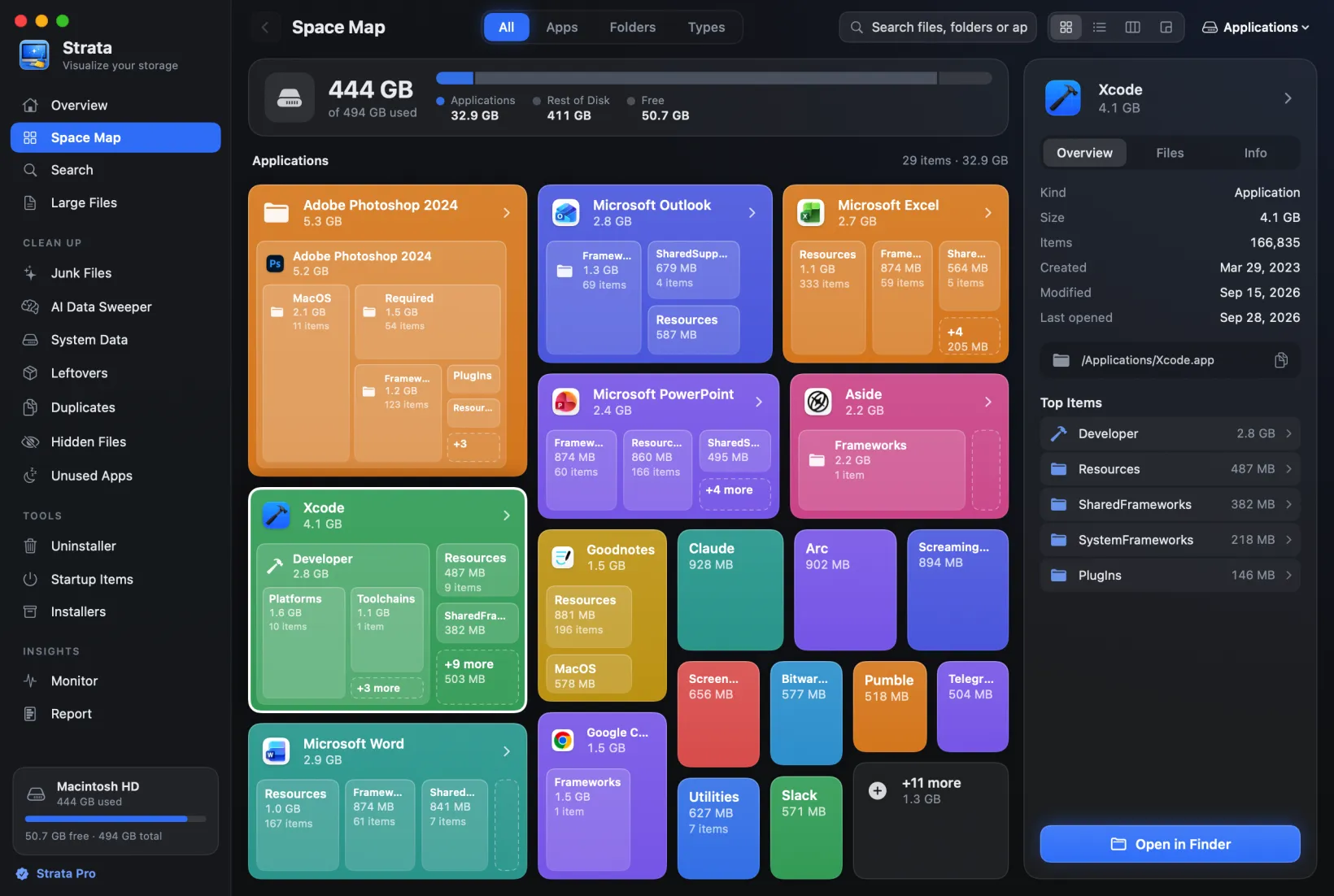
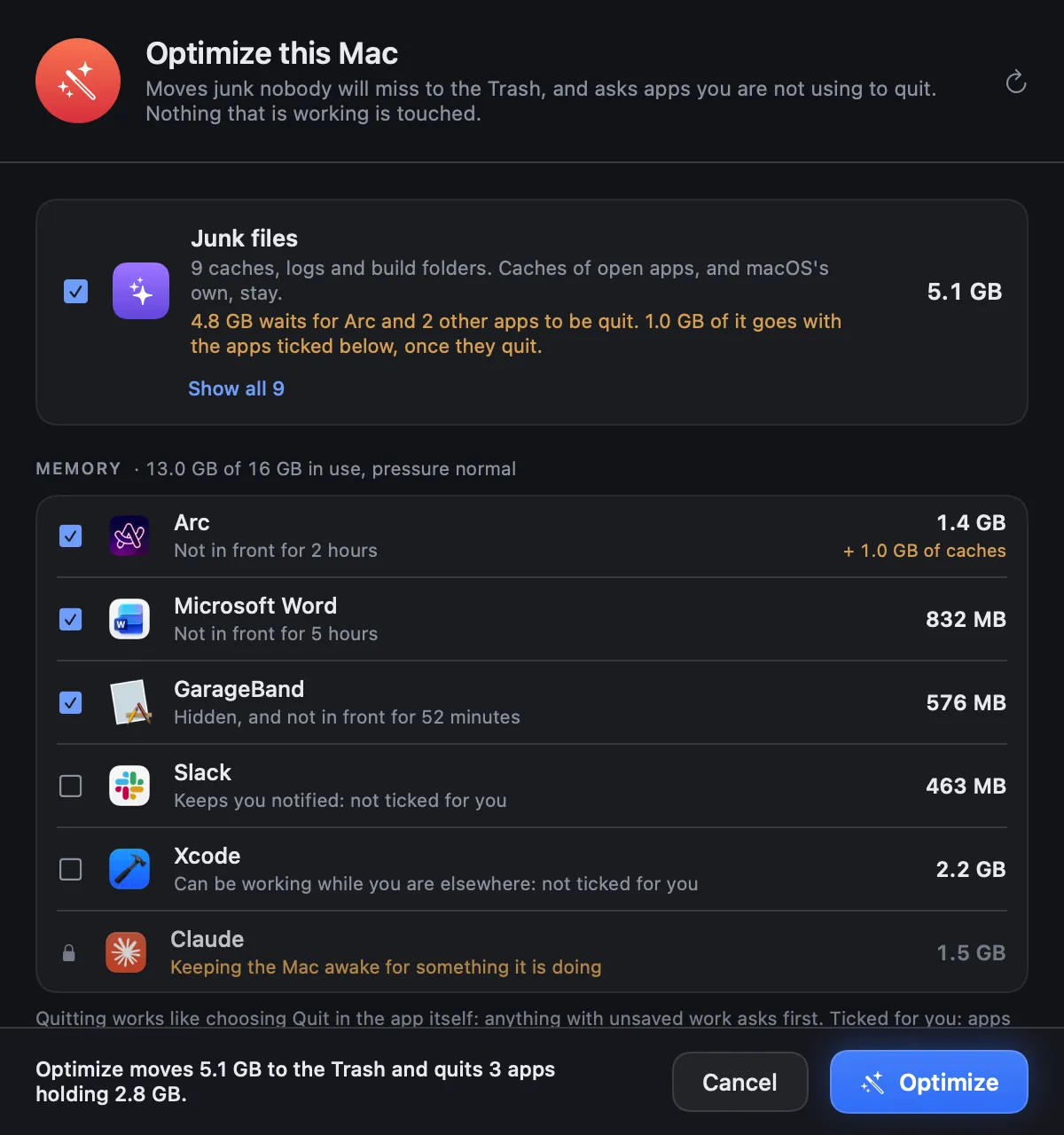
Ours. A disk map (cards, treemap, list, columns) with cleanup rooms: junk that ticks only what nobody will miss, an uninstaller that grades leftovers, duplicates, old installers ticked only when what is inside them proves the match, startup items, and Optimize, which quits idle apps without touching one at work. It also warns, while it is open in its window or the menu bar, when the disk is almost full, below a share of free space you choose from 2% to 20%: once a day, then every hour when the disk is also under 5% free, and, under 2%, with a warning that drops from Strata's icon in the menu bar. What to do then is in our guide to a startup disk that is almost full. It installs no helper and no background item, never asks for your password, sends nothing but its own update check, and only ever moves things to the Trash. Free to scan; $9.99 once for every Mac you own, after a 14-day trial that removes up to 40 GB.
Mole for Mac
A native app from the author of the Mole CLI: cleanup, uninstaller, treemap, startup items, monitor with fan control, and an updater for other apps. $19 once for two Macs; each paid tool works twice free. Its docs say caches are "permanently deleted by default", with the Trash as an option in Settings; other removals use the Trash. No telemetry. macOS 14 or later. mole.fit is its only official site.
DissectMac
Close to Strata in approach: a free treemap, search, large files and live stats, with Pro adding deletion and an uninstaller with leftovers; everything goes to the Trash. Pro is $12.99 (labelled a sale price against $14.99). It says it has no duplicate finder, and its privacy policy names Sentry for crash reports, with folder names redacted. macOS 12 or later. dissectmac.com.
Macaroom, Bytesweep, DiskBuddy, DeepClean and DataSweeper
Macaroom launched on 26 September 2026. It names about 30 sources of used space, compares scans and forecasts when the disk will be full, and moves things to the Trash with one-click restore. It is $5 for its first 50 buyers, then $19, for up to 10 Macs. Bytesweep is $5 per computer, with a 3-day trial and a 7-day restore point for undo. DiskBuddy draws eight views of the disk and can compress photos and video. It uses the Trash by default, with optional permanent deletion, and costs $19 while its launch lasts, then $49, for one machine at a time. DeepClean rates every item Safe, Review or Caution. It is free up to 10 GB of cleanup and $39 after, and sends usage events unless you turn them off. DataSweeper uses Apple Intelligence to explain files and moves everything to the Trash with undo. It is $9.99 on the App Store, which lists macOS 26.2; its own site says Sequoia and Tahoe.
Trace
A Swiss storage inspector and uninstaller for macOS 15 or later. It shows a dashboard of what the space is (apps, media, development, System Data and more), bars for each folder level, and an App Inspector with profiles for vendors such as Adobe and Microsoft. It is unusually explicit about deleting. Each confirmation says whether items go to the Trash, into a quarantine you can restore from, or are deleted permanently. Before a risky permanent delete, it warns if there is no Time Machine backup from the last 24 hours. It costs €29 once for one Mac or €69 for three, excluding VAT. Its free demo locks the main app's removal tools, and its licence terms say a new major version may be paid. No telemetry; activation checks the licence online. trace.argio.ch.
SpareDisk
$4.99 once, on the App Store or direct: a treemap, a sunburst and a list, duplicates checked byte by byte, an uninstaller with leftovers, developer caches down to downloaded Ollama and LM Studio models, and a comparison with the previous scan that lists what grew. It only ever moves things to the Trash, makes no network connections at all and has no licence check. macOS 15 or later. sparedisk.minilabs.cc.
For developers: the two DevCleaners
Two unrelated apps share the name. DevCleaner for Xcode is free and open source (GPL), on the App Store and GitHub: it lists Xcode's derived data, archives, device support files and old logs by size, and removes what you pick. It deletes permanently, and its README asks you to back up first, because it relies on how Xcode lays out its folders. github.com/vashpan/xcode-dev-cleaner. DevCleaner, a menu bar app, covers more than 30 developer and AI tools, from npm and Docker to Ollama models, and finds stale node_modules and build folders in old projects. It is free, with a Pro version at $19.99 a year or $29 once (an early-bird price for its first 25 licences) for up to three Macs. It deletes permanently by default, with a setting to use the Trash instead, and its anonymous usage statistics are on until you switch them off. devcleaner.app.
A fake DevCleaner spread malware. Its developer reported on 4 September 2026 that a copied site calling the app "CleanDev" was used to spread an information stealer. The only official site is devcleaner.app, which publishes checksums for the real download.
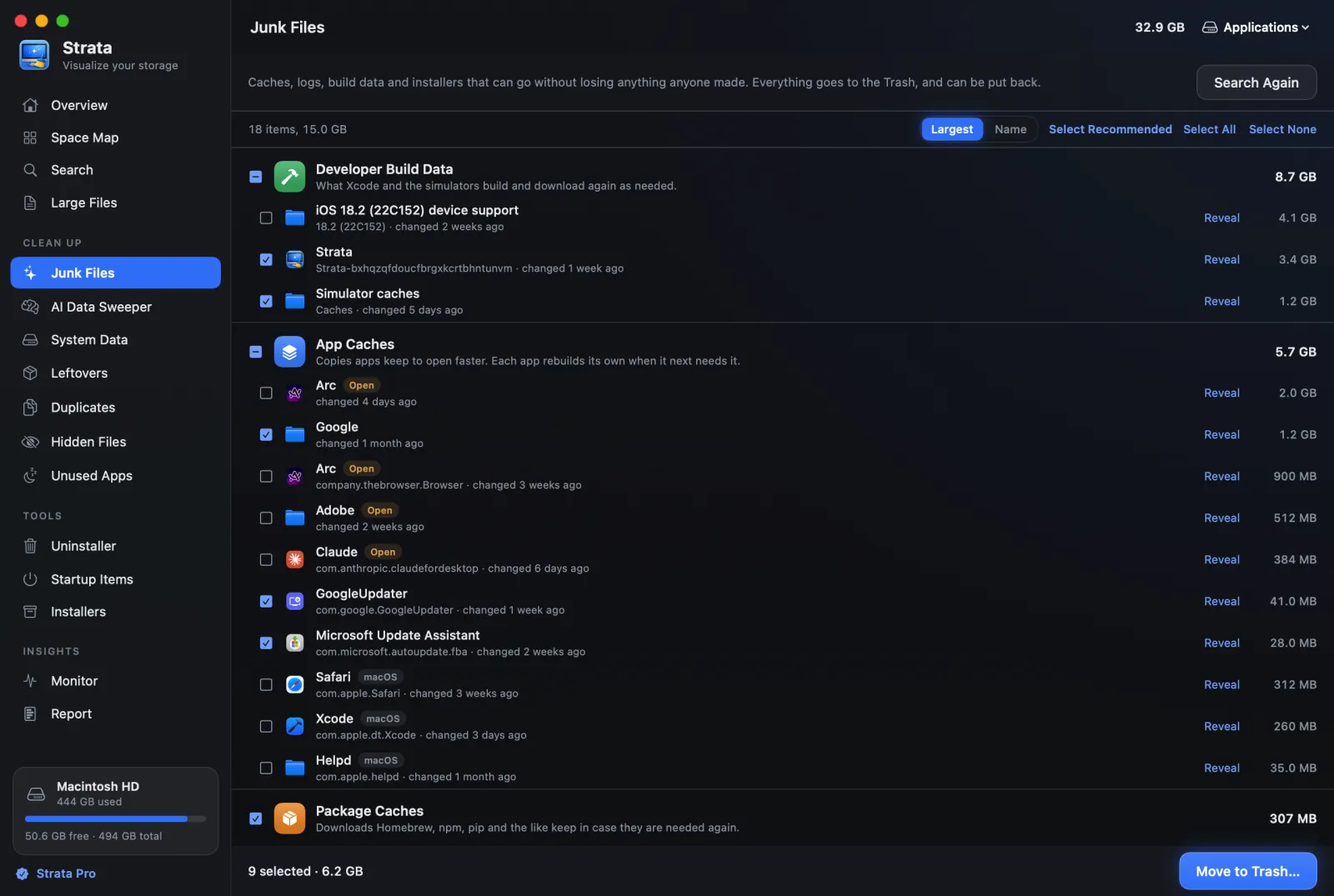
Strata's Junk Files covers Xcode's build data, the caches of
package and build tools from Homebrew and npm to Cargo, Bun and the Android SDK, and what tools
keep in ~/.cache. It also finds your projects' node_modules and,
since version 1.0.29, what their tools build, such as Rust's target and Flutter's
build folders, and ticks each only when nothing in its project has changed for
three months. Device support files and Xcode's archives start unticked: Xcode needs the first to
debug the device they came from, and the archives hold the symbols needed to read crash
reports.
Whatever you clear goes to the Trash.
Which should you choose?
You want everything, including antivirus, in one subscription
CleanMyMac, or MacKeeper if you want a VPN too. Read how each deletes first.
You want to pay once and undo anything
Strata, for every Mac you own; or, among the newer indies, SpareDisk, DissectMac or Macaroom.
You want free
macOS's Storage settings first, then AppCleaner for apps and OnyX for maintenance, or a free disk map from the analyzers roundup. PureMac and Mac Sai do more, free and open source, once you know which of their tools skip the Trash.
Frequently asked questions
Do I need a Mac cleaner app?
Often not. macOS clears caches and logs by itself when space runs short, and its Storage settings can empty the Trash and offload files. A cleaner helps when you need to find what is using the space, remove an app's leftovers, or clear developer build data and duplicates.
Is there a Mac cleaner without a subscription?
Several. Strata is $9.99 once for every Mac you own; SpareDisk is $4.99 once; Mole for Mac is $19 once for two Macs; Trace is €29 once for one Mac. OnyX, AppCleaner, PureMac and Mac Sai are free. CleanMyMac also sells a one-time licence, at about $120 for one Mac, without major upgrades.
Do Mac cleaners delete files permanently?
Some do, by their own documentation: CleanMyMac's Large and Old Files and Duplicates bypass the Trash, BuhoCleaner describes uninstalling as irreversible, Mole and DevCleaner delete caches permanently by default, and DevCleaner for Xcode, PureMac's category cleanup and Intego's Disk Space Monitor delete permanently. Others, such as Strata, SpareDisk, Nektony's apps, DissectMac and DataSweeper, move items to the Trash.
Do memory cleaners speed up a Mac?
Rarely. macOS uses spare memory as cache on purpose, and Nektony, which sells a memory cleaner, writes that on Apple silicon its Memory Cleaner module is less impactful than it was on Intel Macs. Quitting an app that is actually idle and holding a lot of memory helps when memory is under pressure.
Is MacKeeper safe?
It is notarized by Apple and scored well in an AV-TEST malware test in 2025. It is subscription-only, needs an account, and its privacy policy lists collecting device details such as the serial number and MAC address and a list of installed apps. In 2015 its then owner settled a US class action for up to $2 million without admitting fault.
See what your Mac is holding, free
Strata's scan, map and search are free forever, with no account. Every download starts with 14 days of Strata Pro, and everything it removes goes to the Trash first.