Disk Inventory X on Apple silicon: what still works, and the native app to replace it
Disk Inventory X still runs on an Apple silicon Mac, but only through Rosetta, only after you let it past Gatekeeper, and only until macOS 28, when Apple keeps Rosetta for certain older games alone. Its last release came out in December 2019. If you want its treemap, folder tree and kinds of file in an app built for today's Macs, Strata, which we make, is the replacement we recommend: native on Apple silicon and Intel, notarized, and able to clean up with nothing erased. Its map is free, and Strata Pro is $19.99 once.
Key takeaways
- Strata is the native replacement: a treemap that names its larger blocks, a folder list with sizes and a File Types view, on Apple silicon and Intel from macOS 13, signed and notarized.
- Disk Inventory X 1.3, from 8 December 2019, is made only for Intel and not notarized, and its site still lists macOS 10.13 to 10.15.
- An Apple silicon Mac can run it only by translating it with Rosetta, which Apple supports in full through macOS 27. From macOS 28, only certain older games keep it.
- Strata's Uninstaller lists every app in your Applications folders made only for Intel, Disk Inventory X too if you keep it there, so you can sort them out before that deadline.
- Strata's map is free for good. Strata Pro, $19.99 once, adds removal to the Trash with Put Back, an uninstaller and the cleanup rooms.
Written by the maker of Strata, the replacement this guide recommends. Disk Inventory X's facts come from derlien.com, its release notes, its GitLab repository and Homebrew, and Rosetta's from Apple's support pages, all read on 9 November 2026. The steps to open it on macOS 27 were checked on 5 November 2026.
The short answer
Disk Inventory X still works on an Apple silicon Mac today, through Rosetta, but it has had no release since 2019 and its time is running out. Strata gives you the same three ways of seeing a disk in a native, notarized app that is still updated, then helps you clear what you find. The map costs nothing.
- The same three views: a treemap, a folder list and kinds of file.
- Made for current Macs: universal, notarized, macOS 13 or later.
- It finds your other Intel apps before macOS 28 strands them.
- Removing with a way back, plus cleanup Disk Inventory X never had.
- A free map, and $19.99 once for everything else.
At a glance
| App | On Apple silicon | Views | Removing | Needs | Price | Latest |
|---|---|---|---|---|---|---|
| Disk Inventory X | Through Rosetta; not notarized | Tree, treemap, kinds | To the Trash; network items deleted after a warning | Listed for macOS 10.13 to 10.15 | Free | 1.3, 8 Dec 2019 |
| Strata | Native; notarized | Treemap, list, columns, cards, file types | Always to the Trash, with Put Back | macOS 13 | Map free; $19.99 once for the rest | 1.0.45, 14 Nov 2026 |
| QDirStat | Native; notarized | Tree, treemap, file types | To the Trash, or deleted at once | macOS 13 | Free | 2.0-macos.3, 27 Sep 2026 |
| GrandPerspective | Native | Treemap | To the Trash, once enabled | macOS 14 (3.7.2 for 11 to 13) | Free; $2.99 on the App Store | 3.8.1, 13 Sep 2026 |
Where Disk Inventory X stands
Tjark Derlien's app shows a folder tree, a treemap and a statistic of file kinds side by side. They are linked: choose a file in one, and the others show where it sits and what kind it is. Its site says the layout algorithm is based on KDirStat and that WinDirStat gave its author the idea. It is free and open source under the GPL.
WinDirStat itself never ran on a Mac; our guide to WinDirStat for Mac maps each of its views to a Mac tool.
- Last release: 1.3, on 8 December 2019. The download link on its home page still says macOS 10.13 to 10.15.
- Intel only: the 1.2 notes say "Disk Inventory X is now 64 Bit (Intel only ;-)", and no build for Apple silicon has appeared on the site since.
- Not notarized: the 1.3 notes warn that it is "still not signed nor notarized by Apple", so macOS complains the first time it opens.
- Source: the last change in its official repository, on 16 March 2022, readied the project for macOS 12 and for notarization. No release has followed on the site.
- Homebrew: its cask was disabled on 1 September 2026, because the app fails Gatekeeper's check.
Rosetta, and the macOS 28 deadline
An app made only for Intel runs on an Apple silicon Mac through Rosetta, which translates it as it runs. Apple's support page sets a limit: Rosetta is there for any Apple silicon Mac on macOS 27 or earlier. With macOS 28 it narrows to certain older games, no longer maintained, that depend on Intel frameworks.
So on macOS 27, Disk Inventory X still runs once you let it past Gatekeeper. On macOS 28 it will not run on Apple silicon at all. If it is part of how you look after your Mac, now is the time to switch, and the same is true of any other app that still needs Rosetta. How to find the apps that still need Rosetta gives four ways to list them, and Strata's Intel filter is one.
What $19.99 buys when the old app was free
Disk Inventory X never cost anything, and neither does the part of Strata that replaces it: scanning any drive or folder, the Overview, all four views of the Space Map, File Types, Search and Large Files, plus the Monitor and the menu bar: no time limit, no key. The Uninstaller's findings, its Intel filter included, and Optimize's plan are free to look at too.
Strata Pro, $19.99 paid once, is for what comes after the looking:
- Move to Trash wherever you find something, always with Put Back;
- uninstalling from the Uninstaller, leftovers and all;
- Junk Files, Duplicates, Leftovers, Installers, the AI Data Sweeper and System Data;
- Optimize in one press, Startup Items, and Report, which compares the disk with your recent scans.
Think of the price as the cost of the cleanup Disk Inventory X never had: one payment, never a subscription, with fixes for bugs and for new macOS versions included. You can try it before paying, since the first 14 days unlock it all, up to 40 GB of removals, with no account or card; and if it disappoints, you can have your money back within 14 days.
From 10 November 2026, each new licence lives on one Mac at a time; move it to another whenever you like, at no charge. An older licence keeps working on all your Macs; the pricing page covers the rest.
Disk Inventory X's three views, in one native app
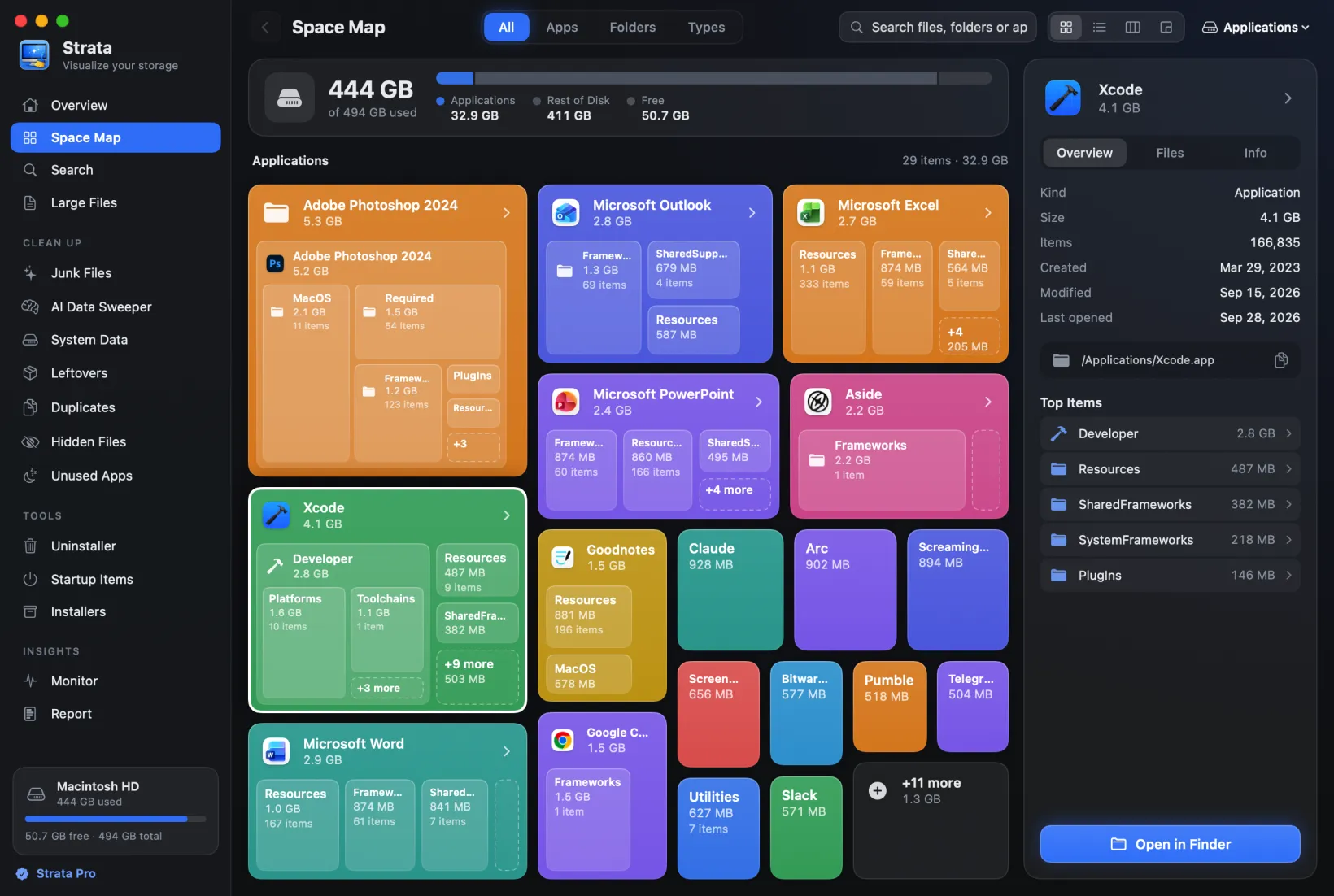
Disk Inventory X puts its tree, its treemap and its kinds in one window. Strata gives each its own view of the same scan, a click or a keystroke apart, with an inspector at the right that describes whatever you point at.
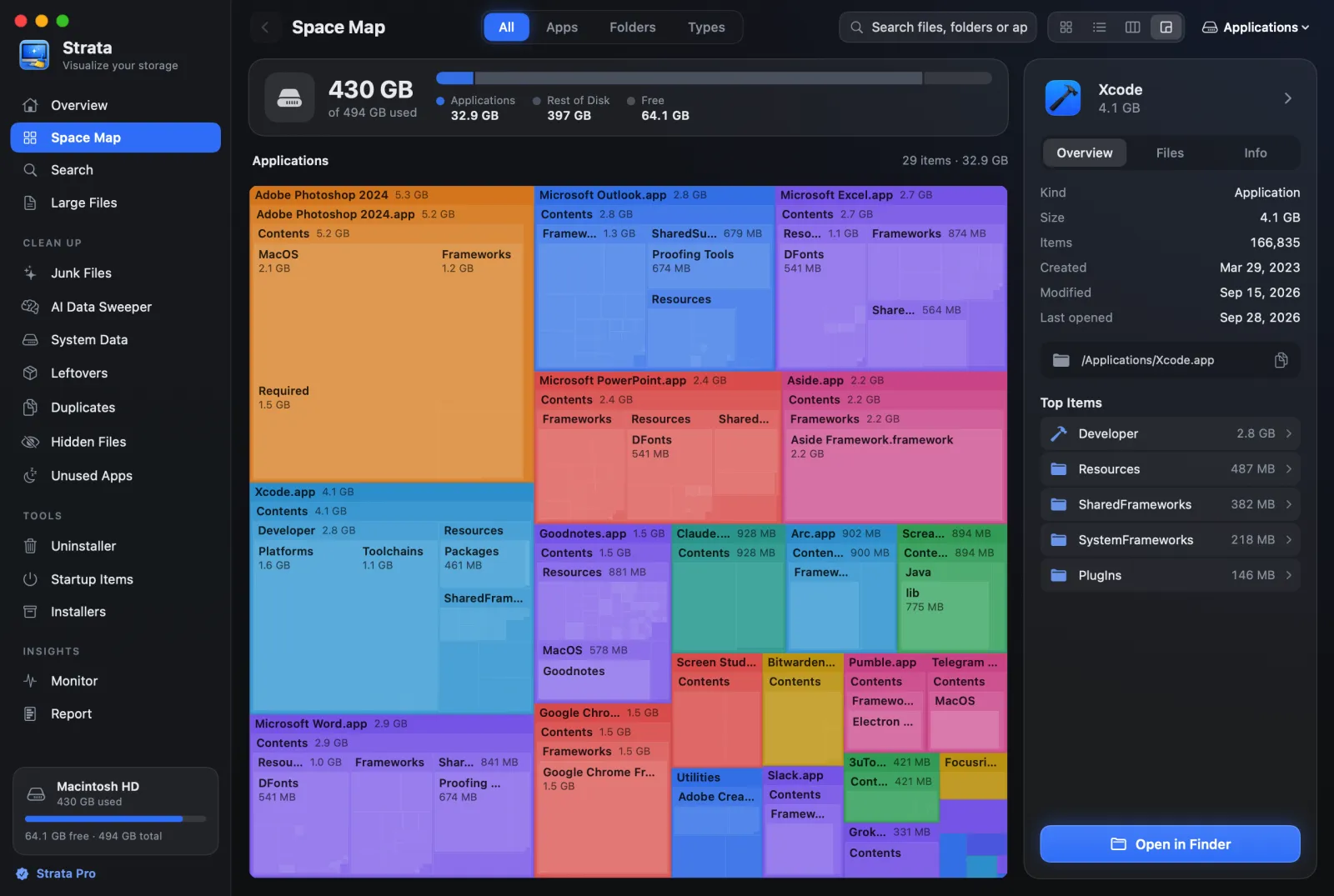
The treemap: the Detailed Map
Press Command-4 for the Detailed Map, the classic treemap drawn down to single files. A folder big enough for a label shows its name and size in a band along its top; click that name to go in, and the back arrow or Command-[ brings you out. Point at a file and the inspector shows its size and when it was created, changed and last opened. Its right-click menu has Copy Path, which is free, and Reveal in Finder and Move to Trash, which come with Strata Pro.

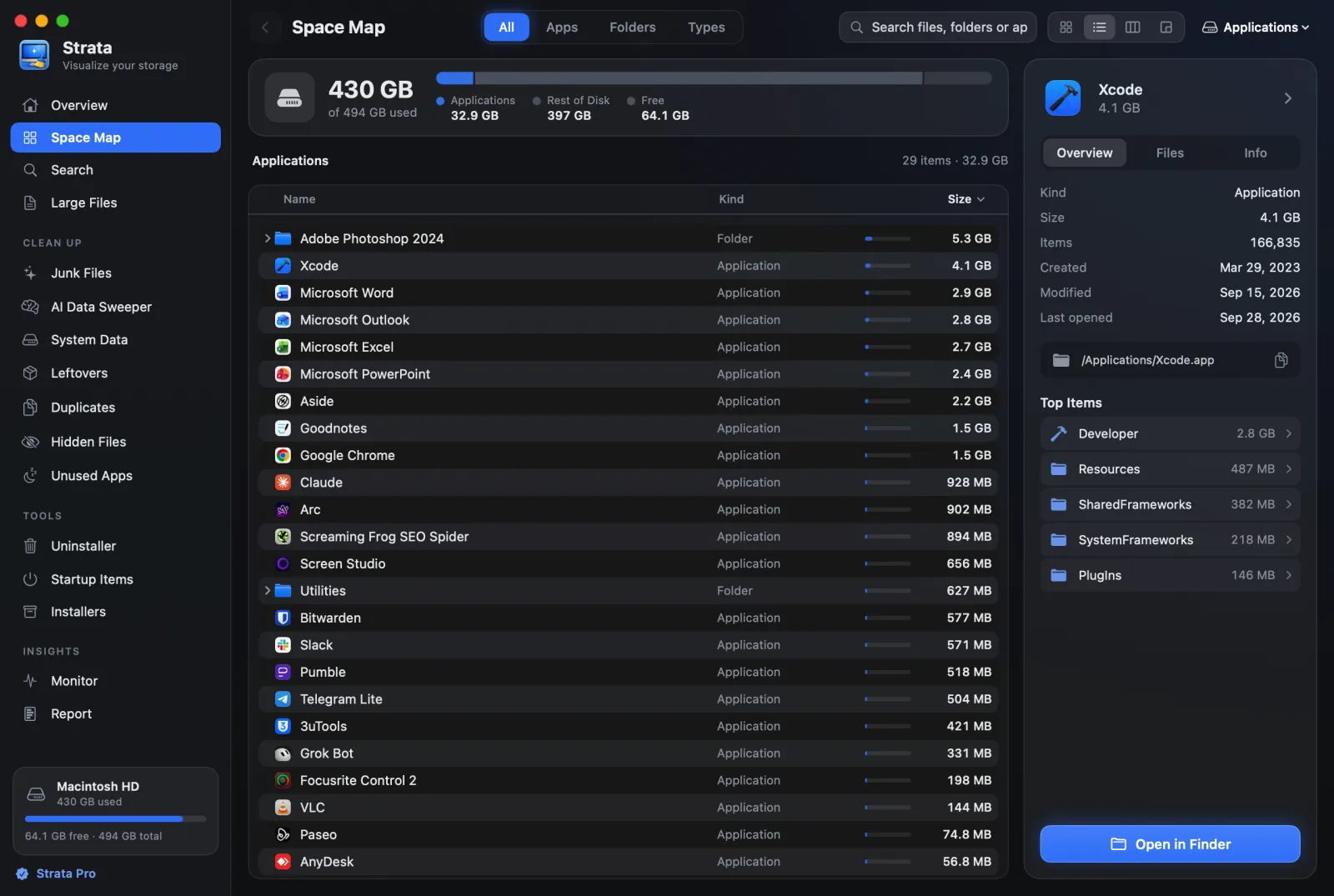
The folder tree: List and Columns
The List view, Command-2, is the outline Disk Inventory X kept beside its treemap: name, kind and size, biggest first, with triangles that open folders in place. Option-click a triangle to open the folders inside it as well. Click Name, Kind or Size to sort by it. If you think in Finder's columns instead, Columns, Command-3, opens each folder you choose in the next column.
The kind list: File Types
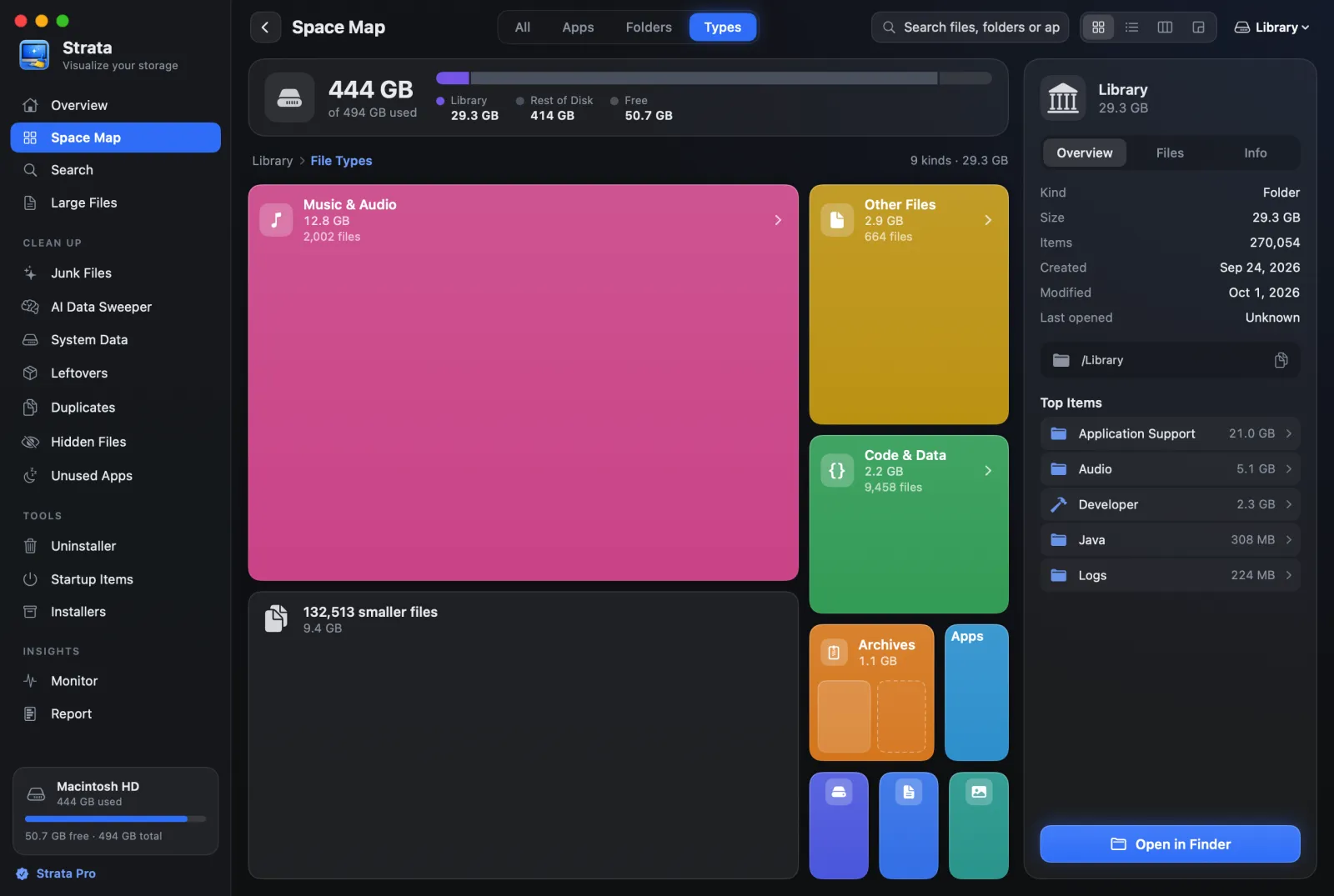
Disk Inventory X's kind statistic answered "what sort of files take the space?" Strata's File Types tab answers it for any folder, sorting everything into nine kinds: apps, videos, music and audio, images, documents, archives, disk images, code and data, and other files, with files under 1 MB together in a card of their own. A Photos library counts as one item. Double-click a kind to see the files in it.
Made for Apple silicon and current macOS
Strata is a universal app, native on Apple silicon and on Intel, and it runs on macOS 13 Ventura
or later. Because Apple has notarized it, macOS asks only its usual one-time question about an app
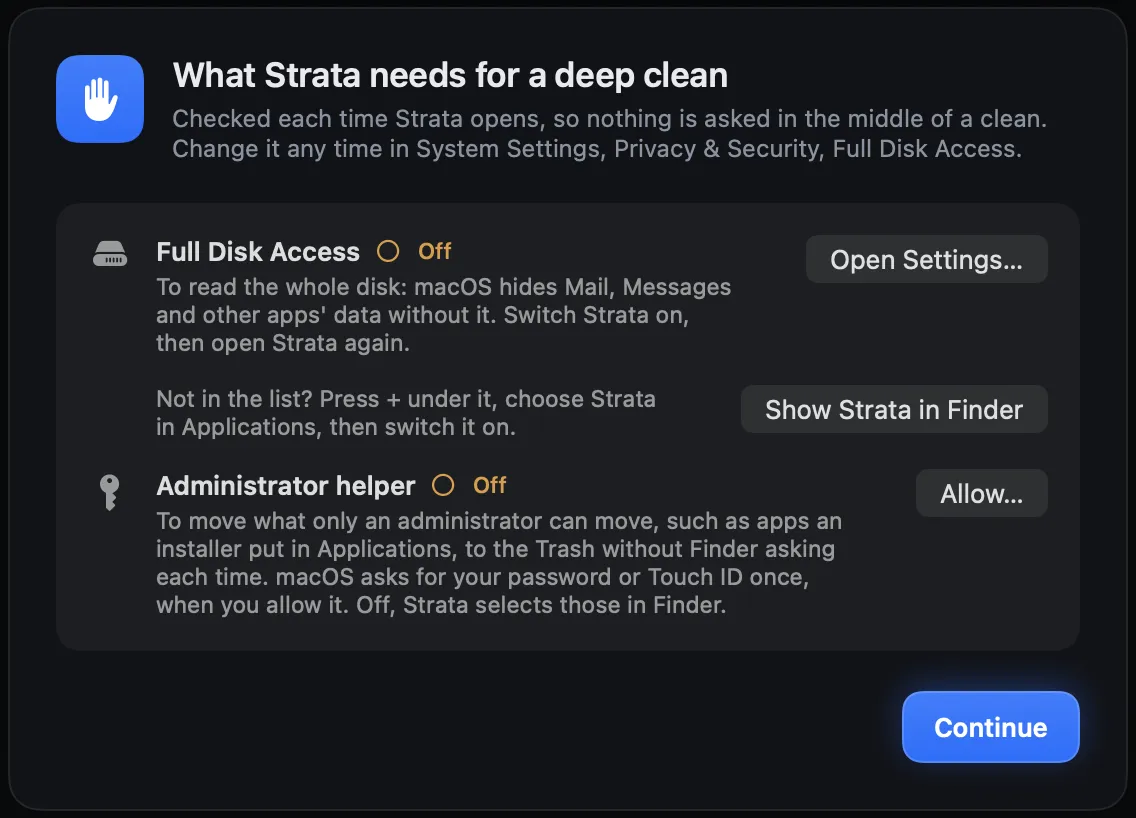
from the internet, with no Open Anyway detour. To read the disk, Strata then asks for one
permission, Full Disk Access, which you switch on in Privacy & Security or skip. After its
first scan it offers its notices too, and macOS asks you once whether they may show. It takes
about 75 MB once
installed, from a 19 MB download, and it also installs with
brew install --cask pankaj-kholiya/strata/strata.
A full scan of a startup disk takes under a minute on most Macs, and the Overview is useful before it ends, filling in while the scan counts. Strata keeps itself up to date, and with Full Disk Access it can measure folders such as Mail and Messages that macOS otherwise hides.
How to open Disk Inventory X on macOS 27
Opening an app that is not notarized is a real decision. Gatekeeper's warning exists because macOS cannot confirm where the app came from or that Apple has scanned it. Download Disk Inventory X only from derlien.com, and only if you are comfortable with that.
The release notes suggest the Open command, but since macOS 15 the way past Gatekeeper for an app that is not notarized runs through System Settings. On macOS 27:
- Download it from derlien.com and move the app into your Applications folder.
- Open it. On an Apple silicon Mac without Rosetta, macOS offers to install it: click Install, and give your password if asked.
- macOS refuses to open the app, saying Apple could not verify it is free of malware. Click Done, not Move to Trash.
- In System Settings, open Privacy & Security, scroll to the note that the app was blocked, and click Open Anyway. Confirm with Open Anyway once more when macOS asks, and enter your password.
Apple's guide to opening an app from an unknown developer says the button stays for about an hour after you try. The app is then saved as an exception, so it opens normally afterwards.
Find your other Intel apps before macOS 28
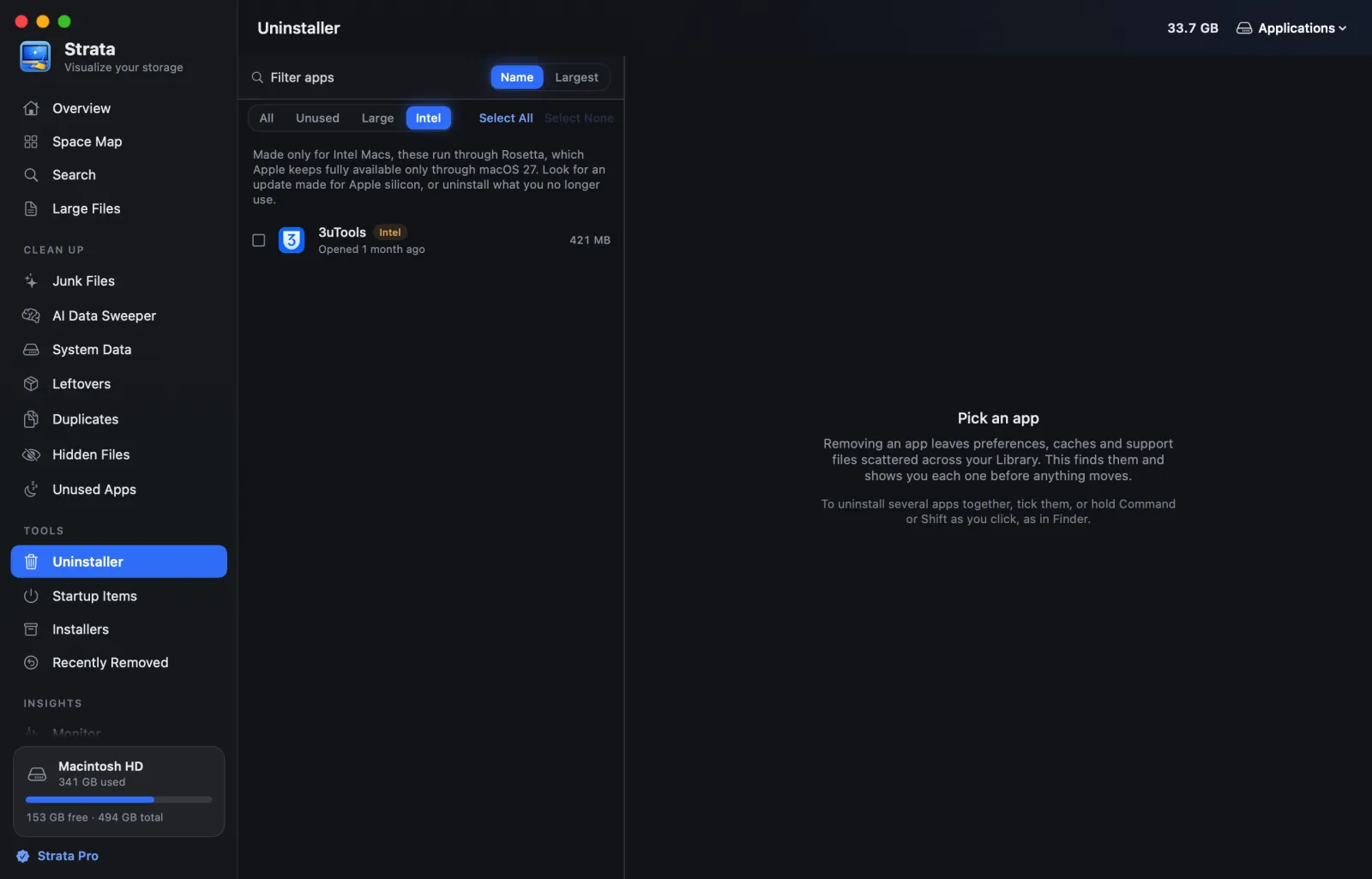
If Disk Inventory X needs Rosetta, other apps on your Mac may too, and on an Apple silicon Mac the Uninstaller has an Intel filter that lists the apps in your Applications folders made only for Intel, each tagged as such. A note above them says Apple keeps Rosetta fully available only through macOS 27. Kept in Applications, Disk Inventory X itself will be on that list. For each app, look for an update made for Apple silicon, or remove it with what it left behind.
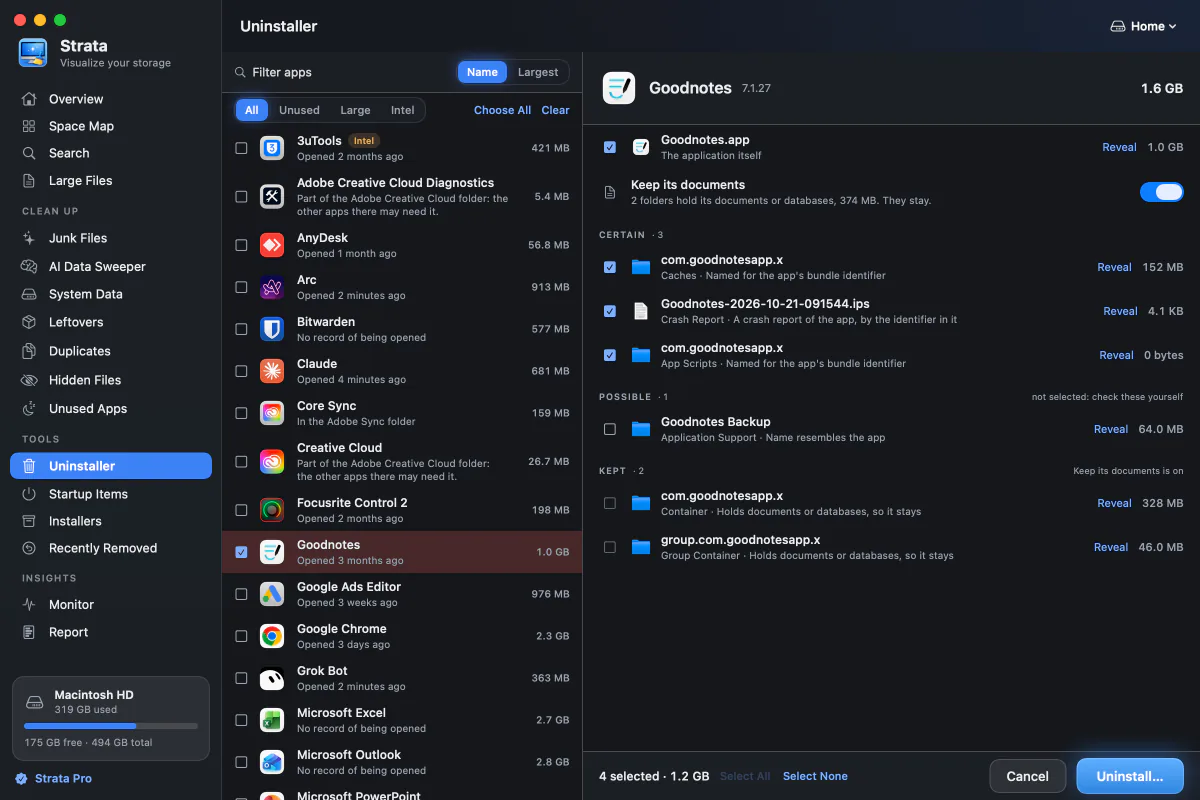
Uninstalling there is more thorough than dragging the app to the Trash. Strata reads the app's bundle identifier, looks in 32 places for its preferences, caches and support files, checks each against every other installed app, and grades it. The sure matches start ticked; the rest wait for you. The app's Dock icon leaves with it, and Put Back returns everything, icon included.
Removing, with a way back
Disk Inventory X moves what you delete to the Trash, and on a network volume, where there is no Trash, it offers to delete the item immediately instead. Strata erases nothing, ever. It removes things with macOS's own move to the Trash; where a drive has no Trash, the move fails and the notice explains, and emptying the Trash is left to you.
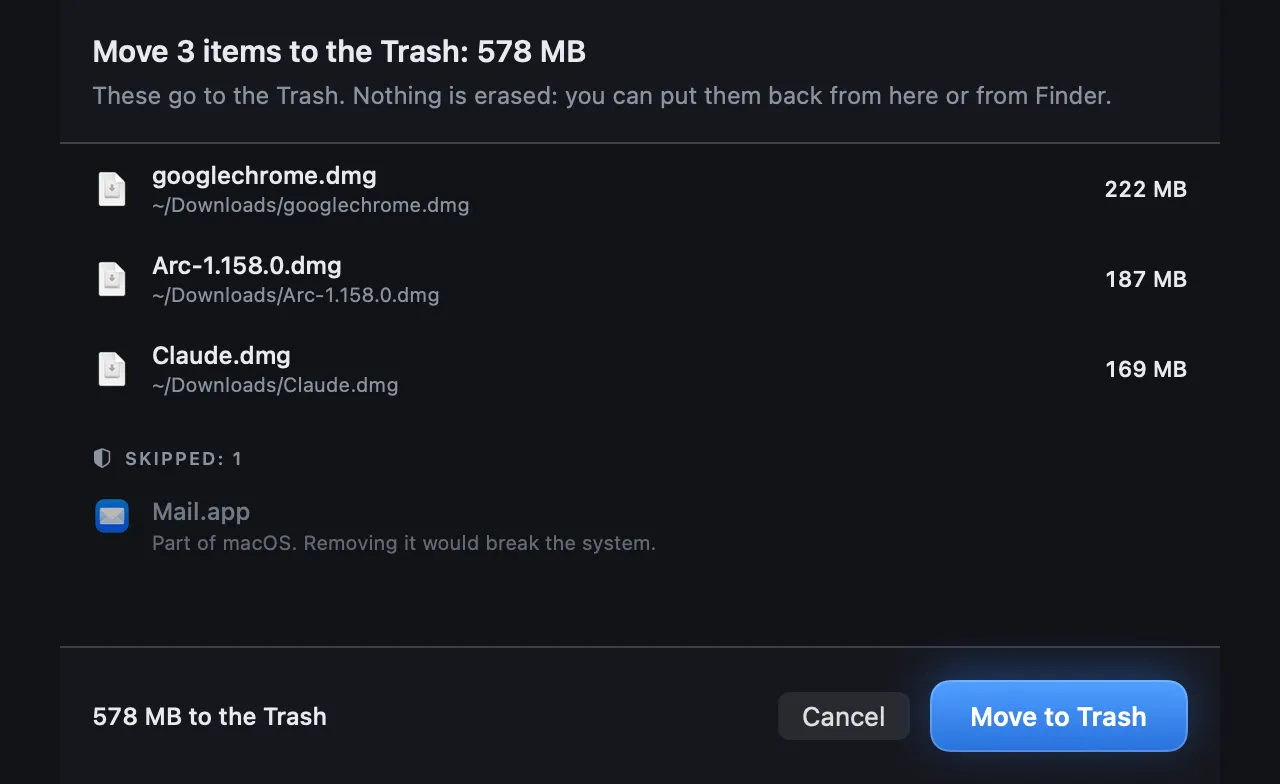
First comes a confirming sheet: each item with its folder and size, then whatever Strata will not touch, named with the reason, from your keychain to macOS's own folders. After the move, a notice offers Put Back, and Recently Removed keeps a record of every removal for 90 days, so a mistake found next month can still be undone while the item is in the Trash.
Cleanup Disk Inventory X never had
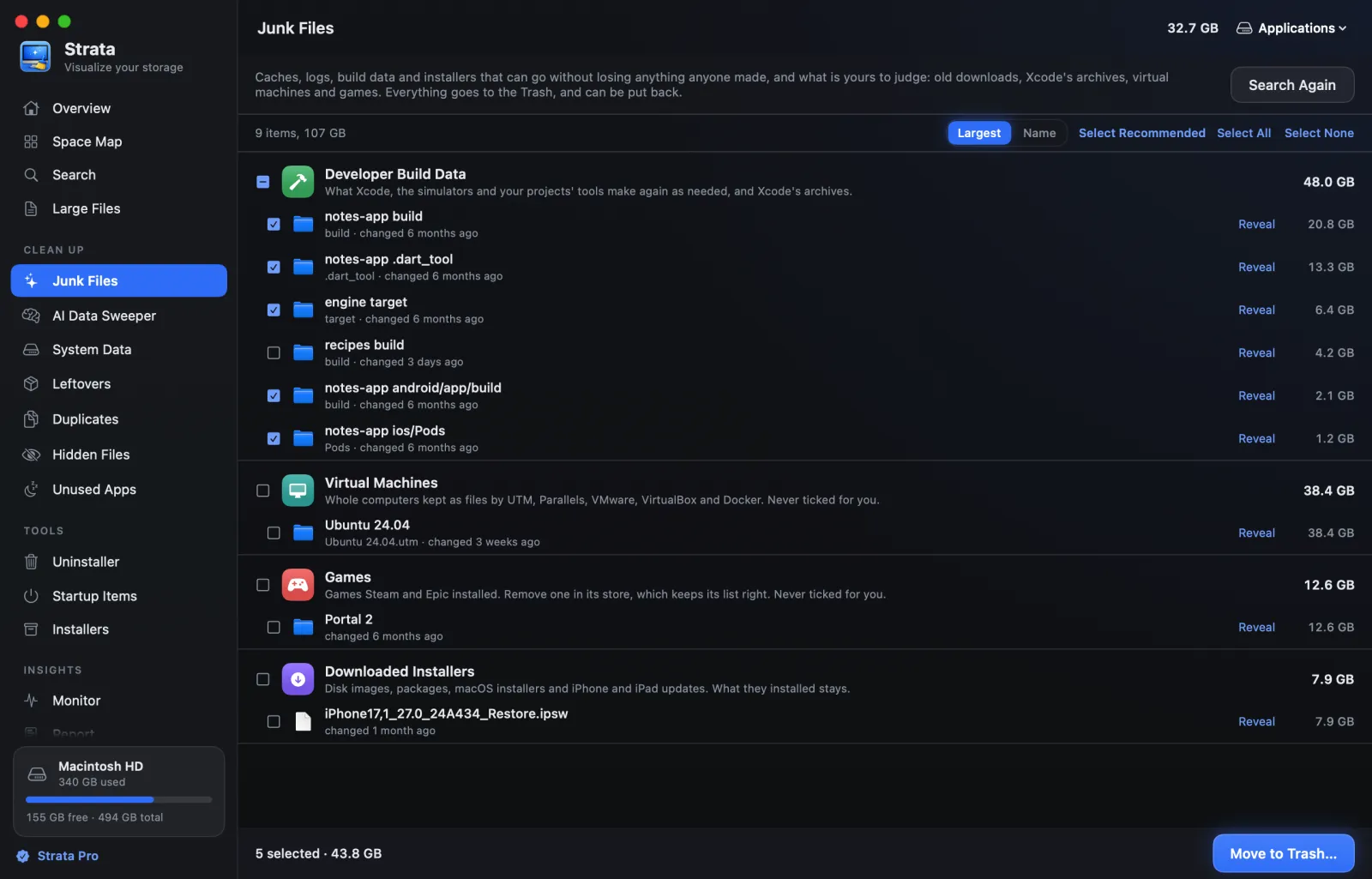
Disk Inventory X showed you where the space went and left the judging to you. Strata's Clean Up rooms do the judging, item by item, and tick only what is safe to lose:
- Junk Files: what apps and tools rebuild by themselves, from browser caches and
logs to Xcode's build data, with a project's
node_modulesticked only after three idle months. - Duplicates: identical files whatever their names; a single click ticks every extra copy and spares one of each set.
- Installers for apps already installed, and Leftovers of apps removed long ago.
- The AI Data Sweeper for downloaded models, and System Data for backups and attachments.
The forks, if you want Disk Inventory X itself
Because Disk Inventory X is open source, others have brought it to Apple silicon or rewritten it. None comes from its author. As of 9 November 2026, from each project's own page:
| Project | What it is | Build | Latest |
|---|---|---|---|
| Disk Inventory Xs | The original code brought forward | Apple silicon only; notarized | v1.2.1, 27 May 2026 |
| Disk Inventory X-Ray | A SwiftUI rewrite, based on the fork above | macOS 14 or later; notarized | v2.1.0, 2 Sep 2026 |
| DiskInventoryY | A rewrite in Swift | Universal, macOS 14 or later; notarized from v1.2.1 | v1.2.1, 11 Jul 2026 |
These are small projects, a few with no more than a handful of stars. Notarization tells you Apple scanned a build for known malware and knows who signed it, not that the code is well tested. Builds from other forks may not be signed at all, so check before you run one.
Who should keep Disk Inventory X, or pick another free tool
Disk Inventory X still makes sense on an Intel Mac running macOS 10.13 to 10.15, the systems it
was built for. If you want a free, open-source tool with its three views on a current Mac, try QDirStat: its
notarized universal builds need macOS 13 and install with brew install --cask qdirstat.
Besides Move to Trash it has a delete that cannot be undone, so pick carefully. GrandPerspective is a free native treemap on macOS 11 or later (3.7.2 below macOS 14), and
our
roundup of disk space analyzers covers the
rest.
Privacy
Strata asks for no account, collects no analytics, and keeps every file name and size on the Mac. It goes online for two reasons only: to look for its own updates (a setting stops this), and when a licence sold from 10 November 2026 is added or taken off. What Strata sends lists every request.
Verdict
Choose Strata
if Disk Inventory X was how you kept an eye on your disk. You keep its treemap, its tree and its kinds of file, natively on Apple silicon and notarized. You also gain cleanup rooms that tick only what is safe, Put Back for anything still in the Trash, and a filter that finds your other Intel apps before macOS 28. The map is free; Strata Pro is $19.99 once.
Disk Inventory X may still suit you
on an Intel Mac that stays on macOS 10.13 to 10.15.
Frequently asked questions
Does Disk Inventory X work on Apple silicon?
Only through Rosetta. Its last release, 1.3 from December 2019, is made only for Intel and is not notarized. Apple says Rosetta stays available on Apple silicon Macs through macOS 27; from macOS 28 it remains only for certain older games, so Intel-only apps such as this one stop running.
Is there a native Apple silicon version of Disk Inventory X?
Not from its author. Unofficial projects on GitHub publish Apple silicon builds: Disk Inventory Xs, the original code brought forward, and two rewrites for macOS 14 or later, Disk Inventory X-Ray and DiskInventoryY. They are small third-party projects, so check who publishes one before you run it.
What is the best replacement for Disk Inventory X?
For most people, Strata. Its Detailed Map is a treemap that names its larger blocks, its List view a folder tree with sizes and its File Types view the kind list, natively on Apple silicon and Intel from macOS 13, and it adds an uninstaller and junk and duplicate cleanup that only use the Trash. For a free, open-source tool in the same style that is well maintained, QDirStat is the safest pick; Disk Inventory Xs keeps the original app itself, for Apple silicon only.
Why did Homebrew disable Disk Inventory X?
Homebrew disabled its disk-inventory-x cask on 1 September 2026, with the reason that it fails Gatekeeper's check: the app is neither signed nor notarized.
Is Disk Inventory X safe to open?
The copy on derlien.com comes from its author, but it is not signed or notarized, so Apple has not checked it. macOS 27 refuses to open it until you allow it in Privacy & Security. Allow it only if you trust the source; a notarized app such as Strata needs no Open Anyway step.
Is Disk Inventory X free?
Yes. It is free and open source under the GPL, from its author's site, derlien.com. Strata's scan and every view of its map are free as well; moving things to the Trash with it needs Strata Pro, $19.99 once.
Retire Rosetta from your disk checks
Download Strata, let it scan your startup disk, open the Space Map and press Command-4: the treemap you know, drawn natively and free for good. For your first 14 days every cleanup room is open as well.