Rosetta 2 on Mac: installing it, checking it, and what ends in macOS 28
Rosetta 2 lets a Mac with Apple silicon run apps made for Intel Macs. Upgrading to macOS 27 can leave you without it, and macOS 27 is the last version where it runs Intel apps in general. Here is how to get it back, how to tell whether you have it, and what to sort out before macOS 28.
Key takeaways
- Rosetta 2 lets a Mac with Apple silicon run apps made only for Intel Macs. Intel Macs never need it.
- Apple says upgrading to macOS 27 does not restore Rosetta. If an Intel app asks for it, click Install, or run
softwareupdate --install-rosetta. - macOS 27 is the last version that runs Intel apps in general. From macOS 28, Apple keeps Rosetta only for some older games, and Intel translation for Linux virtual machines.
- macOS 27 already flags Intel apps: a notice when you open one, a line in Get Info, and a list in System Settings.
- On our Mac, ten of the eleven Intel items System Information found were not apps we open: printer filters, background services and helpers inside other apps.
How we tested: on an M2 MacBook Air with macOS 27.0.1 (26A434) and Rosetta
installed, on 23 October 2026, we read the words of macOS's Rosetta prompts and notices from
the system's own files, checked which apps are built for Intel by reading the header of each
app's program with lipo, compared that with System Information's list, read the
softwareupdate manual page, and measured the files Rosetta's package installs.
Nothing was installed or removed. Strata is described as of version 1.0.32.
What Rosetta 2 does
Apps contain code for a particular kind of processor. An app made only for Intel Macs has code that Apple silicon cannot run as it is, so the Mac hands it to Rosetta 2, which translates that code in the background. Apple describes it as "not an app that you manually open or interact with", in its support article on using Intel-based apps on a Mac with Apple silicon: there is no window to open, and the app simply opens.
Apps built for Apple silicon, and Universal apps, which carry code for both kinds of Mac, run natively unless you set them to Open using Rosetta in Finder's Get Info. A Mac with an Intel processor does not need Rosetta at all. And it has limits: Apple's documentation on the Rosetta translation environment says it cannot translate kernel extensions, or virtual machine apps that run x86_64 systems (an Intel version of Windows in a virtual machine, for example).
Is Rosetta installed on your Mac?
Apple's own test is the simplest: open an app made for Intel Macs. If it opens, Rosetta is installed. If it is not, macOS asks you to install it, as described below.
One Terminal command checks without opening anything. It changes nothing, though Apple does not document it as a way to check:
pkgutil --pkg-info com.apple.pkg.RosettaUpdateAutoIt prints Rosetta's version when Rosetta is installed, and "No receipt" when it is not. On our Mac its install time, a long number, matched the last macOS update rather than the day anyone installed Rosetta.
How to install Rosetta 2
Many people meet the prompt again this autumn for one reason. Apple's macOS 27 release notes say that if Rosetta was installed before, it "is not automatically restored after upgrading to macOS 27.0". Our own Mac, which ran the macOS 27 test versions, lost Rosetta after the first one and got it back by itself with a later update, so yours may or may not have it. The prompt tells you.
- Open the Intel app. macOS 27 asks: "To use Intel-based apps, you will need to install Rosetta." It adds that such apps "will not open in macOS 28, the next major release."
- Click Install, then enter your user name and password. The prompt links to the software licence you accept by installing. Rosetta downloads from Apple, so you need to be online; it is small, and takes a moment.
Or install it from Terminal, which is in Applications, Utilities. Apple's support article gives this command:
softwareupdate --install-rosettaIt asks you to accept the licence: type A and press Return. The softwareupdate
manual page adds that --install-rosetta "only applies to Apple silicon Macs", and
documents an option that accepts the licence without asking, which is how management tools
install Rosetta on many Macs at once, running as administrator:
sudo softwareupdate --install-rosetta --agree-to-license.
There is no separate Rosetta download to look for. Apple offers no installer of its own to fetch: macOS downloads Rosetta from Apple through the prompt or the command, so ignore sites that offer a "Rosetta download".
The prompt has one blind spot. PaperCut, which makes print management software, notes in its guide to the Rosetta transition that only apps you open yourself bring up the prompt. A printer back end, sync tool or updater that runs in the background gets none, so after the upgrade it can simply stop working until Rosetta is back. If printing or a background tool broke when you moved to macOS 27, install Rosetta from Terminal, even though nothing asked you to.
Rosetta costs almost no space. On our Mac its package put 0.9 MB of files in /Library/Apple, and its programs that ship inside macOS take about 2 MB more. It also keeps the code it has translated in /var/db/oah, a folder macOS does not let apps read, so that part could not be measured. Apple offers no way to uninstall Rosetta, and there would be little to gain.
What ends in macOS 28
Apple has set out the end of Rosetta for apps in steps:
| When | What changes |
|---|---|
| June 2025, WWDC | Apple says macOS Tahoe 26 is the last macOS for Intel Macs, and that Rosetta stays available through macOS 27 |
| March 2026, macOS 26.4 | A notice when you open an app that uses Rosetta |
| September 2026, macOS 27 | The last version where Rosetta runs Intel apps in general; the upgrade does not restore it; Intel apps are flagged in Get Info and System Settings |
| macOS 28, no date yet | Intel-only apps no longer open; Rosetta stays for some older games, and Intel translation for Linux virtual machines |
At WWDC in June 2025, Apple's Platforms State of the Union said "macOS Tahoe will be the final release for Intel Macs", and the developer documentation gave Rosetta "through macOS 27" as a general tool. On 1 September 2026, Apple's developer news called macOS 27 the final release to support Rosetta, after which Intel-only apps will no longer run on Macs with Apple silicon.
Apple's support article, published on 21 September 2026, puts it plainly: starting with macOS 28, Rosetta will be available "only for certain older, unmaintained games" that rely on Intel-based frameworks. The release notes of macOS Tahoe 26.4 add Intel programs running inside Linux virtual machines, and since macOS 27 that part is built into macOS itself, Apple's documentation on running Intel binaries in Linux VMs says, with no Rosetta to install. Apple has not given macOS 28 a date, though its major releases have come every autumn.
macOS 27 has started saying so on screen. Here is what its own files contain:
- When you open an Intel app, a notification titled "App Update Required" says that this version of the app "will not open in macOS 28, the next major release", with buttons to show the app in Finder or visit its developer's website. An app that is native but carries an Intel component gets a version saying it "includes a component" that will not open in macOS 28. Apple's macOS 26.4 release notes say these notices began with that version, where they are worded differently and speak of "a future release of macOS".
- When an app loads an Intel plug-in, the notification is titled "Action Recommended for This Plugin" and names the plug-in.
- In Finder's Get Info, an app whose Kind is Application (Intel) carries a similar warning, as Apple's support article shows.
- In System Settings, General, About, a row called Intel-based Apps reads "Support ending for Intel-based apps in macOS 28." Its Details… button lists them, split into those opened within the last year, those opened longer ago, and additional apps and components, with Show App in Finder… and Move to Trash for each. macOS 27's files also hold an option called "Notify when an Intel-based app is opened".
- If you had set a Universal app to Open using Rosetta, macOS 27 opens it natively instead, as its release notes say, and tells you in a notification, "Rosetta Turned Off for This App", that the app no longer needs Rosetta.
None of these stops an Intel app from working on macOS 27. They are a deadline, not a block.
Which of your apps still need it
The list in System Settings is the quickest place to look. Our step-by-step guide, finding the apps Rosetta still runs, covers it along with Finder's Get Info, System Information and Strata.
What surprised us was where the Intel code was. System Information, which lists the apps it finds on the Mac, showed eleven Intel items on ours. Only one was an app we open from Applications: 3uTools 3.15, an iPhone utility. The other ten were:
- three Kyocera printer filters in /Library/Printers, which a printer driver installed;
- three parts of DivX in /Library/Application Support: its uninstaller and two background services;
- two control panel tools that DaVinci Resolve installs for Blackmagic hardware;
- two versions of a password importer inside the Aside app.
So check printer drivers, background services and plug-ins, not only the apps in your Dock. Activity Monitor helps with the ones running now: its Kind column says Intel for anything going through Rosetta, background processes included. System Information goes further: its Rosetta Software section lists the programs that have run through Rosetta, with how often and when, background helpers among them. Apple's macOS 27 release notes warn that Intel plug-ins, such as audio plug-ins, printer dialog extensions, colour pickers, and Quick Look and Spotlight plug-ins, may not appear in Settings or trigger a notification at all. Apple's examples are ~/Library/Audio/Plug-Ins, ~/Library/Printers and ~/Library/ColorPickers; look in the same folders in /Library too, where our printer filters were. Beyond the eleven, all thirteen of the Kyocera driver's print dialog plug-ins in /Library/Printers were Intel-only as well; System Information lists them under Printer Software, without saying which are Intel.
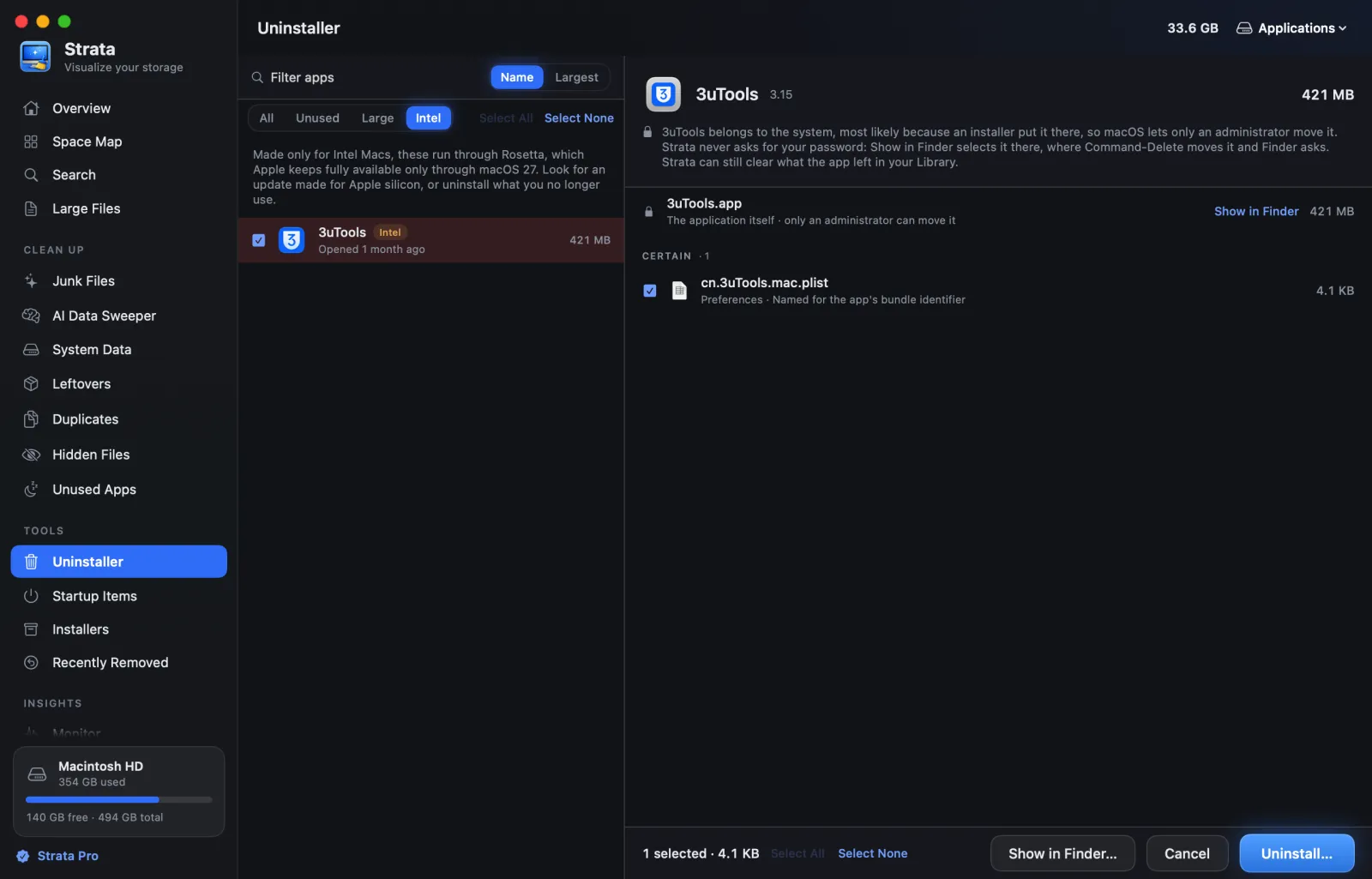
Strata's Uninstaller has an Intel filter on Macs with Apple silicon, shown at the top of this page. It reads the header of each app's program in your Applications folders, runs nothing, and tags the apps made only for Intel; choose one to see what it keeps in your Library. It covers apps rather than printer drivers or plug-ins, which is where System Information, Activity Monitor and the folders above come in. The filter is free to look at; uninstalling with Strata needs Strata Pro or the trial.
What to do about an Intel-only app
- Update it. Look on the developer's website or in the App Store for a Universal or Apple silicon version. macOS's notification may link to the website.
- Replace it. An app last updated years ago is unlikely to change now; Disk Inventory X, for example, has not been updated since 2019, and our guide to its alternatives covers native options. Find one that does the same job before you need it.
- Remove what you no longer use. The list in System Settings moves the app itself to the Trash. An uninstaller also clears what the app keeps in your Library; ours shows each file before anything moves, as in the picture at the top, and our guide to uninstalling Mac apps completely covers the places leftovers hide. Our comparison of the best uninstallers for Mac covers the options.
- Printers and scanners. Get the maker's current driver, or check whether your printer works with AirPrint, which needs no driver from the maker at all.
- Plug-ins. Update the plug-in itself. If you used Open using Rosetta so a Universal app could load an Intel plug-in, macOS 27 now opens that app natively, so the plug-in stops loading until it is replaced.
- An app you cannot replace keeps working on macOS 27. Waiting with the upgrade to macOS 28 buys time, but Apple has not said how long macOS 27 will get security updates, so plan the replacement anyway.
Games are the one open question. Apple says it will keep the part of Rosetta that older, unmaintained games need, but has not said which games qualify.
Frequently asked questions
Is Rosetta 2 still available on macOS 27?
Yes. Apple says Rosetta stays a general-purpose tool for Intel apps through macOS 27. Apple also says the upgrade to macOS 27 does not restore it if you had it, so you may need to install it again: macOS asks the first time you open an Intel app, or you can run softwareupdate --install-rosetta in Terminal.
Will Rosetta be removed in macOS 28?
For apps, yes. Apple's support article says that from macOS 28, Rosetta will be available "only for certain older, unmaintained games" that rely on Intel-based frameworks, and Apple's macOS 26.4 release notes add Intel programs in Linux virtual machines. Apps made only for Intel Macs will not open.
How do I install Rosetta 2 on a Mac?
Open an app made for Intel Macs and click Install when macOS asks, then enter your user name and password. Or open Terminal and run softwareupdate --install-rosetta, then type A and press Return to accept the licence. Both need an internet connection, and both work on macOS 27 or earlier.
Where can I download Rosetta 2?
There is no separate download. Apple offers no Rosetta installer to fetch: macOS downloads it from Apple itself when you click Install in its prompt or run softwareupdate --install-rosetta. Avoid sites that offer a Rosetta download.
How can I tell whether Rosetta is installed?
Apple's own test is to open an Intel-based app: if it opens, Rosetta is installed. In Terminal, pkgutil --pkg-info com.apple.pkg.RosettaUpdateAuto prints Rosetta's version when it is installed, and No receipt when it is not.
Does Rosetta take up space, and can I uninstall it?
It takes almost none: on our Mac its package's files came to 0.9 MB, and its programs inside macOS about 2 MB more. Apple offers no way to uninstall it, and from macOS 28 it stops running apps anyway.
Do Intel Macs need Rosetta?
No. A Mac with an Intel processor runs Intel apps as they are. Rosetta exists only for Macs with Apple silicon, and macOS Tahoe 26 is the last version of macOS for Intel Macs.
See which of your apps are Intel-only
Strata's Uninstaller tags every app in your Applications folders that is made only for Intel, shows what each keeps in your Library, and moves only what you choose to the Trash, from where Put Back in Strata returns it.
The scan, the map and search are free. Every download starts with 14 days of Strata Pro, removing up to 40 GB.