WinDirStat for Mac: what to use instead, and what works differently
WinDirStat is Windows only, and its own website sends Mac users elsewhere. If you have just moved from a PC, here is what replaces each of its three views on a Mac, which of the alternatives are still maintained in 2026, and the one thing that genuinely works differently: how a Mac counts the size of a file.
Key takeaways
- There is no WinDirStat for Mac. Its site lists GrandPerspective and QDirStat for macOS instead.
- QDirStat is the closest in spirit: same family tree, a tree plus a treemap, free, with notarized Mac builds.
- WizTree has had a Mac version since 16 September 2026, free for personal use.
- Disk Inventory X, the old Mac clone, is Intel-only and unmaintained, and Rosetta, which it needs on Apple silicon, is on its way out.
- On a Mac, prefer a tool that reports space on disk, and remember that Option-Command-Delete in Finder skips the Trash.
Written by the maker of Strata, which is one of the tools below. Facts about the other tools come from their own websites and repositories, checked on 27 September 2026; each links to its source.
Is there a WinDirStat for Mac?
No. WinDirStat describes itself as "a free, open-source disk usage analyzer for Microsoft Windows", and its resources page lists the supported systems: Windows 7, 8, 8.1, 10 and 11, and Windows Server 2008 R2 to 2025. Every download is for Windows. The project is very much alive, with version 2.9.0 released on 26 September 2026, and it has never had a Mac version: not for Mac OS X, and not for any macOS since.
The same page has an "Alternatives" list, and under macOS it names two: GrandPerspective and QDirStat. Both appear below, with the rest of the field.
WinDirStat's three views, and their Mac equivalents
WinDirStat is really three linked views, and the Mac tools each pick up some of them. Knowing which you relied on makes the choice easier.
| WinDirStat view | What it does | On a Mac |
|---|---|---|
| All Files | A sortable tree of folders and files, biggest first | QDirStat's tree; Strata's List view; OmniDiskSweeper's size-sorted list; ncdu in Terminal |
| File Types | Space by extension, with each type's colour on the map | QDirStat's file type view; Disk Inventory X's kind list; Strata groups by kind (videos, archives, disk images) rather than by every extension |
| Treemap | Every file as a rectangle sized by its size | GrandPerspective, QDirStat, WizTreeMac, Disk Inventory X, and Strata's Detailed Map |
Recent WinDirStat versions add a sunburst and a flame graph, plus Largest Files and Duplicate Files tabs. On a Mac, large files and duplicates usually live in a separate tool or a separate room of one.
The alternatives, one by one
QDirStat: the closest relative
WinDirStat began in 2003 as a clone of KDirStat for Linux. QDirStat is KDirStat's successor, by the same author, Stefan Hundhammer, and it shows a tree beside a coloured treemap, like WinDirStat. It runs on macOS through notarized, universal builds made by Jesus Herrera Arroyo, which the author approved; the latest Mac build is 2.0-macos.3, released on 27 September 2026, for macOS 13 or later. It is free, under the GPL.
Two things to know: it is built with Qt, a cross-platform toolkit, rather than Apple's own
frameworks, and besides Move to Trash it has a cleanup action its own source
labels "Delete (no way to undelete!)". Get it from the
macOS builds page or
with brew install --cask qdirstat.
WizTreeMac: new in September 2026
If you used WizTree rather than WinDirStat on Windows, it now has a Mac version. WizTreeMac 1.00 was released on 16 September 2026 for macOS 12 or later, universal. Its maker says it is based on WizTree 4.33 and contains "almost all" of the Windows version's features: treemap, tree and a file list of everything by size. It is free for personal use; commercial use needs a Supporter Code, from $25, which works on both platforms.
What does not carry over is the thing WizTree is famous for. On Windows it reads the NTFS master file table directly; APFS has no equivalent, so on a Mac it uses macOS's own bulk directory reading instead. Its duplicate finder matches by name, size and optionally date, and its site warns that it does not compare contents. Our WizTree for Mac guide covers it in full.
GrandPerspective: the free native treemap
GrandPerspective is the Mac's long-standing free treemap, by Erwin Bonsma, and it is actively maintained: 3.8.1 shipped on 13 September 2026. It is free from SourceForge or $2.99 on the Mac App Store, the same app either way. It draws a treemap and nothing else; rectangles are unlabelled, and a file's name shows at the bottom of the window when you point at it. Deleting is switched off by default and, when switched on, moves items to the Trash.
The catch for older Macs: 3.8.0 and later need macOS 14. On macOS 11 to 13, its site points to version 3.7.2.
Disk Inventory X: the old Mac clone, now a risk
Disk Inventory X was the Mac's WinDirStat for years; its author credits WinDirStat as the idea and KDirStat for the layout, and it has the same trio of tree, treemap and kind list. But its last release, 1.3, is from December 2019, it is Intel-only, and it is not notarized. Homebrew disabled its cask on 1 September 2026 because it fails macOS's Gatekeeper check.
On an Apple silicon Mac it runs only through Rosetta, and Apple says Rosetta is available through macOS 27; from macOS 28 it remains only for certain older games. Unofficial forks with Apple silicon builds exist; Disk Inventory X on Apple silicon covers them and the alternatives.
Strata: the same views, with a cleanup side
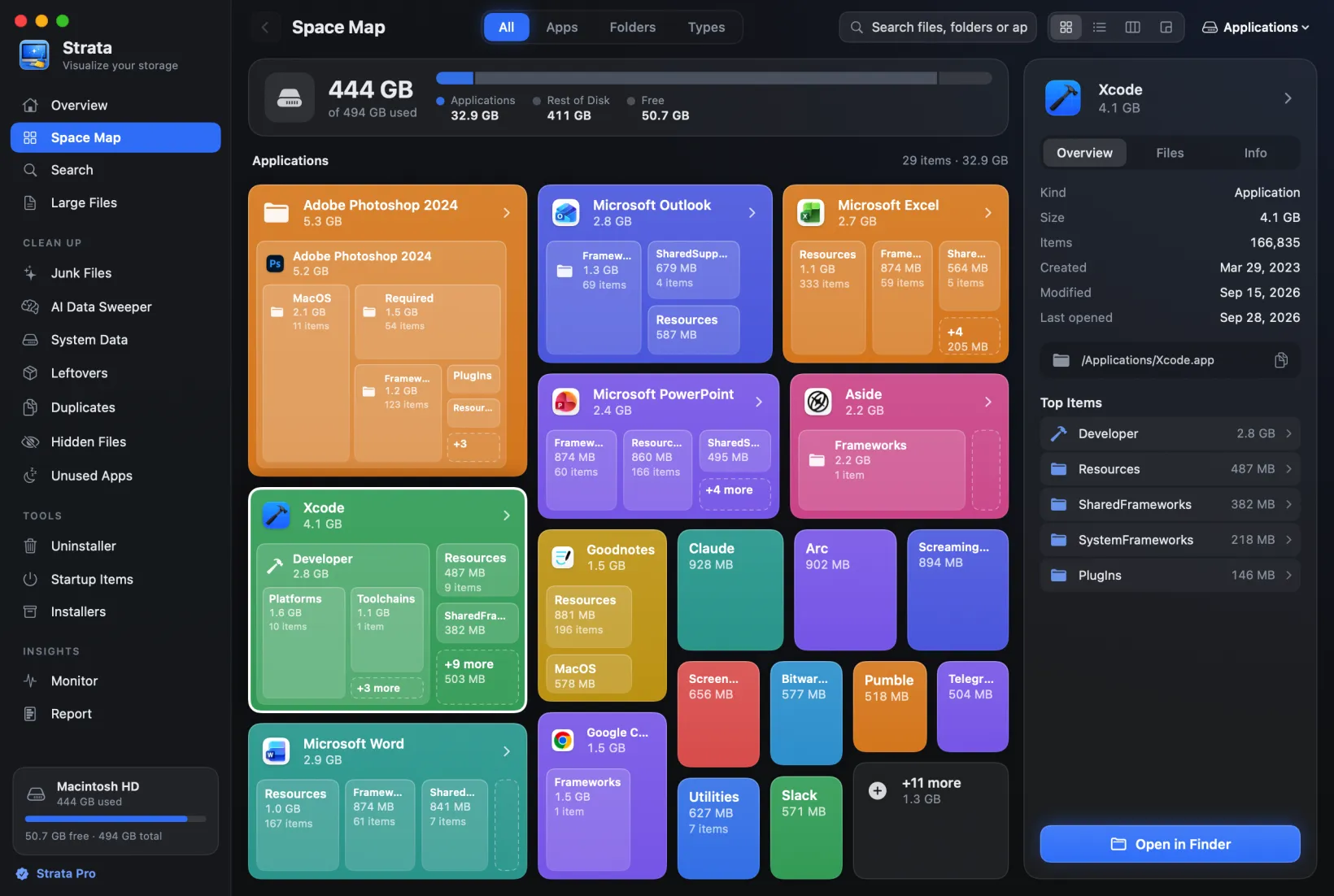
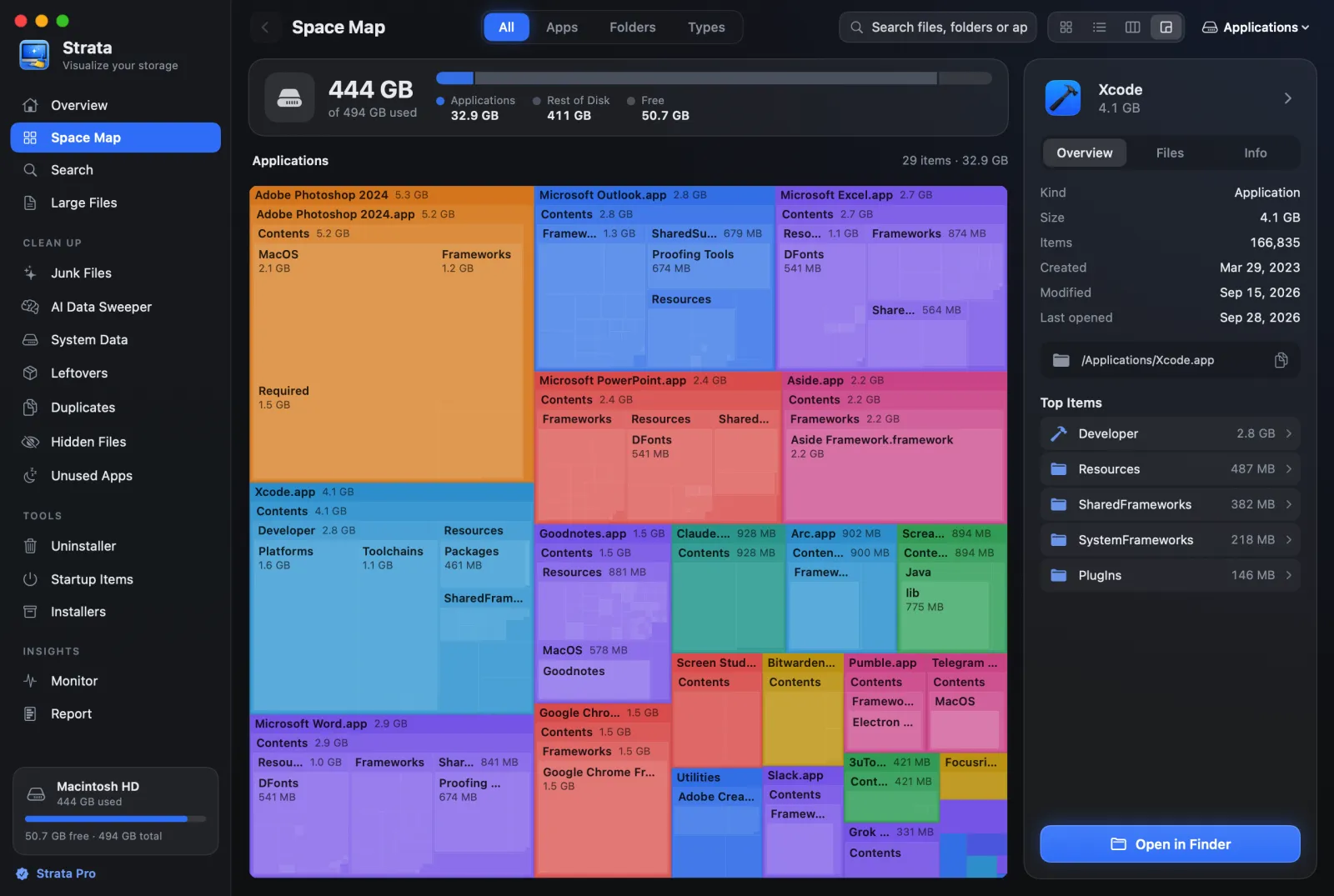
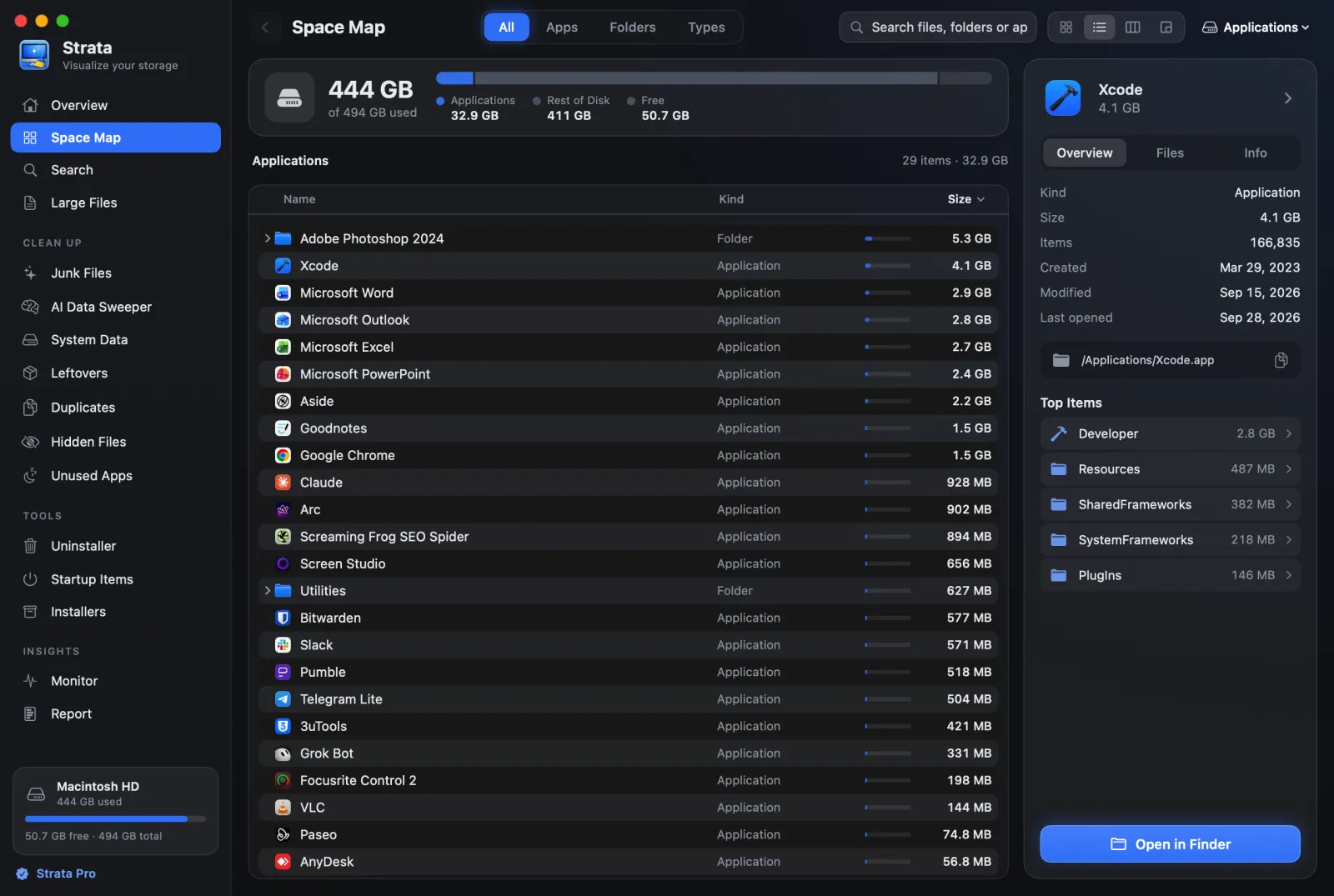
Strata is ours, so weigh this accordingly. It is a native Mac app with four views of any drive or folder (Cards, List, Columns and Detailed Map) and a File Types tab. Three of those map straight onto WinDirStat's:
- Detailed Map (Command 4) is the classic treemap, drawn down to single files.
- List (Command 2) is the sortable tree, opening folders in place.
- File Types groups a folder by kind of file. It is coarser than WinDirStat's
per-extension list; for a single extension, search for it, as in
.mkv.
Where it goes further is acting on what you find: an uninstaller that finds an app's leftovers, junk and duplicate cleanup, and everything goes to the Trash, never a permanent delete. Scanning and every map view are free; removing things is Strata Pro, $9.99 once. It needs macOS 13 or later.
In Terminal: ncdu, dust, gdu and dua
If what you liked was speed and a keyboard, the terminal tools install with Homebrew:
ncdu (an interactive browser), dust (a one-shot tree with bars),
gdu (installed as gdu-go, with an optional web treemap) and
dua-cli (installed as dua). Two Mac details: ncdu's manual says it
counts macOS firmlinks as separate folders, so a whole-disk scan can double up, and dua has an
option, --deduplicate-apfs-clones, that counts fully shared clones once.
TreeSize and SpaceSniffer
Neither has a Mac version. TreeSize can still scan a Mac from a Windows PC, over SSH or through shared folders, which is useful to an IT department and not to most people. Our guides to TreeSize for Mac and SpaceSniffer for Mac map each one's features to Mac tools.
Side by side
| Tool | Shows | Price | Needs | Latest | Deleting |
|---|---|---|---|---|---|
| QDirStat | Tree, treemap, file types | Free | macOS 13 | 27 Sep 2026 | Trash, or a permanent delete action |
| WizTreeMac | Treemap, tree, file list | Free for personal use | macOS 12 | 16 Sep 2026 | Not documented |
| GrandPerspective | Treemap | Free, or $2.99 on the App Store | macOS 14 | 13 Sep 2026 | Trash, off by default |
| Disk Inventory X | Tree, treemap, kinds | Free | Intel, or Rosetta | 8 Dec 2019 | Trash |
| Strata | Cards, list, columns, treemap, kinds | Free to scan; $9.99 once to remove | macOS 13 | 27 Sep 2026 | Trash only |
What works differently on a Mac
Sizes: what a file claims, and what it takes
NTFS and APFS both let a file take less space than its length. On a Mac, duplicating a file in Finder on the same disk makes a clone that shares the original's storage until one of them changes. Many system and app files are compressed. Virtual machine disks are often sparse, full of holes that take nothing. A tool that adds up file lengths will disagree with the disk, sometimes by a lot on a developer's Mac, where virtual machine images and some developer tools use clones. Prefer a tool that reports the space allocated on disk, counts hard links once and says when clones make a total larger than the disk. Our guide to finding large files goes into why the numbers differ.
Permissions: Full Disk Access instead of running as administrator
On Windows, running WinDirStat elevated gives it the fastest scan. On a Mac, running as root is not enough to see everything: macOS keeps Mail, Messages, Safari and other apps' data from any app that has not been given Full Disk Access in System Settings. Every tool above needs it for a complete picture.
Deleting: the Trash, and the shortcut that skips it
WinDirStat sends Delete to the Recycle Bin and Shift+Delete straight to oblivion. The Mac's habits are different: Finder's Command Delete moves to the Trash, and Option Command Delete deletes immediately, with no Trash. Tools vary too, as the table shows. Know which a tool does before you press anything.
Which should you use?
You want WinDirStat, as close as possible
QDirStat. Same lineage, same tree-and-treemap layout, free.
You used WizTree on Windows
WizTreeMac, now that it exists, especially if you bought a Supporter Code in the past year.
You want a free, native, maintained treemap
GrandPerspective, on macOS 14 or later.
You want to find the space and then clear it safely
Strata: the same views, plus an uninstaller and cleanup where everything goes to the Trash. Seeing is free.
Frequently asked questions
Is there a WinDirStat for Mac or Mac OS X?
No, and there never was one, from Mac OS X to macOS 27. WinDirStat supports Windows 7 to 11 and Windows Server, and every download on windirstat.net is a Windows package. Its own resources page lists GrandPerspective and QDirStat as alternatives for macOS.
What is the closest thing to WinDirStat on a Mac?
QDirStat, which comes from the author of KDirStat, the program WinDirStat was cloned from, and has notarized macOS builds approved by that author. For a native Mac app with a treemap, GrandPerspective is free, and Strata's Detailed Map and List views cover the same ground with a cleanup side.
Does WizTree work on a Mac?
Yes, since 16 September 2026. WizTreeMac 1.00 runs on macOS 12 or later on Apple silicon and Intel, and is free for personal use. Its Windows speed trick of reading the NTFS master file table does not exist on a Mac's APFS disks.
Why do Mac disk tools show different sizes from Finder?
On APFS, a file's length and the space it takes on disk are different numbers: clones share storage, compressed files take less, and sparse files have holes. Tools that add up lengths disagree with the disk. Look for one that reports space allocated on disk, counts hard links once and says when clones inflate the total.
See your Mac the WinDirStat way
Strata maps any drive or folder as a treemap, a list or cards, and the scan and the map are free forever. Every download starts with 14 days of Strata Pro, which adds the uninstaller and cleanup, $9.99 once after that.