SpaceSniffer for Mac: the treemaps that do the same job
SpaceSniffer turns a Windows drive into a treemap you click into, filter with typed rules and tag in colour, and it is free and needs no installing. There is no Mac version. Here is what does the same job on macOS, which of its habits a Mac already has built in, and which tool suits which kind of user.
Key takeaways
- There is no SpaceSniffer for Mac. It is a Windows program, and its latest version, 2.2.0.27, is an x64 Windows build.
- GrandPerspective is the closest Mac equivalent: a free treemap you zoom into, with filters by name, size and file type.
- SpaceSniffer's colour tags have a ready-made counterpart: Finder tags, Control-1 to Control-7.
- For a tree beside the treemap, QDirStat is free and WizTreeMac is free for personal use.
- Strata pairs a treemap, its Detailed Map, with cleanup rooms in the same app, where everything removed goes to the Trash.
Written by the maker of Strata, which is one of the tools below. Facts about SpaceSniffer and the other tools come from their own websites, checked on 10 October 2026; each links to its source.
Is there a SpaceSniffer for Mac?
No. SpaceSniffer, by Umberto Uderzo, is a Windows program, and its site offers no Mac version. It is freeware, with donations welcome, and portable: you unzip it and run it, with no installer, and its settings live in an XML file rather than the registry. Its release notes leave no doubt about the platform: version 2.0.1.4 made it "an x64 executable" with a graphics engine rewritten on Windows' DirectDraw, and later releases add high-DPI support for Windows 10 and 11 and fix rendering on Windows 7.
It is also more alive than its long quiet spell suggests. After 1.3.0.2 in October 2016 there were no releases for more than eight years; the 2.0 series began in May 2025, and the current version, 2.2.0.27, came out on 25 March 2026. So if you have moved to a Mac, the reason to switch tools is the platform, not the project.
What SpaceSniffer does, and where each part lives on a Mac
SpaceSniffer is a treemap first and last, with a handful of habits built around it. Each has a Mac equivalent, and one of them is already in Finder.
| SpaceSniffer | What it does | On a Mac |
|---|---|---|
| Treemap | Folders and files as rectangles sized by space; click for detail, double-click to zoom in | GrandPerspective; QDirStat; WizTreeMac; Strata's Detailed Map |
| Filter field | Typed filters such as *.jpg, |*.jpg to exclude, >1mb or <3months, combined with semicolons | GrandPerspective's filters and masks; WizTreeMac's search filters; Strata's Search and File Types |
| Colour tags | Four colours, Ctrl+1 for red, then filter on them | Finder tags, Control-1 to Control-7 |
| Export module | Text reports in a layout you design | GrandPerspective's text export; WizTreeMac's CSV export; Strata Pro's Report |
| Portable | Runs from any folder with no installer; settings in one XML file | WizTreeMac's portable mode, from an external drive |
The alternatives, one by one
Eighteen Mac disk tools sit in one table in our roundup of Mac disk space analyzers. These five are the closest to SpaceSniffer.
GrandPerspective: the closest in spirit
GrandPerspective is a free Mac treemap, and it works much as SpaceSniffer does. Point at a rectangle and its name and size appear; click to lock the selection, then zoom in with Command +, one folder level at a time, and back out with Command -, as its help describes. Its filters and masks do the work of SpaceSniffer's filter field: tests on name, path, size, file type and more, which can hide items, remove them from a view, or skip folders during a scan.
Like SpaceSniffer, it costs nothing: SourceForge has it free, and a $2.99 Mac App Store copy is the same app for those who prefer the store. The 3.8.1 release of 13 September 2026 asks for macOS 14; on macOS 11 to 13, 3.7.2 still works. It will not delete anything until you allow it, since that control is disabled by default, and once allowed it moves items to the Trash.
QDirStat: treemap plus tree
QDirStat puts a tree
of folders beside its treemap, which suits anyone who found SpaceSniffer's single view hard to
read for exact sizes. The GPL keeps it free, Apple has notarized its Mac builds, and
Homebrew sets it up with
brew install --cask qdirstat, for macOS 13 or later. Its Qt toolkit gives it a
cross-platform look rather than a Mac one.
WizTreeMac: a Windows favourite, now on the Mac
Antibody Software's WizTree, another Windows treemap tool, came to the Mac on 16 September 2026 as WizTreeMac. It pairs a tree with a treemap, filters its search with regular expressions too, exports CSV, and has a portable mode that keeps its settings beside the app on an external drive, much as SpaceSniffer keeps its XML file. Personal use costs nothing, on macOS 12 and up. What changed in the move from Windows is in our WizTree for Mac guide.
DaisyDisk: rings instead of rectangles
DaisyDisk draws the disk as interactive rings rather than a treemap: the same information, drawn another way. Unlike SpaceSniffer it is paid, $9.99 once for up to five personal Macs on macOS 10.13 or later. Its user guide is plain about deleting: files go for good, not to the Trash, after five seconds in which you can cancel.
Strata: a treemap, and cleanup in the same app
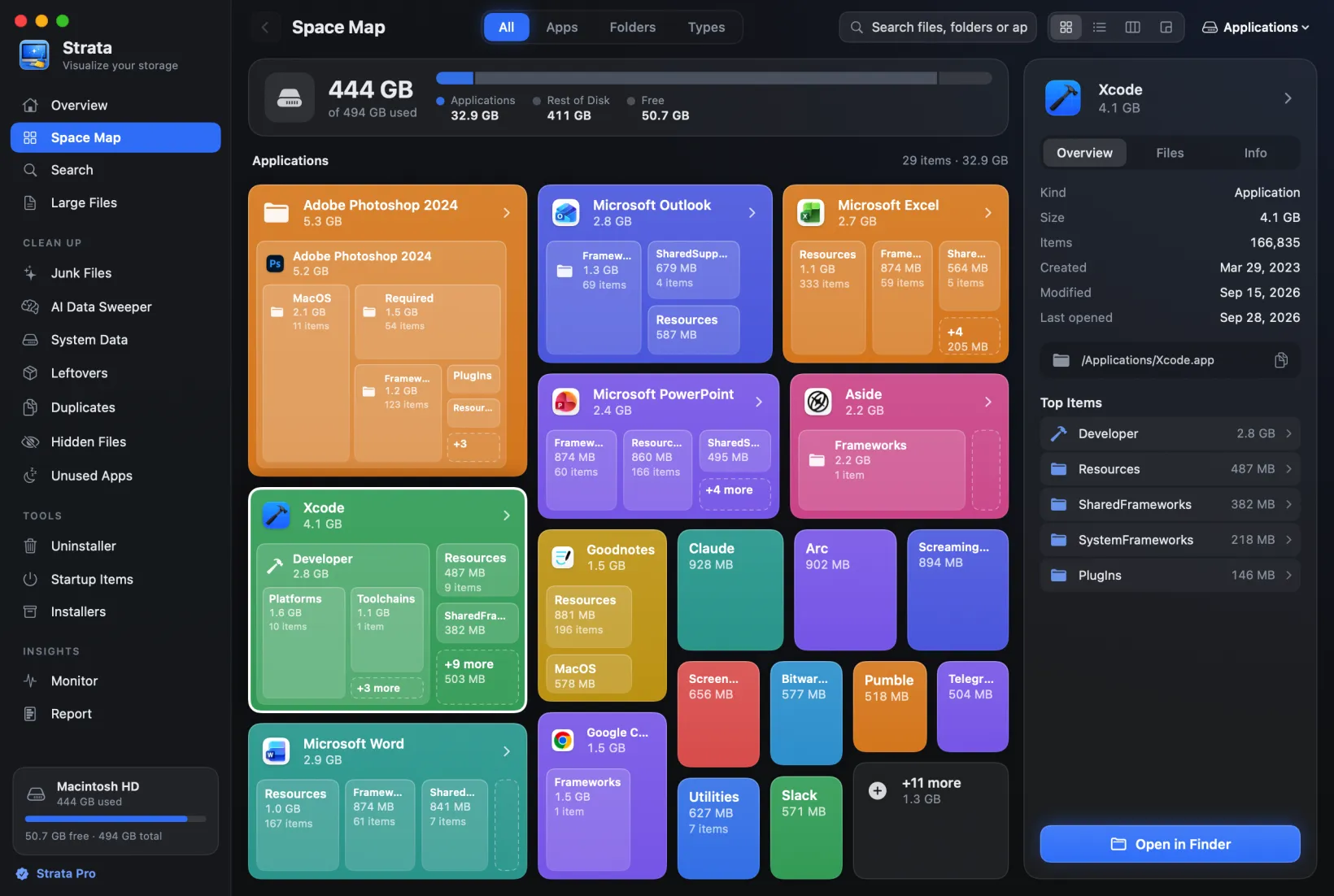
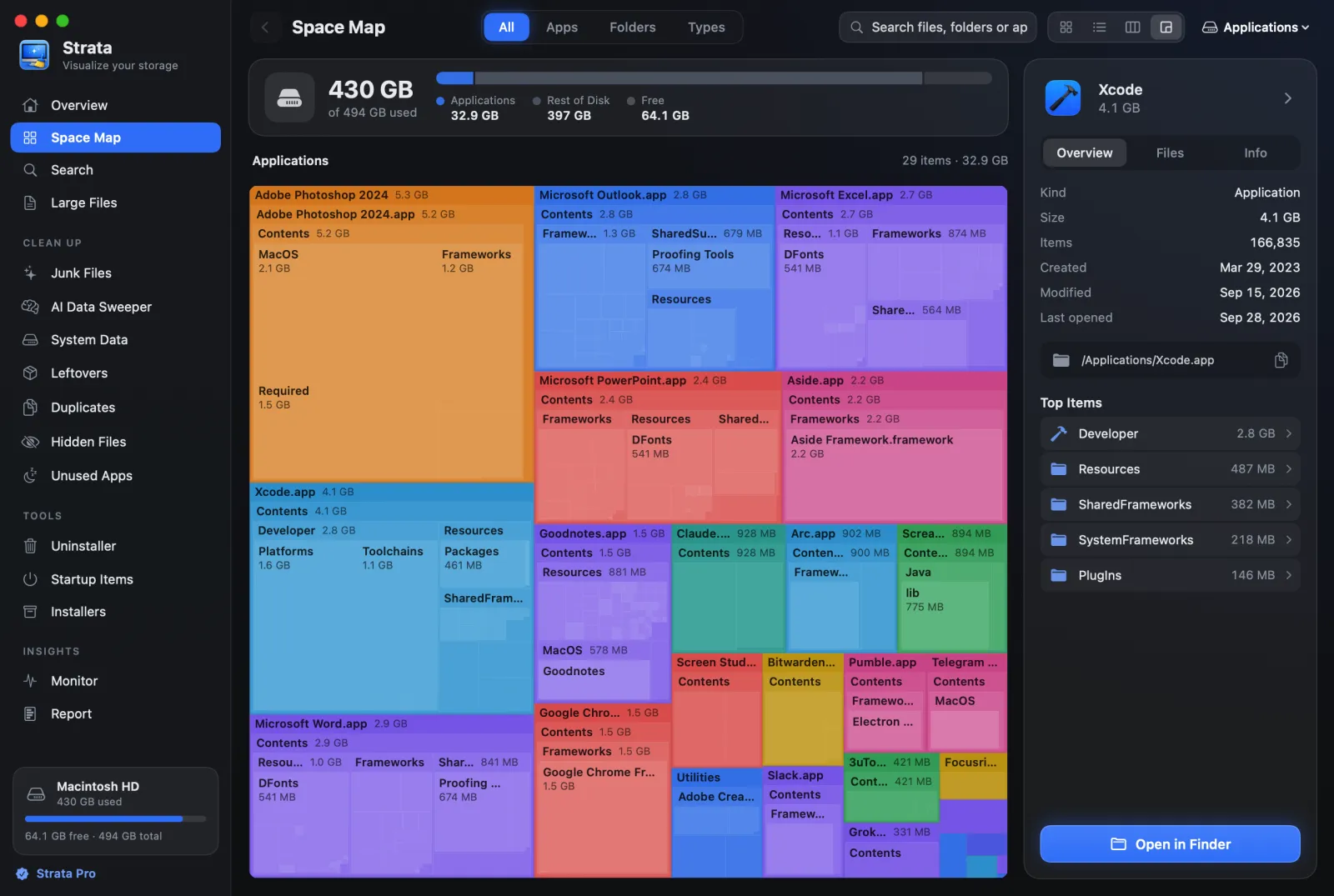
Strata is ours, so weigh this accordingly. Its Detailed Map (Command 4) is a treemap drawn down to single files, with names and sizes written on the larger rectangles, as in the picture at the top of this page. Point at a rectangle to read what it is, click a folder to go in, and press Command [ or Back to come out. Where SpaceSniffer has its filter field, Strata has Search, which looks through the whole scan and draws what it finds by size, and File Types, which groups a folder into videos, archives, disk images and other kinds.
The difference is what happens next. Strata finds junk, duplicates, app leftovers and large files, and anything it removes can come back from the Trash with Put Back. The map, Search and Large Files cost nothing; cleanup is Strata Pro, a single $9.99, on macOS 13 or later.
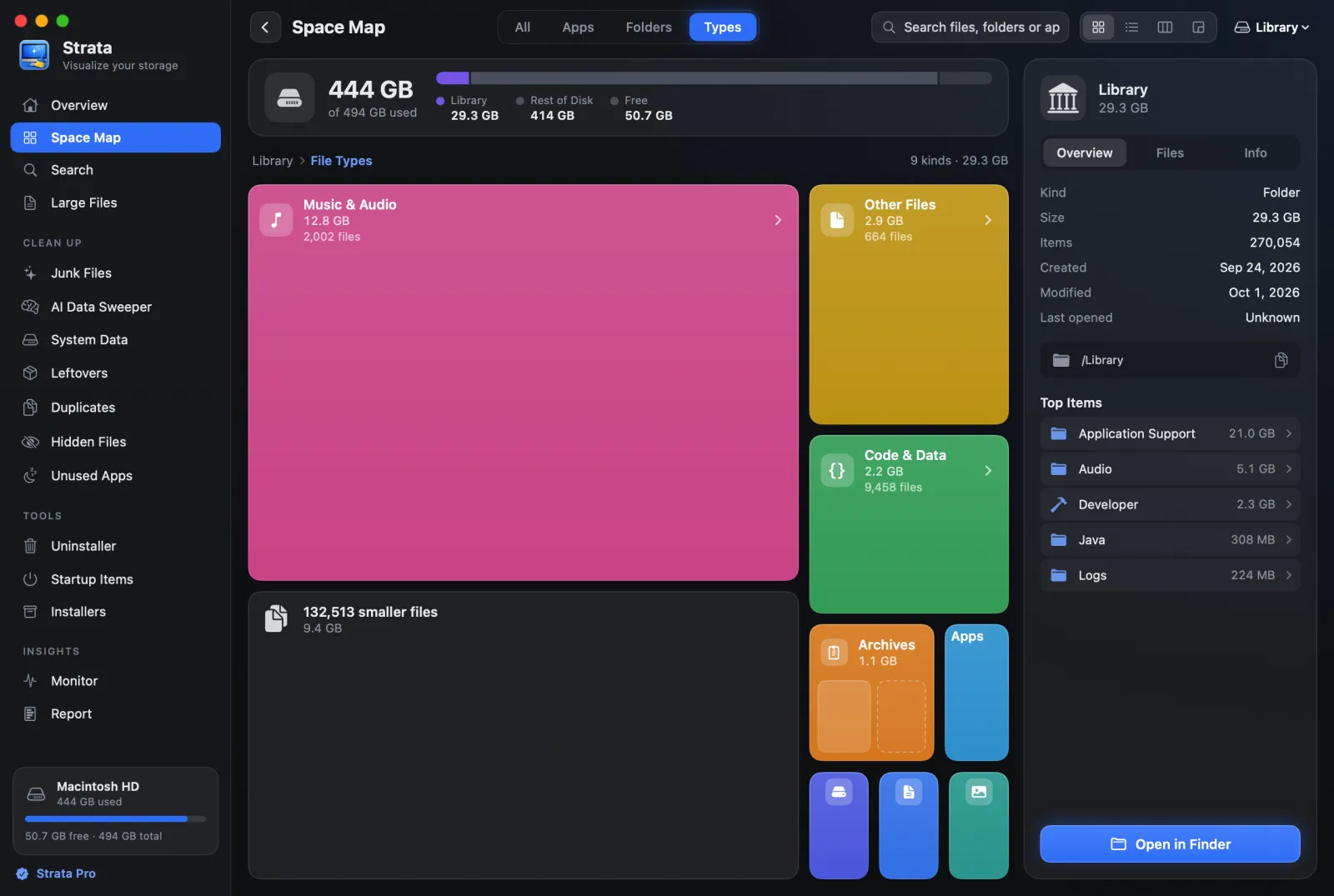
*.mp3 is often used for: it shows how much of a folder each kind of file takes.Colour tags: already in Finder
SpaceSniffer's tags are a way to mark files while you work: hover, press Ctrl+1 for red, and filter on the colour later. The Mac has the same idea built into Finder, and it keeps the tags after you close the window. Per Apple's guide to tags:
- Select a file and press Control 1 to Control 7 to add or remove a favourite tag; Control 0 clears them.
- Control-click a file and pick a colour just above Tags in the menu.
- Click a tag in Finder's sidebar to see every file that has it, or type its name in the search field.
So a workflow that went "find big files, tag the ones to check, review the tagged ones" works the same way on a Mac: find them with your disk tool, tag them in Finder, and come back to the tag in the sidebar.
SpaceSniffer's filters, translated
SpaceSniffer's filter field covers kinds of file, sizes and dates in one line. On a Mac they live in different places, but each has a route:
- One kind of file, such as
*.jpg. In Strata's Search, type.jpg, or pick the Images tab; it looks through the whole scan and lists matches largest first, though it matches names only for files of 1 MB or more. GrandPerspective can mask or filter its treemap with a test on the name. - Big files, such as
>1mb. Strata's Large Files lists up to the 500 biggest files over a threshold you choose, from 10 MB to 5 GB, from ordinary folders rather than inside apps or libraries such as Photos. GrandPerspective's filter tests can use size as well. - Old files, such as
>2years. Finder's own search does this: start a search, click the Add button on the right, just below the search field, and choose Last opened date from the menu on the left, as Apple's guide to narrowing a search describes.
Side by side
| Tool | Shows | Price | Needs | Deleting |
|---|---|---|---|---|
| GrandPerspective | Treemap, with filters | Free, or $2.99 on the App Store | macOS 14 (11 with 3.7.2) | Trash, off by default |
| QDirStat | Tree, treemap | Free | macOS 13 | Trash, or a permanent delete |
| WizTreeMac | Tree, treemap, file list | Free for personal use | macOS 12 | Not documented |
| DaisyDisk | Rings | $9.99 once | macOS 10.13 | Permanent |
| Strata | Treemap, list, columns, cards, file types | Free to scan; $9.99 once to remove | macOS 13 | Trash, with Put Back |
Two things that work differently on a Mac
A map can have holes. Before a Mac disk tool can draw the folders where apps keep your mail, messages and browsing, you have to grant it Full Disk Access in System Settings. Without that, those areas are simply absent from the map. Some tools warn you, GrandPerspective by asking for the access and Strata with an orange triangle on a short total; a bare treemap gives no sign.
Rectangles can overlap in real life. A copy made with Finder's Duplicate shares its original's storage on APFS, the Mac's file system, yet a map that sizes files by length draws both at full size. Our guide to finding large files explains how to read the numbers.
Which should you use?
You want SpaceSniffer, as close as possible
GrandPerspective: free, a treemap you zoom into, with filters.
You want exact sizes beside the picture
QDirStat, or WizTreeMac if you knew WizTree on Windows.
You carried SpaceSniffer on a USB stick
WizTreeMac, whose portable mode runs from an external drive.
You want to act on what you find, with an undo
Strata: the treemap and Search for free, and cleanup where everything goes to the Trash.
Frequently asked questions
Is there a SpaceSniffer for Mac?
No. SpaceSniffer, by Umberto Uderzo, is a free, portable Windows program. Its current version, 2.2.0.27 of 25 March 2026, is an x64 Windows build, and its site offers no Mac version.
What is the closest thing to SpaceSniffer on a Mac?
GrandPerspective: a free treemap that you zoom into folder by folder, with filters on name, size and file type. QDirStat and WizTreeMac add a tree beside the treemap, and Strata pairs its Detailed Map treemap with cleanup elsewhere in the app, where everything removed goes to the Trash.
Does a Mac have colour tags like SpaceSniffer's?
Yes, in Finder itself. Select a file and press Control-1 to Control-7 to add or remove a favourite tag, or Control-0 to clear them. Click a tag in Finder's sidebar to see everything with it.
Is there a free SpaceSniffer alternative for Mac?
Yes. GrandPerspective is free from SourceForge, or $2.99 on the Mac App Store. QDirStat is free and open source, and WizTreeMac is free for personal use.
A treemap of your Mac, with names on it
Strata draws any drive or folder as a treemap labelled with names and sizes, and as a list or cards when you want exact numbers. The scan, the map and search are free forever. Every download starts with 14 days of Strata Pro, removing up to 40 GB.