The best disk space analyzers for Mac in 2026, compared honestly
A disk space analyzer answers one question: what is filling this Mac? There are more of them for macOS than ever, several new this year, and they differ in ways most roundups skip: whether deleting goes to the Trash or is permanent, whether sizes match the disk, whether the app is still maintained, and what it sends home. These are the ones worth considering in September 2026, from each developer's own documentation.
Key takeaways
- Free and good: GrandPerspective (treemap), QDirStat (tree plus treemap), OmniDiskSweeper (list), OpenDisk (sunburst). Strata's map is free too.
- Cheap and new: DiskLens ($2.99, macOS 26) and SpareDisk ($4.99, macOS 15) move items to the Trash and send nothing.
- Check how it deletes. DaisyDisk, OpenDisk, DuckDisk and DiskGeeker delete permanently; several others offer both; a few only use the Trash.
- Check it is maintained. Disk Inventory X and SquirrelDisk are not, and Disk Inventory X will stop running on Apple silicon after macOS 27.
- Check what it sends. Most here send nothing. StorageRadar sends analytics and crash reports unless you turn them off, CleanMyMac lists diagnostics that include file paths, and Nektony's analytics are optional.
- Our pick for most people: a map that also cleans, where every removal can be undone. We make one, so read the criteria and decide for yourself.
We make Strata, which is in this list. Every other tool's facts come from its developer's own website, documentation, update feed or App Store listing, checked on 27 September 2026, and link to their source. We did not run the other apps for this article; where a vendor claims speed, we say it is their claim.
What matters in a Mac disk analyzer
Sizes that match the disk
On APFS, a file's length and the space it occupies are often different. A copy made on the same disk is a clone that shares storage; many system files are compressed; virtual machine disks are often sparse. A tool that adds up lengths can report hundreds of gigabytes that are not really there, especially on a developer's Mac. Prefer one that measures allocated space, counts hard links once and says when clones make a total larger than the disk. Why the sizes lie explains the details.
What deleting does
Some analyzers move items to the Trash. Some delete permanently, on purpose, so the space comes back at once. Some offer both. Neither is wrong, but you should know which you are pressing. It is the single biggest difference between tools that otherwise look alike.
Whether it is maintained, and for your macOS
macOS 27 shipped on 14 September 2026 and runs only on Apple silicon. Several popular recommendations have not been updated in years, and one depends on Rosetta, which Apple is limiting from macOS 28. Others have raised their minimum to macOS 14 or 15.
Privacy, price and permissions
A disk tool sees the name of every file you have. Check whether it sends analytics or crash reports, and whether its licence check phones home. Check whether the price is once or yearly, and how many Macs it covers. And know that any analyzer needs Full Disk Access to see everything, and that App Store versions are sandboxed and often see less.
The comparison table
| Tool | Shows | Price | Deleting | Needs | Latest |
|---|---|---|---|---|---|
| Strata | Cards, treemap, list, columns | Free to scan; $9.99 once, every Mac | Trash only | macOS 13 | 27 Sep 2026 |
| DaisyDisk | Sunburst | $9.99 once, 5 Macs | Permanent | macOS 10.13 | 10 Jul 2026 |
| GrandPerspective | Treemap | Free; $2.99 App Store | Trash, off by default | macOS 14 | 13 Sep 2026 |
| OmniDiskSweeper | Size-sorted list | Free | Trash; Option for permanent | macOS 11 to 26 | 12 Sep 2025 |
| QDirStat | Tree and treemap | Free | Trash, or permanent | macOS 13 | 27 Sep 2026 |
| OpenDisk | Sunburst and list | Free | Permanent | macOS 15 | 26 Sep 2026 |
| WizTreeMac | Treemap, tree, file list | Free for personal use | Not documented | macOS 12 | 16 Sep 2026 |
| StorageRadar | Treemap and sunburst | Free preview; from $9.99 once | Trash, or permanent | macOS 15 | 22 Sep 2026 |
| DiskLens | Treemap, sunburst, table | $2.99 once, App Store | Trash | macOS 26 | 8 Jul 2026 |
| SpareDisk | Treemap, sunburst, list | $4.99 once | Trash only | macOS 15 | 21 Sep 2026 |
| DiskMap (DiskMap AI) | Sunburst and list | $4.99 a month on Setapp; in-app purchases on the App Store | Trash | macOS 13 | 31 Aug 2026 |
| DuckDisk | Table and tree | Free | Permanent (local files) | macOS 12 (App Store) | 17 Sep 2026 |
| Mac Sai | Treemap | Free | Trash by default | macOS 14 | 22 Sep 2026 |
| Nektony Disk Space Analyzer | Sunburst and outline | $9.95 a year or $19.95 once | Trash | macOS 11 | 26 Jun 2026 |
| WhatSize | Columns, browser, table | $14.99, 2 Macs | Trash, or in place | macOS 11 | 31 Aug 2026 |
| iBoysoft DiskGeeker | Tree and treemap | $29.95 a year, 1 computer | Permanent | macOS 10.13 | V4.8 (undated) |
| CleanMyMac (Space Lens) | Bubbles and list | $39.95 a year | Varies by module | macOS 11 | 25 Sep 2026 |
| macOS Storage settings | Category bar | Built in | Not stated | macOS 13 path | macOS 27 |
The tools, one by one
Strata
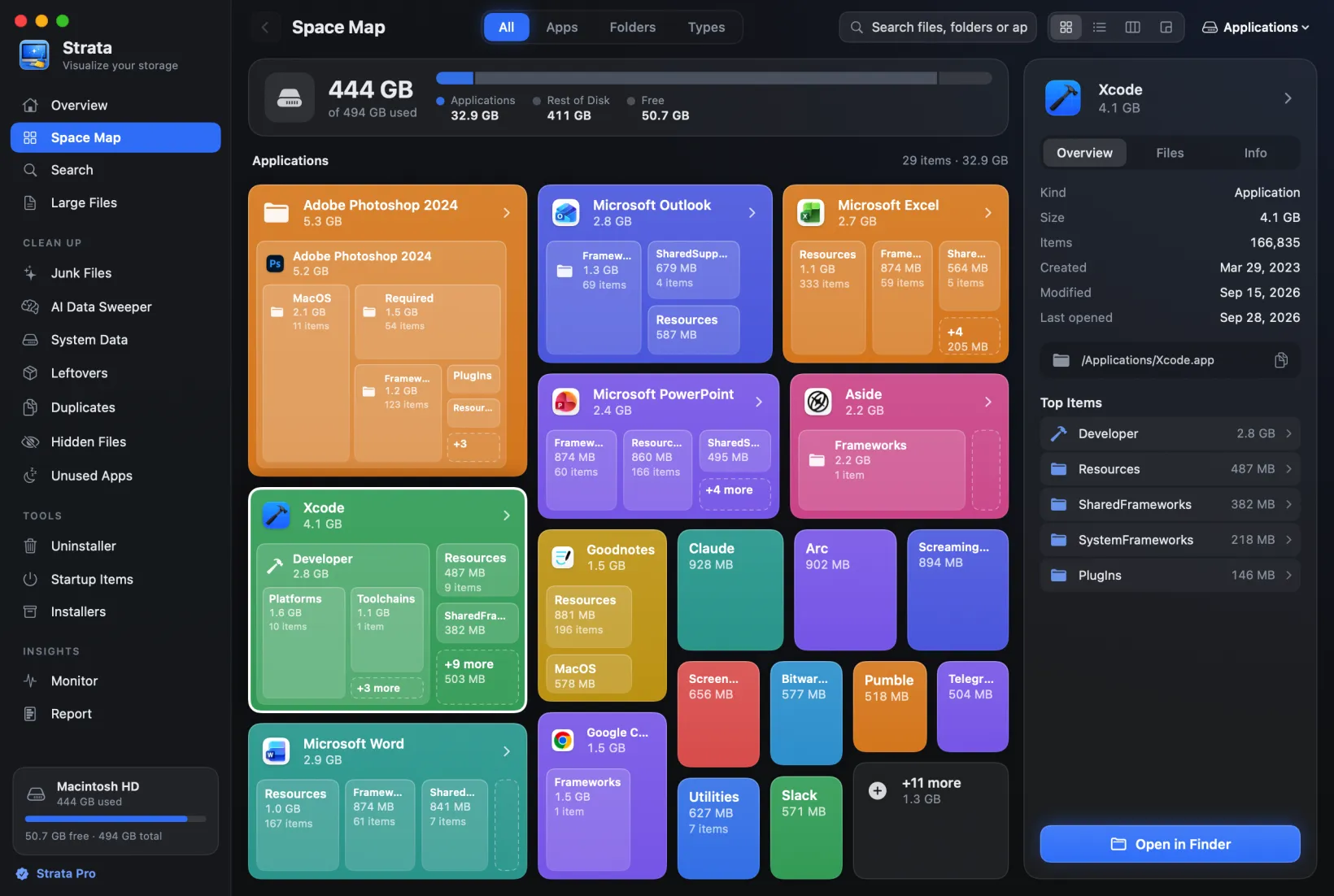
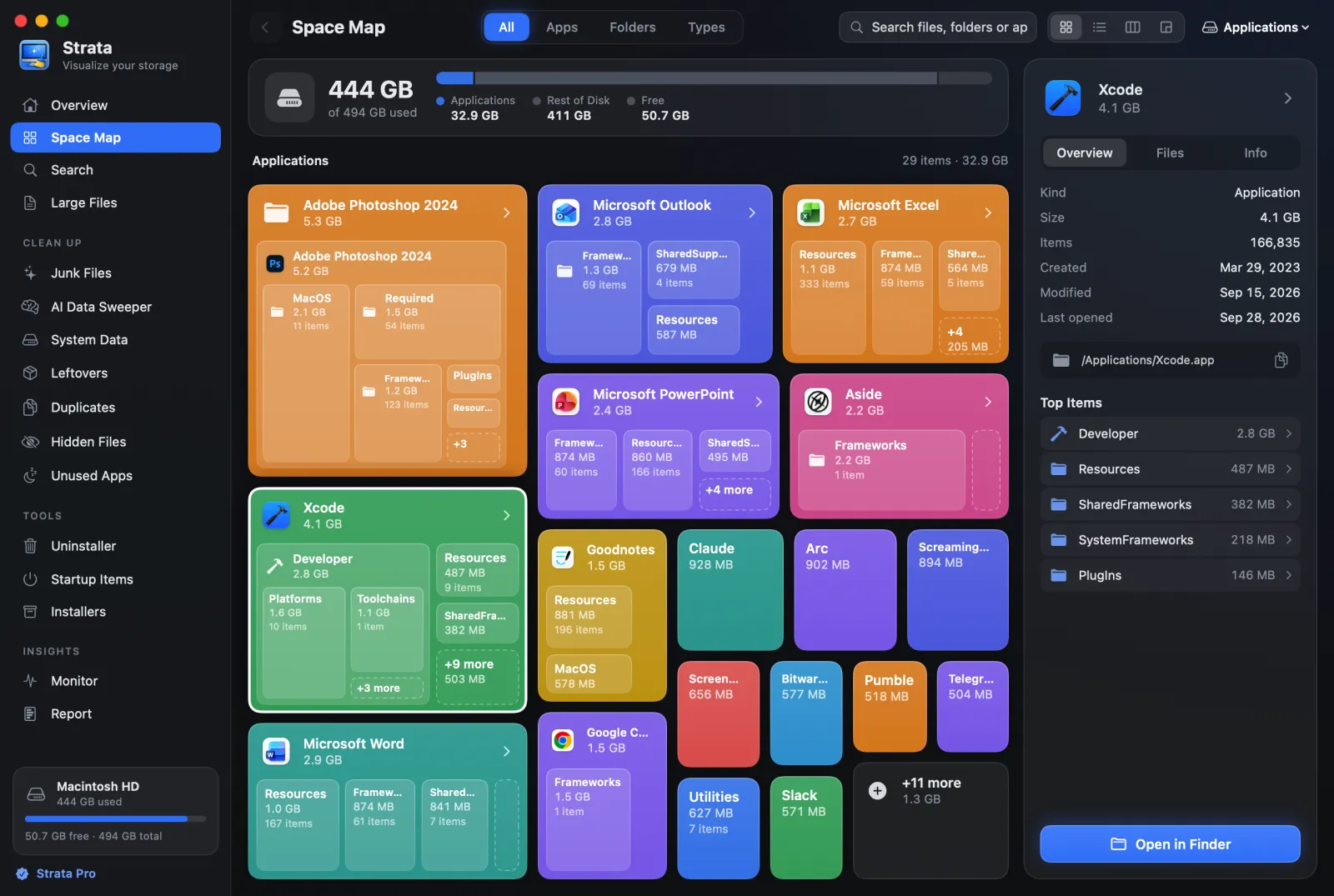
Ours. A native app that maps any drive or folder as labelled cards, a treemap (Detailed Map), a Finder-style list or columns, and by kind of file. Sizes are allocated space, hard links count once, and when clones make a scan larger than the disk, it says how much is really on disk. Beside the map are the rooms that act on it: an uninstaller that grades leftovers, junk, duplicates, old installers, startup items and a one-press Optimize, plus a Monitor and menu bar panel. Everything removed goes to the Trash. The scan and every map view are free with no time limit; Strata Pro is $9.99 once for every Mac you own, after a 14-day trial. No analytics; its only network request is its own update check.
Best for: finding the space and clearing it in one app, reversibly. Watch out for: it needs macOS 13, and it is not on the App Store.
DaisyDisk
The best-known Mac disk map: a sunburst of rings, with the folder you point at listed beside it. Its direct edition explains hidden and purgeable space, can scan as administrator and can delete APFS snapshots; it scans Dropbox, Google Drive, OneDrive and Box; and it runs on macOS 10.13 or later. It is a map by design, with no duplicate finder, uninstaller or junk cleaning, and it deletes permanently. $9.99 once, up to five Macs; also on the App Store. DaisyDisk vs Strata goes deeper.
GrandPerspective
The free, open source treemap, actively maintained (3.8.1, September 2026), private by design. It colours, filters, searches and exports; its rectangles are unlabelled; deleting is off by default and moves to the Trash when on. It now needs macOS 14; 3.7.2 remains for 11 to 13. grandperspectiv.sourceforge.net, or $2.99 on the App Store. More here; coming from SpaceSniffer.
OmniDiskSweeper
The Omni Group's free size-sorted list of your drive, with a Trash button (hold Option to destroy permanently). Updated rarely: the stable 1.16 covers macOS 11 to 26, and a 1.17 test build covers macOS 27. Not on the App Store. omnigroup.com/more; alternatives for list lovers; coming from TreeSize.
QDirStat
From the author of KDirStat: a tree of folders beside a treemap, with file-type and age views.
Free, GPL, with notarized universal Mac builds made by a contributor with the author's approval,
for macOS 13 or later (brew install --cask qdirstat). It is built with Qt rather than
Apple's own frameworks. It has Move to Trash and a separate permanent delete.
Mac builds.
OpenDisk
New this year: a free, MIT-licensed sunburst with a Finder-style list, search, purgeable space, and no telemetry. It needs macOS 15. Its own README warns that deleting from its Collector "is permanent and skips the Trash". Its developer claims faster scans than DaisyDisk; we have not tested that. opendisk.app.
WizTreeMac
The Mac version of Windows' WizTree, released on 16 September 2026: treemap, tree and a list of every file by size, for macOS 12 or later. Free for personal use; Supporter Codes start at $25. Its duplicate finder matches names, sizes and dates, not contents, as its site warns. diskanalyzer.com; WizTree for Mac, in full; coming from Windows.
StorageRadar
A treemap and sunburst with developer cleanup profiles, snapshot diffs and exports, sold on the App Store and direct: a free preview, then Core $9.99 and Developer $19.99 on its site (the App Store lists them differently). It needs macOS 15. Cleanups go to the Trash by default, with Delete Permanently as a separate choice. Its site says product analytics (Aptabase) and crash reports (Sentry) are on by default, with switches to turn them off. storageradar.app.
DiskLens
A $2.99 App Store app, new this summer, with six views: a dashboard, a treemap coloured by kind or by size, a sunburst, a sortable details table, search (with regular expressions) and duplicates by content. It exports CSV or HTML reports and the sunburst as an image, reads cloud folders without downloading them, and since version 2.1 moves what you choose to the Trash. Its privacy policy says the app has no network capability. It needs macOS 26. Mind the name: a different, unsigned app also called DiskLens has a site of its own; the one described here is at disklens.vtun.ro.
SpareDisk
New in September 2026 and already at version 1.2: a treemap, a sunburst and a sortable list, with search, large and old files, duplicates checked byte by byte, an uninstaller, developer caches and a comparison with the previous scan. $4.99 once, on the App Store or direct. It only moves things to the Trash, makes no network connections and has no licence check. macOS 15 or later. sparedisk.minilabs.cc.
DiskMap
Security Tech's sunburst map, with a ranked list of the biggest files and folders. It moves items to the Trash, naming each one in the confirmation, and locks system folders. On Setapp it is a single-app purchase at $4.99 a month, not part of the membership; on the Mac App Store, as DiskMap AI, it is a free download with in-app purchases. Its privacy policy says it collects no personal data and works fully offline. macOS 13 or later. security-tech.org/diskmap.
DuckDisk
Free and open source (AGPL): a table-first tree with sizes, allocated sizes, shares of the parent folder and file counts, plus totals by file type. It also reads OneDrive, Google Drive (in its direct build only) and folders on other machines over SSH, taking only file details from the cloud. Deleting a local file is permanent, and its button says so: "Delete Permanently". Cloud deletions go to that service's own trash. Its interface is built with web technology (Tauri and React) rather than native Mac controls. The App Store build needs macOS 12 and Apple silicon; the direct downloads cover Intel too. duckdisk.com.
Mac Sai
A free, open source cleaner whose Space Lens is a treemap you can drill into; the rest of it, from duplicates to a malware check, is in the cleaner roundup. Removals go to the Trash by default. macOS 14 or later. github.com/iliyami/MacSai.
Nektony Disk Space Analyzer
A sunburst with an outline and a biggest-files panel, CSV export and search. Removed items "are physically moved to Trash". $9.95 a year or $19.95 once direct, with a two-day trial, or a free Inspector edition and a $19.99 Pro edition on the App Store. Its policy describes optional usage analytics. nektony.com.
WhatSize
A long-running paid list tool: columns, browser and table views, duplicates, cleaning tools and local snapshot management, for macOS 11 to 27. $14.99, with a 30-day trial; a licence activates on two Macs. It measures as administrator through a helper. The App Store only has a 2012 version. whatsizemac.com.
iBoysoft DiskGeeker
A disk utility first: NTFS and BitLocker drives, cloning, encryption, bootable installers. Its Space Analyze lists a volume as a folder tree with a treemap mode, and its help says that what you delete there is gone for good. $29.95 a year (Basic) or $89.95 a year (Professional), excluding VAT, for one computer, after a 7-day trial; the free edition leaves out its AI disk space analysis. macOS 10.13 or later. iboysoft.com.
CleanMyMac's Space Lens
CleanMyMac includes a map, Space Lens, which draws folders as bubbles beside a list. It is one part of a $39.95-a-year suite with malware protection and cleanup; some of its modules delete permanently. Worth it if you want the whole suite. CleanMyMac vs Strata.
macOS's own Storage settings
System Settings, General, Storage shows a bar by category, recommendations such as Store in iCloud and Empty Trash Automatically, and lists of large files and documents. Apple's own guide says you cannot manage the System Data category. Start here; it rarely finishes the job.
In Terminal
du is built in. With Homebrew: ncdu (interactive list),
dust (one-shot tree), gdu (installed as gdu-go) and
dua-cli (installed as dua, with an option to count APFS clones once).
Fast and free; you need to be comfortable in Terminal.
Two to avoid in 2026
- Disk Inventory X: last release December 2019, Intel-only, not notarized, disabled by Homebrew in September 2026, and dependent on Rosetta, which Apple limits to certain games from macOS 28. What to use instead.
- SquirrelDisk: its last GitHub release is from February 2023, the only Mac download is an unsigned Intel build, and its delete removes files outright rather than using the Trash.
Which should you choose?
You just want to see where the space went, free
GrandPerspective on macOS 14 or later; QDirStat if you want names beside the map; Strata's free version if you want labelled cards and a list.
You want to clear it too, and be able to undo
Strata: a map with cleanup rooms, and nothing ever deleted permanently.
You need hidden space, snapshots or an older macOS
DaisyDisk, which explains purgeable space and runs on macOS 10.13 and later.
You want something small and cheap
DiskLens at $2.99 on macOS 26, or SpareDisk at $4.99 on macOS 15; both move what you remove to the Trash.
You prefer a list to a map
OmniDiskSweeper on macOS 26 or earlier, WhatSize, or Strata's List and Columns views.
For apps that clean as well as map, including this year's new indie ones, see the best Mac cleaner apps, compared.
Frequently asked questions
What is the best free disk space analyzer for Mac?
GrandPerspective if you are on macOS 14 or later and want a treemap; QDirStat if you want a tree beside the map; OmniDiskSweeper if you prefer a size-sorted list. Strata's free version also maps any drive four ways, with no time limit. All four are free to use for finding space.
Does macOS have a built-in disk space analyzer?
Partly. System Settings, General, Storage shows a bar by category and lets you review large files and documents, but Apple's own guide says you cannot manage the System Data category. For a folder-by-folder picture you need a separate tool.
Which disk analyzers delete permanently?
By their own documentation, DaisyDisk, OpenDisk, DuckDisk (for local files) and iBoysoft DiskGeeker's Space Analyze delete permanently, skipping the Trash. StorageRadar, WhatSize and QDirStat offer a permanent option alongside the Trash, and OmniDiskSweeper has an Option-key Destroy. GrandPerspective, Nektony's Disk Space Analyzer, DiskMap, DiskLens, SpareDisk and Strata move items to the Trash.
Why do disk analyzers show different sizes from Finder?
On APFS a file's length and the space it takes on disk differ: clones share storage, compressed and sparse files take less than their length. Tools that add up lengths disagree with the disk; tools that measure allocated space come much closer, though each copy of a clone still counts in full.
Is Disk Inventory X still safe to use?
It is unmaintained since 2019, Intel-only and not notarized, and Homebrew disabled it in September 2026 because it fails Gatekeeper. It still runs under Rosetta on macOS 27, but Rosetta will be limited to certain older games from macOS 28.
Map your own Mac, free
Strata maps any drive four ways. The scan and map are free forever, and every download starts with 14 days of Strata Pro.