TreeSize for Mac: what to use instead, free and paid
TreeSize has shown Windows users where their disk space went for more than 25 years, and its maker, JAM Software, makes it for Windows only. If you have moved to a Mac, or look after some, here is what replaces each of its features, free and paid, and how TreeSize itself can still look at a Mac.
Key takeaways
- There is no TreeSize for Mac from JAM Software, which says its products run on Windows only. The App Store app named TreeSize is another developer's.
- Finder can show folder sizes itself: in List view, turn on Calculate all sizes.
- Free replacements: OmniDiskSweeper and QDirStat for folders by size, GrandPerspective for a treemap, and WizTreeMac for personal use.
- Paid: DaisyDisk for a visual map, or Strata for largest files, duplicates, changes over time and exports with cleanup, each $9.99 once.
- From Windows, TreeSize can still look at a Mac: over SSH, or through the folders a Mac shares.
Written by the maker of Strata, which is one of the tools below. Facts about TreeSize and the other tools come from their own websites, checked on 10 October 2026; each links to its source.
Is there a TreeSize for Mac?
No. Every edition of TreeSize runs on Windows, and JAM Software, which makes it, answers the Mac question in its knowledge base: "our products can be run on Windows systems only", and it does not yet provide a Mac version.
TreeSize comes in three editions. TreeSize Free is for private, non-commercial use on Windows desktops. Personal costs €20.40 per user a year, or €40 once with a year of updates, and Professional from €41 per user a year, each with a 14-day trial. None of them installs on a Mac.
One thing causes confusion. The Mac App Store has an app called TreeSize - Disk Usage, and it is not JAM's TreeSize: its developer is listed as woojooin, it costs $3.99 in the US store, and it has been there since 2013, with version 2.83 released on 12 September 2026. Judge it as an app in its own right, not as a Mac edition of the Windows program.
TreeSize's features, and their Mac equivalents
What you should use instead depends on which part of TreeSize you relied on. The free edition is a folder tree with sizes, a treemap and PDF reports; the paid ones add analysis, exports and reach. Here is where each part lives on a Mac.
| TreeSize feature | From edition | On a Mac |
|---|---|---|
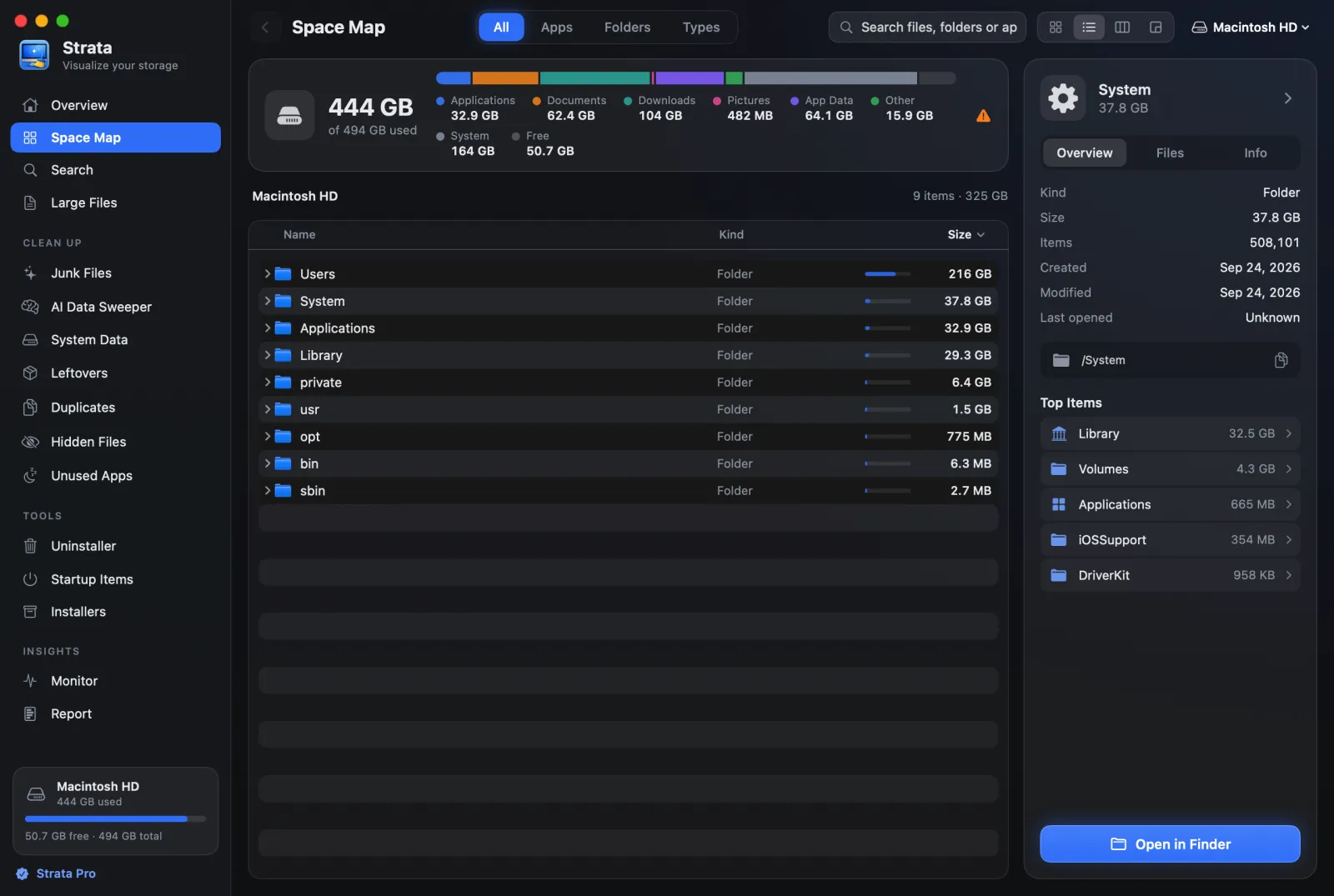
| Folder tree with sizes, down to single files | Free | Finder's List view with Calculate all sizes; OmniDiskSweeper; QDirStat; Strata's List and Columns views, which show a folder's files smaller than about 1 MB as one row |
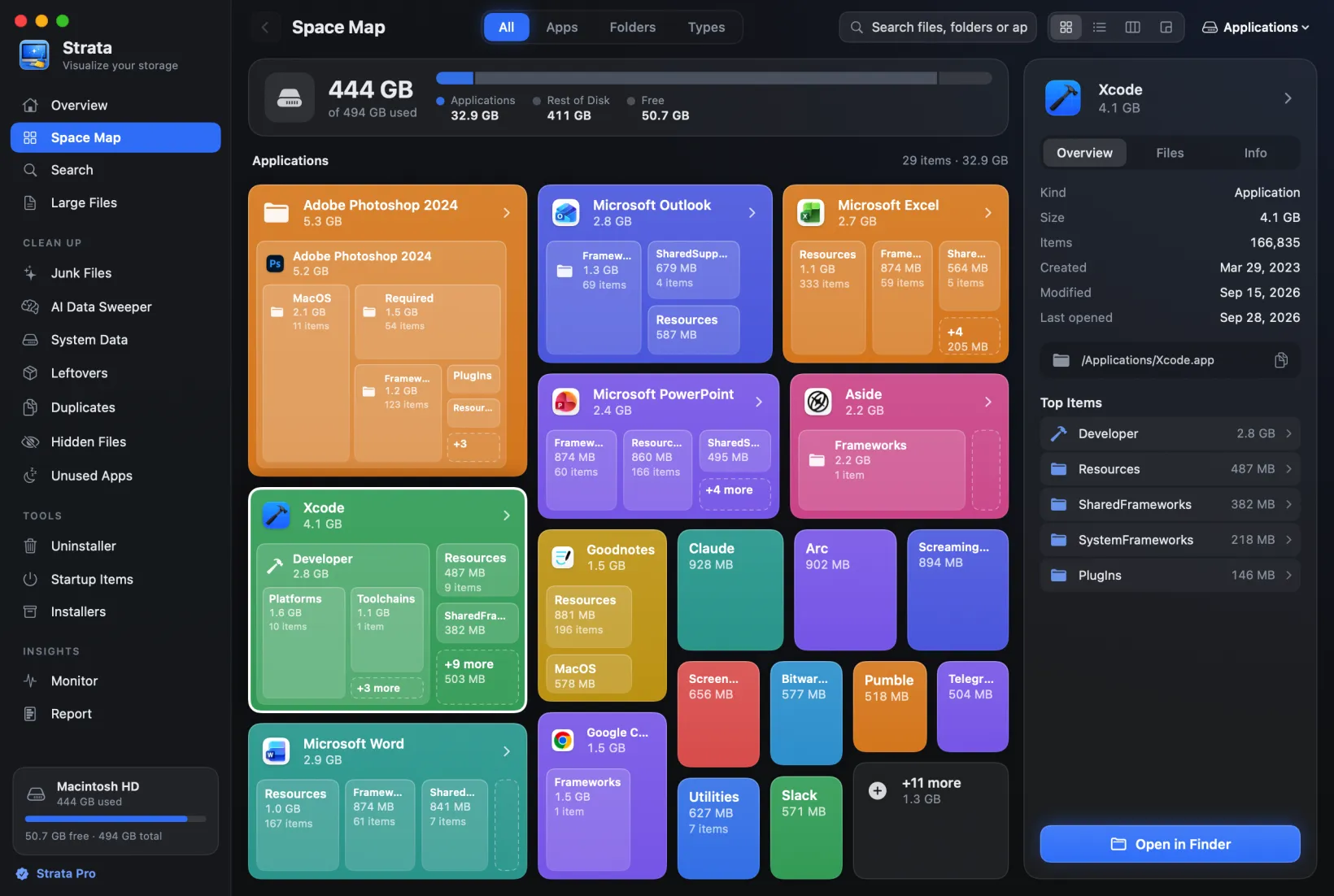
| Treemap chart | Free | GrandPerspective; QDirStat; WizTreeMac; Strata's Detailed Map |
| PDF reports | Free | GrandPerspective saves the map as an image or the data as text; Strata Pro's Report saves a spreadsheet or a web page |
| Excel, CSV and HTML exports | Personal | WizTreeMac's CSV export; Strata Pro's Report, as CSV or HTML |
| Largest files | Personal | Strata's Large Files; WizTreeMac's file list |
| Duplicate search | Personal | Strata Pro's Duplicates, by contents; WizTreeMac, by name, size and date |
| Disk usage over time | Personal | Strata Pro's Report, Changes Over Time |
| Scheduled scans and alerts | Professional | No scheduled scans in the tools here; Strata warns when the startup disk falls under a share of free space you choose, from 2% to 20%, while it is open in its window or the menu bar |
| Server shares | Professional (Personal on a home network) | Mount the share in Finder, and the Mac apps here size it like any other drive |
| SharePoint, Amazon S3, Linux over SSH | Professional (Personal on a home network) | No Mac app here does this; TreeSize itself can scan a Mac (below) |
The free alternatives
For every Mac disk tool side by side, see our comparison of disk space analyzers for Mac. These are the ones that map best onto TreeSize.
Finder: Calculate all sizes
The Mac already does the core of TreeSize Free, if you ask. Finder leaves folder sizes blank in List view by default, because adding them up takes time. To turn them on:
- Open the folder you want to measure, and choose View, then as List.
- Choose View, then Show View Options.
- Tick Calculate all sizes. To use it for every folder in List view, click Use as Defaults.
- Click the Size column header to sort, biggest first.
It is a list, not a tree with bars, and on a whole disk it is slow. For an overview by category, System Settings has one: choose General, then Storage, where the More Info button beside a category such as Documents opens more detail and ways to manage it.
OmniDiskSweeper: the whole drive, largest first
OmniDiskSweeper, a free download from The Omni Group, is the closest thing on a Mac to TreeSize Free's main window: everything on a drive, largest to smallest, with the Trash a click away. Its current release, 1.16, supports macOS 11 to 26; for macOS 27, Omni offers a 1.17 test build. Our OmniDiskSweeper guide covers the tools like it.
QDirStat: TreeSize Free's two panes
QDirStat is the
nearest thing to TreeSize Free's tree and chart: folders with their sizes, and a coloured
treemap of the same data. Open source under the GPL and free, it ships as notarized Mac builds,
signed off by Apple's malware check, and Homebrew installs it with brew install --cask qdirstat on
macOS 13 and later.
GrandPerspective: the chart on its own
If the treemap was the part of TreeSize you used, GrandPerspective draws that and little else, and can save the map as an image or the data as text. Download it free from SourceForge, or pay $2.99 for the identical Mac App Store copy. Version 3.8.1 runs on macOS 14 and later, and 3.7.2 on macOS 11 to 13.
WizTreeMac: free for personal use
WizTree, another favourite Windows disk tool, has had a Mac version since 16 September 2026. WizTreeMac has a tree, a treemap, a list of the largest files, a duplicate finder that matches by name, size and date, and CSV export. It is free for personal use and needs macOS 12 or later. Our WizTree for Mac guide covers what differs from Windows.
In Terminal: du and ncdu
Every Mac has du: du -sh * in a folder prints the size of each item
in it, except hidden ones, whose names start with a dot. For something closer to TreeSize,
ncdu, from Homebrew, browses a disk by size with the keyboard.
The paid alternatives
Strata: TreeSize Personal's analysis, with cleanup
Strata is ours, so weigh this accordingly. It covers the parts of the paid editions most people with one Mac use: largest files, duplicates, changes over time and exports. It has nothing for Professional's scheduled scans, command line, or server and cloud scanning.
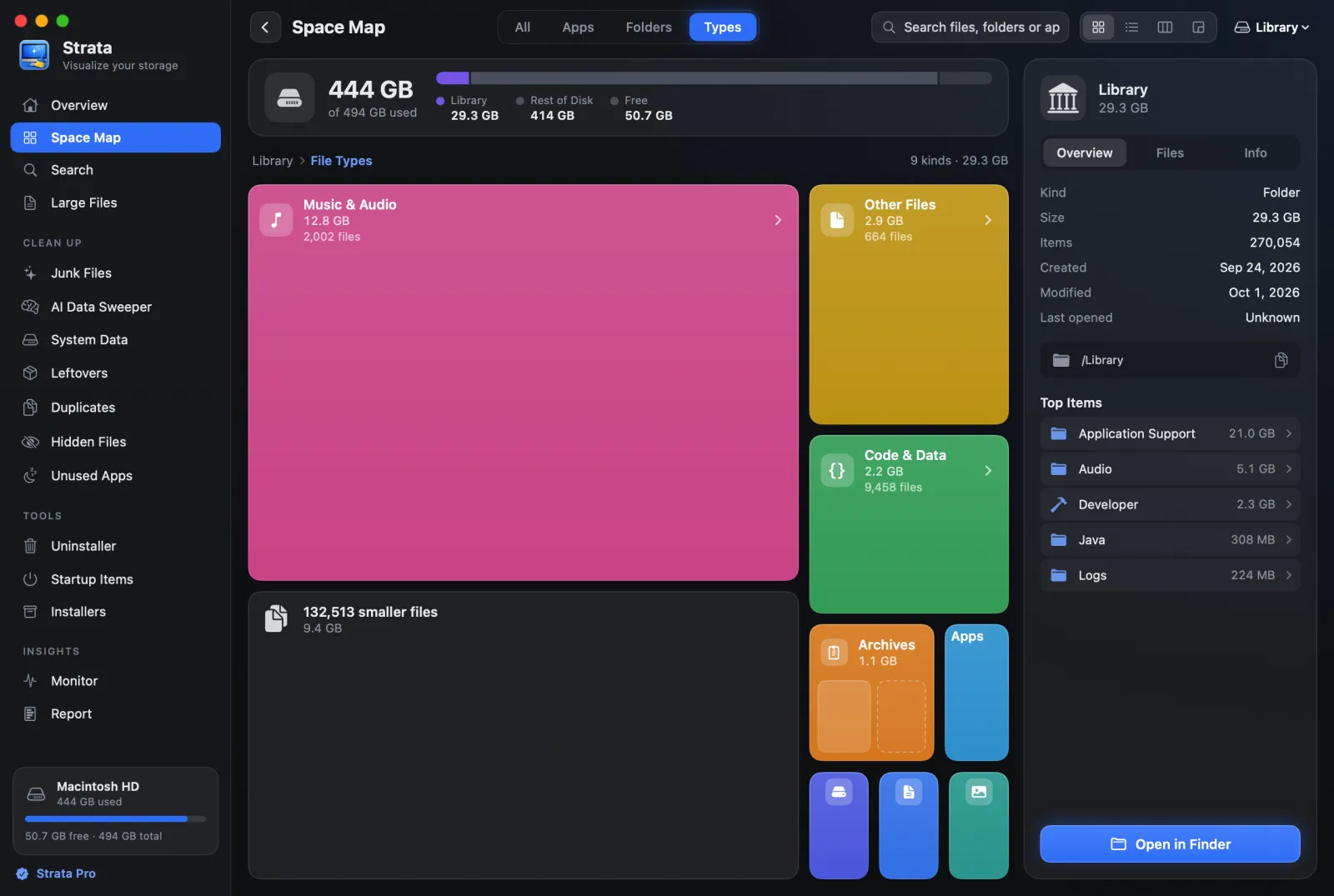
- Free: the whole disk or any folder as a list or in columns, folders by size; a Detailed Map treemap; File Types; Search and Large Files; and almost-full notices, more often as the disk fills, at a share of free space you choose in Settings, while Strata is open.
- Strata Pro: Duplicates, which compares contents rather than names; Report, with Changes Over Time and exports as a spreadsheet or a web page; junk, hidden files and app leftovers; an uninstaller; and removing anything at all, which TreeSize Free does for nothing.
Everything it removes goes to the Trash, with Put Back. Strata Pro is $9.99 once, not a subscription, and one licence covers every Mac you personally own. It needs macOS 13 or later.
DaisyDisk: TreeSize's charts, not its tools
DaisyDisk replaces the picture rather than the toolkit: it draws the disk as rings you click into, and its site lists no duplicate search. A $9.99 licence, paid once, covers up to five personal Macs on macOS 10.13 or later. Before you delete with it, know that its user guide says it "permanently removes files and folders instead of moving them to the system Trash".
Scanning a Mac with TreeSize, from Windows
If you look after Macs from a Windows PC, TreeSize can reach them in the two ways JAM's knowledge base names: "through SSH or by using a Samba server".
- Over SSH, with TreeSize Professional (or Personal, on a home network). Its feature list includes scanning Linux machines via SSH, and its version 9.2 added support for zsh, the Mac's default shell, and for GNU coreutils installed with a prefix, which its changelog says "can significantly simplify the analysis of MacOS systems."
- What the Mac needs for SSH. Turn on
Remote
Login: System Settings, General, Sharing, then the Info button beside Remote Login. Allow
full disk access for remote users there decides whether an SSH session can read the folders
macOS protects, and Allow access for limits who can log in. Homebrew's
coreutilsinstalls the commands that clash with the Mac's own with agprefix, which is that kind of prefixed installation. - Over SMB, with Professional in an office (Free and Personal are for home use only). Turn on File Sharing with SMB on the Mac, and TreeSize sizes the shared folders like any network drive. It sees only what is shared, and only what the account it connects with can read.
This is a job for an IT department with Windows PCs and a few Macs. For someone with one Mac, any app above is simpler.
Side by side
| Tool | Shows | Price | Needs | Duplicates | Deleting |
|---|---|---|---|---|---|
| Finder | Folder sizes in List view | Built in | Any Mac | No | Trash, or immediately with Option |
| OmniDiskSweeper | Everything, largest first | Free | macOS 11 to 26; a test build for 27 | No | Trash, or permanent with Option |
| QDirStat | Tree, treemap | Free | macOS 13 | No | Trash, or a permanent delete |
| GrandPerspective | Treemap | Free, or $2.99 on the App Store | macOS 14 (11 with 3.7.2) | No | Trash, off by default |
| WizTreeMac | Tree, treemap, file list | Free for personal use | macOS 12 | By name, size and date | Not documented |
| DaisyDisk | Rings | $9.99 once | macOS 10.13 | No | Permanent |
| Strata | List, columns, cards, treemap, file types, large files | Free to scan; $9.99 once to remove | macOS 13 | By contents | Trash, with Put Back |
Coming from TreeSize: three adjustments
Administrator rights count for less. On Windows, the usual answer to a
folder a disk tool cannot read is to run it as administrator. On a Mac the gate is a privacy
setting: an app needs Full Disk Access, in
System Settings, Privacy & Security, to see other apps' data such as Mail and Messages.
Finder has that access built in; the disk apps above have to be given it, and Terminal needs
it before du or ncdu can see everything.
Sizes can overlap. APFS, the Mac's file system, lets copies made with Finder's Duplicate share storage, so a folder's total can be more than it costs the disk. Our guide to finding large files explains which number to trust.
The Recycle Bin is the Trash, mostly. In Finder, Command Delete sends a file to the Trash, while Option Command Delete removes it on the spot. Disk tools differ, as the Deleting column above shows.
Which should you use?
You used TreeSize Free to see folder sizes
Finder with Calculate all sizes, or OmniDiskSweeper for the whole drive, largest first. For a tree with a chart, QDirStat.
You want a free treemap
GrandPerspective, or WizTreeMac for personal use.
You paid for TreeSize Personal or Professional
Strata, for largest files, duplicates by contents, changes over time and exports, with everything removed going to the Trash, for one $9.99 payment. For scheduled scans and servers, nothing on the Mac replaces Professional.
You look after Macs from a Windows PC
TreeSize Professional itself: over SSH, or over SMB for shared folders.
Frequently asked questions
Is there a TreeSize for Mac?
Not from JAM Software, which makes TreeSize: its knowledge base says its products run on Windows only and that it does not yet provide a Mac version. A Mac App Store app called TreeSize - Disk Usage is a separate product, from a developer listed as woojooin.
What is the best free alternative to TreeSize on a Mac?
For a list of folders by size, Finder does it once Calculate all sizes is on, and OmniDiskSweeper and QDirStat are free downloads. For a treemap, GrandPerspective is free, and WizTreeMac is free for personal use.
How do I see folder sizes in Finder?
Open the folder in List view, choose View, then Show View Options, and tick Calculate all sizes. Finder then fills in each folder's size in the Size column, which can take a while for a large folder. The setting applies to that folder; click Use as Defaults to apply it to every folder in List view.
Can TreeSize scan a Mac?
Yes, from a Windows PC, in two ways. TreeSize Professional, or Personal on a home network, can scan a Mac over SSH once Remote Login is turned on. Any edition can also size the folders a Mac shares with File Sharing, as it would any network drive, though it sees only those folders, and in an office only Professional may be used.
Folder sizes, a treemap and cleanup, on a Mac
Strata shows any drive or folder as a list of folders by size, a treemap or cards, and lists the largest files. The scan, the map and search are free forever. Every download starts with 14 days of Strata Pro, removing up to 40 GB.