Where AI models are stored on a Mac, and how to delete Ollama models and the rest
Local AI apps download models of several gigabytes each and keep them until you remove them, mostly in folders Finder hides. Here is where Ollama, LM Studio, Hugging Face and a dozen other tools store models on a Mac, the commands that delete Ollama models and the rest properly, and what you can and cannot do about Apple Intelligence's own.
Key takeaways
- Ollama keeps models in
~/.ollama/models. Delete them withollama rmwhile Ollama is running, never by deleting blobs in Finder. - LM Studio uses
~/.lmstudio/models, or~/.cache/lm-studio/modelsif you have used it since before January 2025. Itslmscommand cannot delete models; guides use My Models in the app. - Hugging Face's cache is
~/.cache/huggingface/hub. The commands are nowhf cache ls,rmandprune;huggingface-cliis gone. - Apple Intelligence needs up to 14 GB, Apple says, and Apple documents no way to remove its models.
- Almost everything comes back with one download. Models you added by hand, as in ComfyUI, have to be fetched again from where they came from.
How we checked: every path and command here comes from the project's own documentation, release notes or source code, read on 6 and 7 October 2026, against the stable releases of 7 October (Ollama 0.40.0, huggingface_hub 2.1.1). Where a project does not document something, we say so. We make Strata, whose AI Data Sweeper reads most of these folders.
Where each AI tool keeps its models
| Tool | Models are in | Delete with |
|---|---|---|
| Ollama | ~/.ollama/models | ollama rm |
| LM Studio | ~/.lmstudio/models, or ~/.cache/lm-studio/models on older installs | My Models, in the app |
| Hugging Face libraries | ~/.cache/huggingface/hub | hf cache rm, hf cache prune |
| llama.cpp | The Hugging Face cache since March 2026; ~/Library/Caches/llama.cpp before | hf cache rm, or delete the file |
| Jan | ~/Library/Application Support/Jan/data | Settings, then Delete All for an engine |
| GPT4All | ~/Library/Application Support/nomic.ai/GPT4All | Not documented |
| ComfyUI Desktop | ~/ComfyUI-Shared | Delete the file |
| Draw Things | ~/Library/Containers/com.liuliu.draw-things/Data/Documents/Models | Not documented |
| DiffusionBee | ~/.diffusionbee (also holds your images) | Not documented |
| MacWhisper | ~/Library/Application Support/MacWhisper/Models | Not documented |
| OpenAI Whisper | ~/.cache/whisper | Delete the file |
| PyTorch, Keras | ~/.cache/torch/hub, ~/.keras/models | Delete the file |
| Docker Model Runner | Docker's own store | docker model rm |
Two warnings apply to the whole table. First, these are the defaults: if you set a custom
folder in an app or with a variable such as OLLAMA_MODELS or HF_HOME,
your models are there instead. Second, quit an app, or stop its server, before deleting its
model files by hand, so nothing is using them while they go.
How to delete Ollama models
Ollama stores each model's weights as files named by their hash, such as
sha256-3f1a…, in ~/.ollama/models/blobs, and a small manifest that
lists them in ~/.ollama/models/manifests. Version 0.40.0, GitHub's current stable
release when we checked on 7 October 2026, adds a manifests-v2 folder beside it. Its
source shows that a model you pull gets an entry in both, while one you copy with
ollama cp or build with an ordinary ollama create is listed only in the
new folder. The commands below handle both. With
Ollama running, list what you have, then remove what you no longer use:
ollama ls
ollama rm qwen3:8b
ollama ls shows each model's name, ID, size and when it was changed;
ollama ps shows the ones loaded in memory, and ollama stop unloads one.
ollama rm takes several names at once. It works through Ollama's server, so the app,
or ollama serve, has to be running.
Why the space can be less than the size
Models share layers. Two tags of the same model, or a model and its variant, can use the same
multi-gigabyte weights file. Ollama's source shows what ollama rm does: it deletes the
manifest, then only
the layers no other model references. Shared ones stay until the last model using them goes.
Anything left over is usually cleared when the server next starts, unless
OLLAMA_NOPRUNE is set; Ollama skips that clean-up while any manifest is
unreadable.
Do not delete blobs in Finder. Several guides suggest it. Their names tell you
nothing about which model they belong to, and removing one that another model shares breaks that
model. If you deleted something by mistake, ollama pull fetches the model again.
Keeping models on another drive
Ollama reads OLLAMA_MODELS for a different folder, but the Mac app does not see a
variable you export in your shell. Ollama's
FAQ says to set it with
launchctl, then quit and reopen the app:
launchctl setenv OLLAMA_MODELS "/Volumes/External/ollama-models"Removing Ollama completely
Ollama's own macOS page lists what
to remove: the app, its command at /usr/local/bin/ollama, and these folders. Two of
the lines on that page put the
~ inside quotes, which zsh does not expand, so they quietly remove nothing. These are
the working forms:
rm -rf ~/Library/Application\ Support/Ollama
rm -rf ~/Library/Saved\ Application\ State/com.electron.ollama.savedState
rm -rf ~/Library/Caches/com.electron.ollama ~/Library/Caches/ollama
rm -rf ~/Library/WebKit/com.electron.ollama
rm -rf ~/.ollama
The last line deletes every model. If you would rather be able to change your mind, move the
same folders to the Trash instead: in Finder, or on macOS 15 or later with the
trash command in place of rm -rf, as in
trash ~/.ollama.
How to delete LM Studio models
LM Studio keeps models in ~/.lmstudio/models, one folder per publisher, then per
model. That has been its home since version 0.3.6, released in January 2025, but its
release notes say the change
applied only to new installs and existing data was not moved. If you have used LM Studio since
before then, look in ~/.cache/lm-studio/models too: you may have models in
both.
LM Studio's documentation does not describe deleting a model. Guides do it from My Models in
the app, and reports in LM Studio's bug tracker confirm that delete exists, some of them about it
leaving empty folders behind, so check the models folder afterwards. Its command-line tool,
lms, can list models with lms ls but has no delete command; a request
for one has been open since June 2026.
How to clear the Hugging Face cache
Code that uses Hugging Face's libraries, from Transformers to diffusers, downloads models into
~/.cache/huggingface/hub, one folder per repository, such as
models--openai--whisper-large-v3. Nothing is ever deleted automatically, and older
revisions are kept. Hugging Face's hf command manages it:
hf cache ls
hf cache rm model/openai/whisper-large-v3 --dry-run
hf cache prune
hf cache ls lists what is cached and can filter by size or by when it was last
used. hf cache rm removes a repository, a revision, or even one file. hf cache
prune removes revisions nothing points to, unfinished downloads, and shared files no
repository uses. Hugging Face's
cache
guide documents all three, and says a deleted file is downloaded again the next time it is
needed.
Why deleting a folder by hand may free little. Since huggingface_hub 1.32.0,
released on 17 September 2026, a file downloaded through Hugging Face's Xet storage is kept once,
in ~/.cache/huggingface/hub/blobs, and each repository folder only links to it. Move
a repository folder to the Trash and the bytes stay where they were. hf cache prune
is what clears them.
Older guides give huggingface-cli delete-cache. That command was removed in
huggingface_hub 1.0, in October 2025. Two neighbours of the hub folder are worth knowing:
~/.cache/huggingface/datasets holds prepared datasets, and
~/.cache/huggingface/xet holds upload data that Hugging Face's guide says can be
deleted whole. And since March 2026, llama.cpp's -hf downloads also land in the hub
folder, so they show up in hf cache ls.
Jan, ComfyUI, Whisper and the rest
- Jan keeps its data in
~/Library/Application Support/Jan/data, with models underllamacpp/modelsandmlx/models. Its settings have a Delete All for each engine, which leaves models you imported yourself alone. - ComfyUI Desktop keeps its shared model library in
~/ComfyUI-Sharedand its installs in~/ComfyUI-Installs. ComfyUI's docs say to remove a model by deleting its file; the app offers no way to do it for you yet. Models you added by hand do not come back by themselves. - OpenAI Whisper puts models in
~/.cache/whisperand downloads one again the next time it is asked for. - MacWhisper keeps downloaded models in
~/Library/Application Support/MacWhisper/Models; its App Store version, Whisper Transcription, keeps them in its own sandbox container. - Docker Model Runner manages its own:
docker model list,docker model rm, anddocker model purgeto remove them all. - GPT4All, Draw Things and DiffusionBee keep models in the folders in the table above. None of them documents how to delete a model, so quit the app first, and keep a note of what you removed in case you need it back.
Apple Intelligence's own models
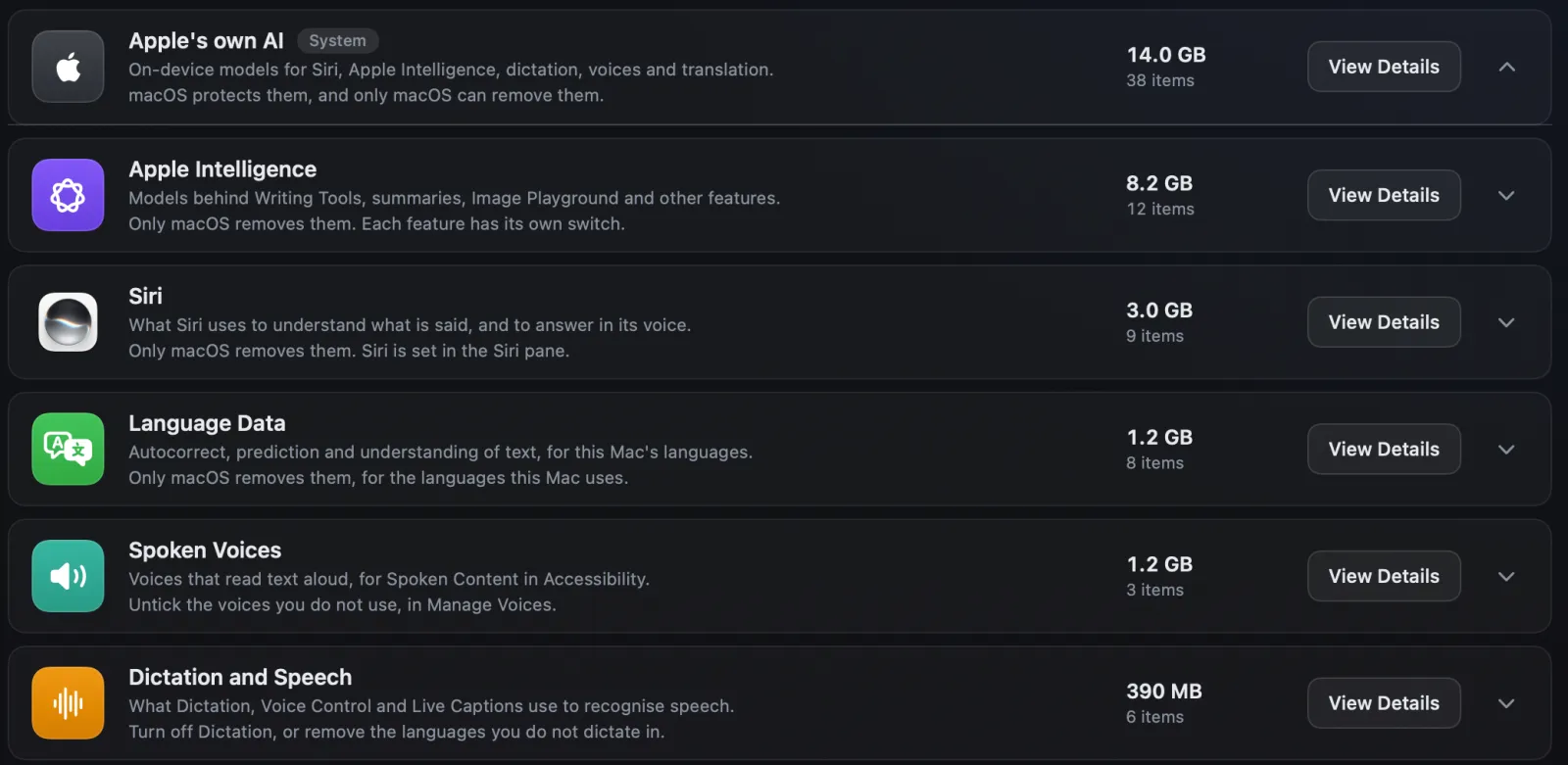
Apple's page on getting Apple Intelligence says it needs up to 14 GB of storage on Macs with M3 or later and at least 12 GB of memory, and up to 8 GB on other Macs that support it. MacRumors measured more than 20 GB on one Mac running macOS 27.
What Apple does not offer is a way to remove them. Its
macOS 27
guide has switches for individual features, such as Siri and message summaries, but no single
Apple Intelligence switch, and no Apple page we found says that turning features off deletes the
models. On our test Mac they sit in /System/Library/AssetsV2, which System Integrity
Protection guards. Third-party tools
that claim to remove them have appeared; Apple does not support them, and we have not tested
them.
How Strata's AI Data Sweeper helps
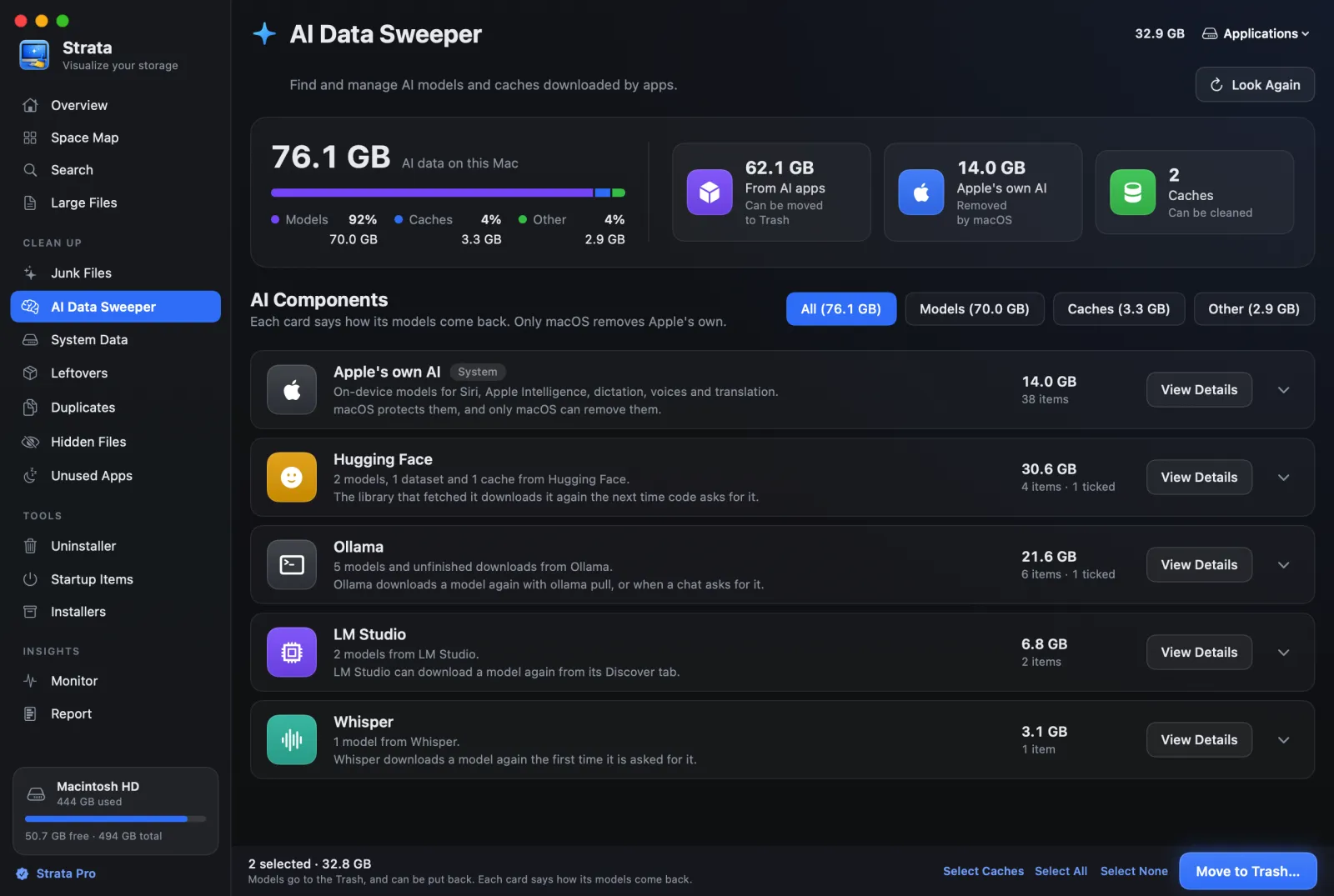
Strata's AI Data Sweeper reads the usual folders of Ollama, LM Studio, Hugging Face, Jan,
GPT4All, Whisper and other tools, plus any folder in ~/.cache that holds model
files (not yet Comfy Desktop's ~/ComfyUI-Shared, Jan's MLX models or the App Store
version of MacWhisper), and shows one card per tool with each model's size and a line on how it comes
back, or for Ollama 0.40 and later, how it goes. For Ollama it reads the manifests, so models
appear by name rather than by hash; before Ollama 0.40, a shared layer moves only when every
model that uses it is chosen. For Hugging Face it counts the
files a model keeps in the cache's shared blobs folder with that model, and moves
such a file only with the last model that uses it.
Whatever you choose goes to the Trash, where Put Back can return it. Apple's own models are shown
so you can see the space, and never moved. Our
step-by-step guide walks through the AI Data Sweeper,
which is part of Strata Pro, included in every download's first 14 days. Strata's System Data
room also gives AI models a part of their own, since Storage settings counts the models an app
keeps in your Library folder as System Data, and those in a folder of their own, such as
Ollama's, may count as Documents instead.
One exception to moving models to the Trash came with Strata 1.0.20. With Ollama 0.40 or later, Strata lists Ollama's models
with their sizes and leaves removing them to Ollama: each row's Copy
Command copies ollama rm and the model's name, to paste in Terminal while
Ollama is running. Moving
an Ollama 0.40 model's files would leave its manifests-v2 entry pointing at nothing,
which stops Ollama clearing unused layers when it starts and stops ollama rm
removing that model. If a model was removed that way with Strata 1.0.19, Put Back returns what
Strata moved, or pulling the model again repairs the entry.
Frequently asked questions
Where are Ollama models stored on a Mac?
In ~/.ollama/models, a hidden folder in your home folder: the weights as files named by their hash under blobs, and a small manifest per model under manifests and, since Ollama 0.40, manifests-v2. To keep them elsewhere, set OLLAMA_MODELS with launchctl setenv and restart the Ollama app.
Does ollama rm free disk space?
Yes, for the parts no other model uses. Ollama deletes the model's manifest and every layer only that model needed. A layer another model still uses stays until that model is removed too. Ollama must be running for ollama rm to work.
Can I delete files in ~/.ollama/models/blobs by hand?
It is not a good idea. Blobs are named by hash, several models can share one, and deleting the wrong one breaks a model you still use. Use ollama rm, which knows which layers are shared.
Where does LM Studio store models on a Mac?
In ~/.lmstudio/models, for installs since LM Studio 0.3.6 (January 2025). If you used LM Studio before then, your models may still be in ~/.cache/lm-studio/models, which the update did not move. The folder can be changed in My Models.
How do I clear the Hugging Face cache on a Mac?
Install the hf command and run hf cache ls to see what is cached, hf cache rm with a repo to remove it, and hf cache prune to clear unused revisions, unfinished downloads and shared files nothing uses. The old huggingface-cli commands were removed in 2025.
Can I delete Apple Intelligence models on a Mac?
Not through any route Apple documents. Apple says Apple Intelligence needs up to 14 GB on some Macs and up to 8 GB on others. On our test Mac, macOS keeps them in /System/Library/AssetsV2, a folder System Integrity Protection guards, and macOS 27 has switches for individual features but none that Apple says removes the models.
Find every AI model on your Mac
Strata finds the AI models on your Mac, names them, and moves the ones you are done with to
the Trash, where Put Back can return them. With Ollama 0.40 and later, its models are listed
with their sizes and left to Ollama, with the ollama rm command ready to copy. It
also maps the rest of your disk, so you can see what else is filling it.
The scan, the map and search are free forever. Every download starts with 14 days of Strata Pro, removing up to 40 GB.