What idleassetsd is, and how Aerial wallpapers can fill a Mac's disk
idleassetsd is the part of macOS Sonoma and Sequoia that downloads Aerial wallpapers and screen savers. When its downloads fail, the aborted files can pile up in a temporary folder only root can read, out of sight of Finder and of every app you run; one Mac collected about 221 GB. Here is how to tell whether yours is affected, how to check without your shell getting in the way, and how to stop it.
Key takeaways
- idleassetsd is the helper in macOS Sonoma and Sequoia that downloads the videos behind Aerial wallpapers and screen savers.
- Its downloads in progress go to root's temporary folder, which only root can open. When downloads keep failing, the aborted files can add up to over 200 GB there.
- The obvious command to check,
sudo duwith a*in the path, fails in zsh before sudo even runs. Let root expand the path instead. - To stop it, choose a wallpaper and a screen saver that are not Aerials, stop idleassetsd, then clear the folder.
- macOS 27, which we tested on, has no idleassetsd: its Aerials come from a wallpaper extension instead.
How we tested: everything we measured comes from one MacBook Air (M2, 512 GB)
on macOS 27.0.1, on 8 October 2026, with read-only commands and no administrator password:
ls, du, xattr, the shells' own path expansion, and a scan
of the whole disk in Strata 1.0.20. We did not run the sudo commands below, since
each asks for the Mac's administrator password, and macOS 27 has no idleassetsd to test them on.
The reports of the problem we link come from Macs running idleassetsd; the one that names a
version is on macOS 15.7.1.
What idleassetsd is
idleassetsd is the background process that macOS Sonoma (14) and Sequoia (15) use to fetch the large files behind their idle-time visuals: the Aerial wallpapers and screen savers, the slow videos of landscapes, cities, oceans and Earth. Apple's manual page for it says the TVIdleServices framework uses it for "asset downloading and privileged operations", and that it is not meant to be run by hand.
If your free space drops by gigabytes at a time while you use an Aerial on Sonoma or Sequoia, idleassetsd is a likely suspect, and the check below takes a minute. An Aerial is downloaded when you choose it: Apple's Wallpaper settings guide shows a download arrow beside one that is not on the Mac yet, and says you click it to download and use it. Each video is large: the one Aerial on our Mac takes 445 MB.
On macOS 26 and 27
On macOS 26 and 27, a wallpaper extension downloads Aerials instead. Our Mac, on macOS
27.0.1, has no idleassetsd at all: no program, no launch job and no manual page. The download
record macOS keeps on its one Aerial video names WallpaperAerialsExtension, in
October 2025, when the Mac ran macOS 26.0.1, and Apple's developer tools on this Mac carry
idleassetsd's manual page for macOS 14 but not for 26 or 27. The folder idleassetsd used is still
on our Mac, though, with no videos in it. If you upgraded from Sonoma or Sequoia, what it
downloaded may still be there, so the checks below are worth a minute.
Where Aerial videos are kept
On Sonoma and Sequoia, idleassetsd keeps finished videos in a folder you can look inside, and downloads in progress in one only root can. Newer macOS keeps them in your Library folder.
| Folder | What is in it | Who can open it | On our Mac |
|---|---|---|---|
/Library/Application Support/com.apple.idleassetsd/Customer | Finished videos, on macOS 14 and 15 | Everyone; removing them needs an administrator | No videos |
/private/var/folders/zz/…/T/com.apple.idleassetsd | Downloads in progress, and aborted ones, on macOS 14 and 15 | Only root | Not readable without a password |
~/Library/Application Support/com.apple.wallpaper/aerials | Your account's videos, where macOS 26 and later keep them, with thumbnails and a list of Aerials | You | One video of 445 MB, and 12 MB of thumbnails |
The downloads nobody can see
In July 2026, a report on the issue tracker of Mole, another Mac cleaner, described a Mac on
macOS 15.7.1 where idleassetsd had got stuck re-downloading its 4K videos and left hundreds of aborted temporary files behind,
each about 1 GB, named CFNetworkDownload_*.tmp: about 221 GB in all
(Mole issue 1253). On
29 September 2026, a developer found 78 GB in the same folder and changed
their own disk
tool to find it; the tool stops idleassetsd before clearing the folder, to keep it from
refilling. Apple has not said why the downloads fail.
Ordinary tools miss these files because every account on a Mac has its own temporary folder
under /private/var/folders, and root's is open to root alone. On our Mac that folder
is marked drwx------ and owned by root, and asking for its size as ourselves gets a
refusal:
du -sh /private/var/folders/zz/zyxvpxvq6csfxvn_n0000000000000/T
du: /private/var/folders/zz/zyxvpxvq6csfxvn_n0000000000000/T: Permission denied
So Finder, du without sudo, and every app you run see only that the
disk is fuller than the folders they can open account for. On a disk that is
filling up for no clear reason, that
difference is the clue.
How to check your Mac
Start with the finished videos, which need no password:
du -sh "/Library/Application Support/com.apple.idleassetsd/Customer" \
  ~/Library/Application\ Support/com.apple.wallpaper/aerials
du counts in binary units, so its figures read a little lower than Finder's.
The downloads in root's temporary folder need sudo, and here the obvious command,
sudo du -sh /private/var/folders/zz/*/T/com.apple.idleassetsd, goes wrong. In zsh,
the default shell on a Mac, it stops before sudo runs:
zsh: no matches found: /private/var/folders/zz/*/T/com.apple.idleassetsdYour shell expands the * as you, before handing the command to
sudo, and you cannot look inside root's folders to find a match. In bash the
pattern is passed on unexpanded, and du looks for a path with a literal
* in it. The developer above made the same point: the path has to be resolved as
root. So run the whole command as root:
sudo sh -c 'du -sh /private/var/folders/zz/*/T/com.apple.idleassetsd'It asks for your password, then looks for the folder in the temporary folders of macOS's own accounts, root's among them. A gigabyte or so can be a single download under way; several gigabytes or more means aborted downloads are piling up. "No such file or directory" means there is no such folder, which is the good answer.
How to stop it and get the space back
- Stop new downloads. In System Settings, open Wallpaper and choose a wallpaper that is not an Aerial; Shuffle Aerials counts as one. Then open Screen Saver and choose one that is not an Aerial either.
- Stop the download under way. In Terminal, run
sudo killall idleassetsd. The developer's tool above does this first, to keep the folder from refilling while you clear it. - Remove the aborted downloads. Run
sudo sh -c 'rm -rf /private/var/folders/zz/*/T/com.apple.idleassetsd', exactly as written: it removes only folders namedcom.apple.idleassetsdinside those temporary folders. Delete nothing else under/private/var/foldersby hand; macOS and your apps keep caches and working files there. - Optionally, remove finished videos you do not use. In Finder, choose Go,
then Go to Folder, enter
/Library/Application Support/com.apple.idleassetsd/Customer, and move the videos there to the Trash; Finder asks for an administrator's password. They are named by code rather than by place, so removing them all is simplest: an Aerial that is not on the Mac shows the download arrow again, and is downloaded when you choose it. Empty the Trash to get the space back.
Snapshots can hold on to deleted files for a while. If the free space does not come back after you empty the Trash, purgeable space explains why, and how to clear it.
What Strata shows, and what it cannot
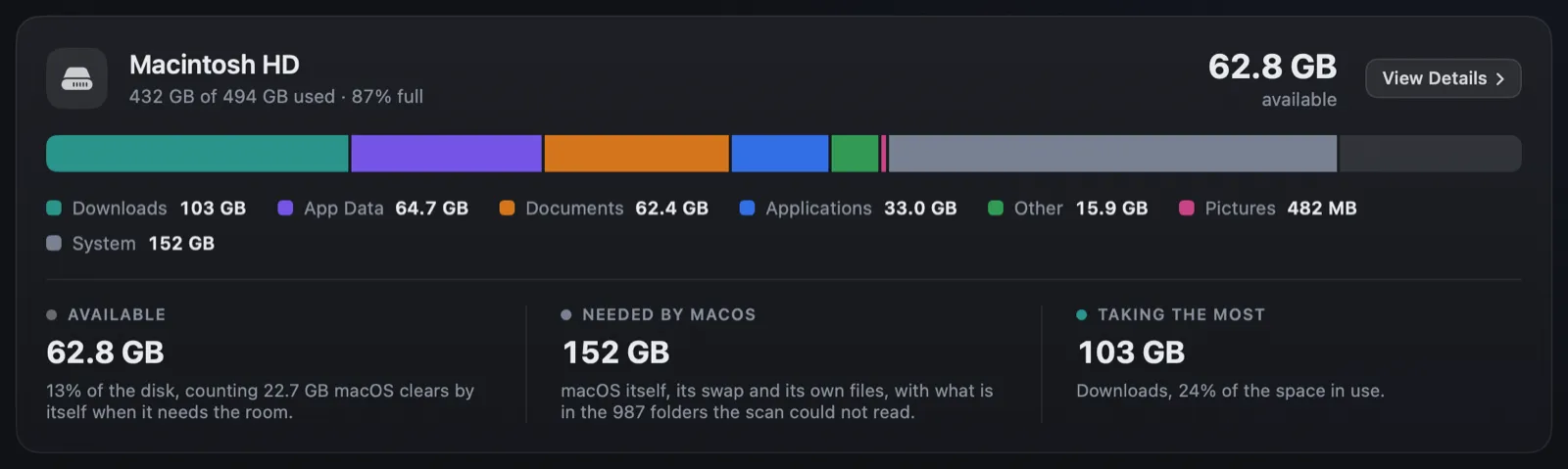
Strata cannot see inside root's temporary folders either. Full Disk Access does not open them, because they belong to root, and Strata never asks for your password, so it can neither measure these downloads on their own nor remove them. What it does is leave none of the disk out. After a scan of the whole disk, it adds the space the disk uses beyond what the scan could read to the Overview's disk bar as part of Needed by macOS, and says how many folders it could not read, as in the picture at the top. If that figure is far larger than you expect, and you use Aerials on Sonoma or Sequoia, root's temporary folder is worth the check above.
The Aerial videos in folders it can open appear in Strata's Space Map like any other folder,
such as ~/Library/Application Support/com.apple.wallpaper. For what else hides in the
grey part of Storage settings, see what System Data is on a
Mac.
Frequently asked questions
What is idleassetsd on a Mac?
A helper in macOS Sonoma and Sequoia that downloads the videos behind Aerial wallpapers and screen savers. Apple's manual page says the TVIdleServices framework uses it for asset downloading and privileged operations, and that it is not meant to be run by hand. macOS 27, which we tested on, has no idleassetsd.
Is it safe to delete com.apple.idleassetsd?
The developer who found 78 GB of downloads in root's temporary folder changed their disk tool to stop idleassetsd first, then empty that folder. The finished videos in idleassetsd's Customer folder can go to the Trash too: an Aerial that is not on the Mac shows a download arrow again, and is downloaded when you choose it. Delete nothing else in /private/var/folders.
Why does du not show the idleassetsd downloads?
They are in root's temporary folder, which only root may open, so du run as you reports Permission denied. Running it with sudo is not enough in zsh, because zsh expands the * in the path as you before sudo starts. The section How to check your Mac gives a command that works.
How do I stop Aerial wallpapers from downloading?
In System Settings, choose a wallpaper that is not an Aerial (Shuffle Aerials counts as one), then a screen saver that is not an Aerial either. Apple's guide shows that an Aerial is downloaded when you choose it.
Can Strata delete these files?
No. They belong to root, and Strata never asks for your password. Strata counts the space the disk uses beyond what it could read as part of Needed by macOS, says how many folders it could not read, and shows the Aerial videos in folders it can open in its Space Map.
See where your disk really goes
Strata scans the whole disk in one pass, shows what is yours, what apps keep and what macOS needs, and counts what it cannot read rather than leaving it out.
The scan, the map and search are free forever. Every download starts with 14 days of Strata Pro, removing up to 40 GB.