The best free Mac cleaner in 2026, and what free really gets you
There is no single best free Mac cleaner, because free means one of three things: free for good, free for a while, or free only to look. macOS's own Storage settings, OnyX, AppCleaner, PureMac and Mac Sai are free for good. Most paid cleaners are free for a while or only to look: CleanMyMac for a 7-day trial, DaisyDisk's trial for scanning but not deleting, BuhoCleaner for its first 3 GB of removals. We make Strata, the Mac disk cleaner, and it is a mix: finding and seeing are free for good, while removing needs Strata Pro, $19.99 once, after a 14-day trial. Here is what each one really does for free, from its maker's own pages on 23 November 2026.
Key takeaways
- Every Mac already has a free cleaner: Storage settings makes three recommendations and lists big files by category, and when room runs low, macOS itself clears the caches and logs it judges safe.
- AppCleaner, OnyX, PureMac, Mac Sai, GrandPerspective and OmniDiskSweeper are free for good, and Pearcleaner is free too but on hold since May 2026.
- Most paid cleaners are free only in part, or only for a while: CleanMyMac's trial lasts 7 days, DaisyDisk's trial cannot delete, BuhoCleaner's free removals stop at 3 GB, and CCleaner keeps photo analysis and automatic browser cleaning for Professional.
- Strata, which we make, is free for finding, from the scan and the Space Map to Search and how much junk is safe to clean, while removing needs Strata Pro.
- DaisyDisk, CleanMyMac's Large & Old Files and some of PureMac's clean-ups skip the Trash, by their own documentation, so check where a cleaner puts what it removes.
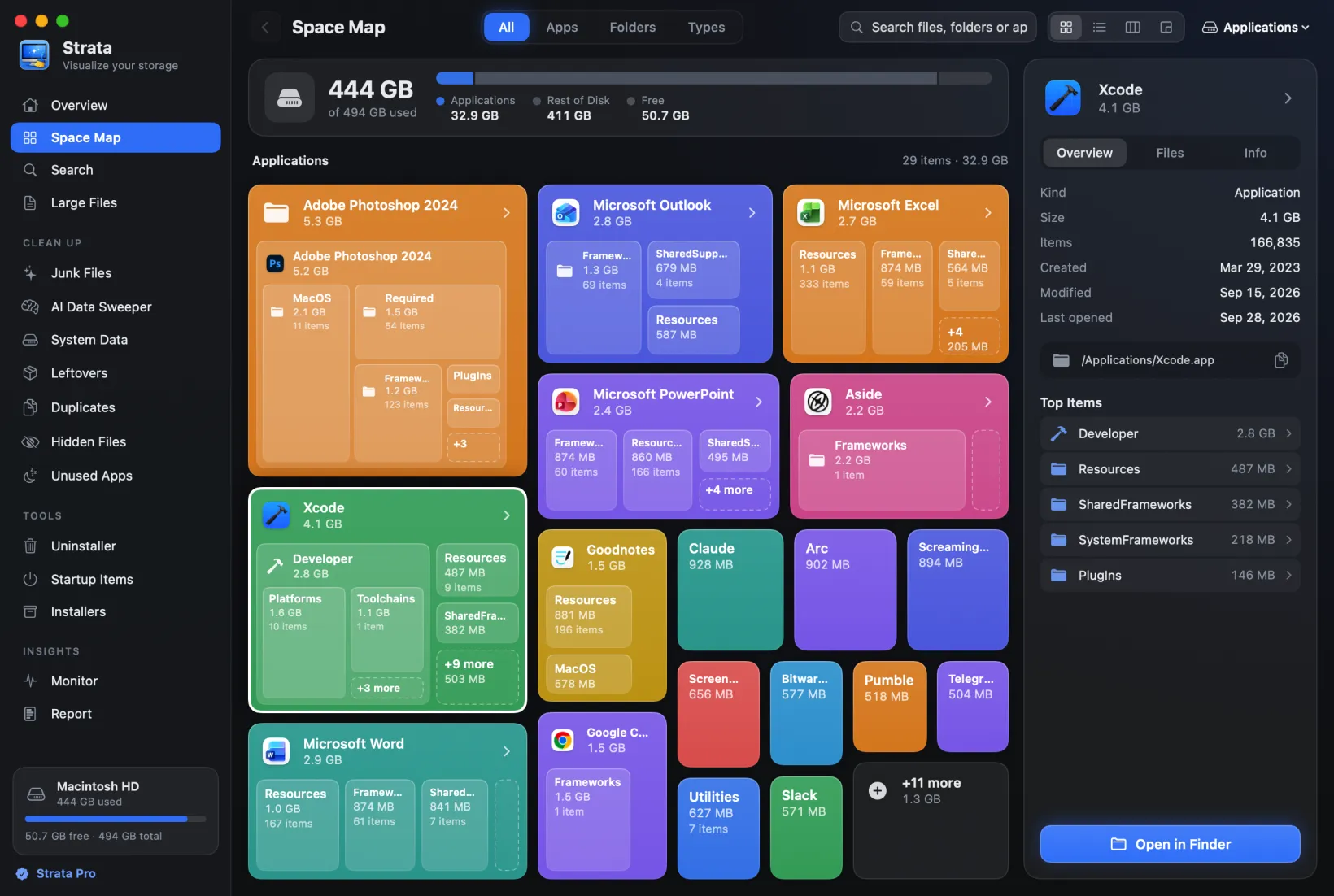
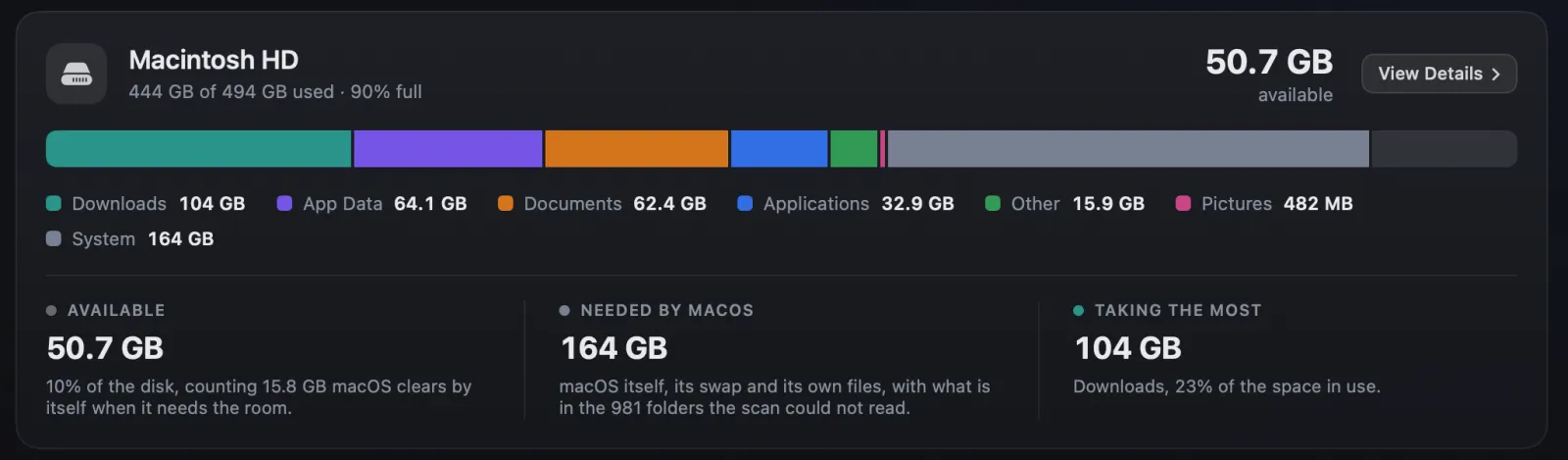
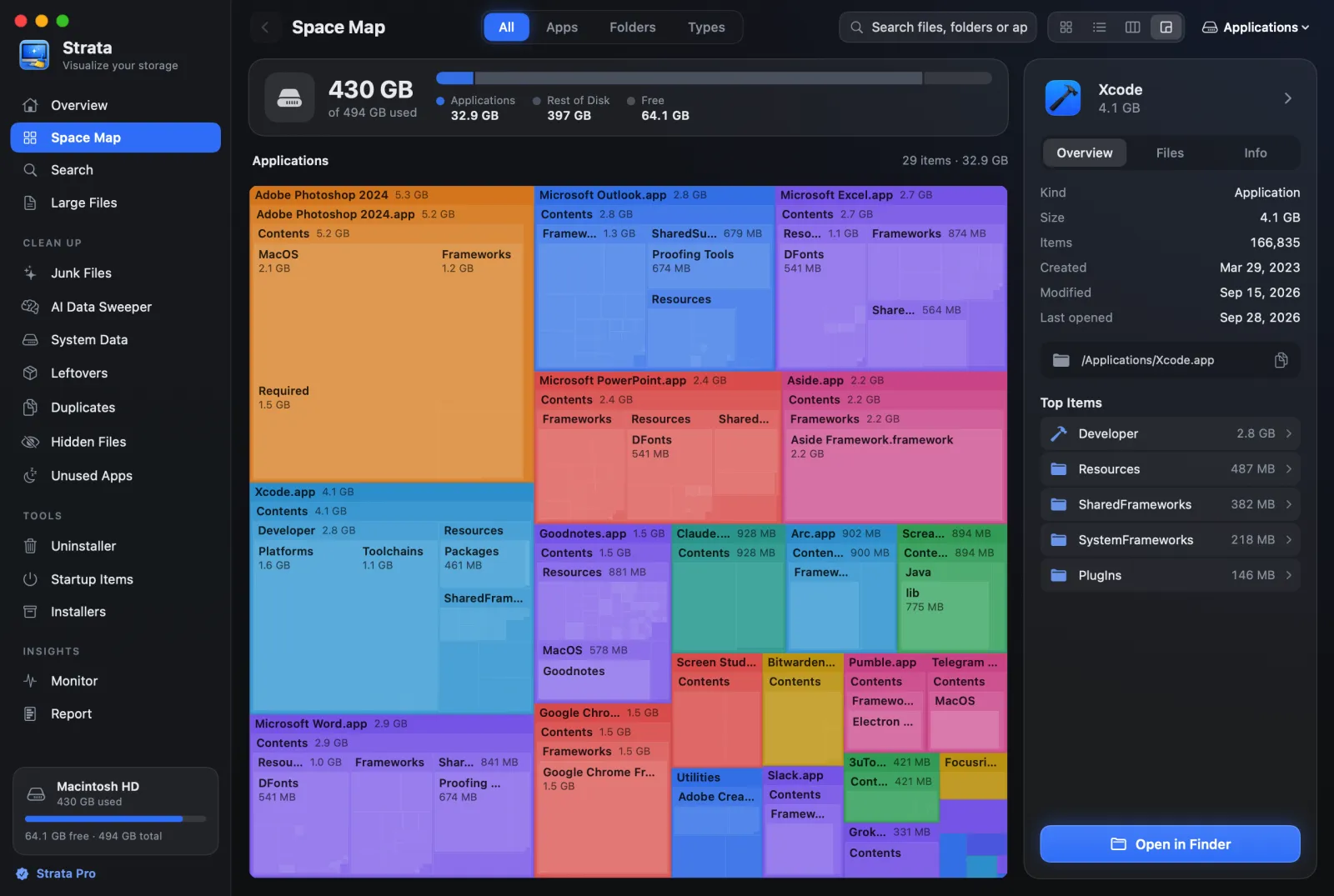
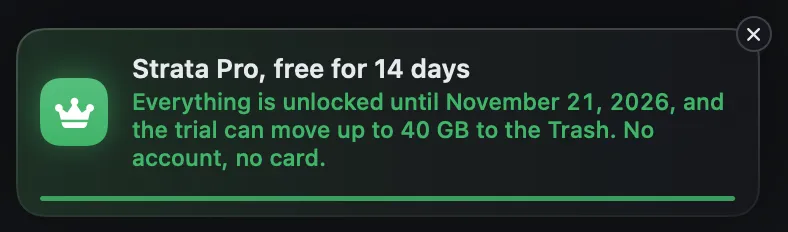
How we checked: we make Strata, so weigh what we say about it. We read every other app's own website, guide, release notes or README on 23 November 2026, searched the US Mac App Store for each name that day, and ran none of them. Apple's tools are described from its Mac User Guide for macOS 27, and Strata's from the code and documentation of version 1.0.45, released on 14 November. Strata's pictures are real captures from versions 1.0.30, 1.0.33 and 1.0.37, named in each caption; the one in the closing box is from 1.0.19.
The short answer: which free Mac cleaner for which job
Start with Storage settings, which every Mac already has, then choose by job. A paid cleaner's free version is mostly a way to look before you buy.
- Storage settings: recommendations and lists of big files, built in.
- To find what is big: a free map (Strata's free version or GrandPerspective) or OmniDiskSweeper's list.
- To uninstall: AppCleaner, 3.7 on macOS 15 or later and 3.6.8 on macOS 10.14 to 15.6.
- To maintain macOS: OnyX, in the build made for your version.
- To clean with one open-source app: PureMac or Mac Sai, once you know which of their tools skip the Trash.
What each one really does for free
Read from each maker's own pages on 23 November 2026; prices and trials change often, so check them before you rely on one. Where a cell says not stated, the maker's pages do not say. On a phone, swipe the table sideways for where each one puts what it removes, and what it needs.
| App | Free for good? | What free gets you | Where removals go | Needs |
|---|---|---|---|---|
| Storage settings | Yes, built in | Three recommendations; big files and downloads by category, with Delete and Show in Finder | Apple's guide does not say | Any Mac (guide for macOS 13 to 27) |
| Strata | Yes, for finding | Scan, Space Map, Search, Large Files, Unused Apps, the Monitor, the junk safe to clean; removing needs Strata Pro | The Trash, with Put Back | macOS 13 |
| AppCleaner | Yes | Uninstalling an app with the files it spread | Not stated | macOS 15 for 3.7, 10.14 for 3.6.8 |
| Pearcleaner | Yes, source-available | Uninstalling, orphaned files, Homebrew and package managers | Not stated in its README | macOS 13 to 26; on hold |
| OnyX | Yes | Maintenance: caches, databases and indexes, Finder, Dock and Safari settings | Not stated | One build per macOS |
| PureMac | Yes, MIT licence | Junk, leftovers, uninstalling, duplicates, scheduled cleaning | Trash for uninstalls, leftovers and duplicates; some clean-ups permanent | macOS 13 |
| Mac Sai | Yes, BSD licence | Junk, uninstalling, duplicates, a malware scan, a treemap | The Trash by default; its Shredder erases | macOS 14 |
| GrandPerspective | Yes, GPL ($2.99 on the App Store) | A treemap of any folder | Not stated | macOS 14 for 3.8.1, 11 for 3.7.2 |
| OmniDiskSweeper | Yes | Files listed largest first | The Trash | macOS 11 to 26 |
| CleanMyMac | No: a 7-day trial | Every tool, for seven days | Large & Old Files bypasses the Trash | macOS 11 |
| DaisyDisk | A trial that scans | Scanning and the map; no deleting | Permanent, with 5 seconds to cancel | macOS 10.13 |
| BuhoCleaner | Up to 3 GB removed | Scanning, and up to 3 GB of removals | Uninstalling is irreversible, per its guide | macOS 10.10 |
| CCleaner for Mac | Yes, a free tier | Clutter, duplicates, uninstalling, startup items | Not stated | Page lists 10.12 to 13 |
Start with what macOS already does for free
Apple's own cleaner is Storage settings: choose the Apple menu, then System Settings, General and Storage. Apple's guide to optimising storage space lists three recommendations, each one a button:
- Store in iCloud moves Desktop and Documents to iCloud Drive, photos and videos to iCloud Photos and messages to iCloud, then keeps only recently opened files on the Mac when it needs room.
- Optimize Storage removes Apple TV movies and shows you have watched, and keeps only recent email attachments when space is needed.
- Empty Trash Automatically erases anything that has sat in the Trash for more than 30 days.
On the same page, Apple lists what macOS removes by itself when space is needed. It "clears caches and logs that are safe to delete", among them Safari's website data, interrupted downloads, staged macOS and app updates and temporary database files. So clearing caches like these by hand brings forward what macOS would do anyway once it needed the room. Large files and apps you no longer use are different: macOS leaves those to you.
Each category with an Info button opens a list. In Documents, buttons gather large files and downloads, and File Browser shows how much each folder takes. Apple's page on finding and deleting files says to select a file, then click Delete, or Show in Finder to see it there.
Apple's guide does not say whether Delete in Storage settings goes through the Trash. For a way back, choose Show in Finder and press Command Delete there. Apple's Trash guide says items are not deleted until you empty the Trash, and until then Put Back, in Finder's File menu, returns one to where it was.
What Storage settings will not do is open System Data. Apple's guide to the Storage settings categories says plainly, "You can't manage the contents of this category." Its Applications list can delete an app, but the guide says nothing about the files that app leaves in your Library. Our guide to what System Data holds picks up from there.
Mac cleaners that stay free
These cost nothing to keep using. On 23 November we searched the Mac App Store for each name: only GrandPerspective is sold there, and apps with names like AppCleaner's come from other developers.
AppCleaner: free uninstalling
FreeMacSoft's AppCleaner does one job. Drop an app onto its window and it finds the small files the app spread around the system, ready to delete with the app. Its site names no price, only a Donate link, and says AppCleaner deletes the files safely, without saying whether they go to the Trash.
Version 3.7 is for macOS 15 and later. Its update feed dates it 22 September 2026 and gives the minimum as 15.6, and its release notes say it added support for macOS 27. Version 3.6.8 stays available for macOS 10.14 to 15.6. AppCleaner beside Strata's Uninstaller compares how each decides what belongs to an app.
Pearcleaner: free, but on hold
Pearcleaner was inspired by AppCleaner and grew a toolbox around it: orphaned file search, managers for Homebrew, installer packages and plugins, and App Lipo, which strips code for other processors out of universal apps. It is free and source-available under Apache 2.0 with the Commons Clause, which forbids selling it.
But its README has read "On Hold" since 11 May 2026, as the developer no longer has a Mac for personal development. Its last build, 5.4.3, dates from 26 November 2025, and the README lists support for macOS 13 to 26 and names itsalin.com as the developer's only legitimate website. Pearcleaner set against Strata has the details.
OnyX: free maintenance, one build per macOS
Titanium Software's OnyX is free, with a link for donations. Its maker calls it a multifunction utility. It verifies the structure of system files, clears caches, rebuilds databases and indexes, and adjusts settings in Finder, the Dock and Safari. That makes it a maintenance toolbox rather than a way to see where your space went.
Each macOS gets its own build. The newest, OnyX 5.1.2 of 2 November 2026, runs only on macOS 27 with Apple silicon, and 5.0.6, for Tahoe, is no longer updated. The site's advice on choosing is brief: "Use the correct version".
PureMac: an open-source cleaner, careful about the Trash
PureMac is free under the MIT licence, needs macOS 13 or later, and says it sends no telemetry. Version 3.3.0 came out on 19 November 2026. It clears system and developer junk, finds what deleted apps left behind, uninstalls apps, finds exact duplicates and can clean on a schedule.
Its README says plainly which paths use the Trash: uninstalls, orphaned files and exact
duplicates. Category clean-up, scheduled cleaning, Docker and Xcode runtime clean-up and several
other paths "can permanently delete data",
so review what is selected before you press the button. Install it with Homebrew,
brew install --cask puremac, or from its GitHub releases.
Mac Sai: an open-source suite that uses the Trash first
Mac Sai calls itself a free alternative to CleanMyMac, with no subscription, no in-app purchases and no telemetry, under the BSD licence. Its 22 modules include junk clean-up, an uninstaller that looks for leftovers, duplicates, a malware scan and a treemap. Removals go to the Trash by default and Clean History puts a whole clean back, though its Shredder has permanent erase modes and another module empties the Trash.
Version 1.32.0 came out on 12 November 2026. Its README gives macOS 14 or later, and it
installs with brew install --cask mac-sai or from its GitHub releases.
Free ways to see what is big
None of these is a cleaner in the usual sense: they show where the space is. GrandPerspective draws a folder as a tree map, each file a rectangle with an area in proportion to its size, and can delete files and folders from that view. It is open source under the GPL and free from SourceForge. The Mac App Store sells the same app for $2.99, a price its developer says covers Apple's developer programme and other costs. Version 3.8.1 needs macOS 14, and the site says 3.7.2, still on SourceForge, supports macOS 11, 12 and 13.
The Omni Group's OmniDiskSweeper lists your files from largest to smallest and lets you move them to the Trash or open them. Omni's notes for version 1.16 say it is supported on macOS 11 through macOS 26, so test it before relying on it under macOS 27. Our comparisons with GrandPerspective's treemap and OmniDiskSweeper's list go into each.
Strata's free version, which we make, maps any drive or folder in four views and lists its biggest files, with no time limit. Removing what it finds needs Strata Pro, as the section on Strata explains.
Paid cleaners' trials and free tiers, and where each one stops
Many lists of free Mac cleaners rank apps whose free part is a trial or a scan. Both can help, as long as you know where the line falls before you start.
CleanMyMac: seven days of everything
MacPaw's CleanMyMac offers "Try 7 Days Free" on its site, with every tool unlocked. On the Mac App Store the download is free, and its listing says the plan you choose is charged automatically after the trial; its plans there include $39.99 a year and $9.99 a month. It needs macOS 11, and version 5.7.4, dated 6 November 2026 on MacPaw's site, is the latest.
The site's FAQ answers "Is this paid software?" with a yes, and mentions a free version to test the features. It does not say what that version can still do once the seven days are over, so plan on paying if you want to keep cleaning with it. One detail matters during a free week: MacPaw's guide says its Large & Old Files tool removes files "bypassing the Trash". CleanMyMac or Strata covers the rest.
DaisyDisk: a trial that scans, a licence that deletes
DaisyDisk costs $9.99 once for up to five personal Macs, and its own download needs macOS 10.13 or later. Its free trial, activated with an email address, scans disks and folders, draws the sunburst map and previews files. It tells you how much hidden and purgeable space there is, but only a licence reveals the hidden space or purges the purgeable.
By DaisyDisk's own comparison, the trial cannot delete what it found, show it in Finder, scan as an administrator or scan cloud storage, and it shows reminders to buy now and then. Its licence agreement says the trial has no time limit but is not a free version: once you have tried it, you should buy a licence or remove the app. The copy on the Mac App Store, also $9.99, has no trial. DaisyDisk's editions page adds that this copy only detects hidden and purgeable space and cannot scan as an administrator, and that its buyers can get the stand-alone licence free.
Once you buy, the guide says DaisyDisk "permanently removes files and folders" instead of moving them to the Trash, with five seconds to cancel. DaisyDisk next to Strata compares the two maps.
BuhoCleaner: free up to 3 GB
Dr.Buho's BuhoCleaner is a free download. Its trial guide and its wiki put the same cap on it: up to 3 GB of files removed through the app, after which you delete by hand or buy a licence. They disagree on the rest. The guide says one-click uninstalling and junk clean-up need a licence, while the wiki says the free version has the same tools as the paid one, with only the 3 GB limit.
The wiki was last updated on 23 June 2026. Read on 23 November, it lists its plans at $19.99 a year or $25.99 for life, for one Mac, and says BuhoCleaner runs on macOS 10.10 or later. Its uninstall guide calls removing an app "an irreversible action", and it is not on the Mac App Store. BuhoCleaner compared with Strata goes further.
CCleaner for Mac: a free tier with the basics
Gen Digital's CCleaner for Mac has a free version, for one Mac, that cleans clutter, finds duplicate files, uninstalls apps and manages startup items. Professional adds photo analysis, automatic browser cleaning, importing browser bookmarks and emptying the Trash automatically. Its latest release, 2.11.194, came out on 19 June 2026, but the system requirements on its page still stop at macOS 13 Ventura, so confirm it works on your version of macOS first. The page does not say whether it uses the Trash.
Where Strata fits: free to find, Strata Pro to remove
We make Strata, so here is exactly where its line falls. Once the trial is over, its Licence room sums up the free version in one line: "Maps and measures everything. Cleaning up needs Strata Pro." With no key and no time limit, the free version:
- scans any drive or folder, internal or external;
- draws the Space Map in all four views, with a file browser that renames, makes folders and moves files, since 1.0.41;
- searches the scan by name, kind or size, and lists the biggest files over a size you choose, up to 500;
- lists Unused Apps, and in the Uninstaller each app's leftovers, to look at;
- shows the Overview, with how much junk is safe to clean and what Optimize would do;
- runs the Monitor and the live readings in the menu bar;
- keeps Recently Removed, so a past removal can still be put back.
Strata Pro, $19.99 paid once, adds everything that removes: moving anything to the Trash, uninstalling apps with their leftovers and Optimize in one press. It also unlocks Startup Items, Installers, Report, Reveal in Finder, the Night theme and every Clean Up room but Unused Apps: Junk Files, the AI Data Sweeper, System Data, Leftovers, Duplicates, Hidden Files and Cloud Files. There is no subscription, and it never expires. A licence sold since 10 November 2026 is for one Mac at a time and moves to a new Mac free, and a refund within 14 days needs no reason.
The 14-day trial
Strata's first launch on a Mac begins the trial, with no account and no card to give. For 14 days it can move up to 40 GB to the Trash in all, counted as Finder counts. When it ends, Strata carries on as the free version, and anything the trial moved waits in the Trash, where Recently Removed can still return it.
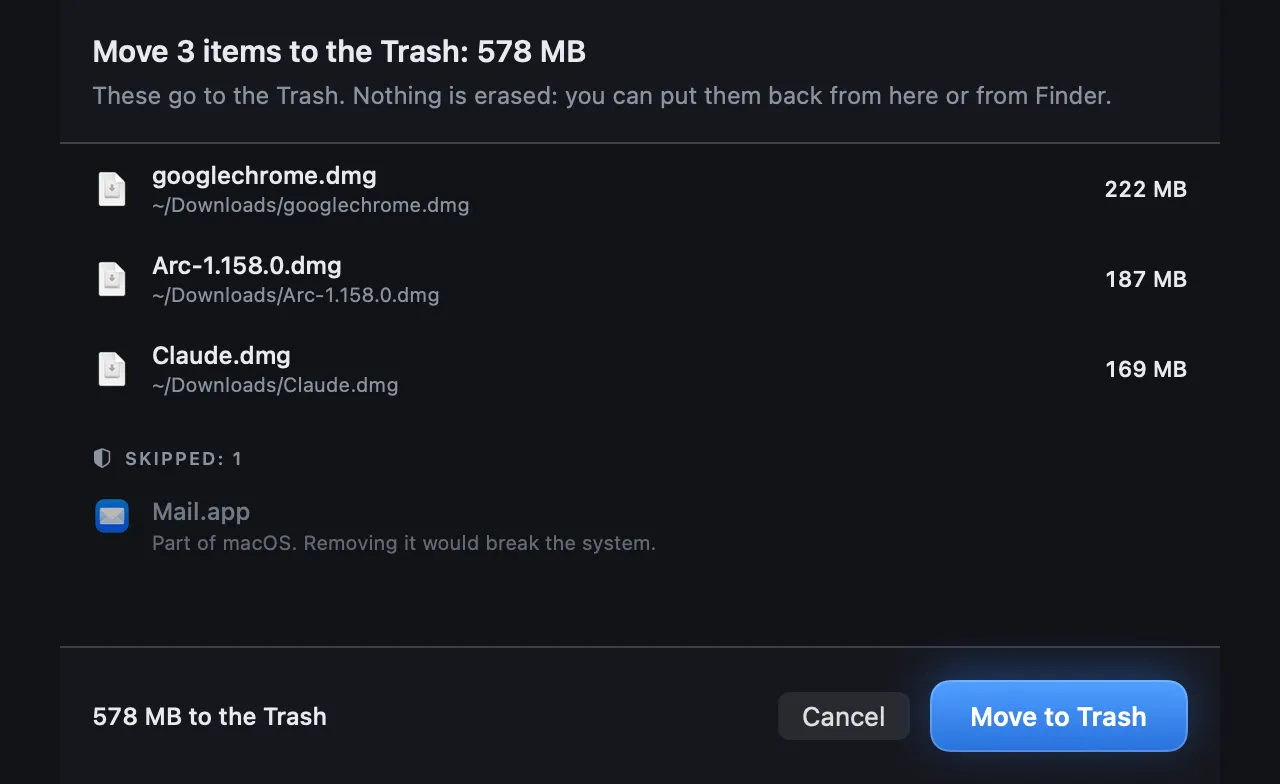
Whatever Strata removes, on the trial or with a licence, goes to the Trash, after a sheet that shows what will go and anything it refuses, with the reason. Strata never empties the Trash, and Recently Removed keeps 90 days of removals, up to the newest 500, for Put Back.
Free, the trial and Strata Pro lists every room on each side of the line.
A free clean-up, step by step
Put together, the free tools above make a clean-up that costs nothing. In this order:
- Take the recommendations you want. In Storage settings, Store in iCloud, Optimize Storage and Empty Trash Automatically are a button each. Check the Trash figure too: what waits there still takes space.
- See where the space went. Run a free map (Strata's free version or GrandPerspective) over your home folder or the whole disk, or open OmniDiskSweeper's list of the largest files. In Storage settings, File Browser gives a plainer view of the same question.
- Move what you are sure of to the Trash in Finder. Select it and press Command Delete. Until the Trash is emptied, Put Back in Finder's File menu returns it; Apple warns that anything emptied from the Trash is permanently deleted.
- Uninstall the apps you no longer use. AppCleaner gathers an app's files for you: version 3.7 on macOS 15 or later, 3.6.8 on macOS 10.14 to 15.6. Or drag the app to the Trash and find what it left by hand, as our guide to removing an app completely shows.
- Leave System Data and macOS's own folders alone. No tool here empties System Data in one go, and files removed at random from System or Library folders can stop apps, or macOS, from working.
Which free Mac cleaner should you choose?
If you would rather install nothing
Storage settings for its recommendations and the biggest files, and Finder's own Move to Trash, so Put Back stays open until you empty it.
If your Mac runs macOS 13 or 14
AppCleaner 3.6.8, PureMac, OnyX's build for your version and GrandPerspective, 3.7.2 on macOS 13; Mac Sai needs macOS 14.
If you want open source
PureMac or Mac Sai to clean, and GrandPerspective to see what is big.
Choose Strata Pro
if you want finding and removing in one window, with what will go shown first and Put Back after it. It costs $19.99 once, after a 14-day trial of everything, up to 40 GB moved.
Ready to pay for one app instead? Our roundup of 17 Mac cleaners, paid and free, weighs the subscriptions and one-time licences.
Frequently asked questions
What is the best free Mac cleaner?
It depends on the job: start with Storage settings, which every Mac has, then add a free tool for each task. To see where the space went, use a free map (Strata's free version or GrandPerspective) or OmniDiskSweeper's list of the largest files. For uninstalling there is AppCleaner, 3.7 on macOS 15 or later and 3.6.8 on macOS 10.14 to 15.6; for maintenance, OnyX; for one open-source cleaner, PureMac or Mac Sai. Most paid cleaners are free only to scan, for a short trial or up to a cap.
Is CleanMyMac free?
Not to keep using. CleanMyMac is paid software with a 7-day trial of all its tools. On the Mac App Store the download is free, and its listing says the plan you choose is charged once the trial ends; its plans there include $39.99 a year and $9.99 a month. MacPaw's own guide says its Large & Old Files tool deletes files permanently, bypassing the Trash.
Is there a free alternative to CleanMyMac?
Yes, if open source suits you: Mac Sai calls itself a free alternative to CleanMyMac, and PureMac is another free, open-source cleaner. For single jobs, AppCleaner uninstalls, OnyX maintains, and Storage settings or a free map such as GrandPerspective shows what is big. Strata's free version finds and measures what takes space; removing it needs Strata Pro.
Does macOS have a built-in Mac cleaner?
Yes: Storage settings, in System Settings under General. It recommends storing files in iCloud, optimising storage and emptying the Trash automatically, and lists large files and downloads with Delete and Show in Finder. When space is needed, macOS also clears caches and logs it considers safe to delete. It cannot open System Data, which macOS manages.
Is Strata free?
Partly, and for good. The free version scans any drive and shows the Space Map and its file browser, the Overview, Search, Large Files, Unused Apps, the Monitor, the menu bar and how much junk is safe to clean. Strata Pro, $19.99 once, adds moving things to the Trash, uninstalling, Optimize in one press, Startup Items, Installers, Report and every Clean Up room but Unused Apps. The first launch on a Mac starts a 14-day trial of Strata Pro, which moves up to 40 GB to the Trash and asks for no account or card.
Which Mac cleaners delete files without using the Trash?
By their own documentation, DaisyDisk removes files permanently instead of moving them to the Trash, and CleanMyMac's Large & Old Files bypasses the Trash. Several of PureMac's clean-ups can delete permanently, although its uninstalls, leftovers and duplicates go to the Trash, and Mac Sai, which uses the Trash by default, has a Shredder that erases. Strata and OmniDiskSweeper use the Trash. With any tool, files you move to the Trash in Finder yourself keep Put Back, in Finder's File menu, until the Trash is emptied.
Which free Mac cleaners support macOS 27?
OnyX has a build for it, 5.1.2, for Apple silicon, and AppCleaner 3.7's release notes say it added support for macOS 27. PureMac, Mac Sai and GrandPerspective give only a minimum, macOS 13, 14 and 14, and no maximum, though Mac Sai's notes for 1.27.1 fix a battery reading on macOS 27. Pearcleaner's README and Omni's notes for OmniDiskSweeper stop at macOS 26, CCleaner's page lists versions up to macOS 13, and BuhoCleaner's site says it is fully optimised for macOS 27, though its free version removes only 3 GB. Strata runs on macOS 13 or later, macOS 27 included; its free version finds and shows what takes space, and removing needs Strata Pro.
See what is filling your Mac, free
Strata's scan, Space Map, Search and Large Files are free with no time limit, and the Overview says how much junk is safe to clean. When you want it gone, Strata Pro moves it to the Trash with Put Back, for $19.99 once.