The BuhoCleaner alternative with a full 14-day trial and Put Back on every removal
For most people choosing a Mac cleaner, Strata is a better buy than BuhoCleaner. You can use all of it for 14 days and move up to 40 GB to the Trash, where BuhoCleaner's free version removes up to 3 GB. Every Strata removal waits in the Trash with Put Back, and its uninstaller grades each leftover before anything goes. Strata Pro is $19.99 once. On 10 November 2026, Dr.Buho's sale page charged $25.99 once, or $17.99 for a year, for one Mac.
Key takeaways
- Strata's trial is the whole app: 14 days with every room unlocked and up to 40 GB moved to the Trash. BuhoCleaner's free version removes up to 3 GB.
- Whatever Strata removes lands in the Trash first: a sheet shows it all beforehand, and the notice afterwards offers Put Back. BuhoCleaner's own guide calls uninstalling irreversible, and its guides do not say whether cleaned files go to the Trash.
- Each leftover is graded from Certain to Possible and compared with the apps you keep, so only the sure ones are pre-selected. With Keep its documents on, an app's container folders stay when they hold documents or databases.
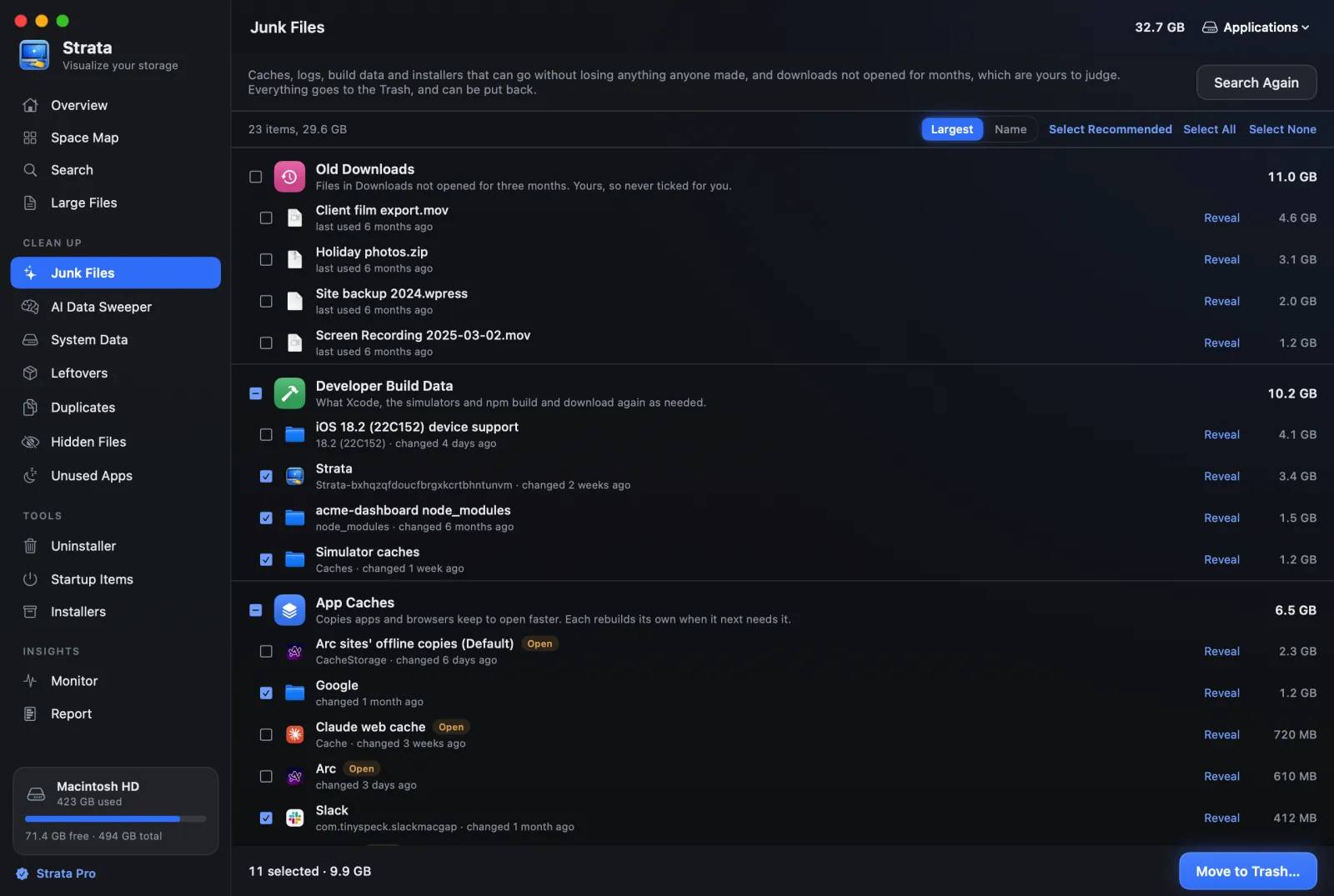
- Junk Files ticks only what nobody will miss, and every row says why. Caches of open apps and macOS's own are tagged and left alone, and Strata never empties the Trash.
- Strata Pro is $19.99 once. On 10 November 2026 Dr.Buho's sale page charged $25.99 once, or $17.99 for a year, for one Mac. BuhoCleaner also offers three Macs for $37.99 and 30-day refunds, and runs on OS X 10.10 or later.
Written by the maker of Strata. BuhoCleaner's facts come from Dr.Buho's product page, its user guide, wiki, refund policy, release notes and store, read on 10 November 2026. The quoted words and the main facts link to Dr.Buho's pages.
The short answer
BuhoCleaner does the usual cleanup jobs; its free version removes up to 3 GB. Strata lets you try every tool for 14 days on up to 40 GB. It sends every removal to the Trash, where Put Back can return it, and explains each leftover before an app goes. For most people that is the better buy, at $19.99 once.
- A full trial: every room for 14 days, on up to 40 GB.
- Removals wait in the Trash, with Put Back and 90 days of history.
- Every junk row says why it is or is not ticked, and open apps' caches are left alone.
- Leftovers are graded before an app goes, and its container folders can stay.
- One payment of $19.99, against $25.99 for BuhoCleaner's one-Mac lifetime licence on 10 November 2026.
BuhoCleaner and Strata side by side
| BuhoCleaner | Strata | |
|---|---|---|
| One Mac | $25.99 once, or $17.99 for a year, on its sale page, 10 Nov 2026 (wiki: $25.99 once, $19.99 a year) | $19.99 once |
| Several Macs | $37.99 once for 3 Macs; a business licence for 10 | Licences bought from 10 Nov 2026: one Mac at a time, moved at no charge; earlier ones: all your Macs |
| Updates | Free for life with a paid licence, by its trial guide | Bug fixes, security fixes and macOS compatibility updates at no cost, for good |
| Trying it | A free version that removes up to 3 GB, with no time limit named | Every room for 14 days, up to 40 GB moved; then the free version, where moving files to the Trash needs Pro |
| Refunds | 30 days, for direct purchases | 14 days, no reason needed |
| Where removals go | Uninstalling is "an irreversible action", per its guide; cleanups not stated | Always the Trash, with Put Back; Recently Removed lists up to 500 removals from the last 90 days |
| Junk | Flash Clean: system, app and browser junk, unused disk images, Xcode junk and the Trash | Junk Files reads your home folder: caches, logs, Xcode builds, package downloads, installers; each row explains its tick; the Trash is never emptied |
| Uninstaller | Leftovers, Large and Old, Incompatible, sources and vendors; custom routines for 100+ apps | 32 places searched; each leftover graded and cross-checked with other apps; container folders that hold documents kept |
| Duplicates | Identical files by MD5, with Smart Select, and similar photos | Identical contents in three passes; Select Extra Copies keeps one of each |
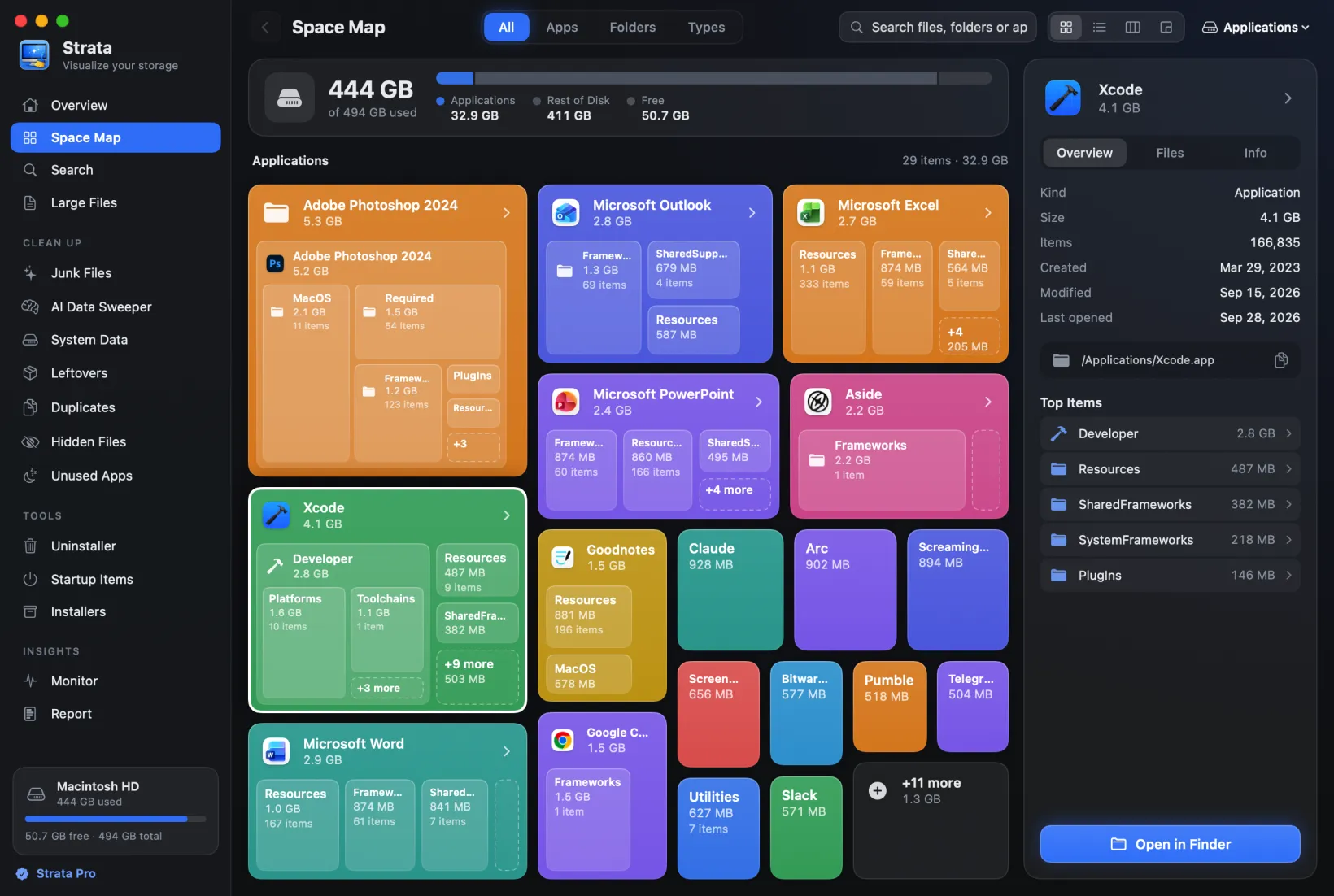
| Disk map | Disk Space Analyzer, in its Toolkit | Space Map in four views, free |
| Menu bar | RAM, disk, CPU load and temperature, fans, network | Free space; a panel with disk, processor, memory, battery, network and Optimize |
| Also | Shredder, Free Up RAM, Spotlight reindex, DNS flush | Optimize, AI Data Sweeper, System Data, Installers, Report |
| Needs | OS X 10.10 or later, Intel and Apple silicon | macOS 13 or later, Apple silicon and Intel |
A full trial first, then $19.99 once
Strata's trial is the whole app. From the first launch, every room is open for 14 days, and up to 40 GB can go to the Trash in that time, from whichever rooms you like. There is no account to make and no card to enter, and nothing renews when it ends.
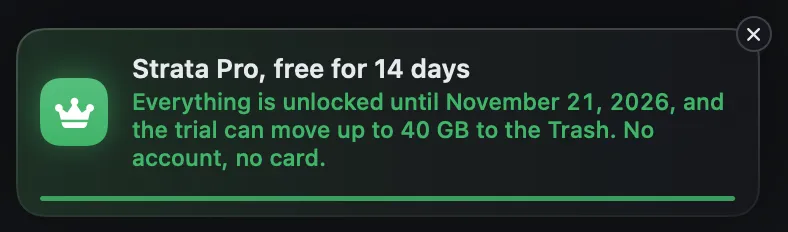
BuhoCleaner's free version works to a different budget. Dr.Buho's trial guide says it removes up to 3 GB of files, after which you delete by hand or buy a licence. We found no Dr.Buho page that gives the free version a time limit, and its wiki says no card is needed. Strata's 40 GB belongs to the 14 days, and after them, moving anything to the Trash needs Strata Pro.
After the trial, and what Pro adds
When the 14 days end, Strata becomes the free version, with no time limit. It still scans any drive and draws the Space Map in all four views. Search, Large Files, Unused Apps, the Monitor and the menu bar keep working, and you can still see what the Uninstaller and Optimize would do.
Strata Pro adds moving anything to the Trash, uninstalling with leftovers and Optimize. It also opens the Clean Up rooms (Junk Files, Duplicates, Leftovers, Hidden Files, System Data and the AI Data Sweeper), Startup Items, Installers and Report. It costs $19.99 once and never renews, and its bug fixes, security fixes and macOS compatibility updates cost nothing, now or later.
What BuhoCleaner costs today
Dr.Buho's store is a sale page at the moment, with crossed-out prices beside the ones it charges. On 10 November 2026 the sale page charged, tax included, $25.99 once for a one-Mac lifetime licence and $37.99 once for three Macs. A year's subscription for one Mac was $17.99, and the card does not say what it renews at. Dr.Buho's own wiki lists $25.99 once and $19.99 a year as its regular prices, and says discounts usually come around Halloween, Black Friday, Christmas and New Year.
Its paid licences include free upgrades for life, by the same trial guide, and Dr.Buho refunds direct purchases within 30 days. Strata refunds within 14 days, no reason needed.
Licences differ by date at Strata. Those sold since 10 November 2026 cover a single Mac at a time and move to a new Mac free. Earlier ones cover every Mac you own. A BuhoCleaner licence moves too, once you deactivate it on the old Mac.
Every removal waits in the Trash
Dr.Buho's guides show each tool's results for review before you press Remove, and since version 1.9.8 BuhoCleaner asks you to confirm a deletion. Its App Uninstall guide calls uninstalling "an irreversible action". The guides do not say whether the files its cleanups remove go to the Trash.
Strata answers that question once, for every room. It removes things in a single way, macOS's own move to the Trash, and if that move fails the item stays put. It never empties the Trash, so nothing Strata removes is gone for good until the Trash is emptied, by you in Finder or by Finder's 30-day auto-empty if you have it on.
Read the list, then confirm
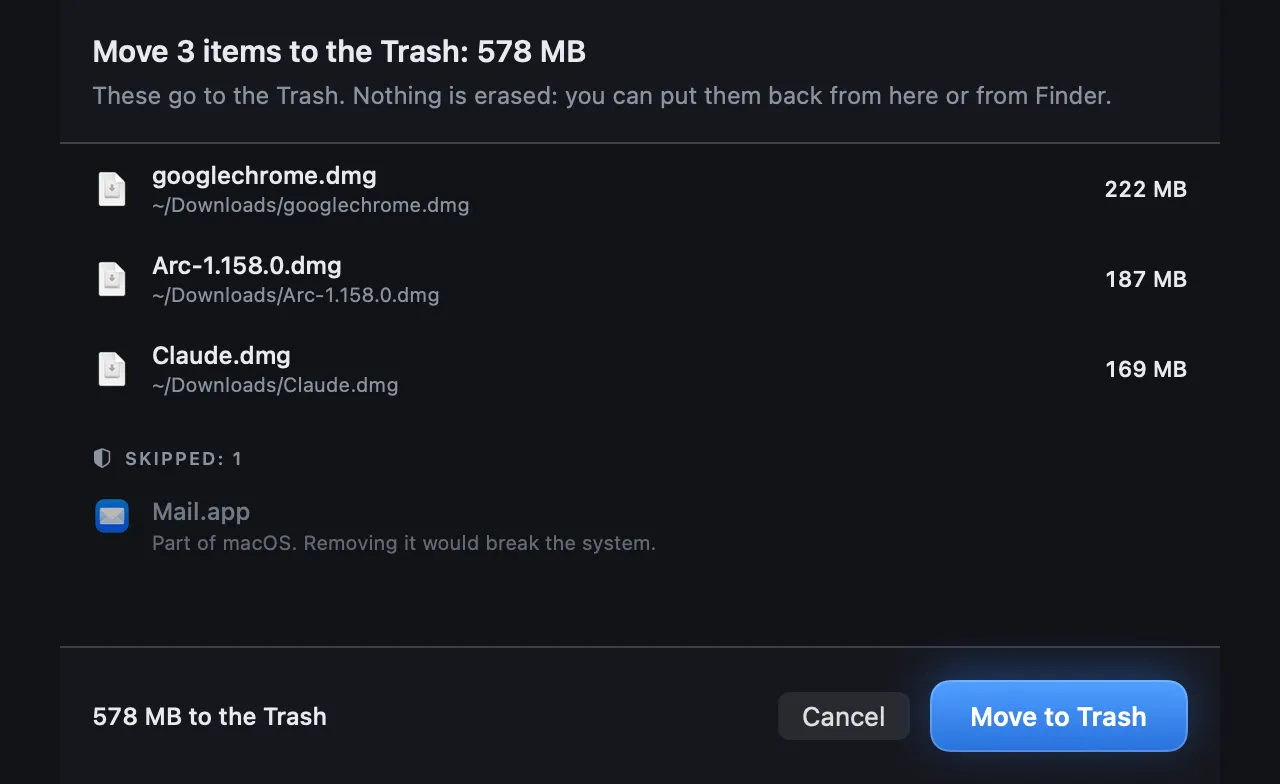
Choosing Move to Trash brings up a sheet listing each item, its folder and its size. Anything Strata refuses, such as your keychain, iCloud Drive, a file inside an app or a part of macOS, is set aside under Skipped, with the reason in plain words. Nothing moves until you confirm.
Put Back after, and Recently Removed for later
Once the move is done, a notice gives the count and the space now sitting in the Trash, with Put Back. Later, Recently Removed lists up to 500 removals from the last 90 days, newest first, each item beside the folder it left. Put Back works while an item is still in the Trash, and it never overwrites something new in the old place.
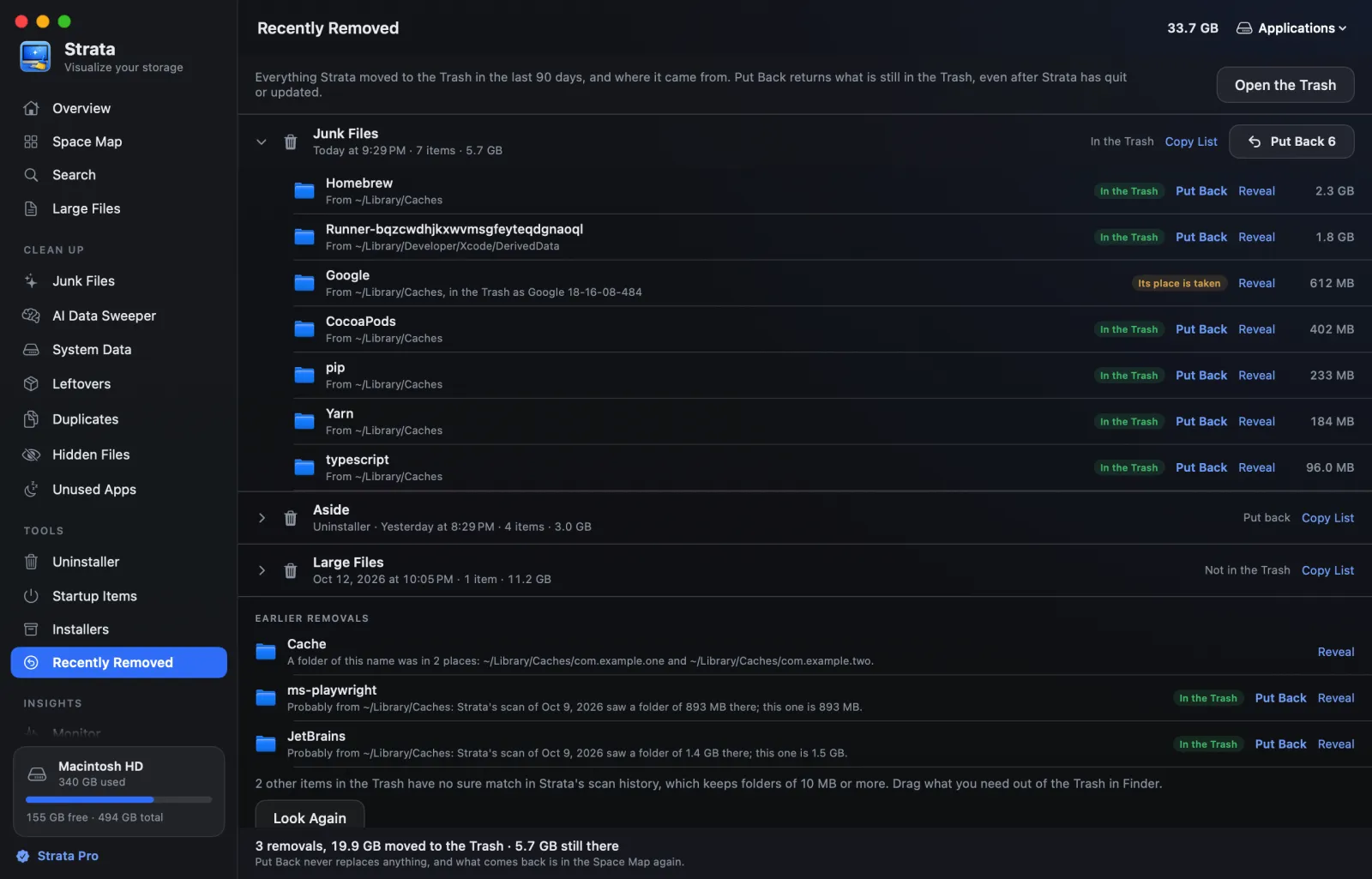
No licence is needed for Recently Removed, so what the trial moved can still be put back while it sits in the Trash. Undoing a removal has the steps.
Junk Files: what starts ticked, and why
Flash Clean is BuhoCleaner's one-scan cleanup. Dr.Buho's guide lists user and system caches and logs, browser caches, unused disk images, Xcode junk and the Trash, shown for review before anything goes. It starts from a default selection and asks you to confirm before you go beyond it.
Strata's Junk Files looks only in your home folder, plus Applications and Epic Games' folder in Shared. It finds app caches, logs and crash reports, Xcode's build data, package managers' downloads and downloaded installers. Its difference is the reasoning on show: every row says why it is or is not ticked. A cache whose app is open is tagged Running and left alone, and macOS's own caches are tagged macOS.

Old downloads, virtual machines and games sit in groups of their own and are never ticked for you, since they are yours to judge. A project's build output is ticked only once the project has sat untouched for three months.
An uninstaller that grades every leftover
BuhoCleaner's App Uninstall has good ways to find apps worth removing, by Dr.Buho's guide. It picks out large and old apps, and apps that stopped working after a macOS update. It groups apps by source and by vendor, and keeps a Leftovers list for apps already dragged to the Trash. Dr.Buho says it has custom routines for more than 100 common apps, Adobe's and Office among them.
Strata's Uninstaller puts its care into how sure it is. It starts
from the app's bundle identifier (Goodnotes's is com.goodnotesapp.x) and looks in
32 places. Every match is checked against your other installed apps, folders a vendor shares are
left out, and each gets a grade: Certain, Very likely, Likely or Possible. Strata ticks the first
two for you and leaves the rest to your judgement.
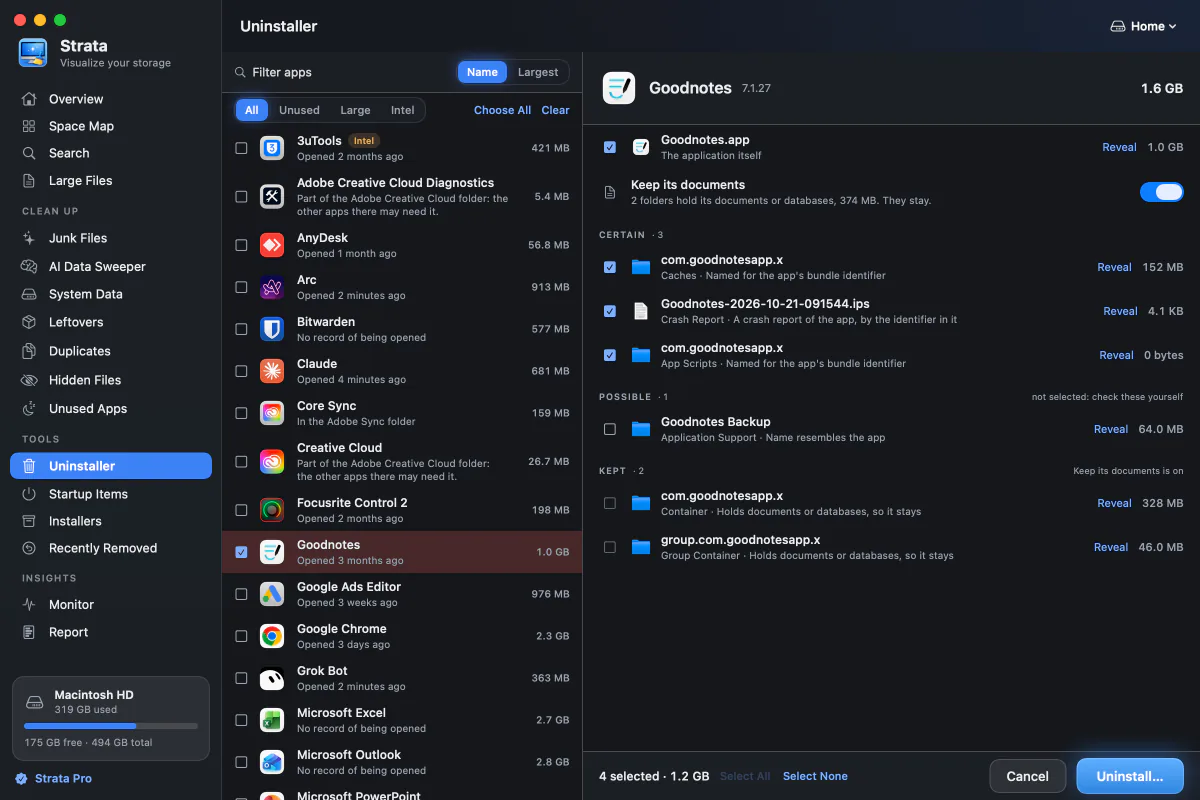
With Keep its documents on, an app goes while its container folders stay, whenever they hold documents or databases. The Dock icon leaves with the app, and Undo puts it back.
Its filters pick out apps unused for three months, the biggest, and, on Apple silicon, apps made just for Intel. An app only an administrator can move goes too, with the optional administrator helper. Uninstalling an app shows each step.
Duplicates, matched by what is inside
Both apps match duplicates by their contents. BuhoCleaner's Duplicates searches the folders you add, and its wiki says it compares files by MD5 hash, a fingerprint of the contents. Smart Select keeps an original in each set and marks the copies, and the same tool finds photos that look alike.
Strata's Duplicates works on the files of 1 MB or more in your last scan. It compares them in three passes: sizes first, then a 16 KB sample from each end, then a full read of only the files still alike. Nothing is ticked until you press Select Extra Copies, which keeps one of each set.

Strata never looks where a copy is usually there on purpose: inside apps and packages, the Photos
and Music libraries, node_modules, your Library and hidden folders. An APFS clone or
a hard link, which shares storage with another file, counts as the little that removing it would
free. More on why copies pile up is in finding
duplicate files on a Mac, and the steps are in
removing duplicates.
The map, Optimize and the menu bar
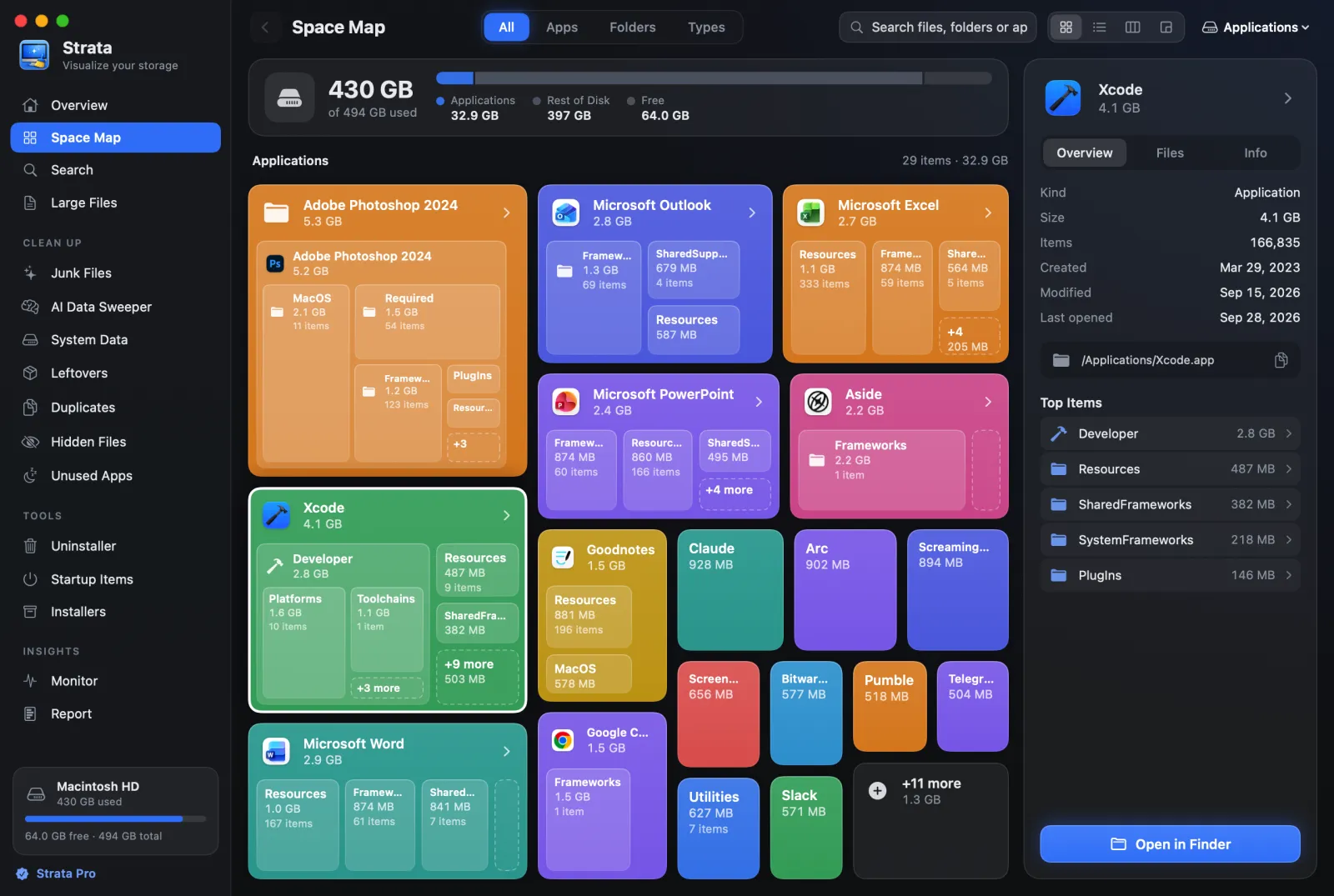
BuhoCleaner keeps a Disk Space Analyzer in its Toolkit. Strata puts its Space Map at the centre, free for good. It draws any drive or folder to scale as Cards, a List, Columns or a Detailed Map, a treemap whose rectangles are sized by the space they take.
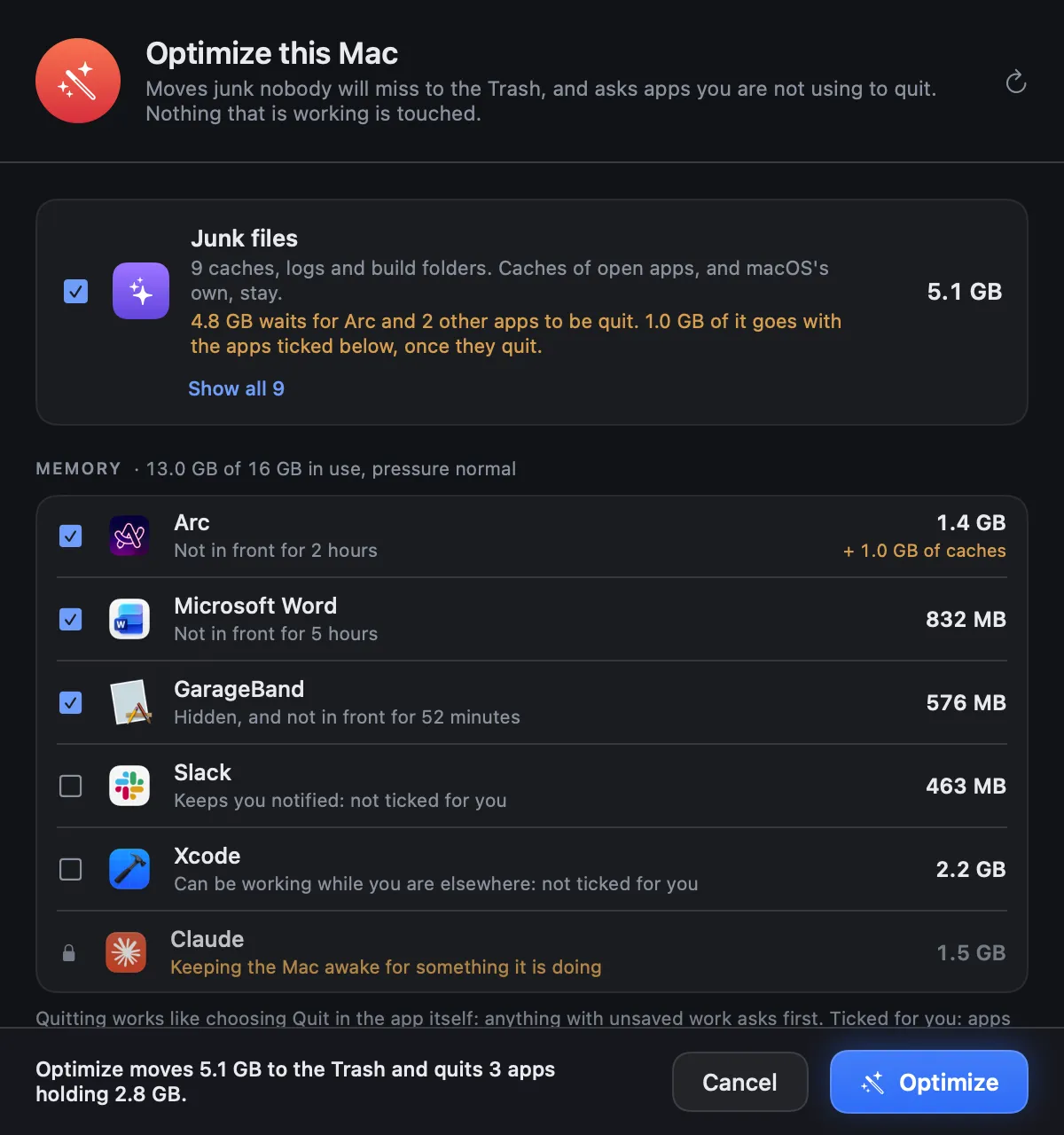
For memory, BuhoCleaner offers Free Up RAM. Strata's Optimize goes another way: it clears the safe junk and asks idle apps to quit through their own Quit, after a sheet shows the plan. It ticks an app only after thirty minutes in which another app was in front, or ten if you hid it. It never ticks one that plays sound or keeps the Mac awake, and when there is nothing to clear or quit, it simply stays green.
Strata also sits in the menu bar, with your free space beside its icon. One click shows the disk, processor, memory, battery and network, the apps working hardest and the Optimize button; like the Monitor, that panel is free.
Who BuhoCleaner still suits
BuhoCleaner runs on OS X 10.10 and every macOS since, so it suits a Mac held on a system older than macOS 13, which Strata needs. Its three-Mac lifetime licence covers a household in one purchase, and its refunds run 30 days. It also adds a shredder, a similar-photo finder, a Spotlight reindex and a DNS cache flush (clearing the Mac's stored lookups of website addresses). If those matter more to you than Strata's full trial and graded uninstaller, it is a sound choice.
Privacy
Strata goes online at two moments: its check for its own updates, which you can turn off, and adding a licence sold from 10 November 2026 to a Mac or taking it off. Nothing about your files leaves the Mac, and there are no analytics, crash reports or account. Dr.Buho's wiki says BuhoCleaner does not upload your files or send usage data, and the app can check for its own updates.
Verdict
Choose Strata
if you want to see the whole job done before you pay: 14 days of every room, on up to 40 GB. After that, $19.99 once moves what you choose to the Trash, where Put Back stays free, and grades each leftover before an app goes, while the map and the Monitor never need a key.
BuhoCleaner may suit you
if your Mac runs a macOS older than 13, or you want one licence for three Macs.
If monitoring matters to you as much as cleaning, Sensei vs Strata weighs a monitor-first app. For uninstalling alone, see Nektony's App Cleaner & Uninstaller vs Strata; for the wider field, the best Mac cleaner apps and the best uninstallers for Mac.
Frequently asked questions
Is Strata better than BuhoCleaner?
For most people, yes. Strata's trial unlocks everything for 14 days with up to 40 GB moved, every removal goes to the Trash with Put Back, its Uninstaller grades each leftover, and Strata Pro costs $19.99 once. BuhoCleaner runs on far older macOS, sells a lifetime licence for three Macs and refunds within 30 days.
How much does BuhoCleaner cost?
Dr.Buho's store is a sale page at the moment. On 10 November 2026 it charged, tax included, $25.99 once for one Mac or $37.99 once for three, and $17.99 for a year on one Mac, without saying what that plan renews at. Dr.Buho's wiki gives $25.99 once and $19.99 a year as its regular prices. Strata Pro is $19.99 once.
Is BuhoCleaner free?
It has a free version. Dr.Buho's trial guide says it removes up to 3 GB of files, after which you delete by hand or buy a licence; no time limit is named. Strata's trial unlocks every room for 14 days and moves up to 40 GB. After that its scan, map, Monitor and menu bar stay free, and moving things to the Trash needs Strata Pro.
Does BuhoCleaner move files to the Trash?
Its App Uninstall guide calls uninstalling an irreversible action, and Dr.Buho's guides do not say whether its cleanups send files to the Trash. Strata has one way to remove anything, macOS's own move to the Trash, with Put Back on the notice afterwards. Recently Removed lists up to 500 removals from the last 90 days.
Does a Strata licence cover more than one Mac?
Since 10 November 2026, each new licence is for one Mac at a time; you move it free by removing it from the old Mac in Settings, then adding it on the new one. Older licences, sold before that date, still work on all the Macs you own. For three Macs at once, BuhoCleaner's three-Mac lifetime licence was $37.99 on its sale page on 10 November 2026.
Try every room for two weeks
Download Strata and scan your Mac. For 14 days every room is open, with up to 40 GB to the Trash and Put Back after every removal. There is no account and no card, and the map stays free afterwards.