The Sensei alternative that maps your disk, cleans it safely and watches your Mac
If you are looking at Sensei mainly to win back disk space, Strata is the better choice for most people. Sensei is first a performance monitor with cleanup beside it. Strata starts from the disk: it maps where the space went, removes things only by moving them to the Trash, where Put Back can bring them home, and gives you its Monitor and menu bar panel for nothing. Strata Pro is $19.99 once; Sensei costs $29 a year or $59 once, and either plan covers up to three Macs. Here is how they compare where they overlap, with Strata on screen.
Key takeaways
- Strata starts from the disk. Its free Space Map shows any drive or folder to scale, four ways, while Cindori describes Sensei's storage view as categories and file lists.
- Every Strata room removes things one way, by moving them to the Trash. A sheet lists them first, a notice offers Put Back, and Recently Removed keeps 90 days of removals, up to 500.
- The Monitor and the menu bar panel are free, with no key and no time limit: processor, memory, disk, battery, network, temperatures, fans and the busiest apps.
- Strata Pro is $19.99 once; Sensei is $29 a year or $59 once. Either Sensei plan covers up to three Macs, and Strata licences sold since 10 November 2026 each cover one Mac at a time, moved free.
- Sensei goes further into the hardware: GPU figures, drive health, a disk benchmark and a TRIM switch. Strata runs on macOS 13 Ventura or later; Sensei 2 needs macOS 14, by its update feed.
Written by the maker of Strata. Sensei's facts come from Cindori's product page, store, support pages and privacy policy, its comparison and how-to articles, and Sensei's update feed, all read on 10 November 2026. The quotation and the main facts link to their pages.
The short answer
Sensei is first a performance monitor, by Cindori's own headline, with cleanup tools beside it. Strata works the other way: it shows where your space went, clears what can go with a way back, and watches the Mac from the menu bar for free. If disk space is why you are shopping, Strata does that job better, for $19.99 once.
- A map of your disk, drawn to scale, where Sensei shows categories and lists.
- Every removal goes to the Trash first: all of Strata's rooms use it, and Put Back returns what is still there.
- Every leftover carries a grade, from Certain to Possible, and only the sure ones start ticked.
- The Monitor and menu bar are free, with no key and no time limit.
- One payment of $19.99, against $29 a year or $59 once.
Sensei and Strata at a glance
| Sensei | Strata | |
|---|---|---|
| Price | $29 a year, or $59 once | $19.99 once, never renewed |
| Macs per licence | Up to 3, on either plan | One Mac at a time if bought from 10 Nov 2026, and moving it is free; older licences work on all your Macs |
| Before you pay | A 7-day trial, per Cindori's comparison and how-to pages | 14 days of everything, up to 40 GB moved; then the free version, with no time limit |
| Refunds | Within 14 days, if the licence has not been activated | Within 14 days, no reason needed |
| Seeing the disk | Categories and file lists, in Cindori's words | Space Map: Cards, List, Columns and a treemap, free |
| Removing | Uninstaller and duplicate finder use the Trash, per Cindori's guides; Clean's caches and logs not stated | Every room uses the Trash; Put Back, and 90 days of removals (up to 500) in Recently Removed |
| Junk and caches | Clean: caches, system logs, large downloads, installers' leftovers, developer data and disk images | Junk Files, in your home folder: app caches, logs, Xcode and package data, build output; only what nobody will miss starts ticked |
| Uninstaller | Yes, with leftover files | Yes: 32 places, every match graded, only the sure ones ticked |
| Menu bar and monitoring | Sensei Monitor, a separate app with custom widgets: CPU, GPU, memory, disk, network, battery, temperatures and fans | Free, with no key: processor, memory, disk, battery, network, temperatures and fans, the busiest apps |
| Drive health, benchmark, TRIM | Yes | No |
| Data sent | Crash logs to Sentry, pre-crash steps to Amplitude; update and licence checks | No analytics or crash reports; online only for its updates and to add or remove a licence sold from 10 Nov 2026 |
| Needs | macOS 14 or later, by its update feed (some Cindori pages give older figures) | macOS 13 or later, Apple silicon and Intel |
What Strata Pro's $19.99 buys, and what stays free
Cindori's store sells Sensei two ways: a plan at $29, billed every year, and a licence at $59, paid once. Either one is valid on up to three Macs.
Strata Pro costs $19.99 one time. It never renews or expires, and bug and security fixes and the updates each new macOS needs cost nothing, for good. It unlocks:
- sending anything to the Trash, from whichever room, with Put Back to undo it;
- the Uninstaller, Startup Items and Optimize, which clears safe junk and quits idle apps together;
- Junk Files, Duplicates, Leftovers, Hidden Files, the AI Data Sweeper and System Data;
- Installers you no longer need, and Report, which compares today's disk with earlier scans.
What stays free, and how to try the rest
A good part of Strata needs no key. Scanning any drive, the Overview and all four views of the Space Map are free for as long as you like. So are Search, Large Files, Unused Apps, the Monitor, the menu bar and Recently Removed. You can even see what the Uninstaller and Optimize would do; pressing the button is the Pro part.
From the first launch you get 14 days with every room open and up to 40 GB of removals, with no account and no card. Cindori's own comparison and how-to pages give Sensei a 7-day trial. Strata's refunds run 14 days, no reason needed; Cindori refunds within 14 days only if the licence has not been activated.
One fact cuts the other way. Since 10 November 2026, each new Strata licence works on one Mac at a time, and moving it to a new Mac costs nothing. A licence bought before that date still covers every Mac you own. If you need three Macs covered at once, Sensei's licence does that.
See where the space went, drawn to scale
Cindori is candid about how Sensei shows storage. Its own guide to disk analyzers says "Sensei uses categories and file lists rather than a spatial disk visualization." Its Clean view groups what it finds as large files, developer data, downloads, disk images, caches, logs, installer packages and more.
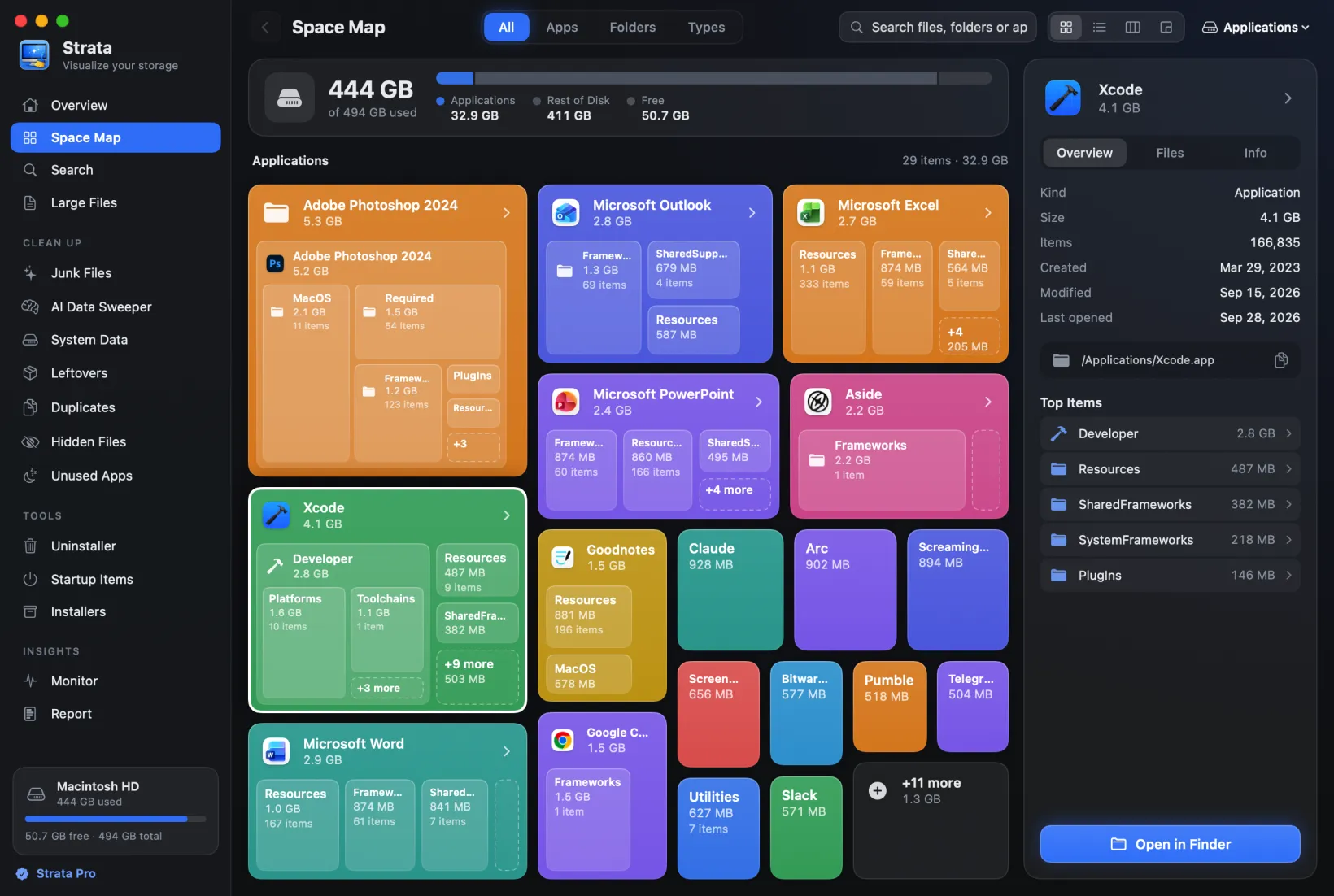
Lists say what can be cleaned. A full disk first raises another question, where the space went, folder by folder, and Strata's Space Map answers it for free.

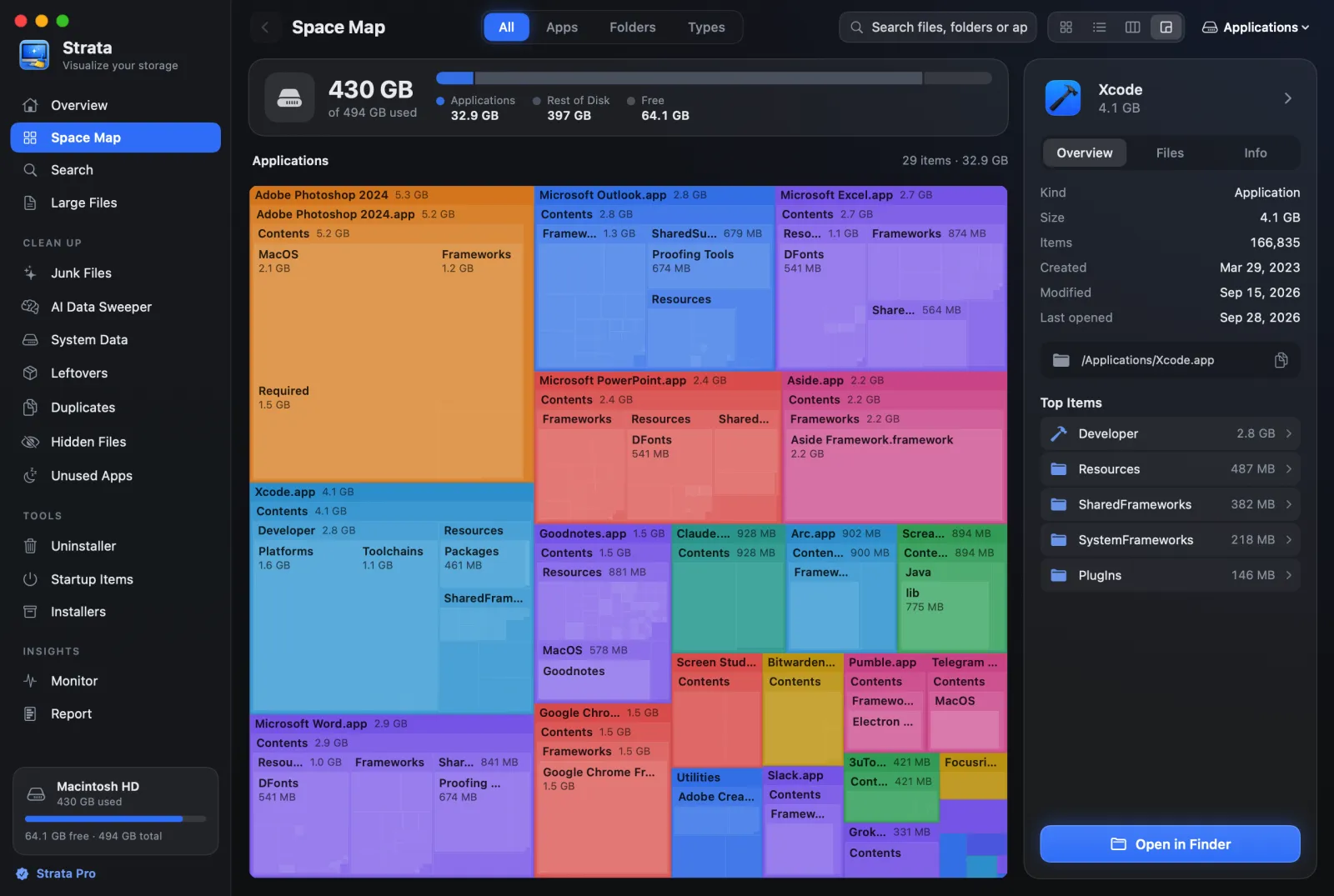
Four views draw any drive or folder to scale, so the biggest things are the biggest shapes:
- Cards: each app or folder a card sized by its space, its largest contents nested inside;
- List: Finder's list ordered by size, with folders that open in place;
- Columns: Finder's column view, each folder opening into the next;
- Detailed Map: a treemap, where the folder is one rectangle cut into smaller ones whose areas match their sizes.
You can also look at a folder by its apps, its largest folders or its file kinds. Files of 1 MB or more are drawn one by one, and smaller ones share a single block per folder. From 1.0.38 the map follows changes on the disk as you watch, and Command-F searches it.
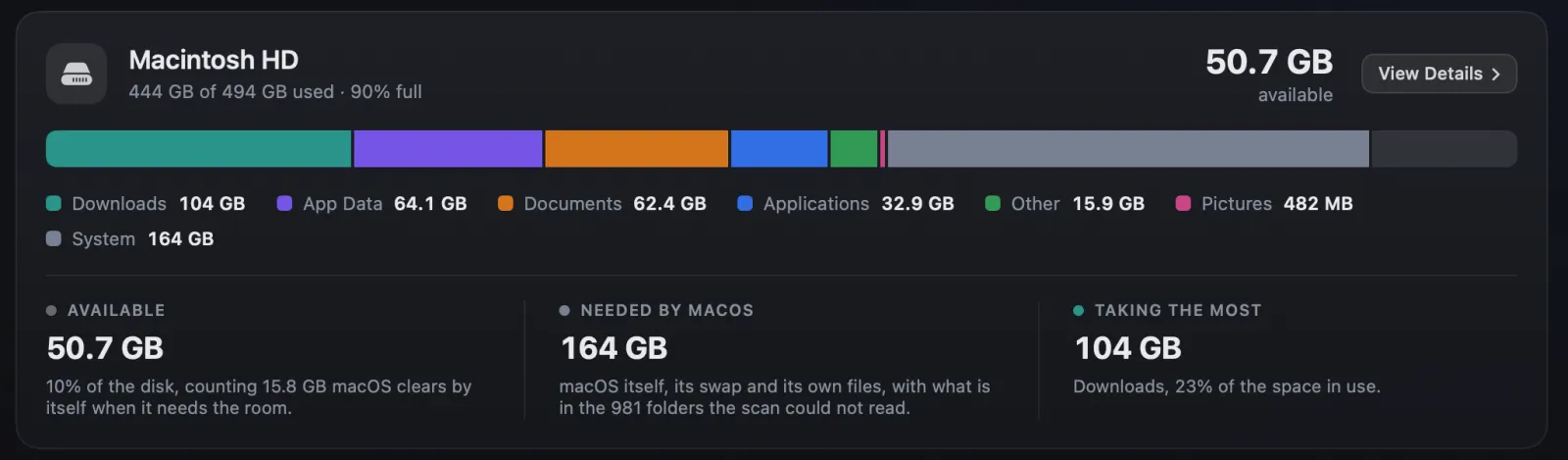
Seeing the whole folder first also guards against removing the wrong thing. The Overview sums the same scan up in one bar.
Cleanup with a way back
Cindori's uninstall guide says Sensei's Uninstaller moves what it removes to the Trash first, so it can be recovered until the Trash is emptied. Its duplicate-files guide says the same of the duplicate finder. We found no Cindori page that says so of the caches and logs Clean removes.
In Strata the answer is the same in every room. A folder chosen on the map, an app's leftovers, the junk Optimize clears: each goes to the Trash through macOS itself, and anything macOS refuses to move stays where it is. Strata never empties the Trash; that step is yours, in Finder.
The list first, the button second
Nothing moves until a sheet has listed every item with its path and size. Whatever Strata refuses waits under Skipped with the reason: the keychain, iCloud Drive, anything inside an app and macOS's own folders. Afterwards a notice counts what went and the space it holds in the Trash, beside a Put Back button.

Recently Removed, once the notice has gone
Recently Removed keeps your removals from the past 90 days, the newest 500 at most, naming the room each came from and the folder each item left. While an item is still in the Trash, Put Back returns it alone or with its whole batch, even after Strata has been quit or updated. It never lands on top of something new in the old place.
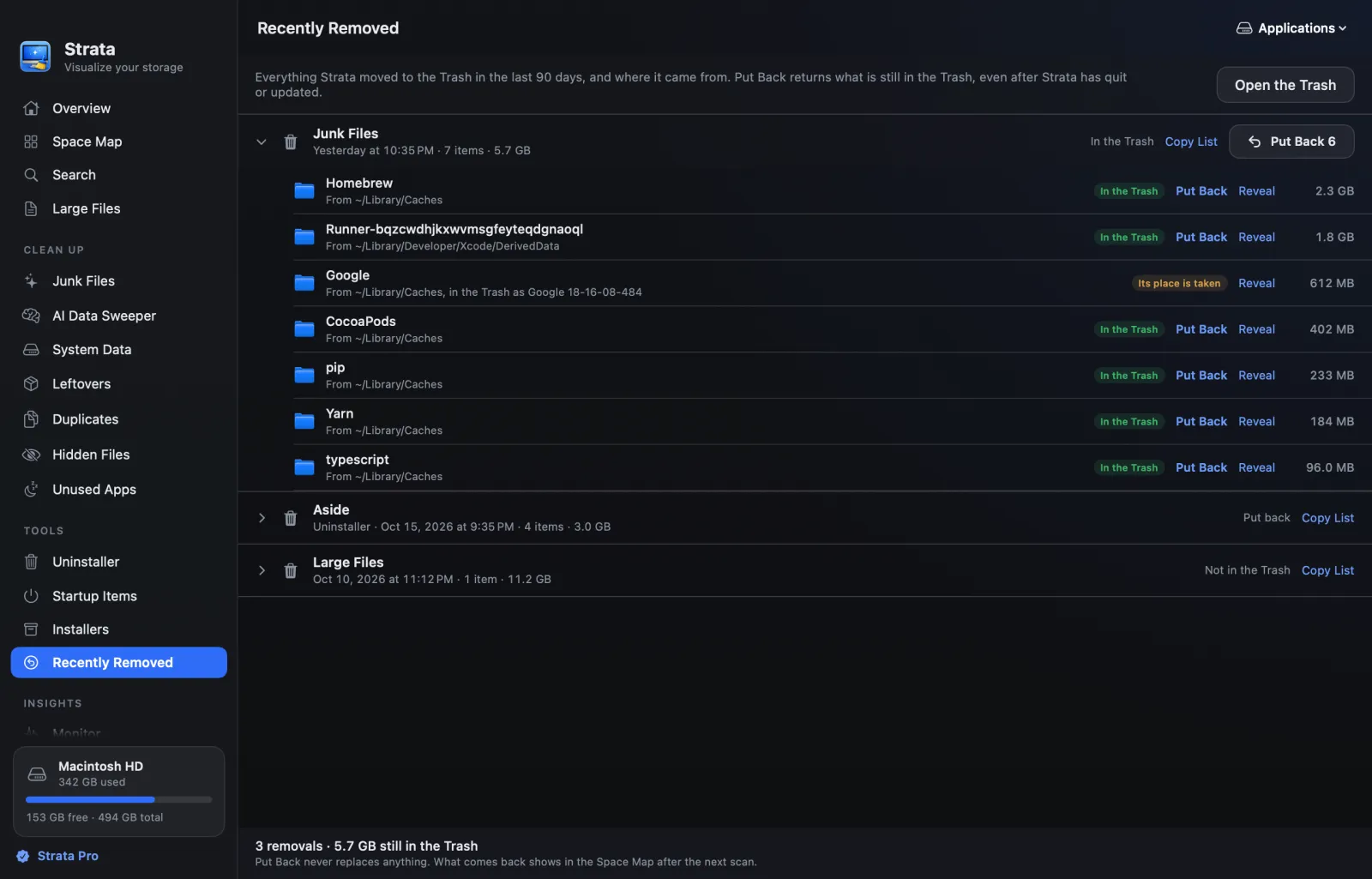
Recently Removed needs no licence, so it outlasts the trial. The steps are in undoing a removal, and the limits of any undo in deleting files safely on a Mac.
Junk explained before it goes
By its product page, Sensei's Clean clears old caches, system logs, large downloads and the files installers leave behind. Strata's Junk Files works in your home folder, and outside it only in the Applications folder and Epic Games' folder in Shared. There it finds app caches, logs and crash reports, what Xcode builds, and what package managers such as Homebrew and npm keep, each row naming its app.
What starts ticked is chosen with care: only what nobody will miss, and every empty box has a reason you can read by pointing at its row:
- open apps' caches are tagged Running, since the app may be using them;
- macOS's own caches are tagged macOS and left to macOS;
- installers, old downloads, virtual machines and games are listed apart, for you to judge.
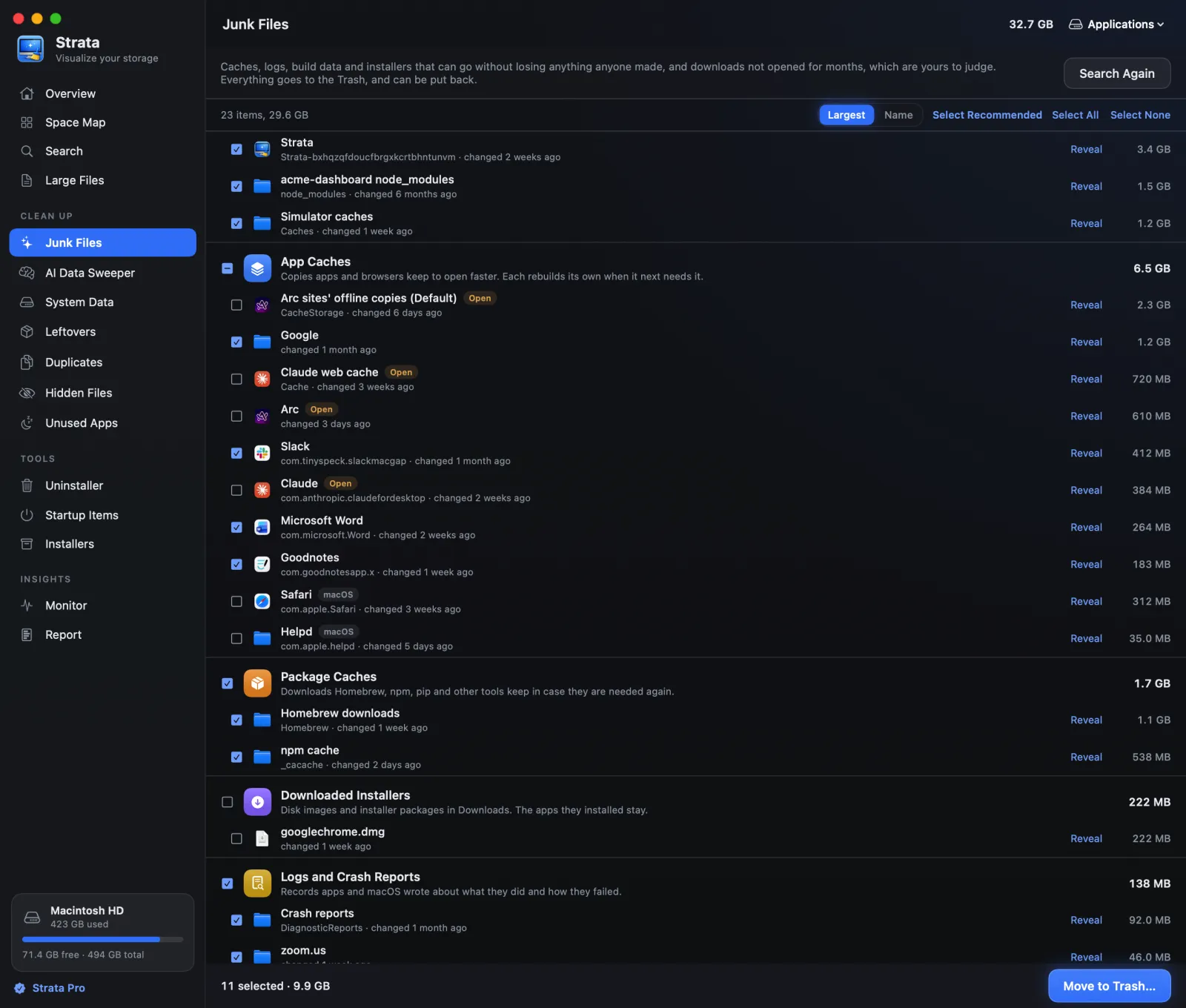
Developers often have the most to clear here: node_modules or Rust's
target is ticked only once its project has sat unchanged for three months.
Clearing junk files has the steps.
An uninstaller that shows how sure it is
Sensei's product page promises a complete removal, leftover files and all. Strata's Uninstaller takes leftovers too, and shows how it decided each one belongs to the app.
It reads the app's bundle identifier, the unique name every Mac app carries, such as
com.goodnotesapp.x. Then it searches 32 places for anything that belongs to it. Each
match is checked against every other app you have installed, and folders a vendor shares, such
as Adobe's or Google's, are left out. Every match is graded Certain, Very likely, Likely or
Possible, and only the first two start ticked.
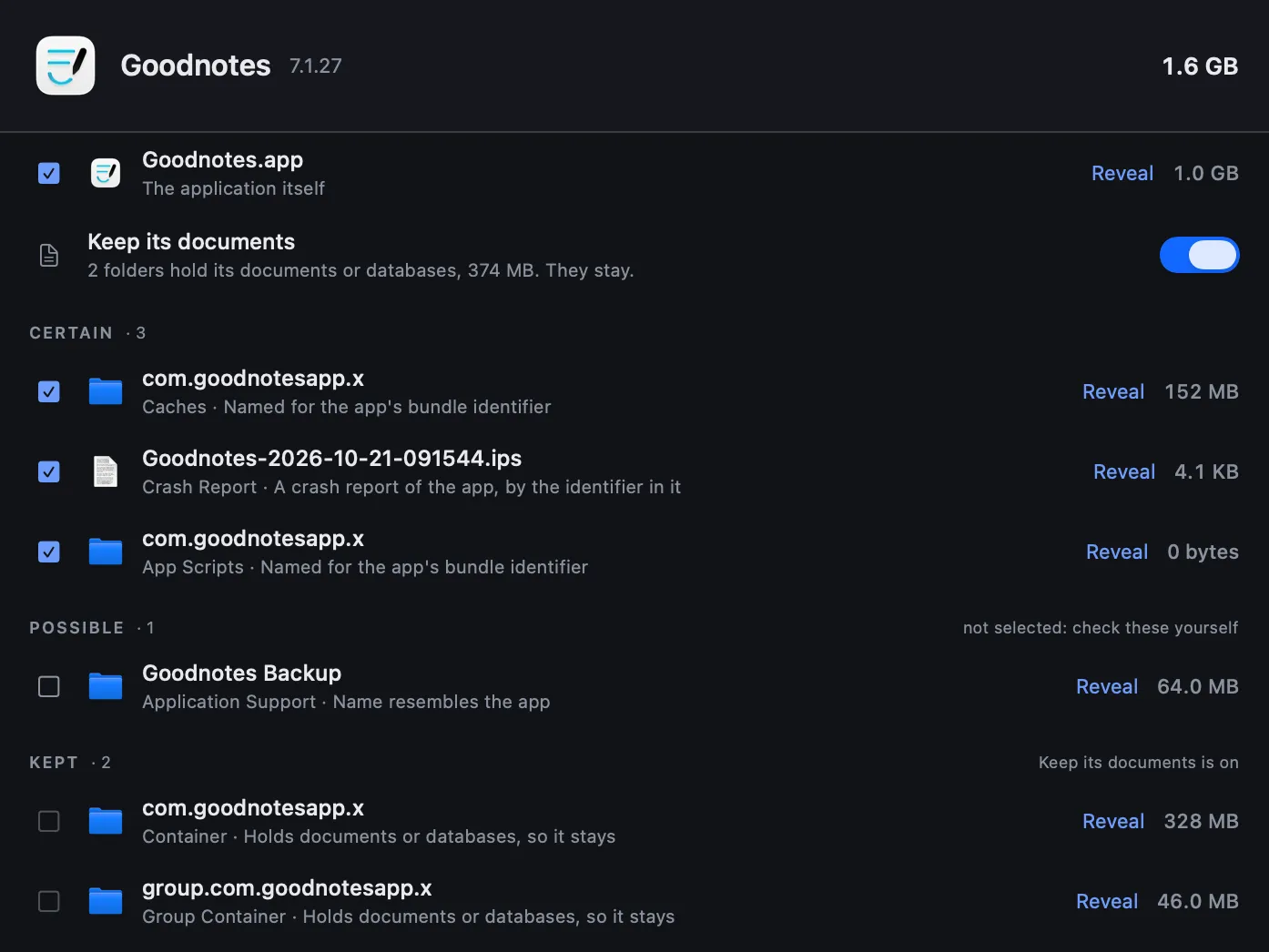
The grades are there because a missed leftover wastes a few megabytes, while a wrong one can take another app's data with it. The app's Dock icon goes too, and Undo restores it. You can remove several apps in one go. Filters find the ones you have not opened in three months, the largest, and on Apple silicon those built only for Intel.
The Monitor and menu bar, free
Monitoring is Sensei's home ground. Cindori's comparison page lists live and historical readings of the CPU, memory, disk, network, battery, sensors and temperatures. Its product page adds the GPU and an editor for custom menu bar widgets.
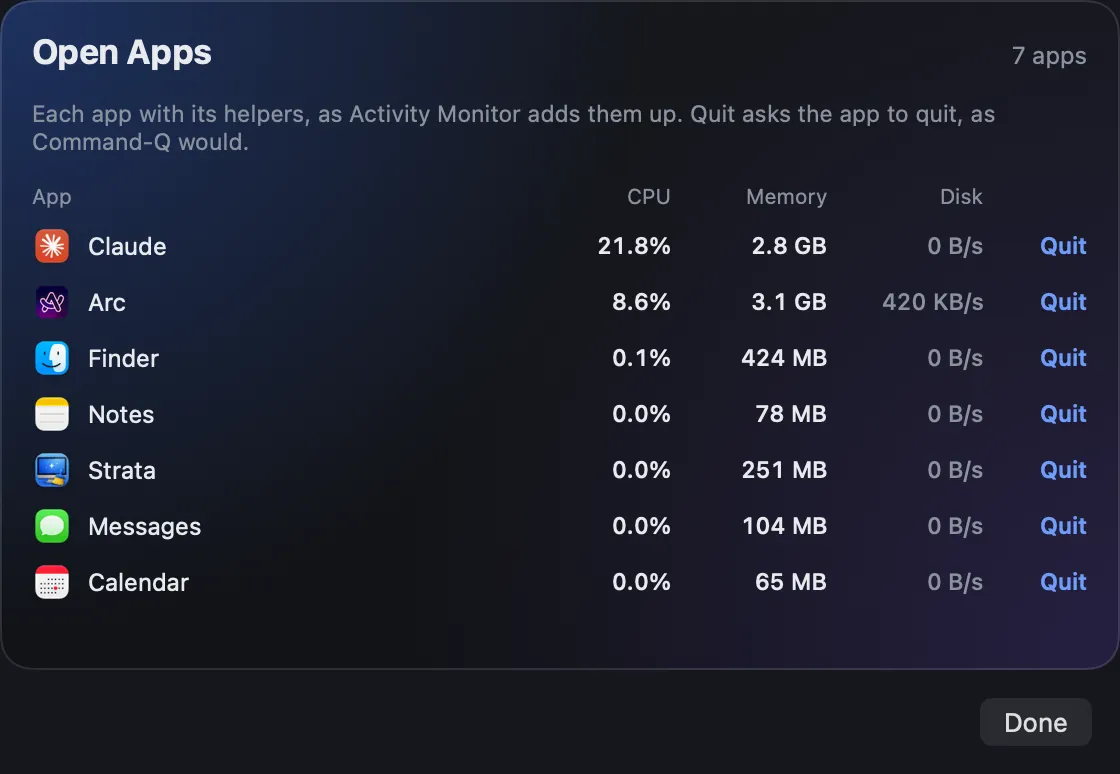
Strata's menu bar item shows your free space, or the processor, memory, network or battery if you prefer. In the Dashboard look, its panel carries those readings with the disk, the five busiest apps with a quit button each, and Optimize at the top. The Cards look, in the clip below, sets disk, memory, battery, processor, network and Optimize on six cards. A notice warns once a day when the disk is nearly full, and hourly below 5% free.

The Monitor room charts the processor, memory, disk, battery and network over 5, 15 or 60 minutes. Where the Mac reports them, it adds temperatures for the chip, the logic board, the SSD and the battery, and how fast each fan spins. It also gives the battery's cycle count and health, disk activity across all disks, and memory pressure with swap. Readings stay in memory for an hour and are never written anywhere.
Free space shrinking by itself? Why Mac storage keeps filling up shows how to find what is writing.
Optimize: one press, with the plan shown first
Optimize, part of Strata Pro, sits in the panel and beside Scan on the Overview, and turns red when junk or an idle app is worth dealing with. It shows its plan in a sheet and never quits anything on its own. An app is ticked only after half an hour out of the front, or ten minutes hidden, and nothing that plays sound, keeps the Mac awake or works away is ever ticked. Mail, chat apps, terminals and editors are left unticked too, and each app leaves through its own Quit, so unsaved work asks first.
Who Sensei still suits
Sensei reads more of the hardware than Strata does. It adds GPU figures, a S.M.A.R.T. drive health report (the health record a drive keeps about itself), a disk speed benchmark and a switch for TRIM, an SSD maintenance command. Its Optimizer can also switch login items, launch agents and daemons (helpers set to start at login or with the Mac) off and on, as its support page describes, which Strata does not do. If those, or one licence for three Macs, matter more to you than seeing and clearing your disk, Sensei is the one to try.
Privacy
Cindori's privacy policy covers all its apps. It says crash logs go to Sentry, without personal or identifiable information, and that Amplitude records which view and button you used just before a crash. Update checks and licence activation may contact Cindori's servers, and the policy says such features can often be turned off.
Nothing about your files leaves the Mac with Strata: there are no analytics, no crash reports and no account. The app reaches the internet only for its own update check, which a switch in Settings stops, and once whenever you add or remove a licence sold from 10 November 2026.
Verdict
Choose Strata
if you want your disk space back and want to see where it went first. The map, the Monitor and the menu bar cost nothing, ever. $19.99 once adds the cleanup rooms, the Uninstaller and Optimize, and whatever they remove waits in the Trash, where Put Back can return it.
Sensei may suit you
if hardware readouts are the point: GPU figures, drive health, benchmarks and TRIM, on up to three Macs.
Weighing a plain cleaner instead? BuhoCleaner vs Strata sets the trial, the Trash and the price side by side. Many more cleaners are weighed in the best Mac cleaner apps, and disk maps in the best disk space analyzers for Mac.
Frequently asked questions
Is Strata better than Sensei?
For getting disk space back, yes for most people. Strata draws where the space went in four views, moves everything it removes to the Trash with Put Back, grades an app's leftovers before uninstalling, and keeps its Monitor and menu bar free. It costs $19.99 once against $29 a year or $59 once. Sensei reads more of the hardware, such as GPU figures, drive health and disk speed, and its licences cover up to three Macs.
How much does Sensei cost?
On 10 November 2026 Cindori's store listed two prices: $29 a year, or $59 as a one-time purchase, each valid on up to three Macs. Cindori refunds within 14 days if the licence has not been activated. Strata Pro is $19.99 once, and Strata's map, Monitor and menu bar need no licence at all.
Does Sensei move files to the Trash?
Cindori's guides say its Uninstaller and its duplicate finder move files to the Trash. We found no Cindori page that says the same of the caches and logs Clean removes. In Strata every removal, from every room, goes to the Trash. Put Back can return an item while it sits there, and Recently Removed keeps your removals from the past 90 days, the newest 500 at most.
Does Sensei show a map of the disk?
Not one drawn to scale, by Cindori's comparisons of September 2026: no treemap or sunburst, but categories and file lists. Strata's Space Map shows any drive or folder to scale, as cards, as a list, in columns or as a treemap, at no cost.
Which macOS does Sensei need?
Sensei's update feed sets macOS 14 Sonoma as the minimum for 2.1.3, the current version, and for every 2.x release, though some of Cindori's pages still give older figures. Cindori offers an older build, 1.5.10, for older Macs. Strata runs on macOS 13 Ventura or later.
Are Strata's Monitor and menu bar really free?
Yes, with no key and no time limit. Between them they show the processor, memory, disk, battery and network, the temperatures and fan speeds a Mac shares, and the apps using the most. Strata Pro adds removing things, Optimize and the cleanup rooms.
Find out where your space went, free
Scan your Mac with Strata and the Space Map shows what is taking the room, on most Macs in under a minute. The map, Monitor and menu bar never need a key, and your first two weeks include every room, with no account and no card.