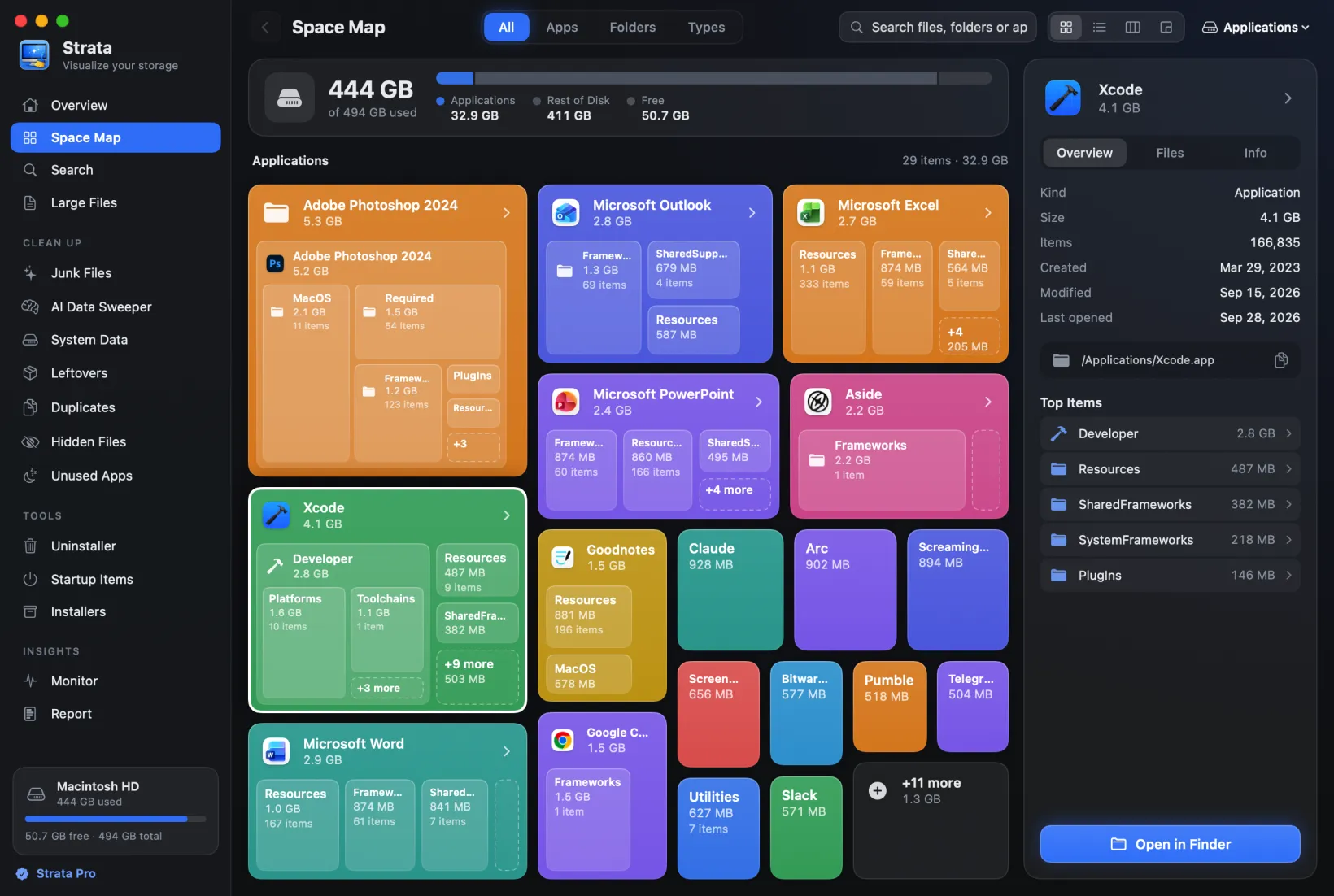
The App Cleaner & Uninstaller alternative that uninstalls carefully and cleans the whole disk
If you are weighing Nektony's App Cleaner & Uninstaller to clear out old apps, Strata is the better buy for most people. Its Uninstaller grades every leftover and checks each one against your other apps. It keeps an app's container folders when they hold documents or databases, and whatever you remove goes to the Trash, where Put Back can return it. The same app maps the disk and finds duplicates. Nektony leaves those jobs to separate apps, some with free editions, or to its MacCleaner Pro bundle. App Cleaner is $14.95 a year or $34.95 once for one Mac; Strata Pro is $19.99, once.
Key takeaways
- Strata's Uninstaller looks in 32 places for an app's files, grades each match, rules out what another installed app owns and ticks only the Certain and Very likely ones.
- Keep its documents leaves an app's container folders in place when they hold documents or databases.
- Strata only ever moves things to the Trash, with Put Back; App Cleaner uses the Trash by default, but one setting deletes for good.
- The same app maps the disk and lists large files free, and finds duplicates with Pro; Nektony's own table leaves those jobs to other apps.
- Strata Pro is $19.99 once. App Cleaner is $14.95 a year or $34.95 once for one Mac, adds app updates, browser extensions and internet blocking, and runs on macOS 11.
Written by the maker of Strata. App Cleaner & Uninstaller's facts come from Nektony's own product page, buy page, help, FAQ and store, with its Duplicate File Finder page and Disk Space Analyzer's App Store listing, all read on 10 November 2026.
The short answer
App Cleaner & Uninstaller is a broad app manager. Strata is a disk space app with a careful Uninstaller: it grades each leftover, keeps an app's containers when they hold documents, and never deletes for good. It also maps the disk free and finds duplicates with Strata Pro, $19.99 once; Nektony keeps those jobs in other apps.
- Every leftover graded, and checked against the apps you keep.
- Documents in an app's containers stay when the app goes.
- The Trash and nothing else: Put Back while items are there, and a 90-day record.
- The whole disk in one app: map, Large Files, junk, duplicates.
- One payment of $19.99, after 14 days with everything unlocked.
App Cleaner & Uninstaller and Strata at a glance
| App Cleaner & Uninstaller | Strata | |
|---|---|---|
| Price for one Mac | $7.95 a month, $14.95 a year, or $34.95 once | $19.99 once; bug and security fixes and macOS compatibility updates free for good |
| Latest version | 10.0.3, 28 Oct 2026, per its product page | 1.0.39, 9 Nov 2026 |
| Before you pay | A free version that shows apps and leftovers; 2 days of Pro, no card | A free version to look, map and monitor; 14 days of everything, no card |
| Finding an app's files | By bundle ID, with a database of over 20,000 apps | By bundle identifier in 32 places, each match graded and checked against your other apps |
| Your documents and data | User folders left alone; its help says support files and containers can hold your data | Containers holding documents or databases kept; Application Support ticked as usual when named for the app |
| Where removals go | The Trash by default, with Removal History; a setting deletes permanently | Only ever the Trash; Put Back while items are there, and a 90-day record of up to 500 removals |
| Leftovers of deleted apps | Remains, and an optional offer when an app goes to the Trash | Leftovers, graded, and a notice when an app leaves some other way |
| Apps built into macOS, such as Music and Mail | Cannot be removed; can be reset | Cannot be removed by anything; Strata Pro can keep one closed |
| Disk map, large files, duplicates | Other Nektony apps, some with free editions, or the MacCleaner Pro bundle | In the same app: the map and Large Files free, Duplicates with Pro |
| App updates, browser extensions, default apps, app resets, internet blocking | Yes | No |
| Data sent | Optional usage data, your app list included, to Nektony and Google Analytics | No analytics, crash reports or account; it contacts its own site for updates, and when a licence from 10 Nov 2026 is added or removed |
| Macs | Plans for one, two or five Macs | One at a time if bought from 10 Nov 2026, moved free; older licences work on every Mac you own |
| Needs | macOS 11 to 27 | macOS 13 Ventura or later, on Apple silicon or Intel |
What Strata's $19.99 buys, beside Nektony's prices
Nektony prices App Cleaner & Uninstaller per Mac, and its buy page opens on the plans for two. For one Mac it is $7.95 a month, $14.95 a year or $34.95 once, and that licence never expires.
The crossed-out figures on the multi-Mac tabs are the one-Mac price multiplied: a discount for buying several, not a sale. Without a licence, App Cleaner shows your apps and what deleted apps left; removing any of it needs Pro, which a two-day trial unlocks with no card.
Strata Pro is $19.99, paid once. With no key and no time limit, Strata shows the Uninstaller's list and each app's leftovers, Unused Apps, Search and Large Files, the Space Map, the menu bar and the Monitor. Strata Pro adds:
- uninstalling, and keeping Apple's own apps closed;
- Leftovers, Startup Items and Installers;
- Junk Files, Duplicates, the AI Data Sweeper, System Data and Hidden Files;
- Optimize in one press, and Report;
- Move to Trash in every room, the map included, each move with Put Back.
Strata's first launch starts a 14-day trial of everything, able to move up to 40 GB to the Trash, with no account and no card. Buy on or after 10 November 2026 and the licence lives on one Mac at a time, moving free whenever you change Macs. One bought earlier keeps working on every Mac you own.
Bug and security fixes stay free for good, as do the updates that keep Strata working on new versions of macOS. A refund within 14 days needs no reason; Nektony's store refunds within 30 days, in set cases such as buying the same app twice. Pricing has the rest.
Every leftover graded, then checked against your other apps
Both apps start from the same clue. Nektony says App Cleaner finds an app's service files by
bundle ID, not by name, with a database of over 20,000 apps. It shows each path before
removal. Strata reads that identifier too, the reverse-domain name every Mac app carries,
such as com.focusrite.control, and searches 32 places for what belongs to the
app.
They run from your Library's caches and preferences to helper tools in the shared
/Library. Each match then gets a grade and a reason:
- Certain when the name is the app's identifier or grows from it, like
com.focusrite.control.savedState; - Very likely when the identifier sits inside the name, or the item bears the app's exact name;
- Likely when it shares nothing but the developer's prefix;
- Possible when it only resembles the app's name or identifier.
The first two start ticked. The others wait for you; even Select All leaves the Possible ones alone.
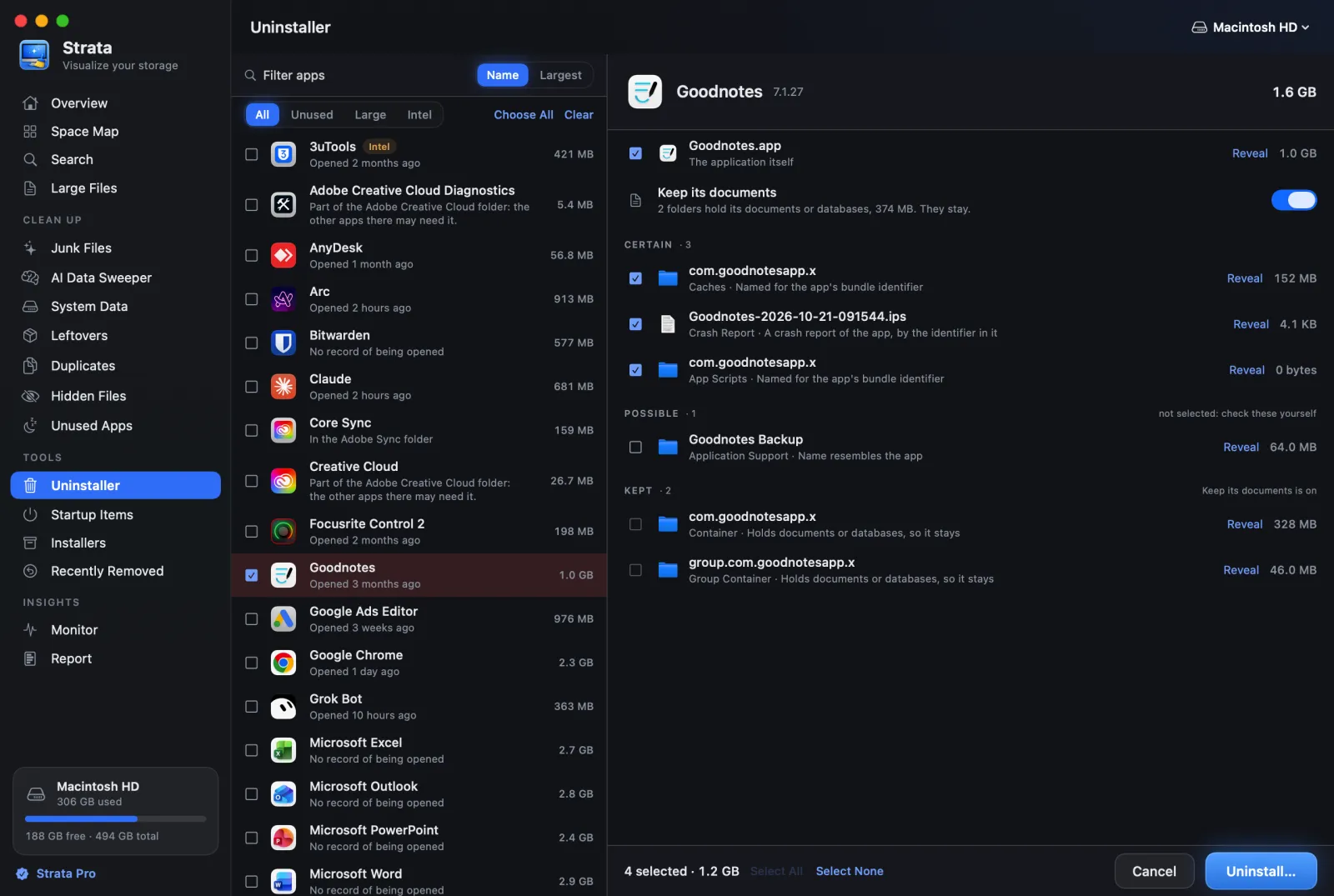
com.focusrite. The home folder is a demonstration one.A safety check comes first
Before grading, Strata compares each match with every other app installed, even copies
macOS knows elsewhere, such as a beta in Downloads. Anything named for, or owned by, another
installed app is dropped. Folders that developers such as Adobe, Google and Microsoft share
between their apps are never offered. Removing Chrome leaves
Application Support/Google alone, because Google Drive keeps data there too.
A missed leftover wastes a few megabytes; a wrong one can cost another app its data. The Uninstaller guide names all 32 places, and how to uninstall an app takes you through the steps.
Documents in an app's container stay behind
Nektony's FAQ and help warn that an app's support files and containers can hold your own data, and ask you to check the list before removing. That is sound advice for any uninstaller, Strata included.
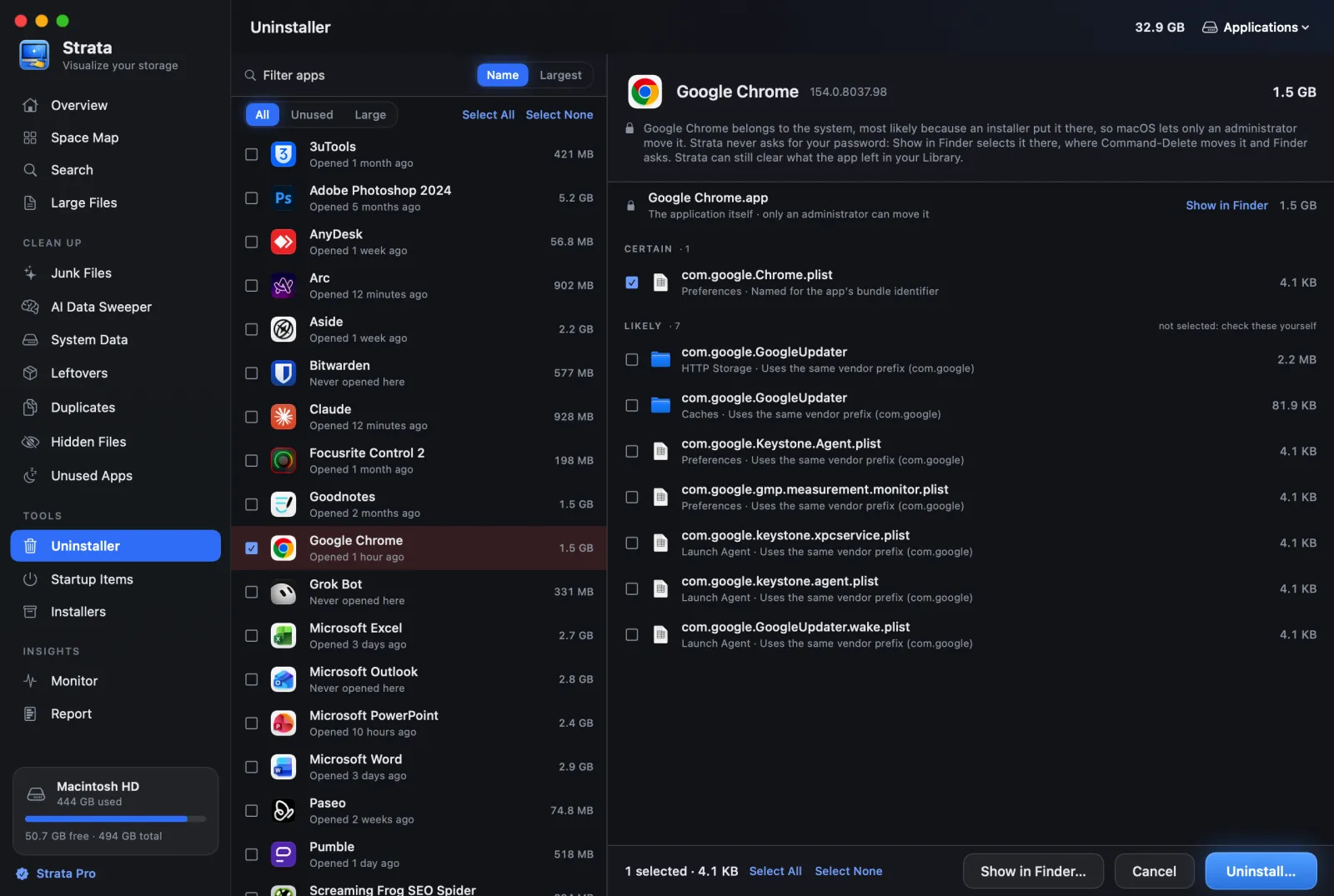
Strata checks one of those places for you. An app's container and group container are the folders macOS sets aside for it in your Library. When either holds documents or databases, a switch called Keep its documents shows up, already on, and those folders stay put; so does any container Strata cannot look inside.
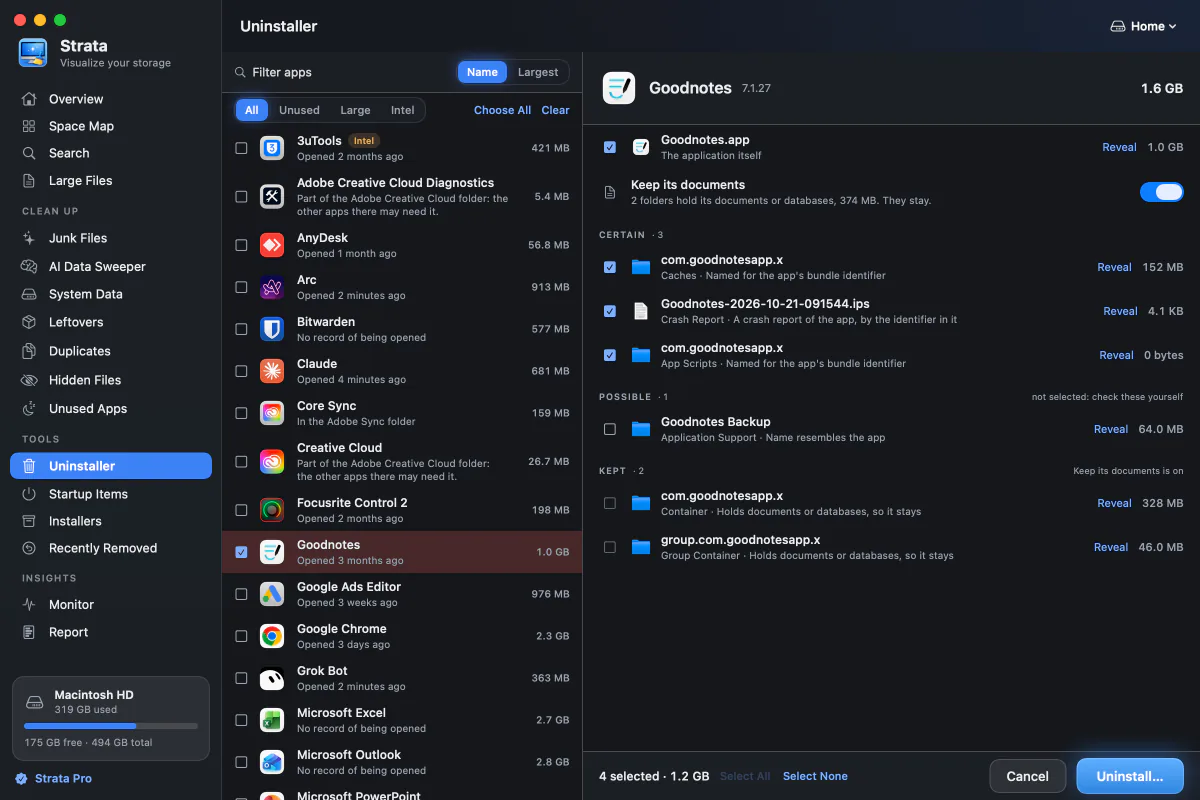
The sheet says what stays: two folders and 374 MB, for Goodnotes. An app's Application Support folder is a different case: named for the app, it starts ticked, so look inside before you press Uninstall.
To move apps from the App Store, or ones an installer placed, Strata uses its optional administrator helper, allowed once and working only in an administrator's account. Without it, Strata selects them in Finder. The app's Dock icon leaves with it, and Put Back restores it.
The Trash every time, with no switch to skip it
Here the two apps are closer than you might expect. Nektony's help makes Move to Trash the default, and its free Removal History returns files from the Trash to their folders. But its settings also offer Delete items permanently, which skips the Trash, and files removed that way cannot be restored.
Strata has no such setting, in any room: each removal is macOS's own move to the Trash. A sheet lists every item first and names anything Strata refuses, such as the keychain or iCloud Drive, with the reason.
Then a notice offers Put Back, and the free Recently Removed lists your removals from the last 90 days, up to the newest 500. Put Back can return an item for as long as it sits in the Trash, though never over something new in its old place.
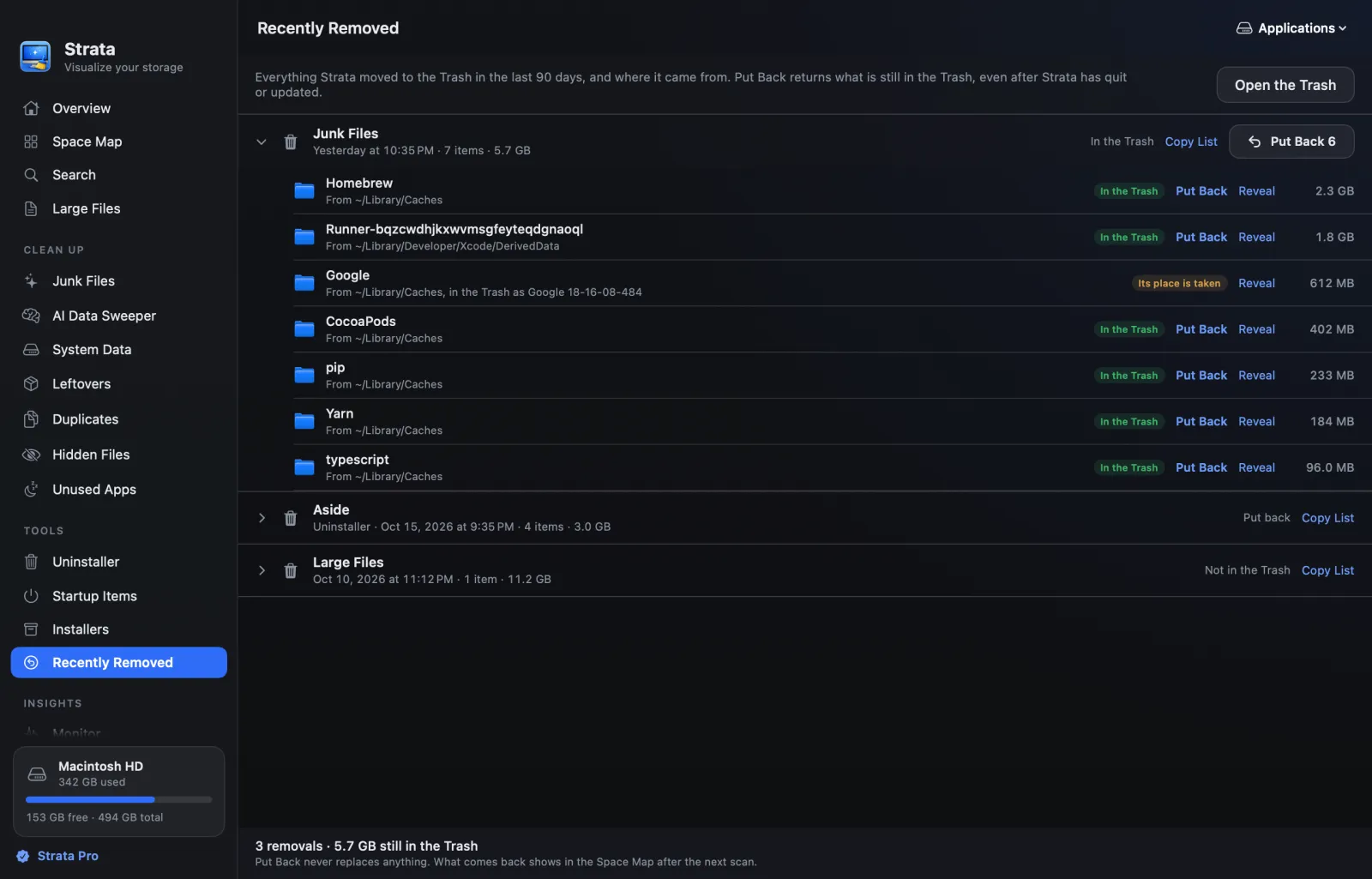
Strata never empties the Trash: that last step stays yours, in Finder. See how to put back a removal.
The rest of the disk, in the same app
Nektony's buy page marks disk space analysis, duplicates and large files as No for App Cleaner & Uninstaller. Nektony covers them with other apps. Disk Space Analyzer has a free App Store edition that draws the disk as a sunburst. Duplicate File Finder is free to find and remove duplicate files, with Pro features for more.
The MacCleaner Pro bundle has both, with App Cleaner, for $39.95 a year or $85.95 once for one Mac. Strata's case is one place for all of it: one window, one rule about the Trash, and the same sheet and Put Back after every removal.
Its Space Map, free, draws any drive or folder four ways: Cards, a List, Columns or a treemap of nested blocks. Since 1.0.38 it keeps pace with the disk as you look.

Beside the map sit the rooms that act on it:
- Large Files, free, lists everything over a size you choose, a Photos library counted as one item.
- Junk Files clears caches, logs, Xcode's build data and package downloads, ticking only what nobody will miss. App Cleaner clears apps' caches and logs, and leaves system-wide junk to the bundle.
- The AI Data Sweeper, System Data and Installers deal with local AI models, macOS's System Data and installers you no longer need. App Cleaner's Extensions section lists installation files too.
Duplicates, found by their contents
Duplicates groups files by size, compares a sample of each, then reads in full only those still matching. Nothing starts ticked; Select Extra Copies ticks every copy but one in each set, and Strata checks the disk again before anything moves.

Finding the apps, and the leftovers, worth removing
App Cleaner sorts its list by size or last use, and flags apps not opened for a period you set. It can also gather the apps your macOS can no longer run. Strata's list has three filters: Unused, for apps not opened for three months; Large, for 1 GB or more; and on Apple silicon, Intel, for apps made only for Intel Macs.
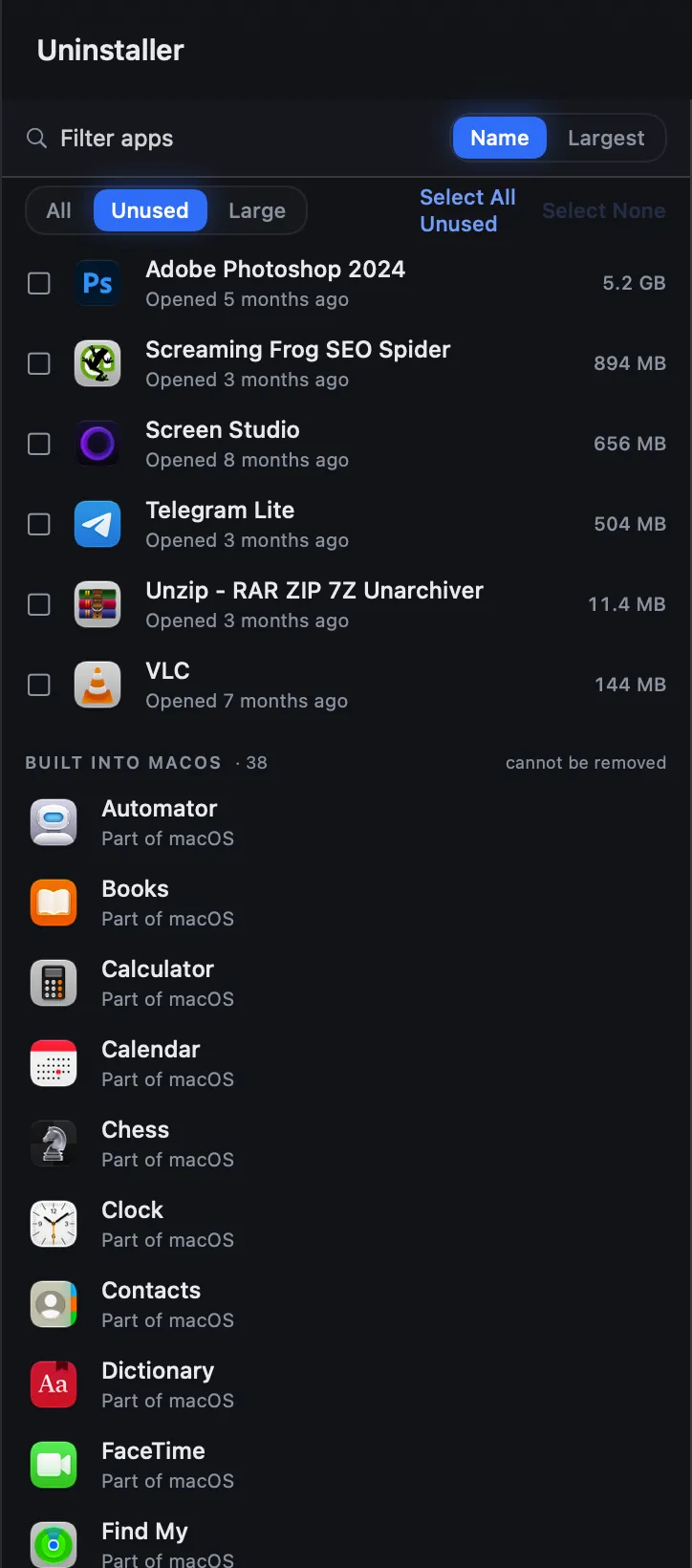
Intel-only apps need Rosetta, Apple's translator for Intel code, which stays fully available only up to macOS 27. Tick several apps, or press Choose All, and they leave in one uninstall, with a leftover they share counted once.
Apps you deleted long ago
App Cleaner lists what deleted apps left under Remains, and can offer a full removal when an app goes to the Trash. Strata's Leftovers room finds entries named like an identifier with no app behind them, rules out any developer with something still installed, and grades the rest.
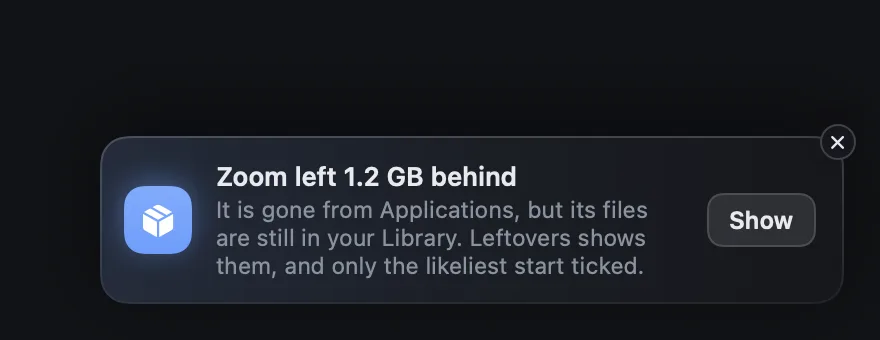
With the app gone, no item reaches Certain. Caches and preferences are Very likely and start ticked, while folders that can hold your work wait. Clearing what deleted apps left shows the steps.
Apple's apps, and what starts by itself
Neither app removes Music or Mail. Nektony's FAQ says App Cleaner follows Apple's guidelines here, and its help says it can reset such an app instead. Strata explains why: they sit on the sealed part of the disk that nothing can change, and hold no space you could reclaim.
Strata Pro can keep one closed. With Keep Music closed on, Strata quits Music whenever it opens, even when the Play key or headphones wake it. That works while Strata is open, in its window or the menu bar, and nothing on the disk changes.

Startup items
Launch agents and daemons are helpers that apps set to start at login or at boot. App Cleaner switches them on and off for free, and Pro deletes some. Strata's Startup Items, a Pro room, groups them with helper tools and system extensions under the app that owns each. It flags any whose program is missing, ticks nothing, and moves what you pick to the Trash, system extensions aside.
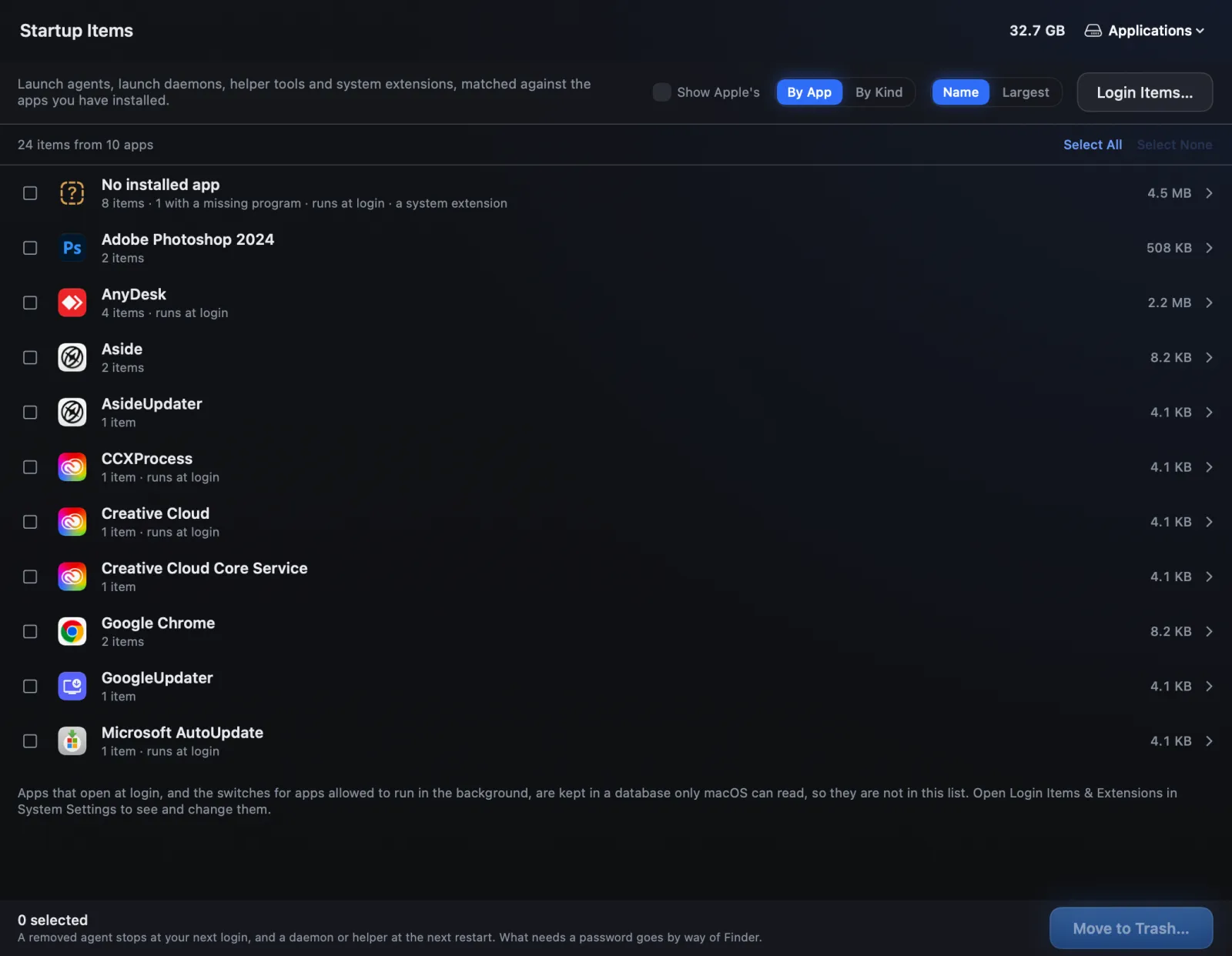
Login items live in a database only macOS can read, so Strata opens that page of System Settings instead.
Who App Cleaner & Uninstaller still suits
App Cleaner & Uninstaller is more of an app manager than Strata is. It updates your other apps through the App Store, Homebrew, GitHub or Sparkle, the update system many Mac apps use, and manages browser extensions and settings panes. It also sets default apps, resets apps, reviews permissions and blocks any app's internet access. It runs on macOS 11 and 12 and sells plans for two or five Macs: if managing apps matters more to you than disk space, it is a sound choice.
Privacy
Strata only ever goes online to its own website, for two things: its updates, which a setting turns off, and adding or removing a licence bought from 10 November 2026. There are no analytics, no crash reports and no account, and nothing about your files leaves the Mac. What Strata sends lists each request.
Nektony's help says App Cleaner analyses app traffic on the Mac itself. Its optional Participate in program improvement setting sends usage data, including your list of installed apps, to Nektony and Google Analytics. Its Updates tab also checks each app's update source.
Verdict
Choose Strata
if you remove apps to win back disk space. Its Uninstaller grades every leftover, checks it against the apps you keep and holds back an app's containers when they hold documents. What you remove goes to the Trash, within Put Back's reach. The same app maps the disk for free, and Strata Pro, $19.99 once, clears junk and duplicates.
App Cleaner & Uninstaller may suit you
if you want one app to update your other apps, manage browser extensions, reset apps and block their internet access, or your Mac runs macOS 11 or 12.
Eight uninstallers are ranked in the best uninstallers for Mac. Pearcleaner vs Strata weighs a free, source-available uninstaller, and BuhoCleaner vs Strata a cleaner with its own uninstaller.
Frequently asked questions
Is Strata a good alternative to App Cleaner & Uninstaller?
Yes, for most people who remove apps to get disk space back. Strata grades each leftover it finds in 32 places, checks it against your other apps, keeps an app's container folders when they hold documents or databases, and moves what you remove to the Trash with Put Back. The same app maps the disk for free, and Strata Pro, $19.99 once, adds junk and duplicates. App Cleaner adds app updates, browser extensions, default apps, resetting apps and blocking an app's internet access, and it runs on macOS 11 and 12.
Is App Cleaner & Uninstaller free?
Partly. Its free version lists your apps, their service files and what deleted apps left, switches startup items on and off, blocks apps' internet access and restores from its Removal History. Uninstalling in one click, deleting leftovers, clearing caches and resetting apps need Pro, which a two-day trial unlocks without a card.
Does App Cleaner & Uninstaller delete files permanently?
Not by default. Nektony's help says removed files go to the Trash, and its Removal History can return them from there. A setting called Delete items permanently skips the Trash, and files removed that way cannot be restored. Strata has no such setting: everything it removes goes to the Trash.
How much does App Cleaner & Uninstaller cost?
For one Mac, $7.95 a month, $14.95 a year or $34.95 once, on Nektony's buy page on 10 November 2026. The one-time licence includes security updates, bug fixes and minor updates. The page opens on the plans for two Macs, where the crossed-out prices are the one-Mac price times the number of Macs, marking a multi-Mac discount, not a sale. Strata Pro costs $19.99, once, with bug and security fixes, and updates for new versions of macOS, free for good.
Does App Cleaner & Uninstaller find duplicates or show what fills the disk?
Not by itself. Nektony's own comparison table leaves disk space analysis, duplicates and large files to other apps. Disk Space Analyzer has a free App Store edition, Inspector, that draws the disk as a sunburst, and Duplicate File Finder is free to find and remove duplicate files. The MacCleaner Pro bundle has both, with App Cleaner, for $39.95 a year or $85.95 once for one Mac. Strata has the Space Map, Large Files and Duplicates in one app.
Can one Strata licence go on several Macs?
It depends on when you bought it. A licence sold from 10 November 2026 sits on one Mac at a time; to change Macs, press Remove from This Mac in Strata's Licence settings, then add the key on the new one, at no cost. A licence from before that date still works on all the Macs you own. Nektony sells App Cleaner plans for one, two or five Macs.
Grade your own apps' leftovers, free
Pick any app in Strata's Uninstaller and its graded leftovers appear, before you pay anything. Strata Pro, $19.99 once, does the removing, and the 14 days from Strata's first launch include it.