The Pearcleaner alternative worth paying for, and what $19.99 adds
For most people deciding whether to pay, Strata is worth it. Pearcleaner is a generous free uninstaller, and it moves what it removes to the Trash. Strata goes further: it grades every leftover it finds, after ruling out what belongs to your other apps. The same window maps and cleans the whole disk, and Recently Removed covers the last 90 days, to a limit of 500 removals, where Pearcleaner's history holds its last 10. Strata is kept current too: 1.0.39 came out on 9 November 2026, while Pearcleaner's README has said On Hold since 11 May 2026. Strata Pro is $19.99, paid once.
Key takeaways
- Strata checks every leftover against the other apps you have installed, grades it from Certain to Possible, and ticks only the sure ones.
- Strata, like Pearcleaner, moves removals to the Trash. It adds a sheet naming what it refuses and why, Put Back for one item or a whole removal, and a list of up to 500 removals from the last 90 days where Pearcleaner keeps its last 10.
- Beyond apps, Strata maps the whole disk for free, and $19.99 once adds Leftovers, Junk Files, Duplicates, Installers and Optimize.
- Strata 1.0.39 shipped on 9 November 2026 and runs on macOS 27. Pearcleaner's latest release, 5.4.3, is from 26 November 2025, and its README has called the project on hold since 11 May 2026.
- Strata leaves some jobs to Pearcleaner, free and source-available: Homebrew and installer-package managers, App Lipo's app slimming, pruning of unused app languages, a cache manager for 26 developer environments and a Finder item.
Written by the maker of Strata. Pearcleaner's facts come from its GitHub repository (its README, release notes and the source code of release 5.4.3) and from its developer's site, itsalin.com, all read on 10 November 2026. Quoted words link to where they appear.
The short answer
Pearcleaner is a capable free uninstaller with a drawer of power tools. Strata is worth paying for when you want the judgement done for you. It grades each leftover, maps and cleans the whole disk in one window, and keeps a longer record of what it moved. It is also still updated for the macOS you run.
- A grade on every leftover, after a check against your other apps.
- Deleted apps' leftovers, graded the same careful way.
- Refusals explained before each removal, and a 90-day list after it.
- The whole disk: a free map, then Junk Files and Duplicates.
- Kept current: 40 versions since September 2026.
Pearcleaner and Strata at a glance
| Pearcleaner | Strata | |
|---|---|---|
| Price | Free | A free version with no time limit; Strata Pro $19.99 once |
| Macs | No key, no limit | Licences sold since 10 Nov 2026: one Mac at a time, moved free; older ones: all your Macs |
| Source code | Public; Apache 2.0 with the Commons Clause | Not public |
| Latest release | 5.4.3, 26 Nov 2025; its README says On Hold since 11 May 2026 | 1.0.39, 9 Nov 2026 |
| Needs | macOS 13 or later; its README's support table ends at 26 Tahoe | macOS 13 or later, macOS 27 included |
| Choosing apps | A searchable list or grid, sorted by size, last use or name | Filters for Unused, Large and, on Apple silicon, Intel apps |
| Finding an app's files | 63 listed folders plus a Spotlight search, at a sensitivity you choose | Each match checked against your other apps, then graded, with the reason |
| Removing | A folder in the Trash per removal, Undo, and a history of the last 10 (Homebrew aside) | The Trash; Put Back while items are there; a 90-day list, up to 500 |
| Deleted apps | Orphaned File Search; Sentinel, off by default | Leftovers, graded; a notice when an app leaves some other way |
| Disk map, duplicates | Not among its tools; File Search can filter by size | Space Map, free; Duplicates by contents |
| Junk | Caches of 26 developer environments; Homebrew's cleanup | Apps' caches and logs, Xcode and package caches, idle projects' build output |
| Other tools | Homebrew, PKG, plugin and services managers, App Lipo, translation pruning, Apps Updater, Finder item, command line | Installers, Startup Items, System Data, AI Data Sweeper, Optimize, Report, Monitor, menu bar |
Why pay $19.99 when Pearcleaner is free?
Pearcleaner costs nothing. Its README calls it source-available and fair-code: anyone can read the code, but its licence, Apache 2.0 with the Commons Clause, forbids selling it or a modified copy. So a site that charges for Pearcleaner is not its developer. Paying for Strata buys judgement where removal is risky, the rest of the disk in one window, and an app kept up to date.
Much of Strata is free, with no time limit. You can scan any drive, browse the Space Map in all four views, and use the menu bar, the Monitor, Unused Apps, Search and Large Files. The Uninstaller's list, each app's graded leftovers and Recently Removed are free too. Strata Pro, $19.99 paid once and never renewed, unlocks:
- removing an app with everything it left, and keeping Apple's apps closed;
- Leftovers, Junk Files, Duplicates, Hidden Files, the AI Data Sweeper and System Data;
- Installers, Startup Items, Optimize in one press, and Report;
- moving anything to the Trash, Reveal in Finder and the Night theme.
The first launch starts a 14-day trial of everything, up to 40 GB moved to the Trash, with no account or card. A licence sold from 10 November 2026 is tied to one Mac at a time and moves to a new one free; one bought earlier keeps covering all your Macs. Refunds within 14 days need no reason. Bug fixes, security fixes and macOS compatibility updates come with the licence, for good.
A grade on every leftover, after a check against your other apps
Pearcleaner casts a wide net. Its uninstaller looks through 63 listed folders, from both
Library folders to /usr/local and ~/.config, adds each Application
Support subfolder, and runs a Spotlight search of your home folder.
What it matches there depends on a slider that runs from fewer files to most, set for every app or for one. Strict, the default, takes only exact matches for the app's name, bundle identifier and entitlements (the capabilities an app declares when it is signed). Enhanced adds partial matches. Deep adds the developer's company name and team identifier (the ID Apple gives them for signing), reaching even their other apps.
It is candid about the trade-off. Above Strict, its settings advise checking found files by hand. Its file list also first opens with a note: "Always confirm the files marked for removal." Strict is a careful default.
Strata's Uninstaller searches 32 places of its own, starting
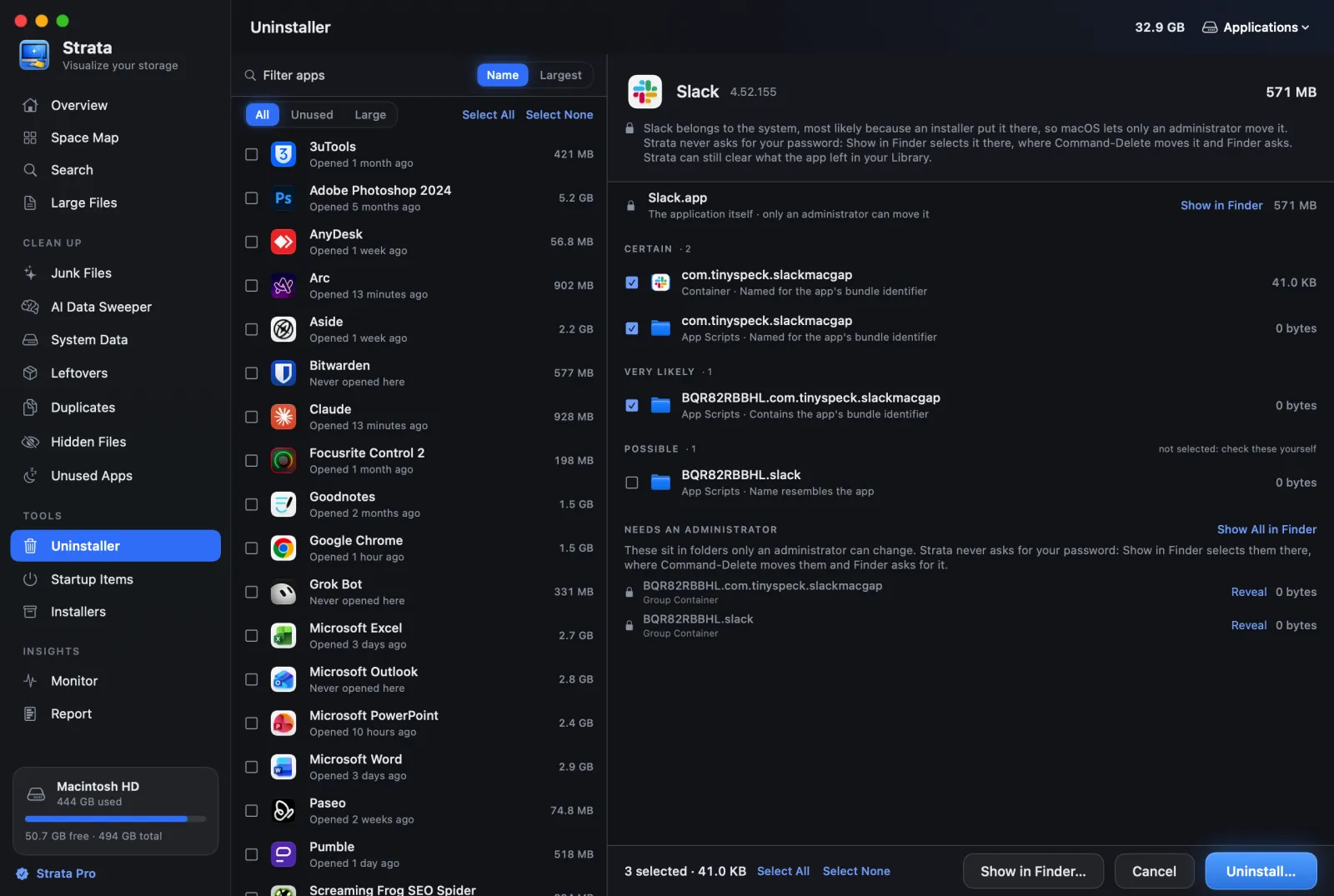
from the app's bundle identifier (Slack's is com.tinyspeck.slackmacgap). The
difference is what happens next: each match faces two questions before you see it.
Could it belong to another app?
Every match is held up against each other app installed, a beta sitting in Downloads included, and dropped if it is named for, or owned by, one of them. Apple's files appear only for Apple's own apps. Vendors' shared folders, such as Adobe's, Google's and Microsoft's, never appear, so removing Chrome leaves alone the Google folder that Drive relies on.
How sure is it?
What survives gets a grade, with its reason on the row. Certain and Very likely items carry the app's identifier or exact name, and start ticked. Likely ones only share the vendor's prefix and Possible ones only resemble the name: both wait, and Select All stops short of the Possible ones.
A dot folder in your home folder named like the app is only ever Possible, with a warning. One that a command-line tool of that name might own, from Homebrew, npm, Cargo or pyenv, is never offered at all. A few megabytes left behind is the price of leaving other apps' files alone.

Choosing what goes, and uninstalling it cleanly
Pearcleaner lists your apps too, in a list or grid you can search and sort by size or last
use. It adds a Finder item, Pearcleaner Uninstall, and a
pear command for Terminal.
Strata's list filters for what can go. Unused picks apps not opened in three months and Large those of 1 GB or more. On Apple silicon, Intel lists apps that still need Rosetta, Apple's translator for Intel code, which Apple supports in full only up to macOS 27. Choose several and their leftovers are gathered together, a shared one counted once.
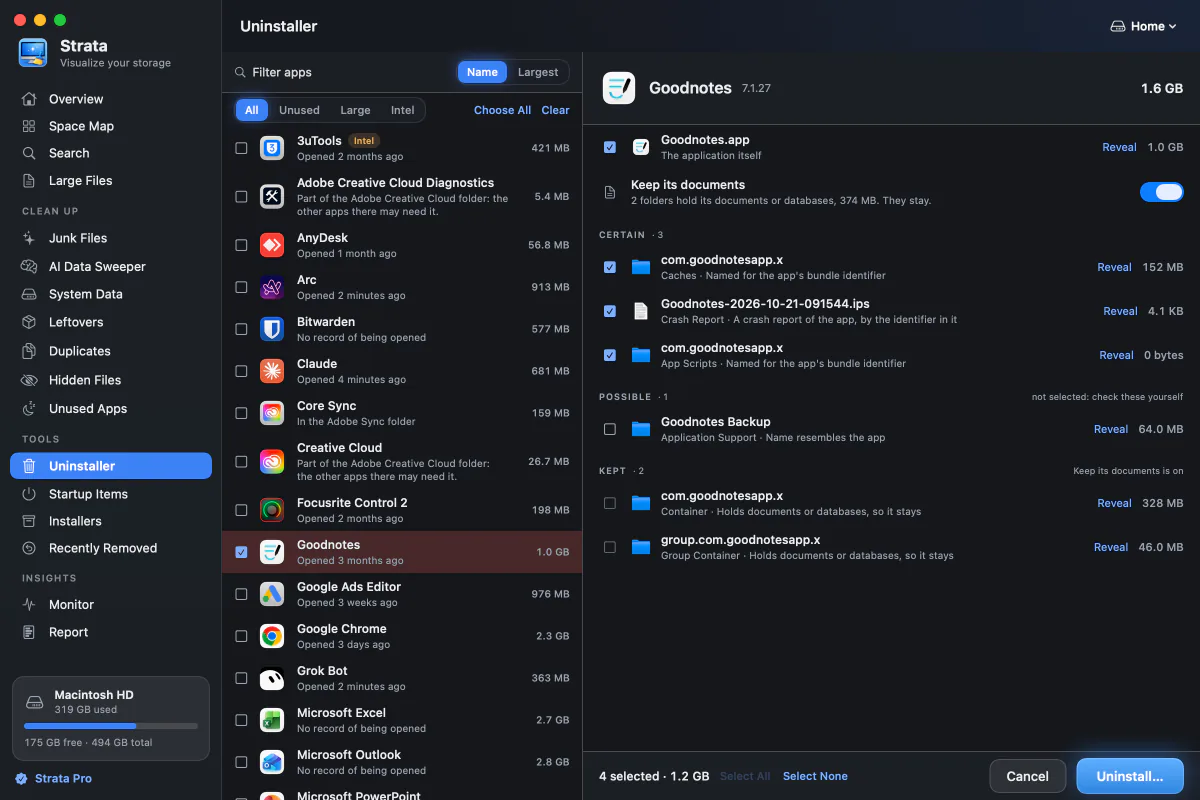
Keep its documents appears, switched on, when an app's container holds documents or databases, so the app goes while the notebooks or library in that container stay. The app's icon also leaves the Dock, and returns if you put the uninstall back. Strata warns when a chosen app is still running and offers to quit it, or its preferences would reappear as it saves them.
Apps only an administrator can move go to the Trash once you allow Strata's optional helper, in an administrator's account. Otherwise Strata selects them in Finder, which asks for the password. Pearcleaner likewise has a privileged helper, enabled once with your password. How to uninstall an app with Strata has the steps.
Apps that left without an uninstaller
Drag an app to the Trash and its preferences, caches and support files stay in your Library. Pearcleaner's Orphaned File Search hunts for them, saying it is "not 100% accurate", leaving out files that overlap with apps you have installed and asking you to confirm each marked file. Its Sentinel Monitor, off by default, watches your Trash and opens Pearcleaner with a newly trashed app's files listed for removal.
Strata's Leftovers room grades this job too. It looks only at names built like an app identifier, and only when nothing from that vendor remains installed, so an app you still use keeps its settings.
With the app gone, Strata never claims certainty. Caches, preferences, logs and launch agents (helpers that start at login) whose program is gone rate Very likely and start ticked. Folders that may hold your work wait as Likely, and anything changed within 30 days is only Possible.
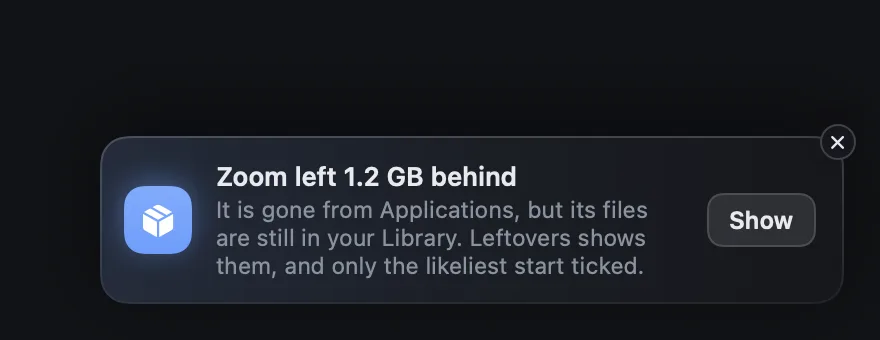
When an app leaves Applications some other way, Strata says what it left, with Show to open Leftovers. Clearing what deleted apps left walks through the room.
Refusals explained first, and 90 days of removals after
Pearcleaner deserves credit here. Release 5.4.3 moves what it removes into a folder inside your Trash, one per removal, named for what went (the app, for an uninstall) with the date and time. Undo is there, and a Delete History restores any of the last 10 operations. Homebrew's own uninstall and cleanup commands are the exception, since Homebrew removes those files itself.
Strata uses macOS's own move to the Trash in every room; if a move fails, the item stays put. First comes a sheet with every item's path and size. Whatever Strata refuses, from your keychain and iCloud Drive to an app's insides and macOS's own folders, sits under Skipped with its reason.

Afterwards a notice offers Put Back. Later, Recently Removed shows the last 90 days of removals, capped at the newest 500, each with the room and folder its items came from. It stays free even after a trial.
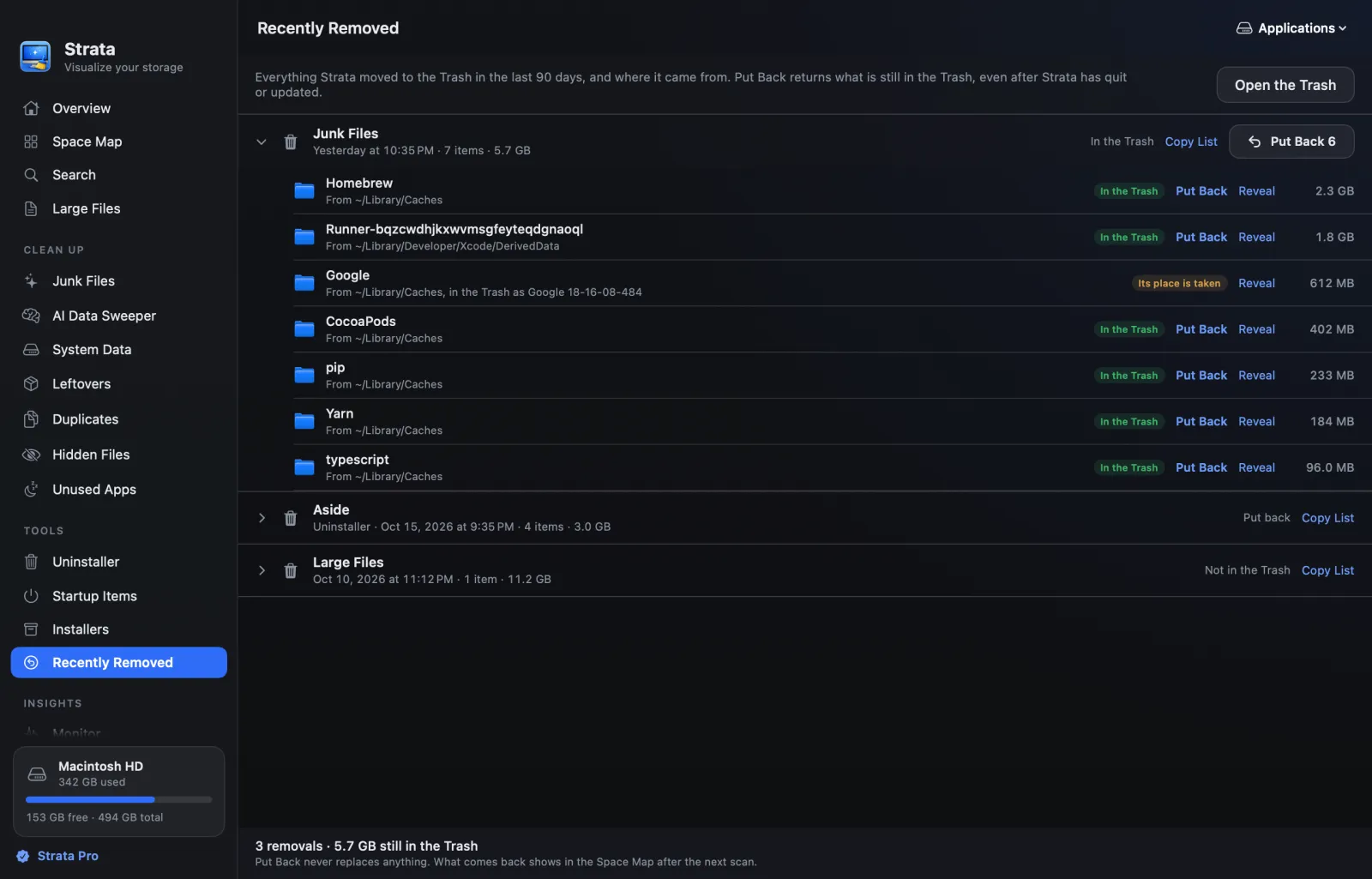
Put Back reaches an item until the Trash is emptied, by you or by Finder's 30-day setting, and never overwrites whatever has taken its place. Strata never empties the Trash itself. Putting back a removal shows the steps.
The whole disk, not only the apps on it
Pearcleaner's one general tool, File Search, filters by name, extension, size, dates, kind, tags or comment, which helps when you know what you want. A disk map and a duplicate finder are not among its tools.
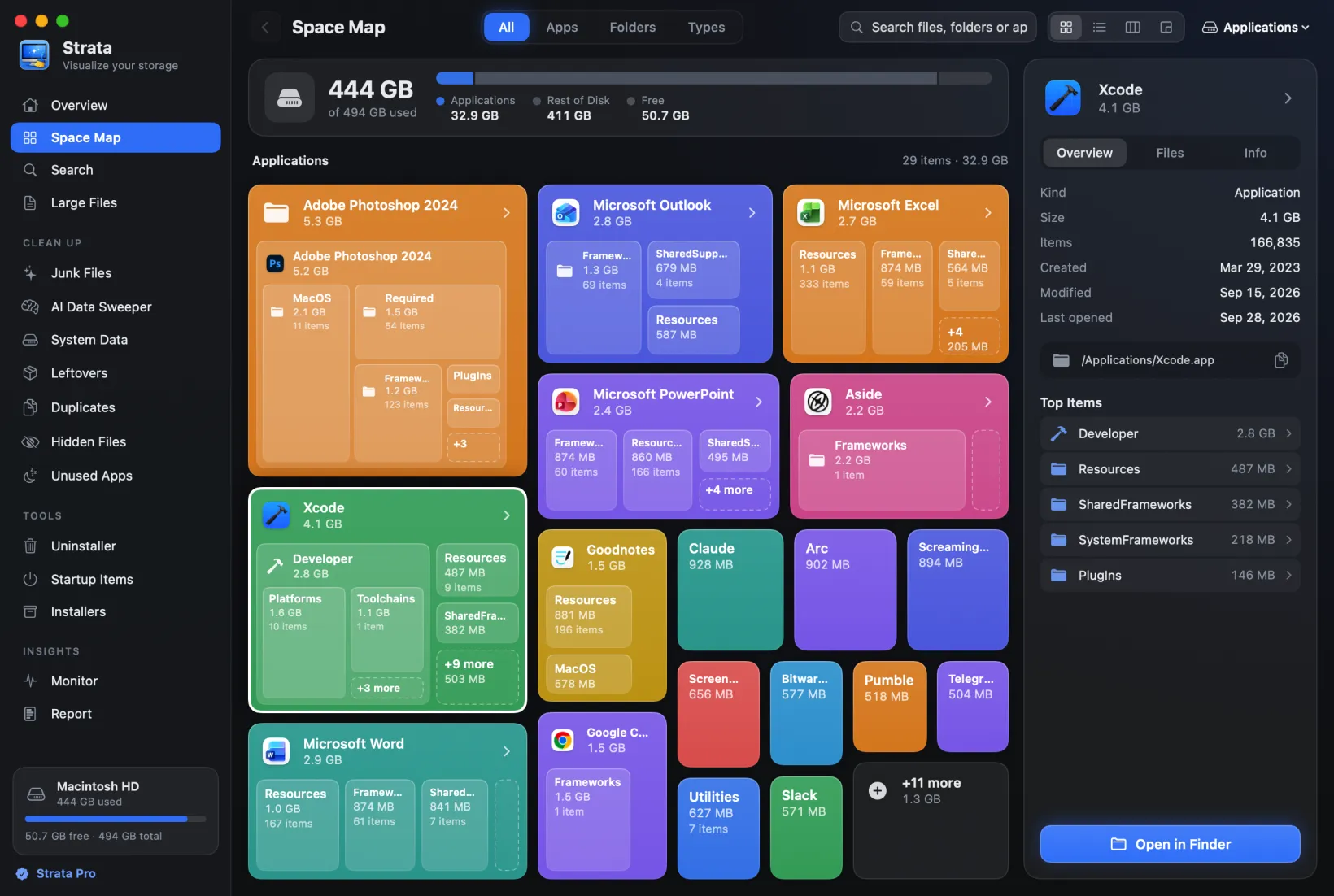
Strata's Space Map starts from the question you have first: where did the space go? It draws any drive or folder to scale for free, a whole startup disk in under a minute on most Macs. Choose Cards, a List, Columns or the Detailed Map, a treemap of rectangles sized by space, with files under 1 MB grouped per folder.

Seeing the disk first means you clear what is truly big, not just what an app list happens to show. Since 1.0.38 the map keeps up while you look, and Command-F searches it. Large Files lists everything above a size you choose.
Junk and duplicates, well beyond developer caches
Pearcleaner's Development Environment Manager is a real strength for developers. It clears stored files and caches for 26 environments, from Xcode and VS Code to npm, Cargo and Yarn, and its Homebrew manager runs Homebrew's cleanup.
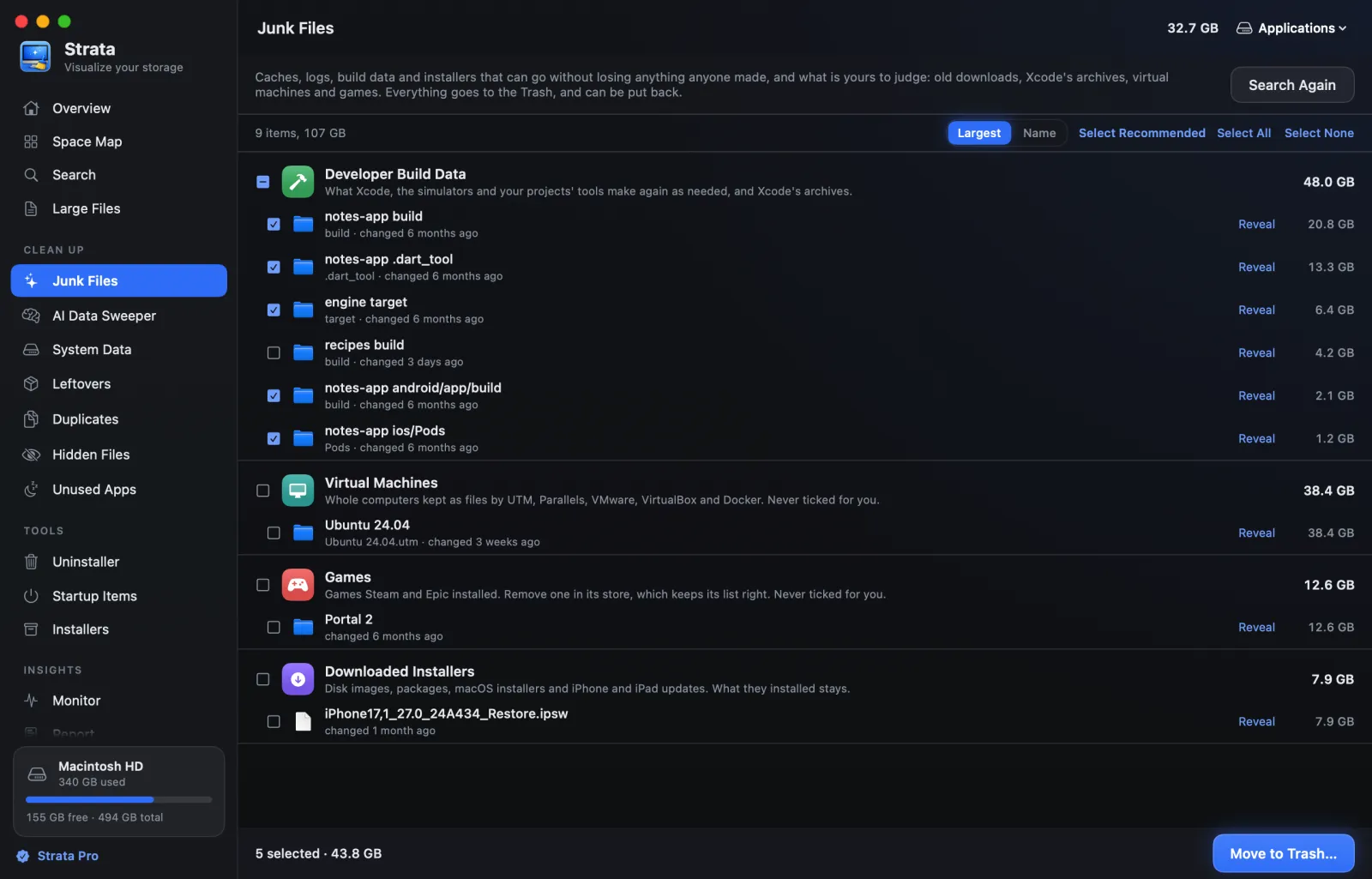
Strata's Junk Files reaches well beyond developer tools. In your home folder it finds apps' caches, logs and crash reports, Xcode's build data, simulator caches and package downloads, grouped by kind and named for their app. Only what nobody will miss starts ticked.
Build output such as node_modules qualifies only in projects untouched for three
months. Open apps' caches, macOS's own, old downloads, virtual machines and games are left for
you. For Xcode in particular, clearing Xcode's caches goes
further.
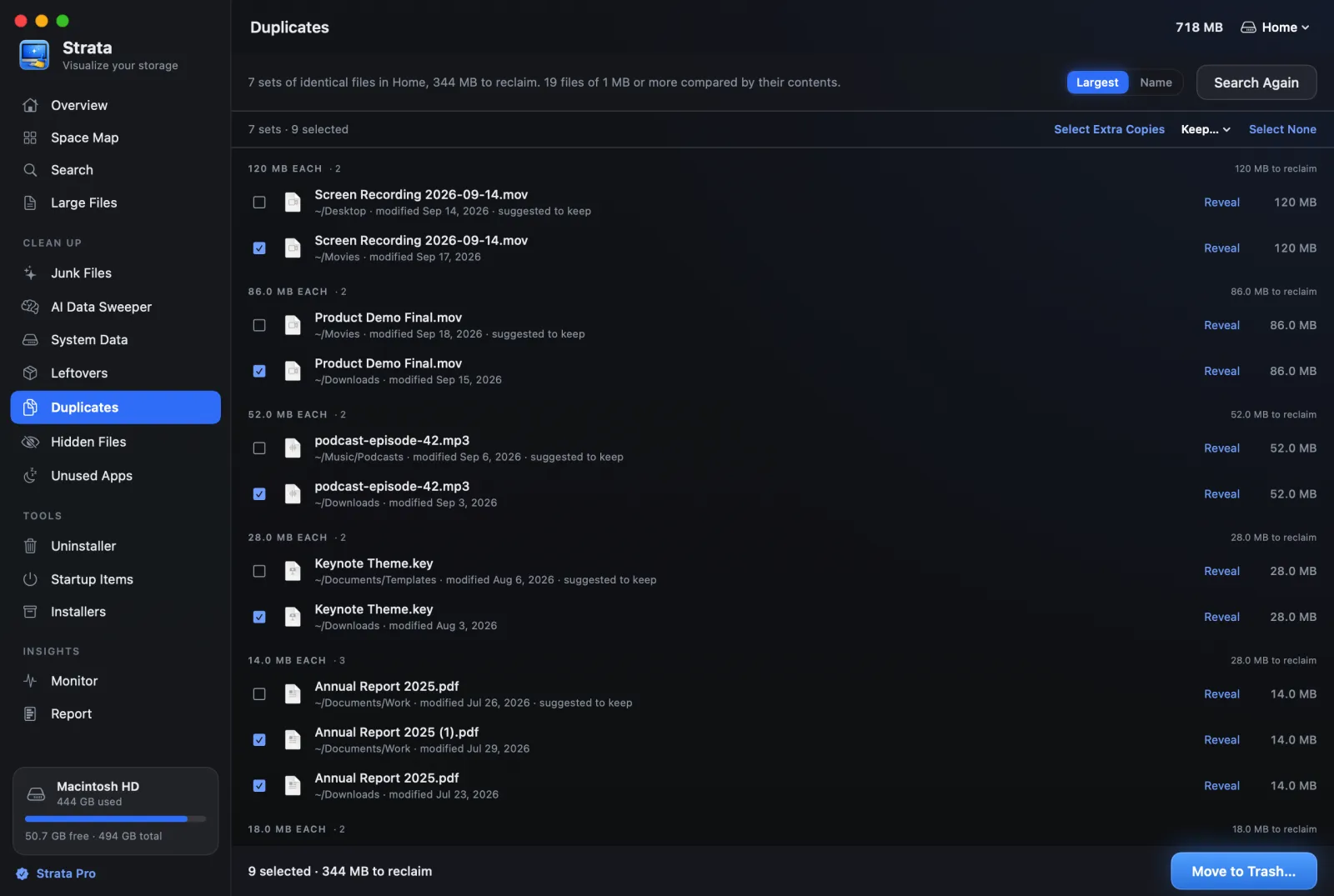
Duplicates compares contents, never names: files grouped by size, a sample compared, then only those still matching read in full. Nothing starts ticked, and Select Extra Copies leaves one of each set.
Installers, Startup Items, System Data, the AI Data Sweeper and Optimize sit beside them, and the Monitor and menu bar are free.
An app kept current for the macOS you run
Pearcleaner has a long record: 119 releases between November 2023 and November 2025. Since 11 May 2026, though, its README has marked the project "On Hold". It gives two reasons: a new job with other priorities, and no longer having a Mac for personal development. So the developer is "currently unable to build, test, or release updates".
It also says the project is "not abandoned entirely", and that the developer hopes to come back to it. The latest release is 5.4.3, from 26 November 2025, and the README's support table runs from macOS 13 Ventura to 26 Tahoe.
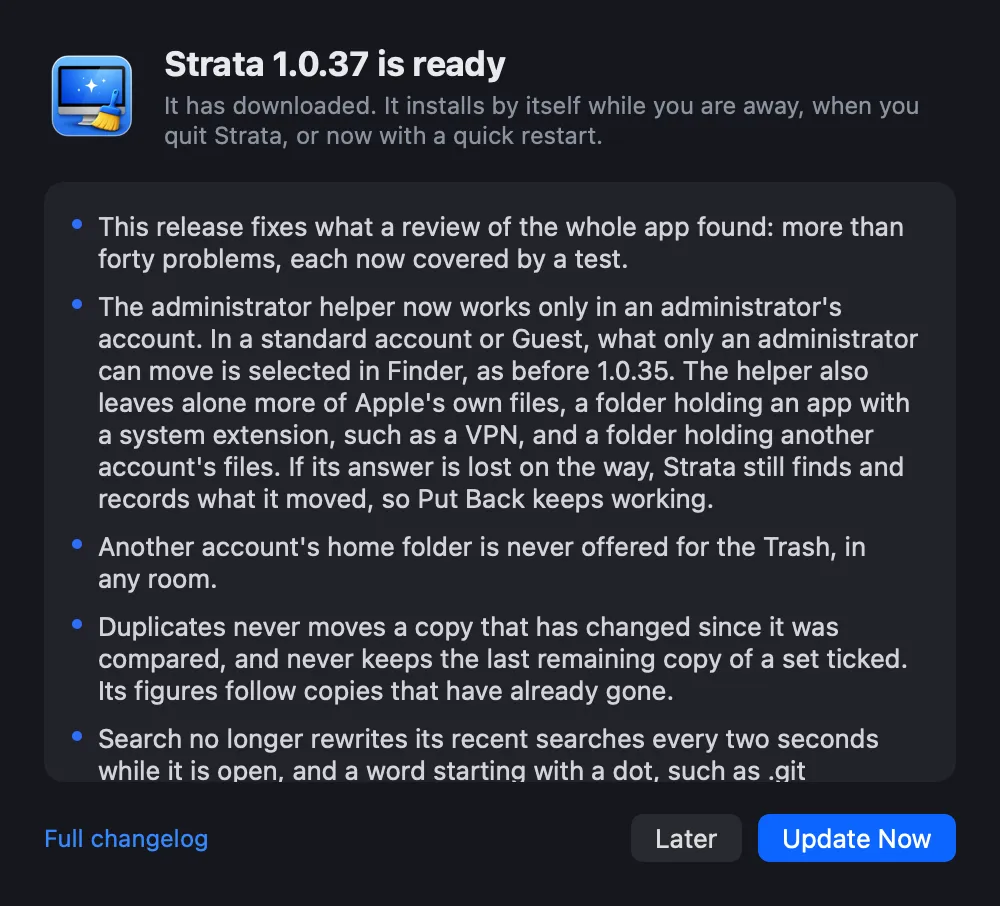
Strata's changelog lists 40 versions since September 2026, the newest, 1.0.39, on 9 November 2026. It runs on macOS 13 or later, macOS 27 included, checks hourly for its own updates and installs them while you are away, unless you switch that off.
Who Pearcleaner still suits
Pearcleaner suits someone who wants a free tool, reads its file lists before pressing the
button and runs a macOS version its README lists as supported, 13 to 26. It suits developers
best, if they will use its managers for Homebrew, installer packages (PKG) and developer
environments, App Lipo (which strips unused processor code from universal apps) or its command
line. Get it only from its GitHub releases or with
brew install --cask pearcleaner. Its README names itsalin.com as the developer's
only legitimate site and warns that other download sources are scams or unaffiliated.
Privacy
Nothing about your files leaves the Mac, and Strata has no account, no analytics and no crash reports. It contacts its own site only for its updates, which one switch turns off, and when a licence sold since 10 November 2026 is added or removed. Pearcleaner's public source lets anyone read what it does, which counts in its favour. What Strata sends lists each request.
Verdict
Choose Strata
if you want apps gone with what they left, the whole disk in view, and a way back from every removal. $19.99 once covers uninstalling, Leftovers, Junk Files, Duplicates and Optimize in one press, in an app that keeps pace with macOS. Mapping, monitoring and looking at every app's leftovers stay free.
Pearcleaner may suit you
if you want a free, source-available toolkit for Homebrew, packages and developer caches, on the macOS versions its README supports (13 to 26).
Still choosing? See AppCleaner vs Strata for another free uninstaller, Nektony App Cleaner vs Strata for a paid one, BuhoCleaner vs Strata, and the best uninstallers for Mac.
Frequently asked questions
Is Pearcleaner still being developed?
Not at the moment. Since 11 May 2026 its README has marked the project On Hold. It explains that a new job and other priorities took the developer's time, and that they no longer have a Mac for personal development, so new versions cannot be built or tested; the developer hopes to return to it someday. Its latest release is 5.4.3, from 26 November 2025, and the README's support table lists macOS 13 Ventura to macOS 26 Tahoe.
Is Pearcleaner open source?
Its code is public on GitHub and the app is free, but its licence is Apache 2.0 with the Commons Clause, which forbids anyone to sell Pearcleaner or a modified copy. Its README calls it source-available and fair-code. A site that charges for Pearcleaner is not its developer.
Does Pearcleaner delete files permanently?
No. Release 5.4.3 moves what it removes into a folder inside your Trash, one for each removal, with Undo and a Delete History that restores the last 10 operations. Homebrew's own commands, its uninstall and cleanup, are the exception, since Homebrew removes those files itself. Strata moves everything it removes to the Trash too: Put Back works until the Trash is emptied, and Recently Removed records 90 days of removals, at most 500.
Is Strata better than Pearcleaner?
For most people, yes. Strata checks each leftover against your other apps and grades it, grades what deleted apps left as well, maps the whole disk, clears junk and duplicates, and is still updated, for $19.99 once, with a free version and a 14-day trial. Pearcleaner is free and has tools Strata does not, such as Homebrew and PKG managers, App Lipo and a Finder item.
Is Pearcleaner safe to download?
Get it only from its GitHub releases page or with Homebrew. Its README names itsalin.com as the developer's only legitimate website, and calls every other source of Pearcleaner downloads a scam or unaffiliated.
Does a Strata licence cover more than one Mac?
That turns on the purchase date. Licences bought before 10 November 2026 cover all the Macs you own. A licence sold since that date is for a single Mac at a time, and moving it is free: remove it under Licence in Settings, then add it on the new Mac. Pearcleaner, being free, needs no licence at all.
Try the graded Uninstaller on your own apps
Keep Pearcleaner if it serves you, and open Strata beside it: the grades, the disk map and Recently Removed cost nothing to look at. Strata Pro, $19.99 once, unlocks the rest, and a 14-day trial of everything starts the first time you open it.