MacDirStat: which app is which, and the Mac disk map that also cleans up safely
MacDirStat is not one app. The name belongs to phalladar's read-only treemap for macOS 15, to Ti-03's sunburst, now sold on the App Store as DirStat, and to a smaller project written in Rust. All three are free, open source and less than a year old. If you searched for one because you want WinDirStat's kind of map with a safe way to act on it, Strata, which we make, is the stronger choice: a treemap and three other views, an uninstaller, junk and duplicate cleanup, and Put Back for everything it moves. The map is free; Strata Pro is $19.99 once.
Key takeaways
- Strata is the stronger pick for most people who search for MacDirStat: a treemap plus Cards, List and Columns, then cleanup rooms that use only the Trash, with Put Back.
- phalladar's MacDirStat is the maintained WinDirStat-style one: a read-only treemap beside a folder tree, MIT licence, macOS 15 or later, installed by Homebrew's
macdirstatcask. - Ti-03's MacDirStat, now DirStat, draws a sunburst, finds duplicates between 4 KB and 512 MB and moves files to the Trash. It is free on GitHub, $4.99 on the App Store, and needs macOS 13.
- A third, MichaelStromberg's, is a Rust app that calls itself a WinDirStat clone; its one release, 0.5.0 from March 2026, is not code-signed, and it deletes files outright.
- Strata's map is free with no time limit. Strata Pro is $19.99 once, and the first 14 days on each Mac include all of it.
Written by the maker of Strata, the alternative this guide recommends. The MacDirStat facts come from each project's GitHub repository (its README, licence, releases and source code), Homebrew's cask data, the Mac App Store listing and AlternativeTo, read on 9 November 2026. We did not install or run any of them.
The short answer
For most people, Strata: the map and the cleanup in one app, with a way back from every removal, for $19.99 once and the map itself free. If you want only WinDirStat's look and nothing that deletes, phalladar's MacDirStat, on macOS 15 or later; for a sunburst with a duplicate finder, DirStat.
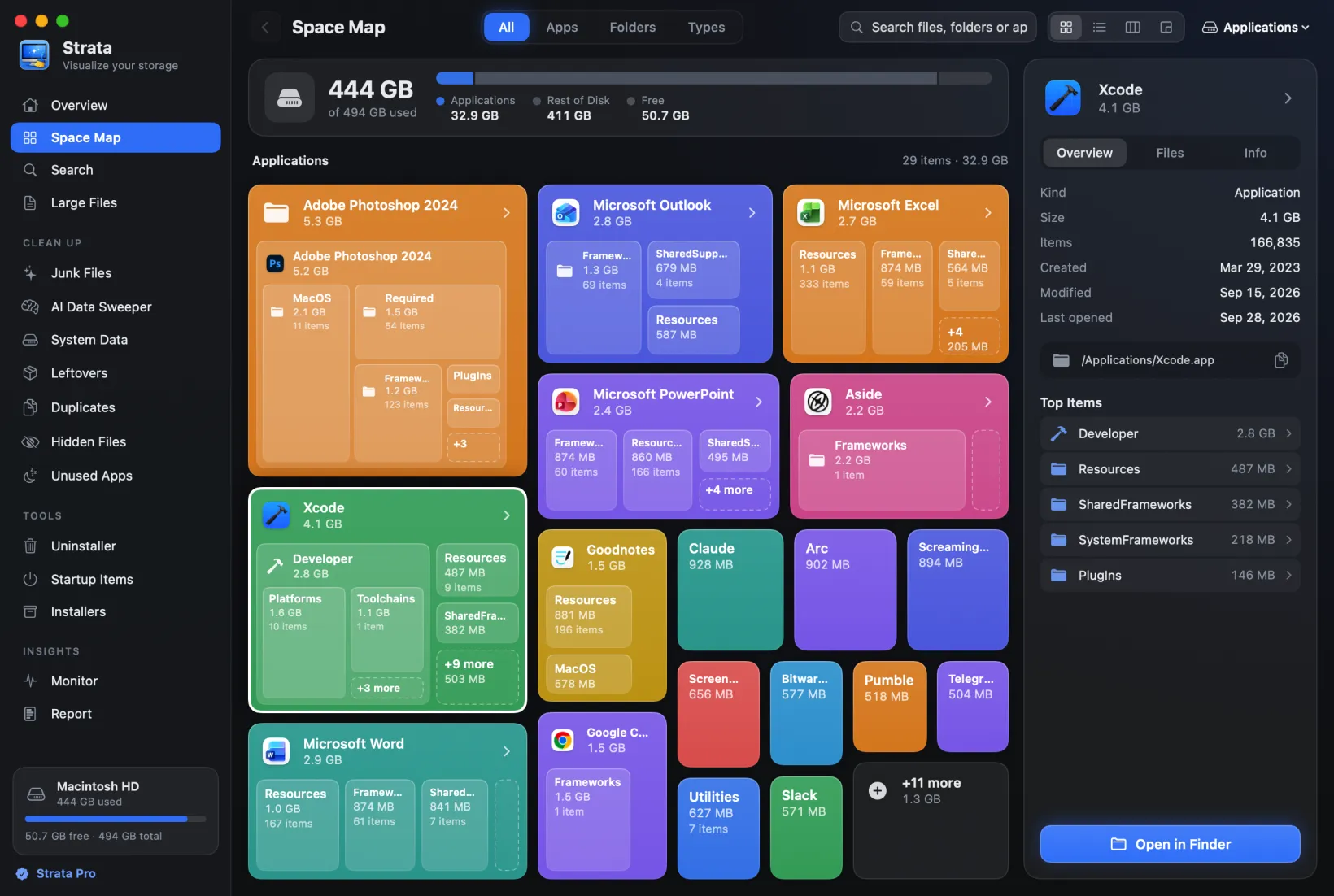
- A treemap like MacDirStat's, plus cards, a list and Finder-style columns.
- Removal you can undo while it is in the Trash, with a sheet before and 90 days of history after.
- Duplicates of any size from 1 MB, checked again before anything moves.
- Cleanup none of them attempts: junk, app leftovers, old installers.
- Recent scans kept for you, so today's disk can be set beside an earlier one.
At a glance
| phalladar's MacDirStat | DirStat (Ti-03) | Strata | |
|---|---|---|---|
| The picture | Treemap beside a folder tree | Sunburst beside a file list | Treemap, Cards, List and Columns, with file types |
| Removing | None; Reveal in Finder | Move to Trash from the chart or list | Move to Trash after a sheet that lists each item |
| Undoing a removal | Nothing is removed | Drag it out of the Trash yourself | Put Back until the Trash is emptied; Recently Removed lists 90 days |
| Duplicates | No | 4 KB to 512 MB, first copy kept | From 1 MB, no upper limit, outside apps, Library and hidden folders; rechecked before moving |
| Uninstaller, junk, installers | No | No | Yes |
| Scans kept | Not in its README | Saved by hand, compared, CSV | Kept by itself, the latest 20 per place (Strata Pro); spreadsheet, web page, text |
| Needs | macOS 15 | macOS 13 | macOS 13 |
| Network | None, not even an update check | GitHub copy checks for updates | Its update check, and adding or removing a licence |
| Licence | MIT | AGPL-3.0 | Closed source |
| Price | Free | Free on GitHub; $4.99 on the App Store | Map free; $19.99 once for the rest |
| Latest | 0.2.0, 11 Oct 2026 | 1.4.1, 16 Sep 2026 (App Store: 8 Sep) | 1.0.39, 9 Nov 2026 |
Which MacDirStat is which
The two main apps called MacDirStat both appeared on GitHub in 2026, both in Swift, and they are unrelated: different developers, licences and charts, and opposite rules about deleting. The surest way to tell which one a page means is its GitHub address. GitHub lists 23 repositories with the name; the most starred of the rest is MichaelStromberg's, written in Rust. AlternativeTo's MacDirStat listing, MIT and macOS 15, is phalladar's.
phalladar's MacDirStat: the read-only treemap
This one is inspired by WinDirStat, as its README says. It scans a drive or folder and draws a treemap in which every file is a rectangle sized by its disk usage and coloured by one of ten categories, with the bigger rectangles labelled. A sidebar lists folders largest first, and an inspector gives a folder's size, counts and a breakdown by file type. Double-click a rectangle to focus on its folder; scroll or pinch to zoom.
- Read-only: its README says it "never deletes or moves files itself". You choose Reveal in Finder and use the Trash there.
- Offline: the app has no networking code, so it does not check for updates; download the new zip, or let Homebrew update it.
- Cloud-aware: iCloud Drive and OneDrive placeholders are measured without being downloaded, and cloud-only folders are marked incomplete.
- New: the repository dates from February 2026 and the latest release is 0.2.0, from 11 October 2026. It runs on Apple silicon and Intel, on macOS 15 Sequoia or later only.
- Getting it:
MacDirStat.zipfrom its GitHub releases, orbrew install --cask macdirstat, which installs this one.
Ti-03's MacDirStat, now DirStat: a sunburst with Move to Trash
The other MacDirStat draws a sunburst: rings around a centre, one ring per folder level, each arc sized by its space, though its App Store page calls it a treemap. Beside the chart sits a sortable list, and the app adds a breakdown by file type. It is now named DirStat on the Mac App Store and on its downloads, while its repository keeps the old name.
- It moves files to the Trash from a right-click on an arc or a row, using macOS's own Trash call, and its duplicate finder can trash every copy but the first in each set.
- Saved scans: a scan can be saved, reopened and compared with a later one, or
exported as a CSV file. Folders such as
node_modulesfold into one row. - Two builds: the free GitHub copy can have Full Disk Access and checks an update feed automatically, with Sparkle. The App Store copy, $4.99, is sandboxed: it scans only folders you choose and cannot have Full Disk Access.
- Older Macs: it runs on macOS 13 Ventura and later. The latest release is 1.4.1, on GitHub from 16 September 2026.
- Getting it: free from its GitHub releases, or $4.99 on the Mac App Store.
MichaelStromberg's MacDirStat: the Rust one
The third describes itself as a "fast windirstat clone for macos", written in Rust, with WinDirStat's three panes: a treemap, a directory tree and statistics by extension. It deletes from its window for good, not to the Trash, and Command-Delete skips even its confirmation. Its one release, 0.5.0 from March 2026, says "The DMG is not code-signed", so macOS will block it until you allow it.
None of the three comes from WinDirStat's developers, and WinDirStat itself has no Mac version. Our guide to WinDirStat for Mac matches each of its views to a Mac tool.
The two main MacDirStat downloads are notarized, their developers say, so macOS opens them without the detour through Privacy & Security that Disk Inventory X needs. phalladar's app, DirStat's GitHub copy and Strata all measure more with Full Disk Access, which macOS requires before a disk tool can read folders such as Mail and Messages.
What $19.99 buys when MacDirStat is free
Every MacDirStat costs nothing from GitHub, and so does the part of Strata that matches them. The free version scans any drive and keeps every view of the Space Map, File Types included, plus Search, Large Files, the Uninstaller's findings, Optimize's plan, the Monitor and the menu bar, with no time limit. What Strata Pro adds, for $19.99 paid once, is everything after the looking:
- Move to Trash from the map, Search and Large Files, with Put Back;
- Duplicates with no upper size limit, and Junk Files that knows which caches and build folders are safe;
- uninstalling an app along with what it left, the Leftovers of apps removed long ago, and Installers you have finished with;
- Report, which keeps your recent scans and shows what changed, and Optimize in one press.
The cost of a free tool is your time, and the risk of a wrong guess. Strata does the sorting and keeps every removal reversible until you empty the Trash, which is what the money pays for.
Judge that before paying: the first time Strata opens on a Mac, 14 days of Strata Pro begin,
enough to move 40 GB, with no account or card. A licence never expires, brings bug fixes and new
macOS support with it, and comes with 14 days to change your mind. Licences bought on or after 10
November 2026 work on one Mac at a time and follow you to your next Mac free; earlier ones cover
all your Macs. Strata comes from the download page or
brew install --cask pankaj-kholiya/strata/strata.
A treemap like MacDirStat's, and three more views
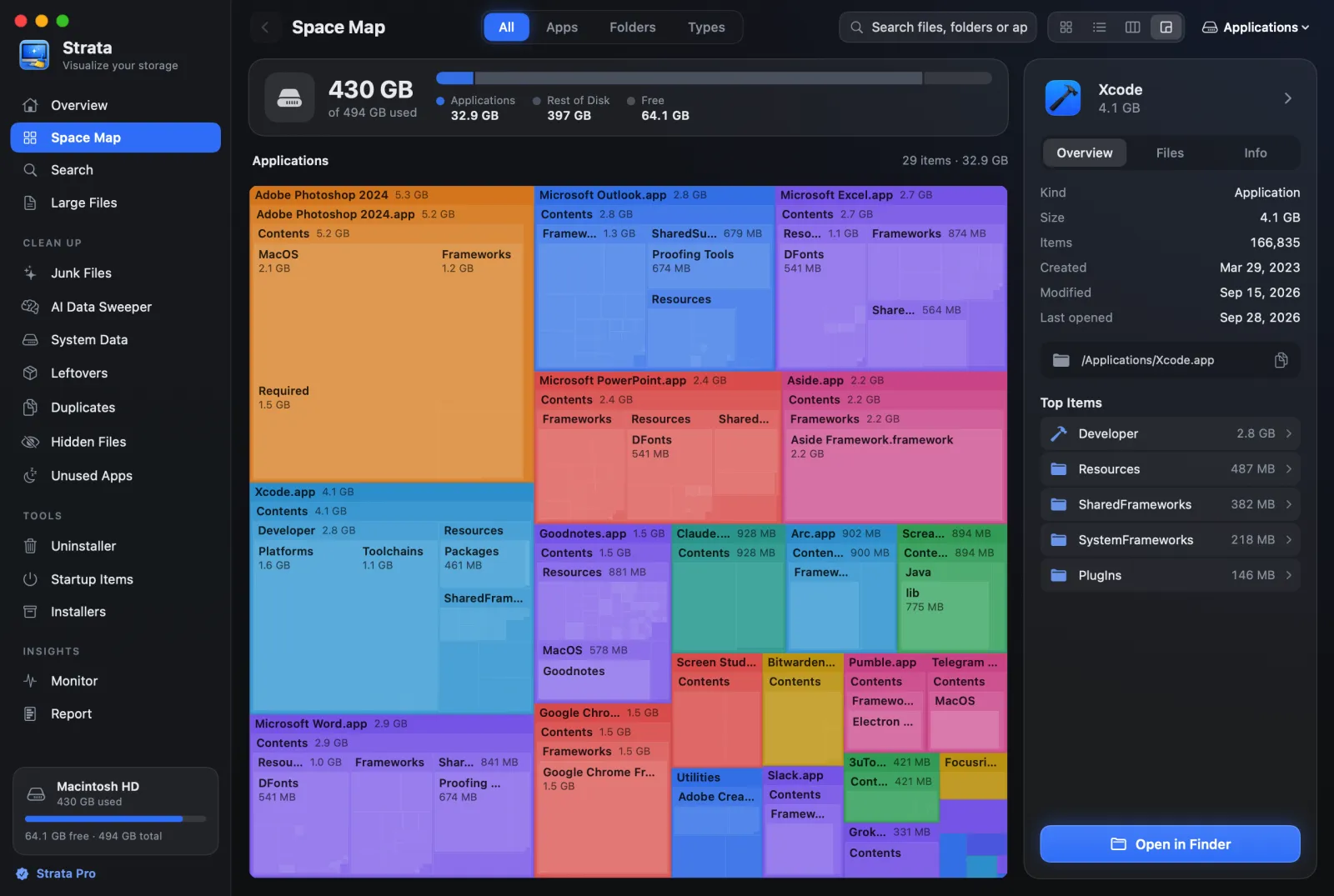
Strata's Space Map draws the treemap phalladar's app is built around: the Detailed Map, Command-4. A folder big enough for a label carries its name and size along its top edge, with its contents nested inside, down to single files.
Three more views show the same scan differently. Cards, Command-1, gives each app and folder a card with its icon, name and size. List, Command-2, is the folder tree both MacDirStats keep beside their charts, biggest first, its folders unfolding where they are. Columns, Command-3, browses like Finder.
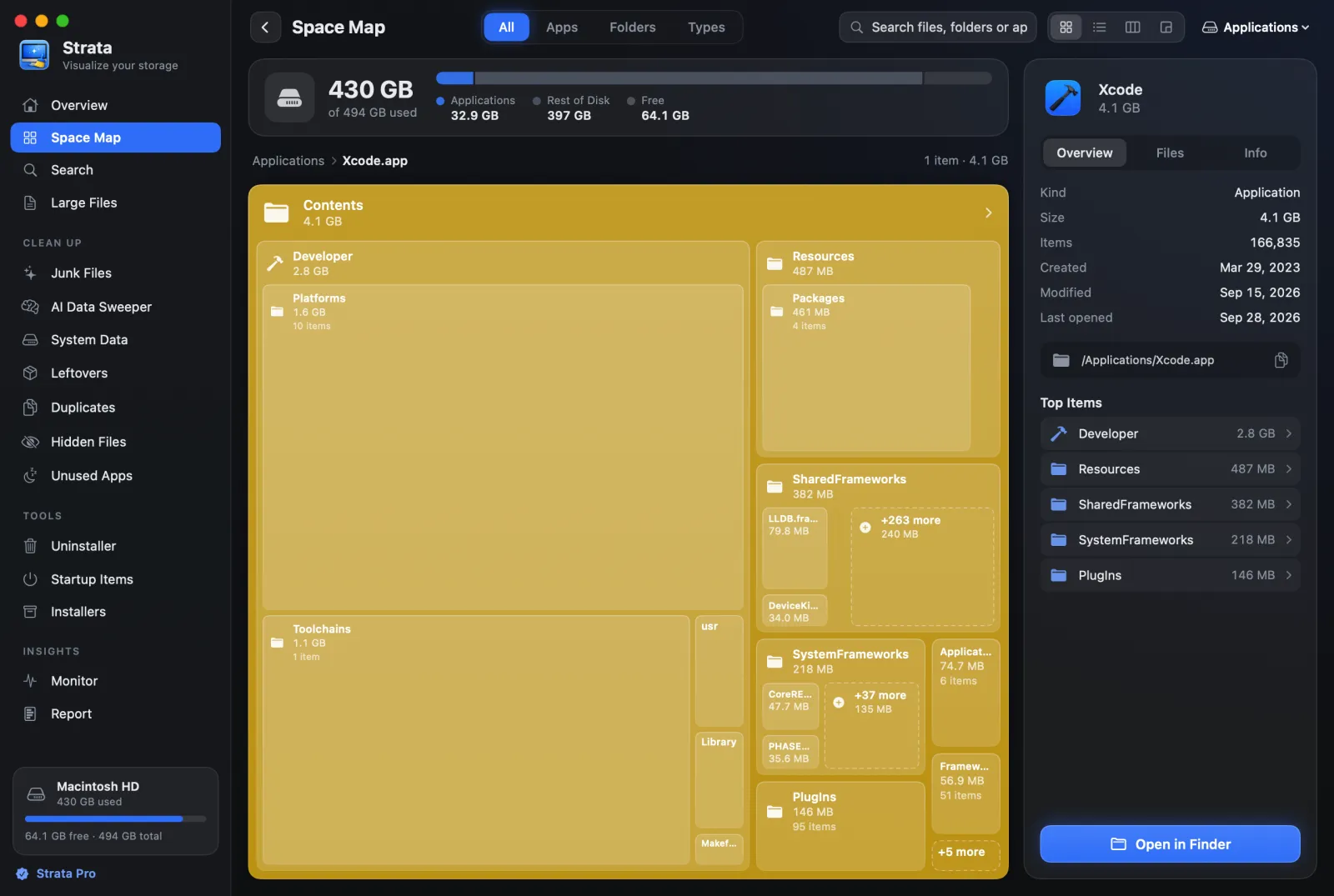
Like MacDirStat's colour categories, the File Types tab answers which kinds of file take the space, with each kind a card you can open. Command-F searches the scan's names (folders, and files of 1 MB or more), and since Strata 1.0.38 the map keeps up with the disk while you look: what you delete or download shows without a new scan.
Removal you can undo
phalladar's MacDirStat avoids mistakes by never deleting: you reveal what you found in Finder and delete it there. DirStat moves items to the Trash from its own window, at once, from a right-click, and they wait there until you empty it. Strata adds the steps between those two.
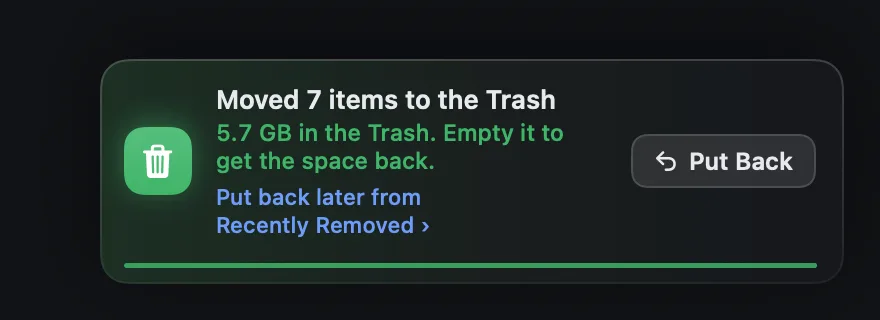
Choose one item or fifty, and a sheet lists each with its path and size before anything moves. Items Strata will not move are named there with the reason: your keychain, iCloud Drive, anything inside an app, and macOS's own folders. Confirm, and everything goes to the Trash through macOS's own move. Strata never empties the Trash, so nothing is ever erased by it.

The notice after each removal has Put Back. Later, the Recently Removed room lists every removal of the past 90 days with each item's old place, and returns a whole removal or a single file while it is still in the Trash. It is part of the free version, so it works after the trial too.
Duplicates, checked before anything moves
DirStat has a duplicate finder, and phalladar's does not. DirStat compares files from 4 KB to 512 MB by their contents, and its code skips anything larger, naming virtual machine images among the reasons. One click keeps the first file of each set and trashes the rest. Its 1.4.1 release notes say an earlier version "could report two different files as duplicates", so use 1.4.1 or later.
Strata's Duplicates room compares every file of 1 MB or more in the scan, however large, outside apps, libraries and hidden folders, so the second copy of a 4 GB film counts. It works in three passes, shown on screen: sizes, then 16 KB samples from the start and end of each file, then a full read with a SHA-256 fingerprint for anything still matching. Nothing starts ticked.

Select Extra Copies keeps one file per set, chosen by place rather than date. A folder you named comes first and Downloads last; between two copies in similar places, the one without "copy" or "(1)" in its name wins.
Copies that share storage on disk, such as APFS clones, are counted as the little that removing them frees. Before anything moves, Strata checks each copy against the disk again, and it warns you if you have ticked every copy of a file. Finding and removing duplicates takes you through it step by step, and the guide to duplicate files on a Mac explains where a duplicate finder should never look.
Cleanup none of them attempts
DirStat folds node_modules into a single row with its size and file count. Strata's
Junk Files room measures each project's node_modules and
build output instead, and ticks them only when nothing in that project has changed for three
months. Beside them it lists app and browser caches, logs, Xcode's build data and package
managers' downloads, ticking only what nobody will miss; old downloads, virtual machines and games
are listed for you to decide.
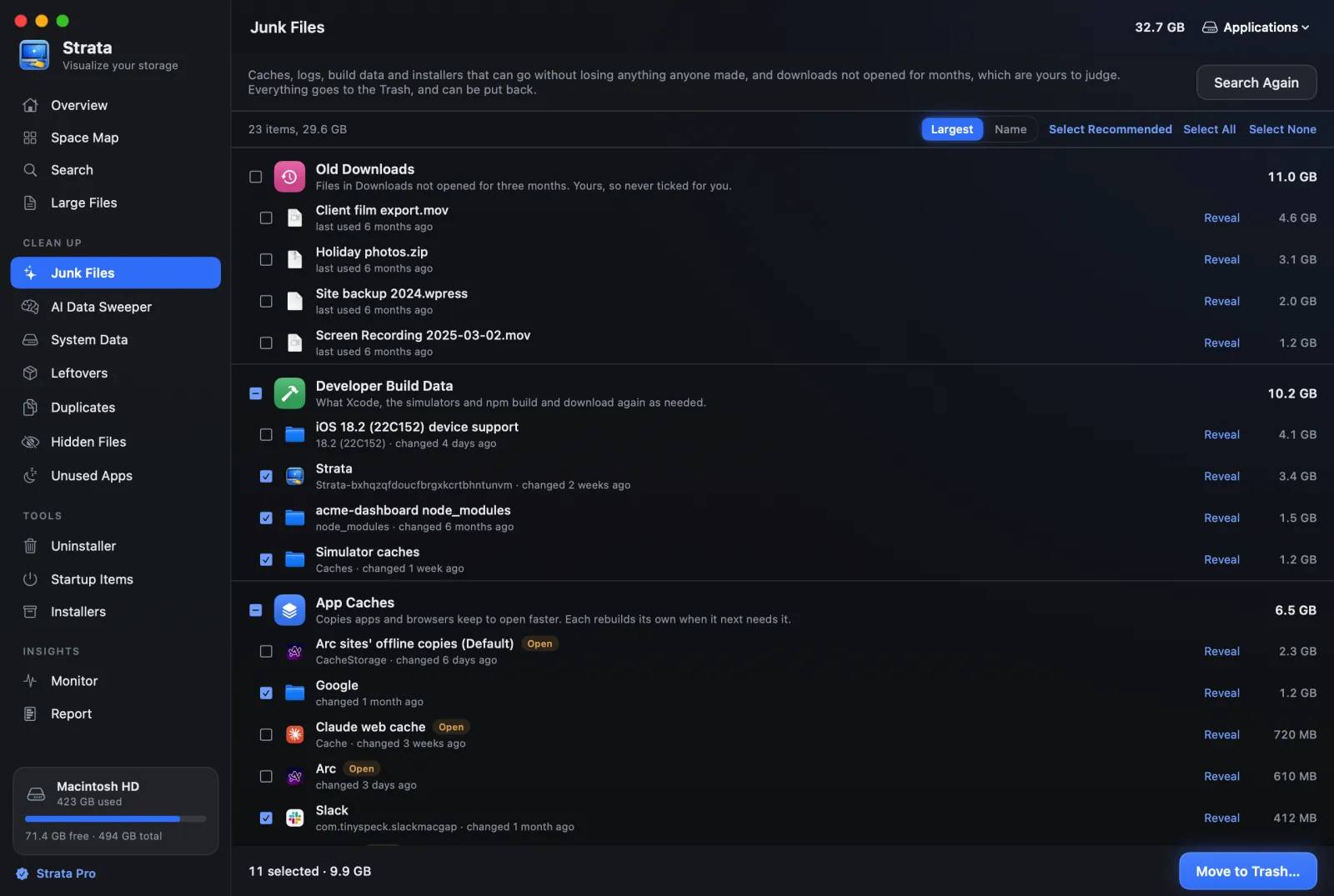
node_modules ticked; old
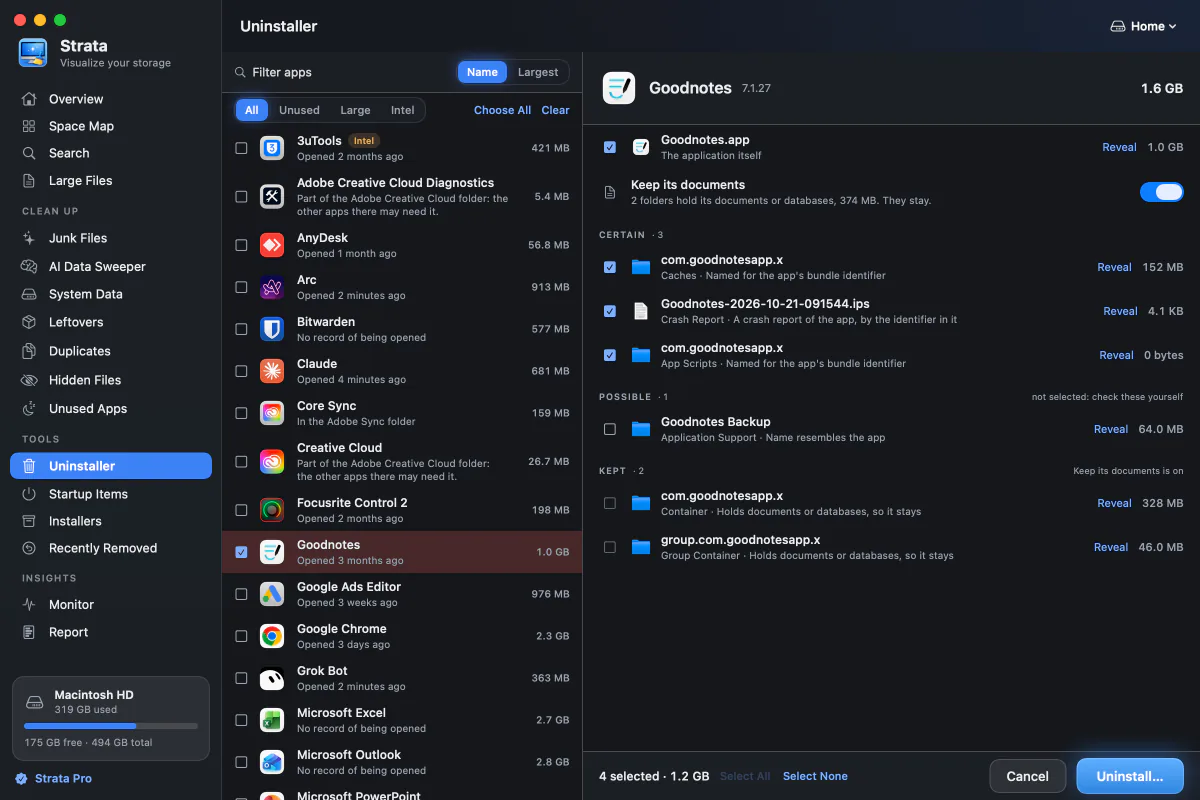
downloads and a running browser's cache are not. Shown with a demonstration home folder.The Uninstaller covers what no MacDirStat touches: the files an app leaves in your Library. It reads the app's bundle identifier, searches 32 places, grades each match from Certain to Possible and ticks only the sure ones. Installers finds disk images of apps you already have, and Leftovers gathers what long-deleted apps left behind.
Recent scans kept for you, without saving them
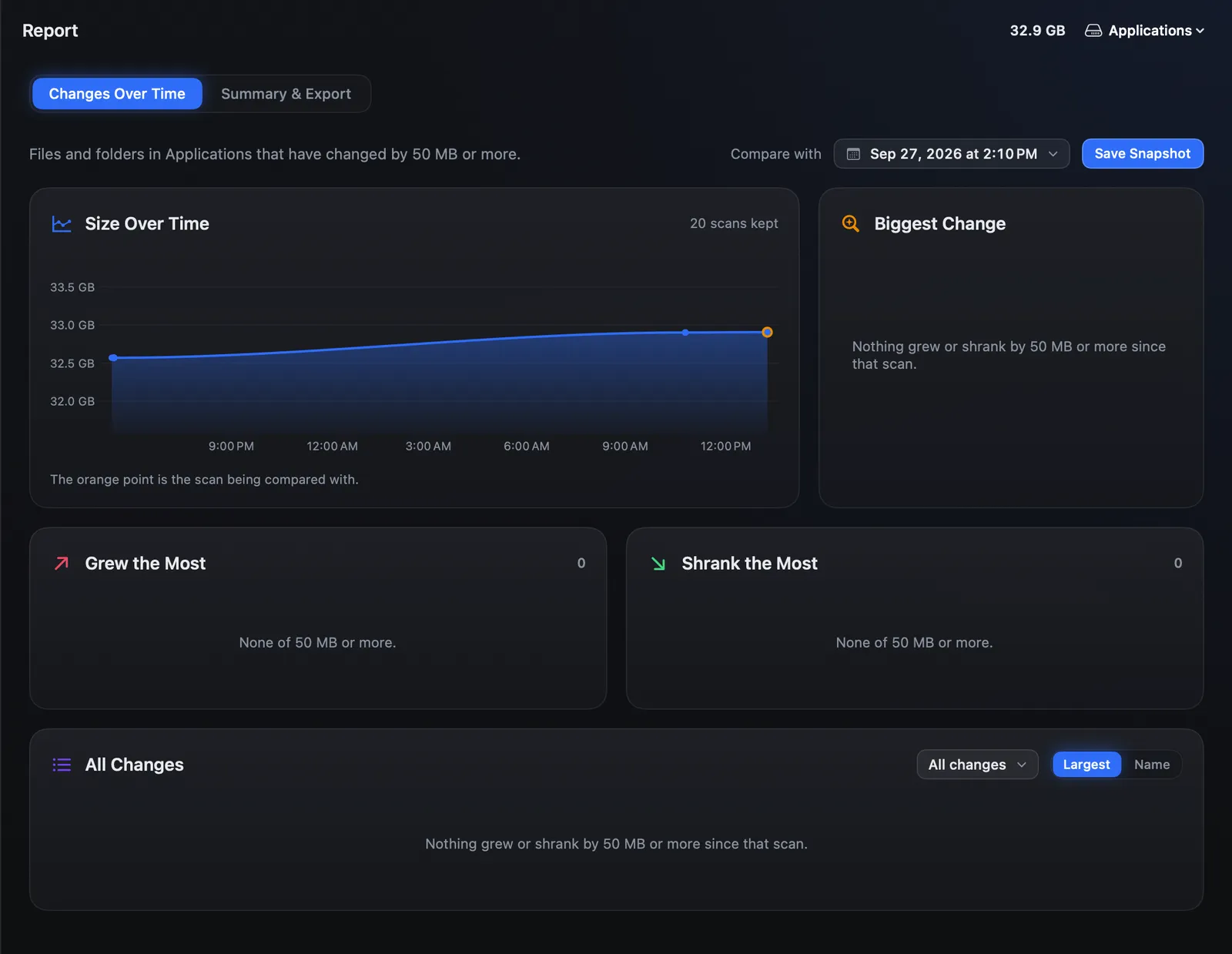
DirStat can save a scan to a file and compare it with a later one, if you remember to save it. With Strata Pro, Report keeps a snapshot of each scan by itself, up to the latest 20 for each place you scan: the sizes of folders of 10 MB or more, a few hundred kilobytes each. Changes Over Time charts the size and lists what grew, what shrank, what is new and what is gone. Exports cover a spreadsheet, a web page that loads nothing online, and a short summary.
Who each MacDirStat still suits
phalladar's MacDirStat suits someone on macOS 15 or later who wants a free, offline treemap and is happy to delete in Finder. DirStat suits a Mac on macOS 13 or 14, or anyone who wants a free sunburst with a duplicate finder, or an App Store copy that stays inside its sandbox. The Rust MacDirStat is for the curious, given its unsigned download and deletes that skip the Trash. None of them uninstalls apps or clears caches.
Privacy
phalladar's MacDirStat has no networking code. DirStat's README says "No network access", and its App Store listing says no data is collected; its GitHub copy looks for updates, as Strata does.
Strata keeps no account and runs no analytics, and nothing about your files leaves the Mac. Besides that update check, which a switch in Settings stops, the only other time it goes online is when a licence sold from 10 November 2026 joins or leaves a Mac.
Verdict
Choose Strata
if you searched for MacDirStat because your disk is full. You get the treemap that drew you to it and three more ways to see the same scan. Then rooms find duplicates of any size above 1 MB, junk, app leftovers and old installers, each ticked only when it is safe. Every removal goes to the Trash with Put Back, and the map stays free; Strata Pro is $19.99 once.
A MacDirStat may suit you
if you only want a free open-source map and will do the deleting yourself.
Frequently asked questions
Is MacDirStat free?
Yes. phalladar's MacDirStat is free and open source under the MIT licence. Ti-03's, now called DirStat, is free from its GitHub releases under the AGPL-3.0, and $4.99 on the Mac App Store as a sandboxed build. MichaelStromberg's Rust MacDirStat is free under the GPL-3.0. Strata's map is free as well; its cleanup is $19.99 once.
Is MacDirStat safe?
The two main ones publish downloads their developers say are signed and notarized, and their code is public. phalladar's is read-only and, its README says, has no networking code. DirStat moves only what you choose to the Trash; use 1.4.1 or later before trashing duplicates, since that version fixed a bug that could match two different files. The Rust MacDirStat's disk image is not code-signed, and it deletes files outright rather than to the Trash.
Does MacDirStat work on macOS 13 or 14?
Of the two main apps, only DirStat does: it needs macOS 13 Ventura or later. phalladar's MacDirStat, and the Homebrew cask that installs it, need macOS 15 Sequoia or later. The Rust MacDirStat does not say which versions it supports. Strata runs on macOS 13 or later, on Apple silicon and Intel.
Is MacDirStat on the Mac App Store?
One of them is, under another name. Ti-03's app is sold there as DirStat for $4.99 and needs macOS 13.0 or later. That copy is sandboxed, so it scans only the folders you choose and cannot have Full Disk Access; the free GitHub copy can. phalladar's MacDirStat comes from GitHub or Homebrew.
Can MacDirStat delete files?
phalladar's cannot: it offers Reveal in Finder, and you delete there. DirStat moves a file or folder to the Trash from its chart or list, and can trash every copy but the first in each set of duplicates. The Rust MacDirStat deletes for good, not to the Trash. Strata uses the Trash, after a sheet that lists every item; Put Back returns a removal while it is still there, and Recently Removed keeps a 90-day record.
Is MacDirStat a Mac version of WinDirStat?
No. None of the three apps called MacDirStat comes from WinDirStat's developers, and WinDirStat has no Mac version. phalladar's and the Rust one both say WinDirStat inspired them; phalladar's, with a treemap beside a folder tree, is the one that is maintained and notarized.
Map it, clear it, and keep a way back
Strata scans your whole disk and draws it four ways at no cost. For the first 14 days the cleanup rooms are open too: see what goes, put something back, and keep the map whether you buy or not.