How-to guides: all pages
How to enter your Strata Pro licence key
Your key arrives by email right after you buy. It is checked on your Mac, with no server and no account, so it works offline and on every Mac you personally own.
What you need
- Your receipt email. Buying is on the pricing page.
Steps
-
Copy the key
From the receipt email, the whole key: it is one long line with a dot in the middle.
-
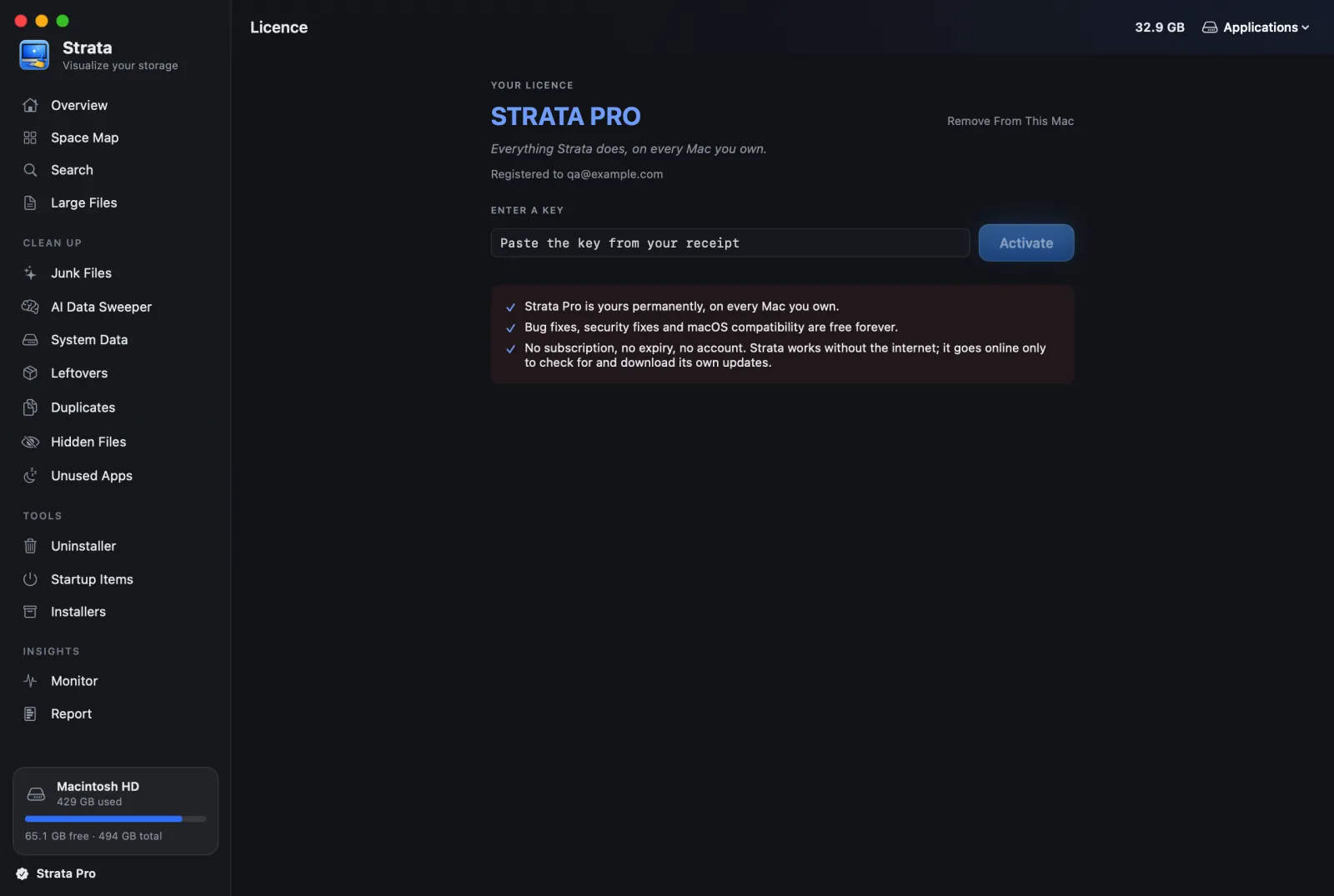
Open Licence
Click the line at the foot of Strata's sidebar (it reads Pro trial or Get Strata Pro), or open Settings and choose the Licence tab.
-
Paste and press Activate
Paste into Paste the key from your receipt and press Activate, or Return. Strata Pro unlocks at once, with a short celebration.
On your other Macs
Enter the same key on each one. There is no limit and nothing to deactivate. When you sell or give away a Mac, choose Remove From This Mac in Licence first.
If something goes wrong
- "That does not look like a licence key": part of it is missing. Copy it again, whole.
- "This key could not be verified": it changed while pasting, or is for another app. Paste it again from the receipt.
- "This key is from a newer version": update Strata with Check for Updates… in the Strata menu, then try again.
- No email: look in spam, or look up your key.
If you bought the earlier Charon, Hades or Atlas tier, your key already unlocks all of Strata Pro in any version from 1.0.1.