How-to guides: all pages
How to delete installers you no longer need
Every app you install from a disk image leaves the image in Downloads. Strata finds the ones whose app is installed, at their version or newer, by reading inside each file, and never lists an installer for something you have not installed.
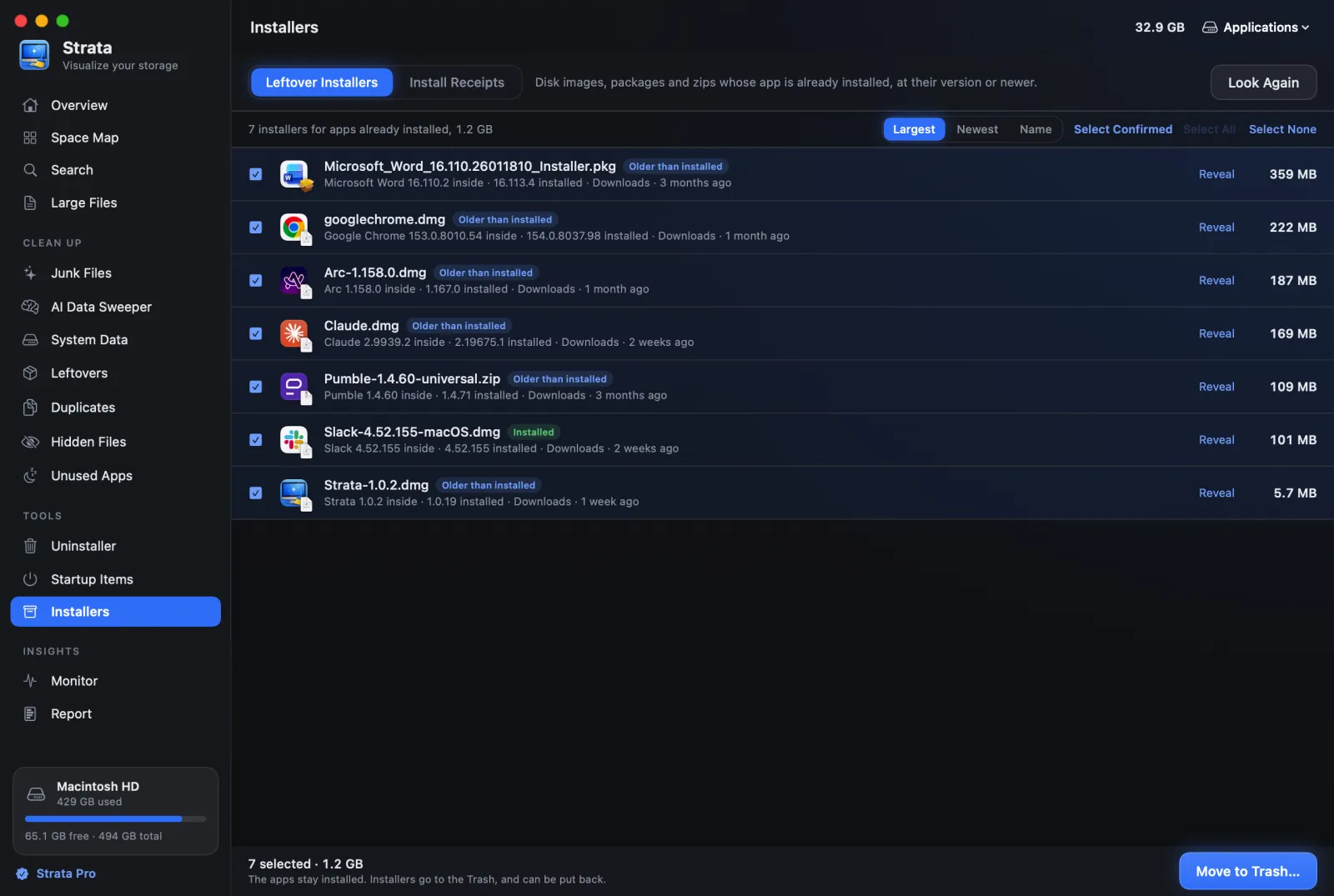
What you need
- Strata Pro or the trial.
Steps
-
Open Installers
In the sidebar, under Tools, on the Leftover Installers tab. It looks in Downloads (and one folder down) and on the Desktop, for .dmg, .pkg, .mpkg, .zip and .xip files.
-
Read the tags
Installed means the same version is installed, and Older than installed that you have since updated. Both are proven from inside the file, and both are safe to remove. Matched by name and App installed are less certain, and are left for you to check.
-
Select Confirmed
Press Select Confirmed to tick exactly the proven ones.
-
Move them to the Trash
Press Move to Trash… and confirm. The apps stay installed; only the installers go.
Keep the installer if you might need it offline. An app that is no longer sold, or a specific older version you rely on, is worth keeping on an external drive rather than in Downloads.
If something goes wrong
Nothing is listed? Either your Downloads folder is tidy, or its installers are for apps you
have not installed yet, which Strata leaves alone on purpose. To see everything regardless,
search for .dmg in Search.